Week 3 - Solving second order ODEs
Aim :- To write a program to solve the second order ODE which represents the equation of motion of a simple pendulum with damping.
Objective :-
- To write a program to create a plot of angular velocity and angular displacement against time.
- To write a program to simulate the motion of a simple pendulum.
Introduction :-
Second order differential equation consists of a derivative of a function of order 2 and no other higher-order derivative of the function appears in the equation. Second order differential equations have a variety of applications in science and engineering.
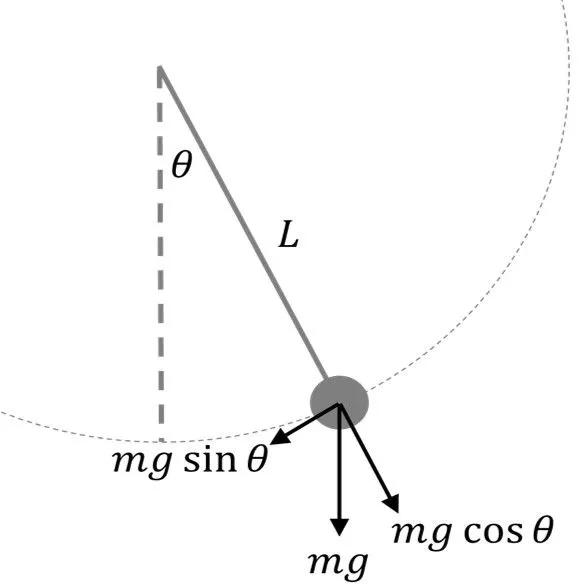
A simple pendulum consists of a ball (point-mass) m hanging from a (massless) string of length L and fixed at a pivot point P. When displaced to an initial angle and released, the pendulum will swing back and forth with periodic motion. When the motion of an oscillator reduces due to an external force, the oscillator and its motion are damped. These periodic motions of gradually decreasing amplitude are damped simple harmonic motion.
The given second order ODE is as follows :-
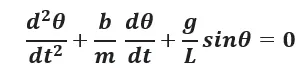
In the above equation,
- g = gravity in m/s^2,
- L = length of the pendulum in m,
- m = mass of the ball in kg,
- b=damping coefficient
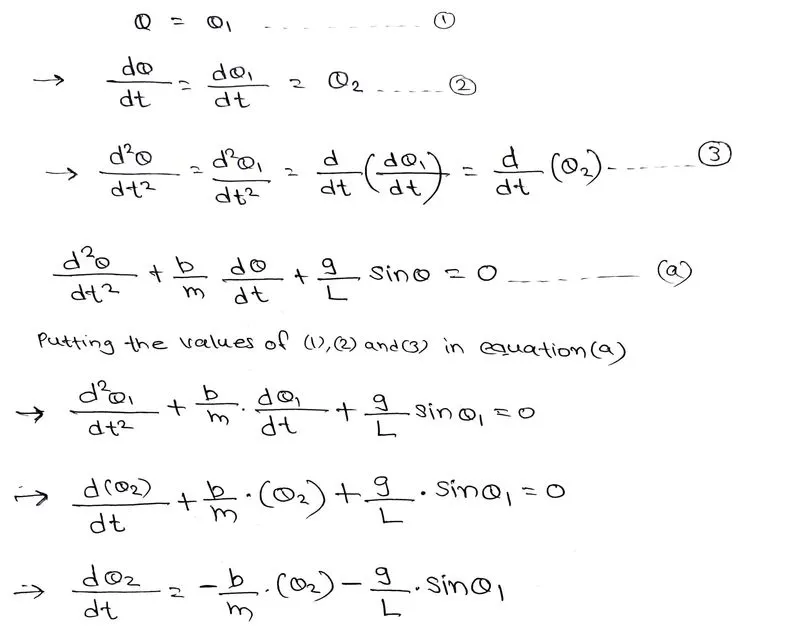
since the given equation is second order ODE we need to convert this equation in first order ODE.
Inputs :-
- L=1 metre,
- m=1 kg,
- b=0.05.
- g=9.81 m/s^2.
- Time span=0-20 sec
- Initial angular displacement=0
- Initial angular velocity=3 rad/sec at time t=0
Main Program :-
clear all
close all
clc

%Inputs
b=0.05;                  %damping coefficient.
g=9.81;                  %gravity in m/s2
l=1;                     %length of the pendulum in m
m=0.1;                   %mass of the ball in kg

%initial condition
theta_0=[0;3];

%time points
t_span=linspace(0,20,500);

%solve ODE
[t,results]=ode45(@(t,theta)ode_func(t,theta,b,g,l,m),t_span,theta_0);

plot(t,results(:,1),'LineWidth',1)
hold on
plot(t,results(:,2),'LineWidth',1)
ylabel('\bf Plot')
xlabel('\bf Time')
grid on
legend('Displacement','Angular velocity')
hold off

%simulation of a simple pendulum
angle=results(:,1);
ct=1;


for i=1:length(t_span)
    x0=0;
    y0=0;

    x1=l*sin(angle(i));
    y1=-l*cos(angle(i));

    figure(2)
    plot([-2 2],[0 0],'linewidth',8,'Color','k')
    hold on

    line([x0 x1],[y0 y1],'linewidth',3,'color','b')
    plot(x1,y1,'o','markersize',25,'markerfacecolor','r')
    axis([-1.5 1.5 -1.5 0.3])
    pause(0.03)
    hold off
    M(ct)=getframe(gcf)

    ct=ct+1;
end

%animation of pendulum
movie(M)
videofile=VideoWriter('Animation_of_Pendulum.avi','Uncompressed AVI');
open(videofile)
writeVideo(videofile,M)
close(videofile)
Function (ode_func) program :-
function [dtheta_dt]=ode_func(t,theta,b,g,l,m)
theta1=theta(1);
theta2=theta(2);
dtheta1_dt=theta2;
dtheta2_dt=-(b/m)*theta2-g/l*sin(theta1);
dtheta_dt=[dtheta1_dt;dtheta2_dt];
end
Output :-
Explaination of code :-
The program starts with the basic commands clear all, close all, clc.
- clear all - It is used to clear the data stored in workspace.
- close all - It is used to close the previous plots and figures etc.
- clc - It is used to clear the command window.
Step-1 Defining the inputs :-
Inputs like damping coefficient(b), acceleration due to gravity(g), Length of the pendulum(l), Mass of the bob(m) are defined.
Step-2 Defining the Initial conditions and time span :-
column vector of Initial angular velocity (3rad/sec) and initial displacement (0) is assigned to the array 'theta_0'.
500 equidistant time points are taken between 0 to 20 sec and this array is assigned to the 't_span'.
Step-3 Creating new 'ode_func' function :-
New 'ode_func' function is created. It is used to divide second order into two first order equations.
Step-4 calling 'ode45' function in main program :-
ode45 function is called in the main program. it is used to solve the differential equations. In ode45 two first order equations are solved to obtain angular displacement and angular velocity for the given time span.
Step-5 Plotting the graph :-
Graphs of displacement and angular velocity are plotted against the time using plot command.
Step-5 Creating animation of a simple pendulum :-
To simulate the motion of pendulum the obtained values of angular displacement are used to plot the motion of pendulum using 'for loop' command. fixed points of pendulum are defined as (x0,y0) and end points of pendulum are defined as (x1,y1) then plotting of those points are done by plot command. Bob (sphere) of pendulum is created using marker command. plot images are saved into an array called 'M' using a function 'getframe(gcf)'. movie command is used to combine all the frames which are stored in array 'M'. 'VideoWriter' function is used to create an empty video file. writeVideo function is used to stich different plot images which are stored in array 'M' to obtain a series of plot and saved in AVI format in system. close command is used to close the videofile.
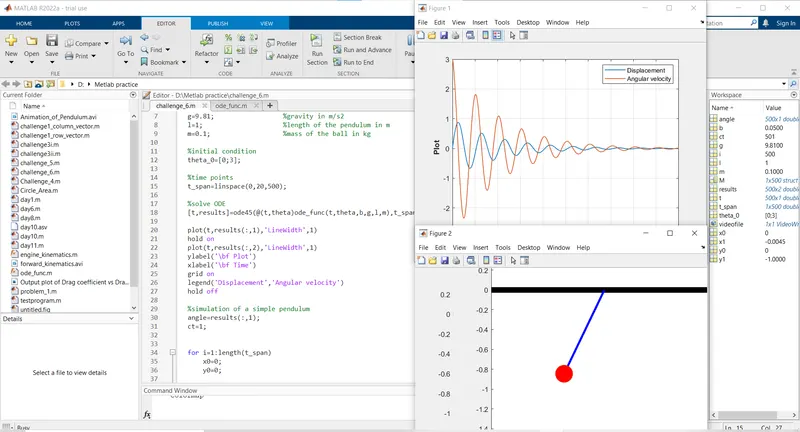
Output Plot :-
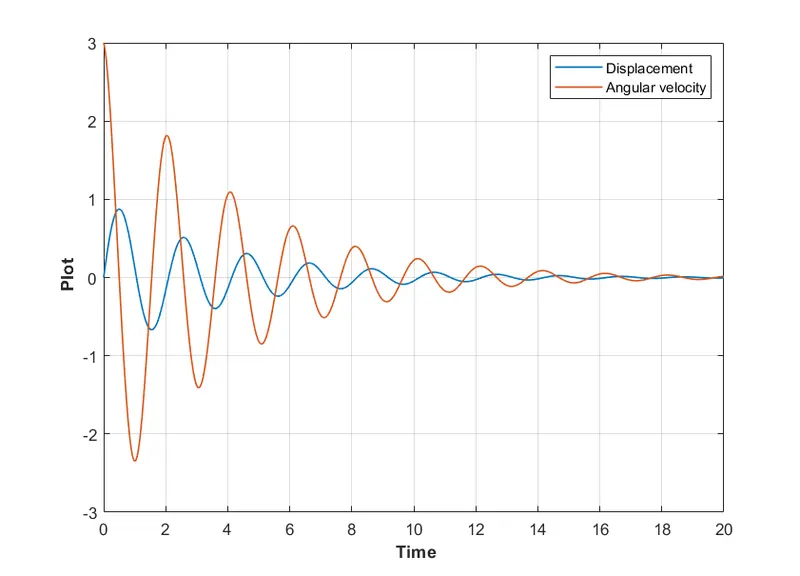
- Blue curve represents the displacement, it starts from '0'.
- Red curve represents the angular velocity, initial angular velocity was 3 rad/sec.
Errors and rectifications :-

The above error was observed because in 'ode45' function '@' sign was missing.
The above error was rectified by adding '@' sign in 'ode45' function syntax.
Conclusion :-
Thus we have solved the second order ODE of a simple pendulum and obtained the values of angular velocity and angular displacement for the given time span.
Graph of angular velocity and angular displacement has been plotted against time.
We have animated the motion of a simple pendulum.
Animation of a simple pendulum :-
here is the link for the video of animation of a simple pendulum.