Week 3 - Solving second order ODEs
1) Matlab program to solve second order ODE with pendulum as an example.
Below is the code to solve ODE.
%Matlab program to slove 2nd order ODE

clear all
close all
clc

%values of damping coefficient, gravity(m/s2), length of string(m) and mass
%of ball(Kg)
b= 0.05;
g= 9.81;
l= 1;
m= 1;

%input condition [angular displacement, angular velocity(rad/sec)]
theta_0= [0 3];

%time in second
t_span= linspace(0,20,75);

%to solve ODE
[t, results]= ode45(@(t,theta) ode_func(t, theta, b, g, l, m), t_span, theta_0);

%taking displacement values separately
result1= results(:,1);

%plotting displacement and velocity against time
figure(1)
plot(t,results(:,1))
hold on
plot(t, results(:,2))
ylabel('displacement, Velocity')
xlabel('time')

%to plot animation of pendulum
X0= 0;
Y0= 0;

ct= 1
for i=1:length(t)
    T=t(i);
    for j=1:length(result1)
        Result1=result1(j);

    X1= l*sin(Result1);
    Y1= -l*cos(Result1);

    figure(2)
    plot([-1 1],[0 0],'linewidth',3)
    axis([-2 2 -2 2])
    line([X0 X1],[Y0 Y1],'linewidth',2,'color','r')
    hold on
    plot(X0,Y0,'.','markersize',10,'markerfacecolor','r')
    plot(X1,Y1,'O','markersize',20,'markerfacecolor','g')
    hold off
    pause(0.009)
    M(ct)=getframe(gcf)
    ct=ct+1;
    end
end

movie(M)
videofile= VideoWriter('Pendulum.avi','Uncompressed AVI');
open(videofile)
writeVideo(videofile,M)
close(videofile)
2) Plot of angular displacement and angular velocity against time.
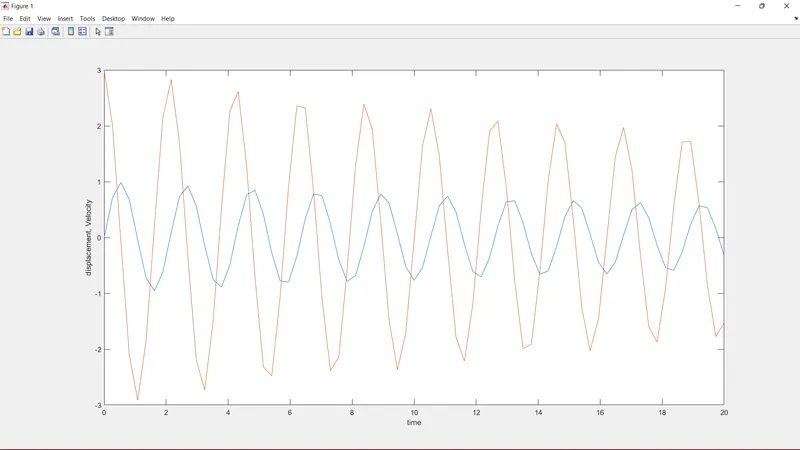
Youtube link for pendulum movie: https://youtu.be/01rIR2uBUY0
3) Step wise explanation of code.
Starting with a comment and basic commands then declaring values of damping coefficient, gravity
(m/s2), length of string(m), mass of ball(Kg).
Giving input values to angular displacement and angular velocity for which ODE will be solved.
For a time period of 20 sec ODE will be solved is been delcared.
Function is been called whose values are saved in variable [ t, results] in which t (values of time) and results( displacement and velocity) respectively.
Values of displacement are written separate so it will be easier to write further code.
Now code to plot displacement and velocity against time.
figure(1) will show above plots
- plot(t,results(:,1)) will plot time vs displacement.
- plot(t, results(:,2)) will plot time vs velocity.
- hold on will show both plot at a time.
- xlabel and ylabel will display respective name to axis
Code to create animation of pendulum
initial co-ordinates of pendulum string X0 and Y0 will be fixed in animation.
ct= 1 is current frame
in for loop variable "i" has each value of time, T will have single value of time(t) at a time for which "j" has each value of displacement from "result1" then "Result1" will have single value of displacement at a time.
writting equation to get second co-ordinate of pendulum string i.e. X1 and Y1 in which angle is in radian.
figure(2) will display animation.
- plot([-1 1],[0 0],'linewidth',3) will plot a straight horizontal line.
- axis limits is been declared.
- line([X0 X1],[Y0 Y1],'linewidth',2,'color','r') will plot string and its motion.
- plot(X0,Y0,'.','markersize',10,'markerfacecolor','r') will plot "." as a fixed point of string.
- plot(X1,Y1,'O','markersize',20,'markerfacecolor','g') will plot "O" as a ball which is in motion.
- hold on and hold off commands will combinedly show above plots.
- pause(0.05) will pause animation for that time.
- M(ct)= getframe(gcf) collect all figures/ frame to create movie.
- ct= ct+1 will increase value of ct to sum up frames.
- ending both for loops by "end" command
To create a movie file and save in particular folder.
Command "movie(M)" take values of M(ct)
VideoWriter('') is used to assign file format and name to a movie saved in variable "videofile".
"open()" will open movie
"writeVideo()" will run movie
"close()" will stop movie
4) Code to generate function.
%Matlab program to generate function

function[dtheta_dt]= ode_func(t, theta, b, g, l, m)
theta1= theta(1)
theta2= theta(2)
dtheta1_dt= theta2;
dtheta2_dt= -(b/m)*theta2 - (g/l)*sin(theta1);
dtheta_dt= [dtheta1_dt;dtheta2_dt];
end
Step wise explanation for above code.
- "function with variable [dtheta_dt] having funtion name "ode_func()"
- theta1 will have value from "theta" i.e. angular displacement.
- theta2 will have value from "theta" i.e. angular velocity.
- assigning value to "dtheta1_dt" from "theta2"
- assigning equation"-(b/m)*theta2 - (g/l)*sin(theta1)" to "dtheta2_dt" i.e. actual equation to solve ODE.
- both above values will be sum up in "dtheta_dt"
- "end" to end function
5) Errors occured
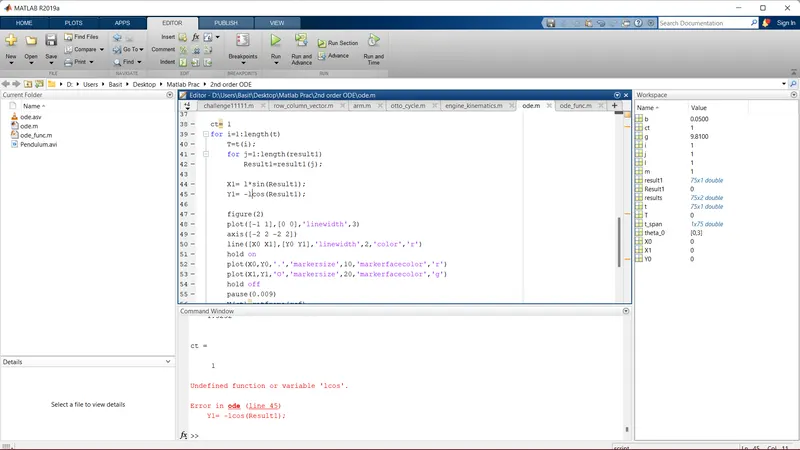
Typing error occured while executing code these errors were corrected by reading alert in command window.