Week 3 - Solving second order ODEs
WRITE A PROGRAMME TO SOLVE A SECOND ORDER ODE.
AIM: 1. TO WRITE A PROGRAMME THAT SOLVES A SECOND ORDER ODE BY USING AN EXAMPLE OF A SIMPLE PENDULUM
2. TO CREATE AN ANIMATION FILE OF THE SWINGING PENDULUM.
INTRODUCTION:
In Engineering, ODE is used to describe the transient behavior of a system. A simple example is a pendulum
The way the pendulum moves depends on the Newtons second law. When this law is written down, we get a second order Ordinary Differential Equation that describes the position of the "ball" w.r.t time.
Our objective is to write a program that solves the following ODE.
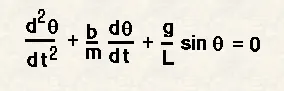
This ODE represents the equation of motion of a simple pendulum with damping.
INFORMATION PROVIDED:
In the above equation,
g = gravity in m/s2,
L = length of the pendulum in m,
m = mass of the ball in kg,
b=damping coefficient.
L=1 metre,
m=1 kg,
b=0.05.
g=9.81 m/s2
angular displacement=0
angular velocity=3 rad/sec
time t=0.
1.REQUIRED PROGRAMME FOR PLOTTING THE NORMAL DAMPING GRAPH:
clear all
close all
clc

b = 0.05 %Damping Co-efficient
g = 9.81 %Gravity in m/s^2
l = 1 %length of pendulum in metre
m = 1 %mass in kg

%intital condition
%in order to solve the first order ODE we need dispacement and velocity values of the pendulum
%initial displacemnt is 0
%intial velocity is 3 m/s

theta_0 = [0 3];

%time points
t_span = linspace(0,20,100);

%solving ODE
[t, results] = ode45(@(t,theta) ode_func(t,theta,b,g,l,m),t_span,theta_0);
outcome = results(:,1);

%plotting
plot (t,results(:,1))
hold on;
xlabel('time')
plot(t,results(:,2))
hold off;
axis([0 20 -4 4])
ylabel('plot')
legend('Angular displacement/time','Angular Velocity/time')
OUTPUT:
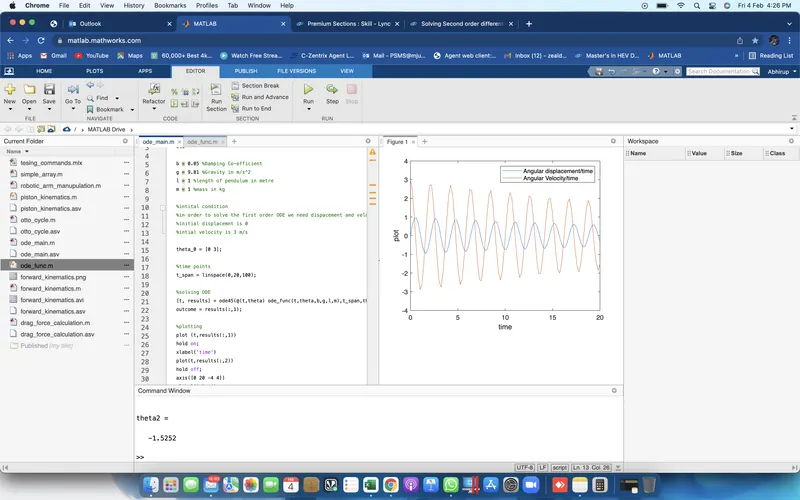
REQUIRED EXPLANATIONS :
THE PARAMETERS HERE USED ARE AS FOLLOWS:
b = damping co-efficient
g = gravity
l = lenth of the pendulum
m = mass of the pendulum
now, providinng the initial conditions for the displacement and velocity of the pendulum;
`theta_0 = [ 0 3]`
now the time interval is the time span for which the pendulum swings and gives us the transient motion.
SOLVING THE SECOND ORDER ODE.
ode_func:
function [dtheta_dt] = ode_func(t,theta,b,g,l,m)
theta1 = theta(1)
theta2 = theta(2)
dtheta1_dt = theta(2);
dtheta2_dt = -(b/m)*theta2 - (g/l)*sin(theta1);
dtheta_dt = [dtheta1_dt; dtheta2_dt];
end
here we have solved the second order ode and just encoded the ode_func value in the 1st code.
with this we have just solved the second order ode and got the plot for the same
but we still require the animation file .
2. ANIMATION
TO GET THE ANIMATION WE NEED NEW SET OF COMMANDS :
%to get the each and every frame we are uysing the cotour command
ct = 1;
%for origin points
x0 = 0;
y0 = 0;
for i = 1:length(outcome)
    pos = outcome(i);
%for maximum point acheived by pendulum
x1 = l*sin(pos);
y1 = -l*cos(pos);
%plotting
plot([-1 1],[0 0],'linewidth',3,'color','g');
axis([-2 2 -2 2]);
line([x0 x1],[y0 y1],'linewidth',2,'color','b');
hold on;
plot(x0,y0,'o','MarkerSize',3,'MarkerFaceColor','y');
plot(x1,y1,'o','MarkerSize',20,'MarkerFaceColor','r');
title('Damping of simple pendulum');
legend('support rod','length of pendulum','fixed point','bob of pendulum');
grid on;
hold off;
M(ct) = getframe(gcf);
ct = ct +1;
end
movie(M)
videofile = VideoWriter('solving_second_order_pendulum.avi','uncompressed AVI');
open(videofile)
writeVideo(videofile, M)
close(videofile)
EXPLAINING ALL THE COMMANDS:
we are using the contour command to get each and every frame for the required animation.
for the orgin points of the pendulum,
the x and y values are set to 0
for the maxmimum points reached by the pendulum,we are using basic trigonometry
for the x value, the angle theta is given as
`x_1 = l*sin(pos)`
for the y value, the angle theta is given by
`y_1 = -l*cos(pos)`
plot command is used to plot the support rod of the pensulum and is denoted by the color green.
and its axis is set to 2 for x and y axis.
line command is used to make the length of the pendulum.
plot command with markersize 3 is used to plot the fixed point of the pendulum denoted by color yellow
and the next plot command with markersize 20 is used to plot the bob of the pendulum denoted by color red.
TO GET THE ANIMATION THE FOLLOWING SET OF COMMANDS ARE USED:
end
movie(M)
videofile = VideoWriter('solving_second_order_pendulum.avi','uncompressed AVI');
open(videofile)
writeVideo(videofile, M)
close(videofile)
THE ANIMATED FILE IS SHARED BELOW: