Week - 3 Drop test Challenge
OBJECTIVE:
Creating the LS-DYNA simulation for drop test.
- In this problem, mobile is dropped on rigid base. The colliding distance is very close and mobile hits the surface with an initial velocity.
- The analysis is done from the instant mobile hits the colliding surface and few milliseconds after that.
(Orientation of phone hitting is ignored)
PRE-REQUISITES:
- Importing .k file into LS-PREPOST.
- Creating design for experiment.
- Creating keywords for analysis.
- Saving the .k file for solving.
- Interpreting plots.
DESIGN OF EXPERIMENT:
- The colliding surface is ground and can be considered rigid and constrained in linear x,y,z and rotational x.y,z.
- The colliding surfcace is master contact set segment abd cell phone is slave set segment.
- The mobile contact needs to be defined with colliding surface.
- The initial velocity and direction of motion of mobile is to be defined.
- Computation time for solving solids is more compared to shell elements.
- Computation for reaction forces on rigid wall are not required on collision, hence we will rigidise the collision surface and not by defining spc boundary.
SYSTEM OF UNITS:
Kg, mm, s
KEYWORDS USED:
*CONTROL
To enter entire duration of simulation to run. i.e Termination time.
*DATABASE
- Binary files, ASCII files.
- Time steps for the event to happen.
*PART
PartID, SectionID and Material ID for mobile and colliding surface.
*MAT
- Elastic plastic card for cellphone with aluminium properties.
- Rigid material properties for the wall.
*SECTION
Section ID for solid elements.
Section ID for shell elements.
*INITIAL_VELOCITY
To assign the velocity to the selected nodes of cell phone.
*CONTACT
To establish contact between the Cell phone and colliding surface.
*SET
- To establish contact between two parts we need to define node segments for cell phone as well as rigid collision surface.
- Node set for velocity assignment.
PROCEDURE:
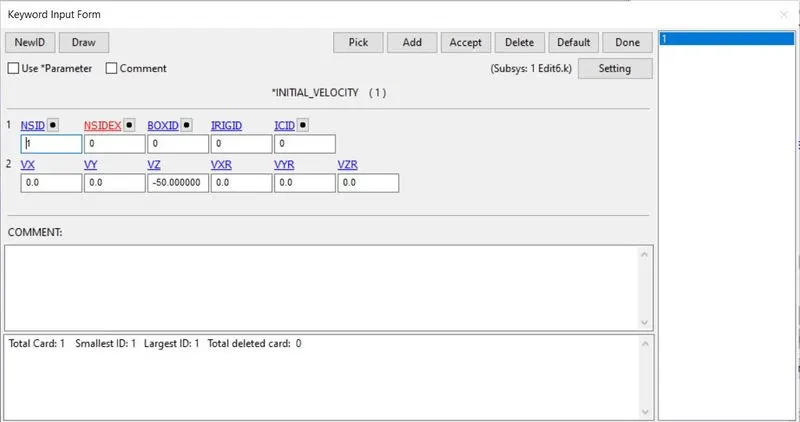
1. Assigning initial velocity to the cell phone.
- Go to create entity
- Go to Set Data.
- Go to *Set_Node>>Create>>SetID as 1>>Select nodes of cell phone by area>>Apply
So by this way, we can create a Set for nodes, later we can assign velocity to this setid.
- Choose the NSID as 1
- Enter VZ as -50mm/s (This is velocity of 50mm/s in negative z direction)
2. Assigning part ID.
Rename the PartID as:
- Collision surface
- Cell phone
3. Assigning Section ID.
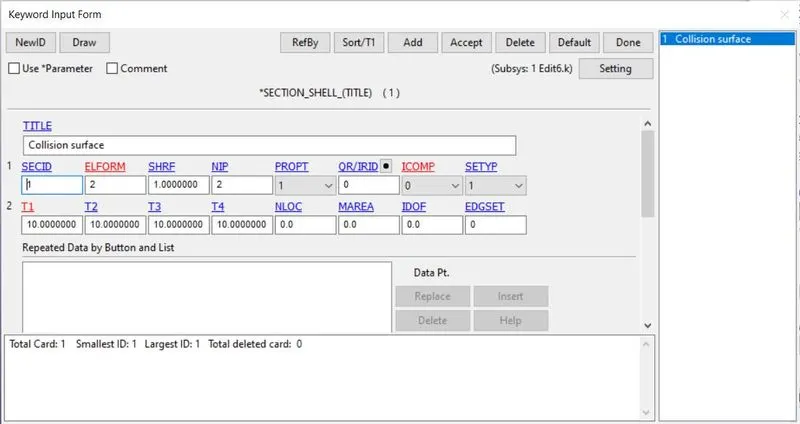
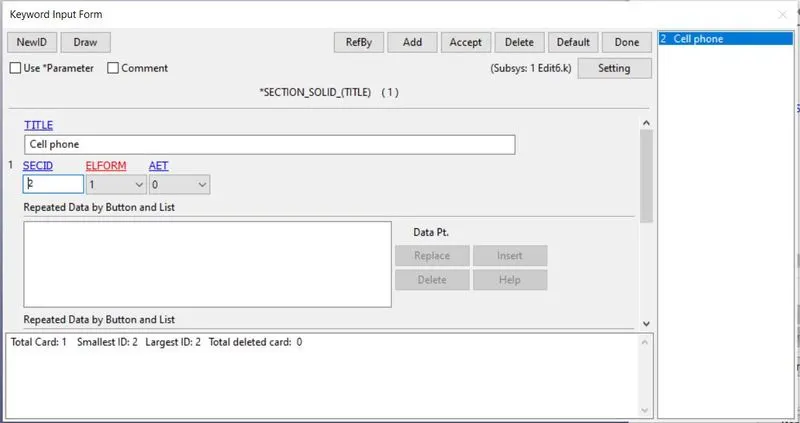
Creating sections for collision surface and cell phone. Choose the appropriate element formulation (ELFORM)
1. Shell section for collision surface as it comprises of shell elements. ELFORM = 2, Thickness = 10mm
2. Solid section for cell phone as it comprises of solid elements. ELFORM = 1
4. Assigning Material ID.
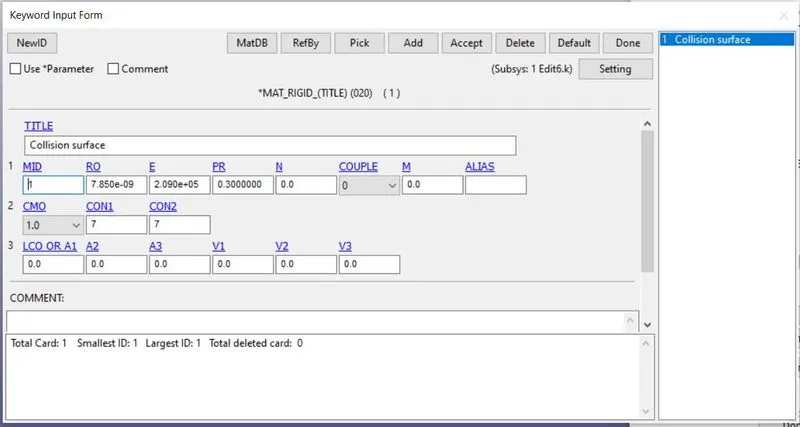
Now, as per our analysis, 020_Material_rigid is chosen as material for collision surface.
MID = 1
Title: Collision surface.
E= 2.090e+05
RO= 7.850e-09
PR= 0.3
Defining constraints for rigid material:
CMO = +1 constraints NSID in global x,y, and z coordinates.
CON1 = 7 to constraint translational x,y and z.
CON2 = 7 to constrain rotational x,y, and z.
5. Assigning CONTACT between Cell phone and Collision surface.
As there will be contact between cell phone and collision surface so we need to define contact.
Contact can be defined only for node segments.
We need to define two node segements, one for:
1. Cell phone node segment.
2. Collision surface node segment.
- Go to create entity
- Go to Set Data
- Go to *Set_Node>>Create>>Enter SetID>>Choose nodes by area>>Title(optional)>>Apply.
Setting up Contact Keyword:
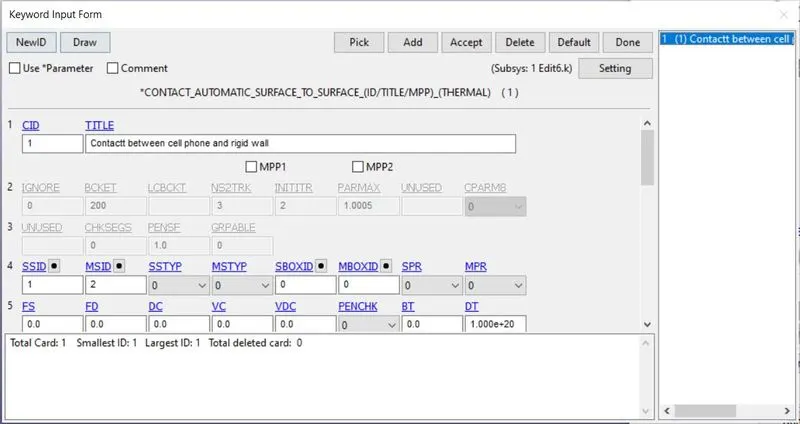
*Contact keyword >> Automatic surface to surface
Enter SSID as node segment for Cellphone
Enter MSID as node segment for Collision surface.
6. Assigning CONTROL Keyword.
Calculating Termination time:
Distance between Mobile and collision surface (D) = 20 mm
Initial velocity assigned (V)= 50 mm/s
Time taken (T)= D/V
= 20/50 seconds = 0.40 seconds
So total temination time is T + some more to get data for post collision.
so *CONTROL_TERMINATION is set for 0.60 seconds.
DT for binary and ASCII plot is 0.06 seconds.
7. DATABASE Keyword
D3plot file (Binary)
GLSTAT and MATSUM (ASCII)
DT = 0.06 second.
PLOTS:
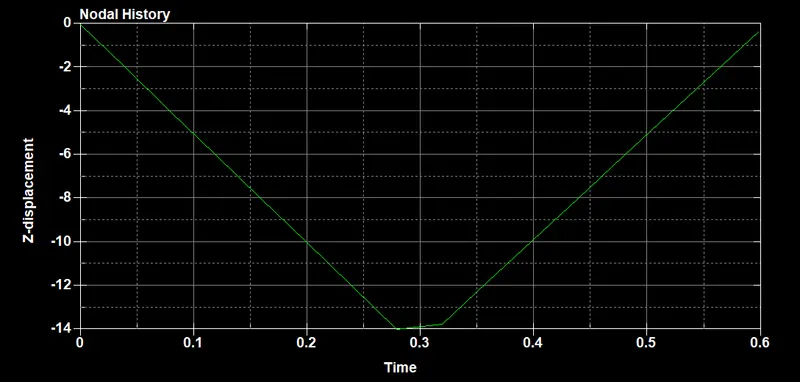
Displacement(Z) Vs Time
Following equation:
S = VT
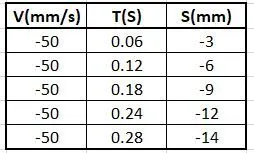 So at T=0.28, collision happens, i.e z = -14mm
We can see in plot some of the kinetic energy of the moving cell phone is converted into deformation.
Magnitude of rebound velocity is not exactly 50mm/s at T = 0.6 second. (imperfect elastic collision)
CONCLUSION FROM PLOT:
There is deformation at the expense of kinetic energy. Some of the kinetic energy is converted into strain energy.
Strain energy can be calculated from the value of `triangle`Z.
From conservation of energy principle, one can calculate the rebound velocity.
And post collision S vs T plot can be plotted.
ATTACHMENT:
Edit7.k file is attached.