Week-3 Challenge: ADVISOR Tool
AIM:
- To simulate a default EV and PRIUS HEV for various conditions using the Matlab ADVISOR Tool.
OBJECTIVE:
- To check for the EV_defaults_in file, if cargo mass is 500 kg with all other default conditions, can the vehicle travel for 45 km with FTP drive cycle and conclude the observations.
- In the above case, to try changing the battery capacity and repeat the simulation and conclude the observations.
- To perform gradeability test with PRIUS_Jpn_defaults_in file and represent the results in a tabular format and conclude the observations.
INTRODUCTION:
- ADVISOR, NREL’s ADvanced VehIcle SimulatOR, is a set of model, data, and script text files for use with Matlab and Simulink. It is designed for rapid analysis of the performance and fuel economy of conventional, electric, and hybrid vehicles. ADVISOR also provides a backbone for the detailed simulation and analysis of user defined drivetrain components, a starting point of verified vehicle data and algorithms from which to take full advantage of the modeling flexibility of Simulink and analytic power of MATLAB.
The benefits of using ADVISOR are:
- estimate the fuel economy of vehicles that have not yet been built
- learn about how conventional, hybrid, or electric vehicles use (and lose) energy throughout their drivetrains
- compare relative tailpipe emissions produced on a number of cycles
- evaluate an energy management strategy for your hybrid vehicle’s fuel converter
- optimize the gear ratios in your transmission to minimize fuel use or maximize performance, etc
- ADVISOR uses basic physics and measured component performance to model existing or future vehicles. Its real power lies in the prediction of the performance of vehicles that have not yet been built. It answers the question “what if we build a car with certain characteristics?” ADVISOR usually predicts fuel use, tailpipe emissions, acceleration performance, and gradeability.
- In general, the user takes two steps:
- Define a vehicle using measured or estimated component and overall vehicle data.
- Prescribe a speed versus time trace, along with road grade, that the vehicle must follow.
- ADVISOR then puts the vehicle through its paces, making sure it meets the cycle to the best of its ability and measuring (or offering the opportunity to measure) just about every torque, speed, voltage, current, and power passed from one component to another.
- ADVISOR will allow the user to answer questions like:
- Was the vehicle able to follow the speed trace?
- How much fuel and/or electric energy were required in the attempt?
- How does the state-of-charge of the batteries fluctuate throughout a cycle?
- What were the peak powers delivered by the drivetrain components?
- What was the distribution of torques and speeds that the piston engine delivered?
- What was the average efficiency of the transmission?
- By iteratively changing the vehicle definition and/or driving cycle, the user can go on to answer questions such as:
- At what road grade can the vehicle maintain 55 mph indefinitely?
- What’s the smallest engine I can put into this vehicle to accelerate from 0 to 60 mph in 12 s?
- What’s the final drive ratio that minimizes fuel use while keeping the 40 to 60 mph time below 3 s?
- What is the fuel economy sensitivity to mass, aerodynamic drag, or other vehicle or component variations?
- ADVISOR’s GUI and other script files answer many of these questions automatically, while others require some custom programming on the user’s part.
- Because ADVISOR is modular, its component models can be relatively easily extended and improved. For example, an electrochemical model of a battery, complete with diffusion, polarization, and thermal effects, can easily be put into a vehicle to cooperate with a motor model that uses a measured efficiency map. Of course, developing new, detailed models of drivetrain components (or anything else, for that matter) requires an intimate familiarity with the environment, MATLAB/Simulink.
- ADVISOR was developed as an analysis tool, and not originally intended as a detailed design tool. Its component models are quasi-static, and cannot be used to predict phenomena with a time scale of less than a tenth of a second or so. Physical vibrations, electric field oscillations and other dynamics cannot be captured using ADVISOR, however recent linkages with other tools such as Saber, Simplorer, and Sinda/Fluint allow a detailed study of these transients in those tools with the vehicle level impacts linked back into ADVISOR.
- As an analysis tool, ADVISOR takes the required/desired speed as an input, and determines what drivetrain torques, speeds, and powers would be required to meet that vehicle speed. Because of this flow of information back through the drivetrain, from tire to axle to gearbox and so on, ADVISOR is what is called a backward-facing vehicle simulation.
- Forward-facing vehicle simulations include a model of a driver, who senses the required speed and responds with an accelerator or brake position, to which the drivetrain responds with a torque. This type of simulation is well suited to the design of control systems, for example, down to the integrated circuit and PC card level—the implementation level.
- ADVISOR is well suited to evaluate and, by iterative evaluation, design control logic and energy management strategies. By this, we mean something like “When the engine torque output is low and the battery state of charge is high, turn off the engine.” The control logic, with which ADVISOR can work, is about what you want the vehicle to do. The detailed control system, getting into details of how you would implement this control logic in hardware, is about how to make the vehicle do what you want and is not the original intention of ADVISOR’s application.
SOLUTION METHODOLOGY:
OBJECTIVE - 1:
- For EV_defaults_in file:
Step - 1:
- Start the 'ADVISOR' tool by giving the command in the command window of Matlab.
Step - 2:
- After the ADVISOR tool is started select the 'EV_defaults_in' from the load file drop down menu.
Step - 3:
- Change the Cargo mass to 500 Kg from the default value and keep all other values as the default condition and click on continue.
Step - 4:
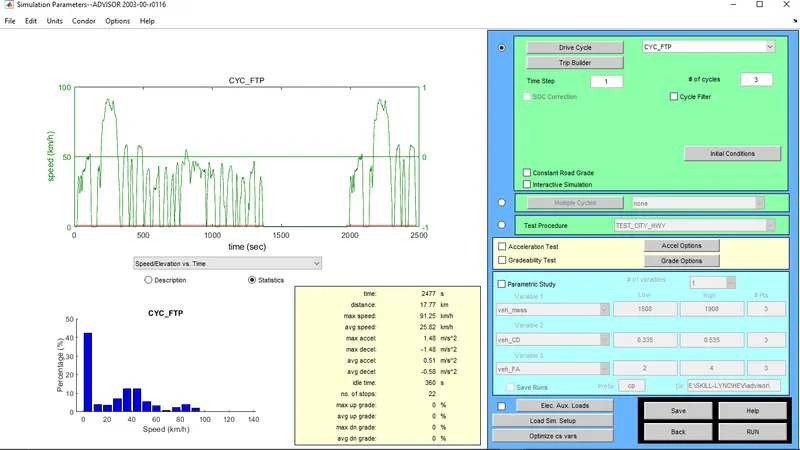
- In the Simulation parameter window select the 'CYC_FTP' from the drive cycle drop down menu.
Step - 5:
- By using the FTP cycle, we can see that for the cargo mass of 500 Kg it can cover a distance of 17.77 Km in one cycle.
- So, for our testing we want the vehicle to cover a distance of 45 Km so we need to have 3 cycles to simulate the EV for atleast 45 Km.
- So, we need to set 3 in the number of cycles option and RUN the simulation by keeping all parameters as the default condition.
SETUP:
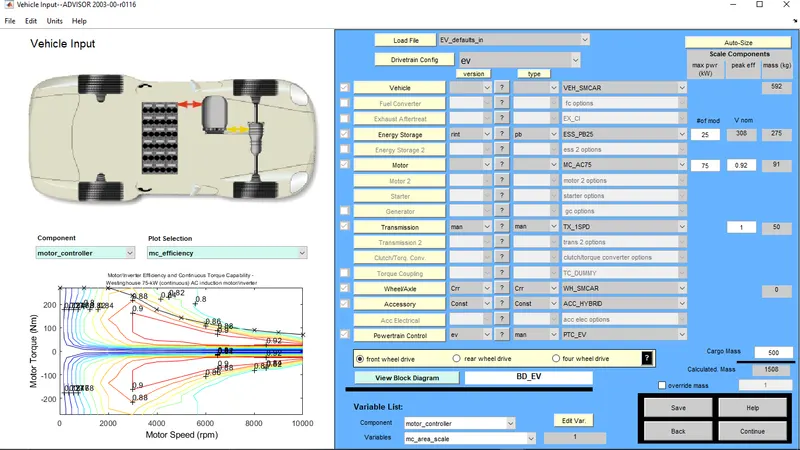
RESULT:
CONCLUSION:
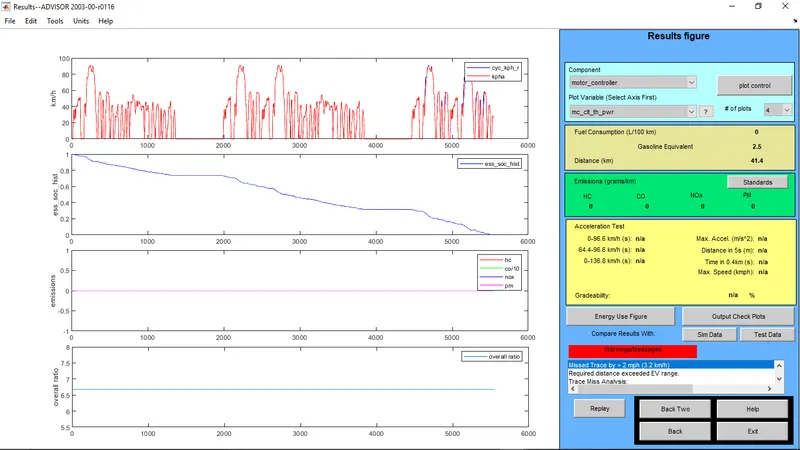
- From the above results it is clear that the simulation gave a warning message as the vehicle could not complete the distance of 53.31 Km which is for 3 FTP cycles.
- The Vehicle only managed to cover a distance of 41.4 Km with a cargo mass of 500 Kg.
- To cover the 41.4 Km distance the State Of Charge (SOC) became 0% which means above that it can no longer travel.
- So, the EV was able to travel only 41.4 Km with a cargo mass of 500 Kg which doesn't fulfil our required conditions of 45 Km.
OBJECTIVE - 2:
- To change the battery capacity to achieve the required condition:
Step - 1:
- Go back to the Vehicle Input window and in the Energy Storage row change the number of modules to test the car to meet our required condition.
Step - 2:
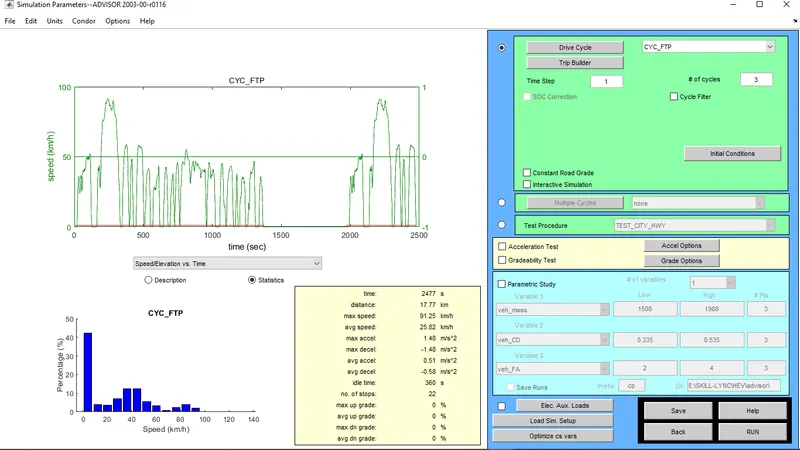
- In the Simulation parameter window, the same drive cycle is selected, that is 'CYC_FTP' and the number of cycles is kept as 3 in order to check for the distance coverage of 45 Km.
- Then click on RUN to perform the simulation and observe the results.
CASE - 1:
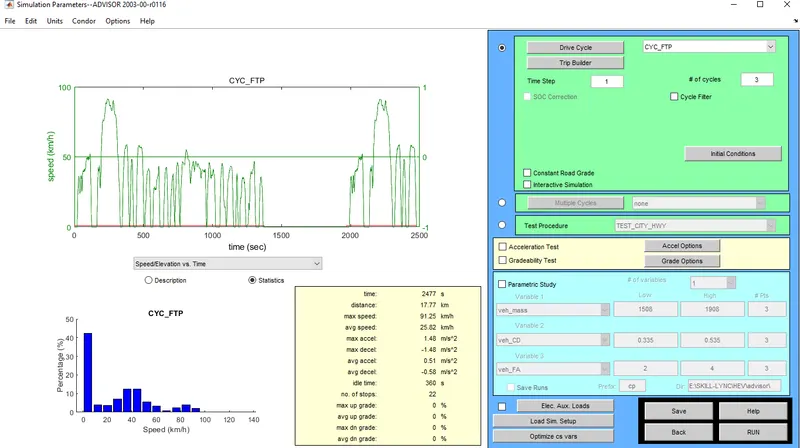
- Number of Battery Units = 26
- Voltage = 321 V
SETUP:
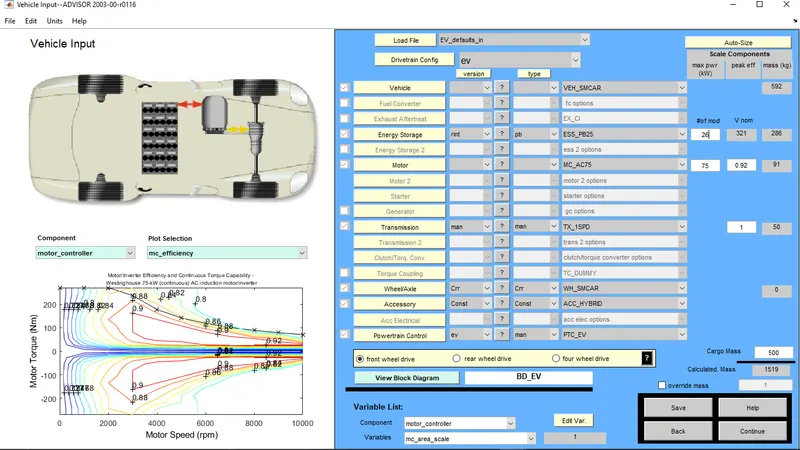
RESULT:
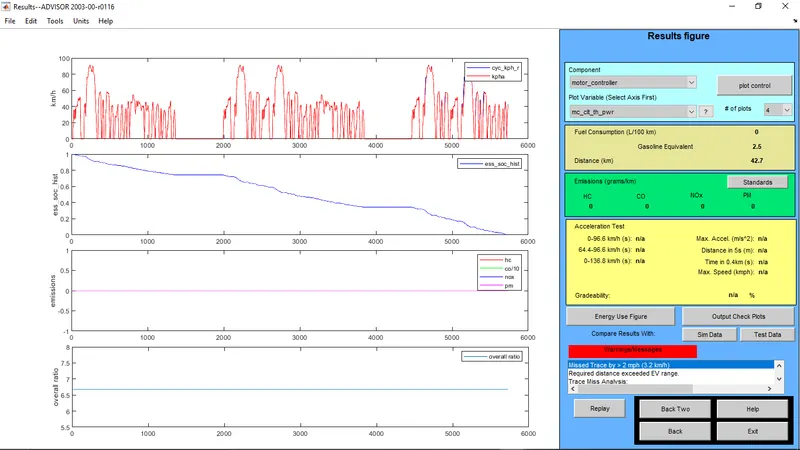
- With 26 units of battery the EV was able to cover a distance of 42.7 Km by completely draining the battery that is the State Of Charge (SOC) is 0%.
CASE - 2:
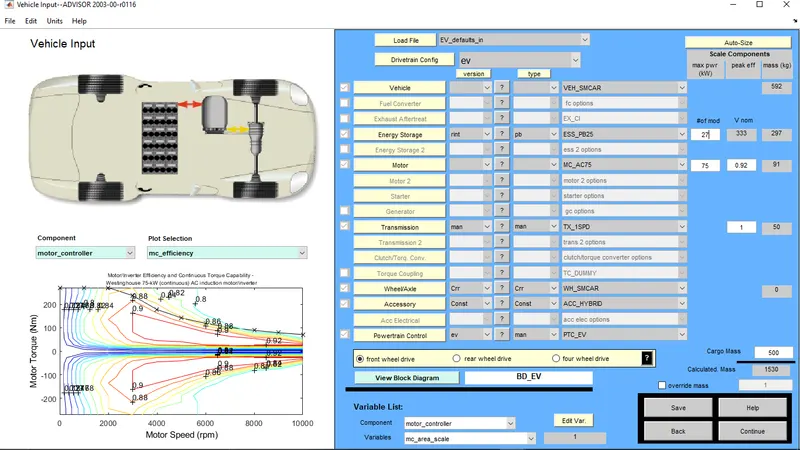
- Number of Battery Units = 27
- Voltage = 333 V
SETUP:
RESULT:
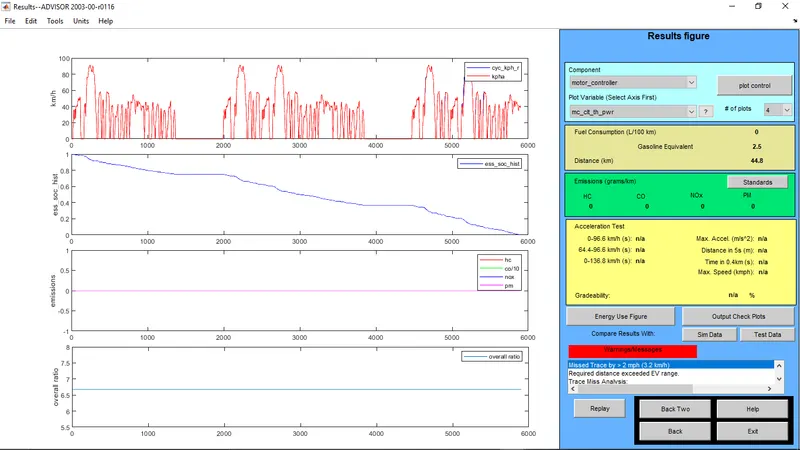
- With 27 units of battery the EV was able to cover a distance of 44.8 Km by completely draining the battery that is the State Of Charge (SOC) is 0%.
CASE - 3:
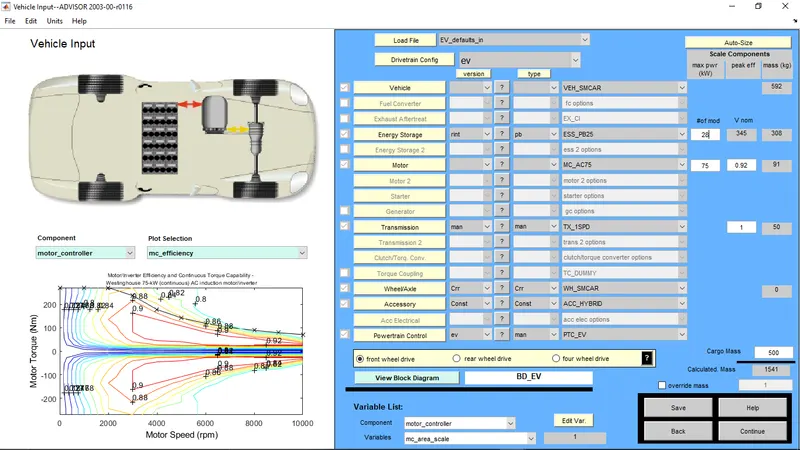
- Number of Battery Units = 28
- Voltage = 345 V
SETUP:
RESULT:
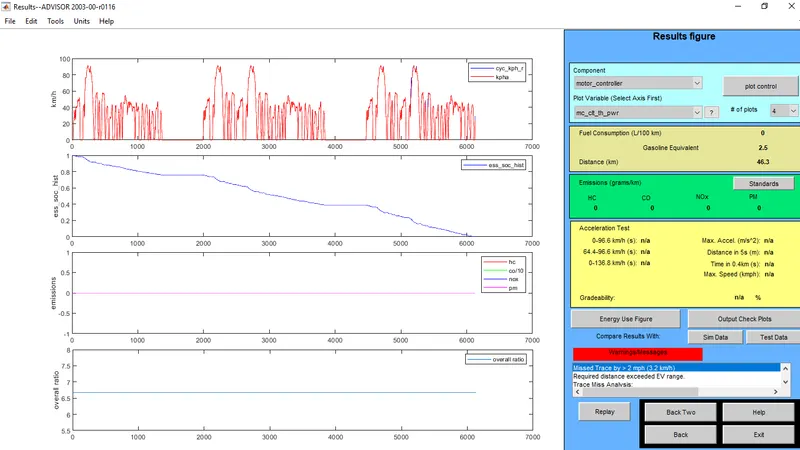
- With 28 units of battery the EV was able to cover a distance of 46.3 Km by completely draining the battery that is the State Of Charge (SOC) is 0%.
CONCLUSION:
- From the above results it can be clearly observed that the vehicle was able to cover the distance of 45 Km with 28 units of battery by completely draining the battery.
- So, we can conclude that by increasing the number of battery units from 25 to 28 we are increasing the battery capacity and the Electric Vehicle can cover the distance of 45 Km with a cargo mass of 500 Kg.
OBJECTIVE - 3:
- To Perform gradeability test with PRIUS_Jpn_defaults_in file
Step - 1:
- Start the 'ADVISOR' tool by giving the command in the command window of Matlab.
Step - 2:
- After the ADVISOR tool is started select the 'PRIUS_JPN_defaults_in' from the load file drop down menu.
- Keeping all the defaults available unchanged, select the continue to move to the Simulation Parameters window.
Step - 3:
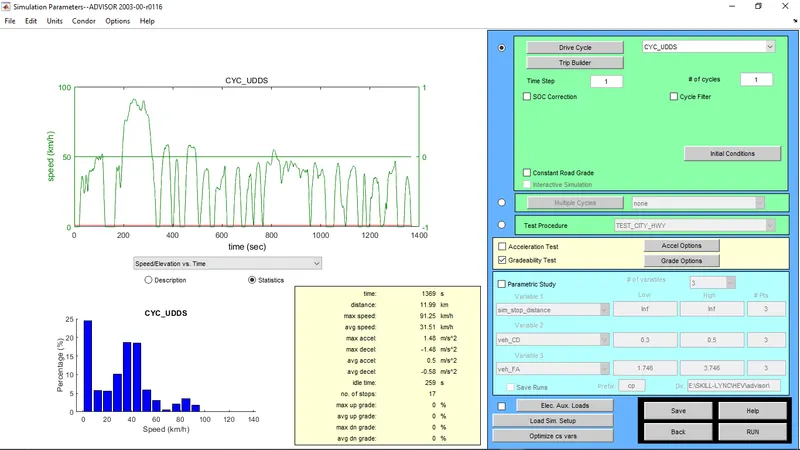
- In the Simulation parameter window select the 'Gradeability Test'.
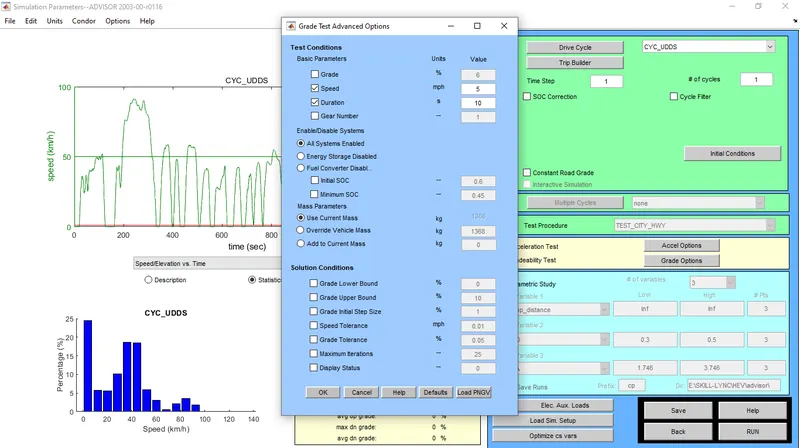
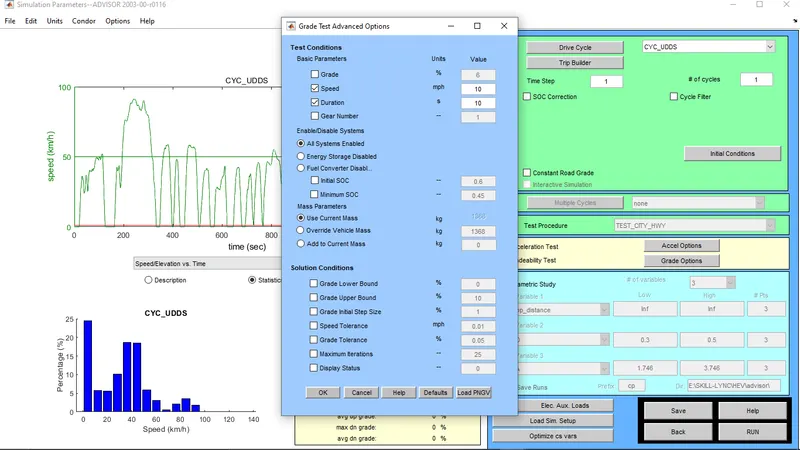
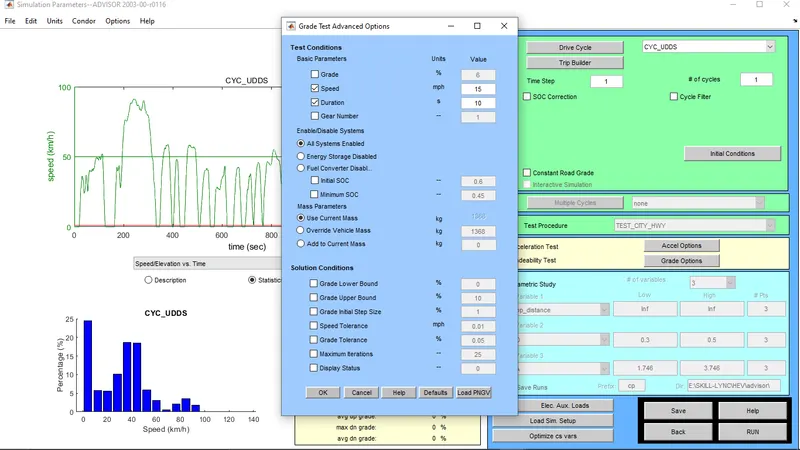
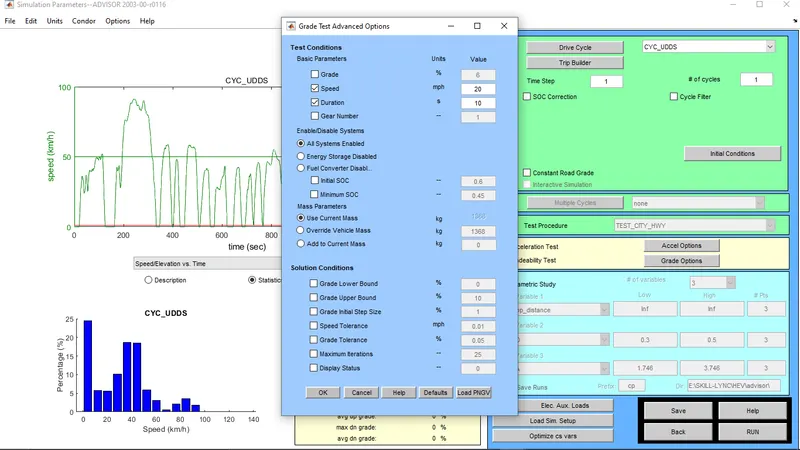
- Then select the 'grade options' and select 'Speed', 'Duration', and 'All system enabled' boxes and input the desired value of speed and duration and select Ok.
Step - 4:
- Keeping all the other parameters as default click on RUN to simulate the PRIUS HEV and observe the Gradeability from the results window.
Step - 5:
- Continue the above steps for different speeds to check for different gradeability depending on the speed of the vehicle and perform a parametric study.
CASE - 1:
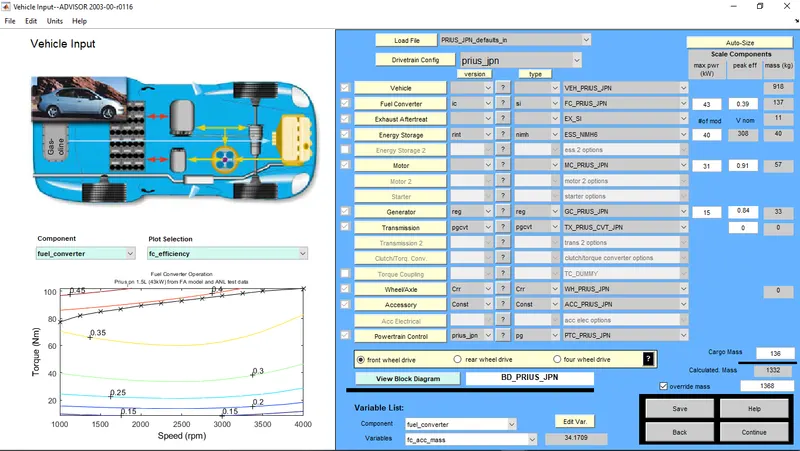
- Speed: 5 Mph or 8.05 Kmph
- Duration: 10 s
SETUP:
RESULT:
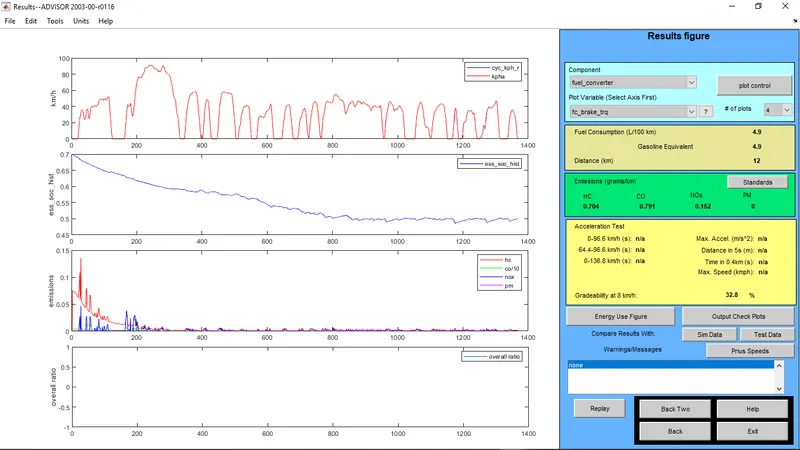
- The gradeability for 5 Mph or 8.05 Kmph is 32.8%.
CASE - 2:
- Speed: 10 Mph or 16.1 Kmph
- Duration: 10 s
SETUP:
RESULT:
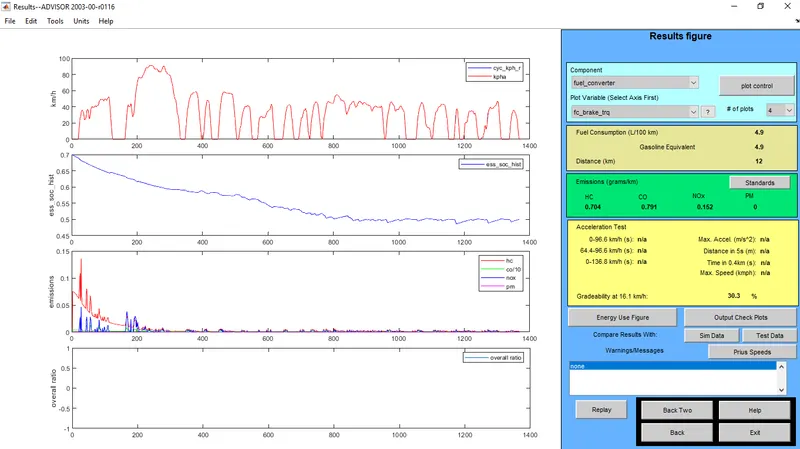
- The gradeability for 5 Mph or 8.05 Kmph is 30.3%.
CASE - 3:
- Speed: 15 Mph or 24.15 Kmph
- Duration: 10 s
SETUP:
RESULT:
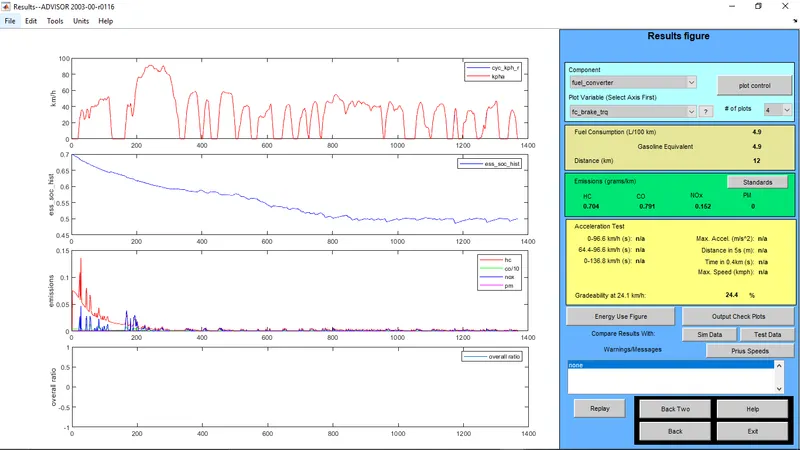
- The gradeability for 5 Mph or 8.05 Kmph is 24.4%.
CASE - 4:
- Speed: 20 Mph or 32.2 Kmph
- Duration: 10 s
SETUP:
RESULT:
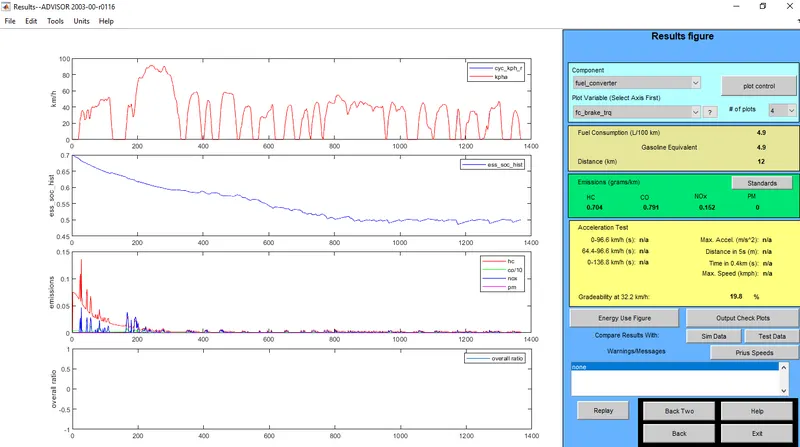
- The gradeability for 5 Mph or 8.05 Kmph is 19.8%.
CASE - 5:
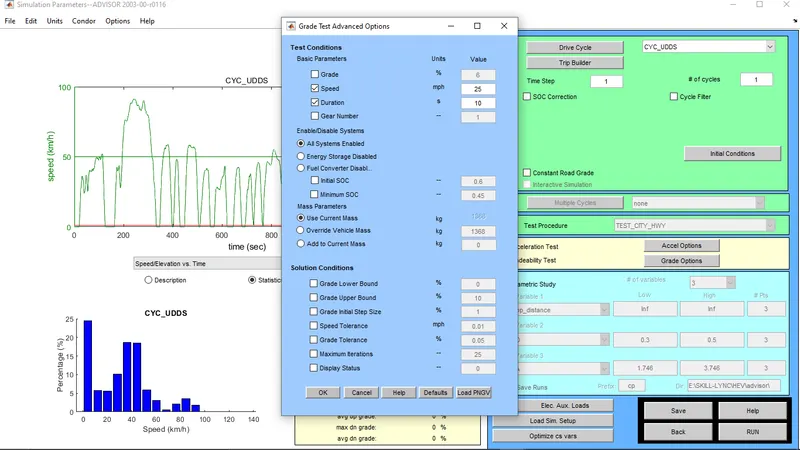
- Speed: 25 Mph or 40.25 Kmph
- Duration: 10 s
SETUP:
RESULT:
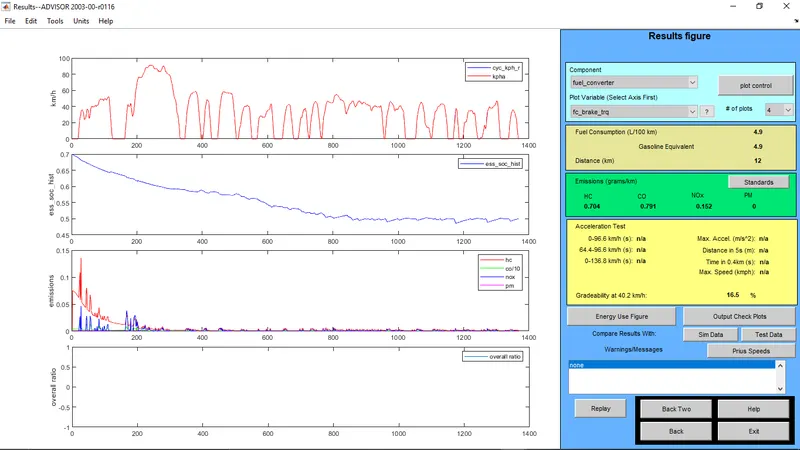
- The gradeability for 5 Mph or 8.05 Kmph is 16.5%.
CASE - 6:
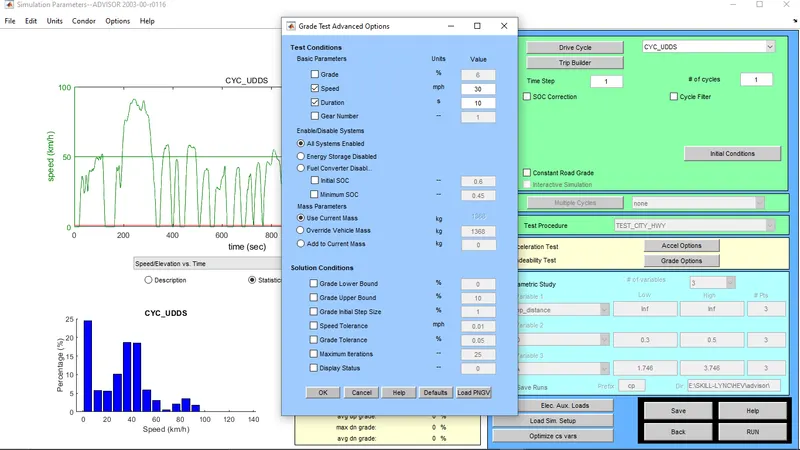
- Speed: 30 Mph or 48.3 Kmph
- Duration: 10 s
SETUP:
RESULT:
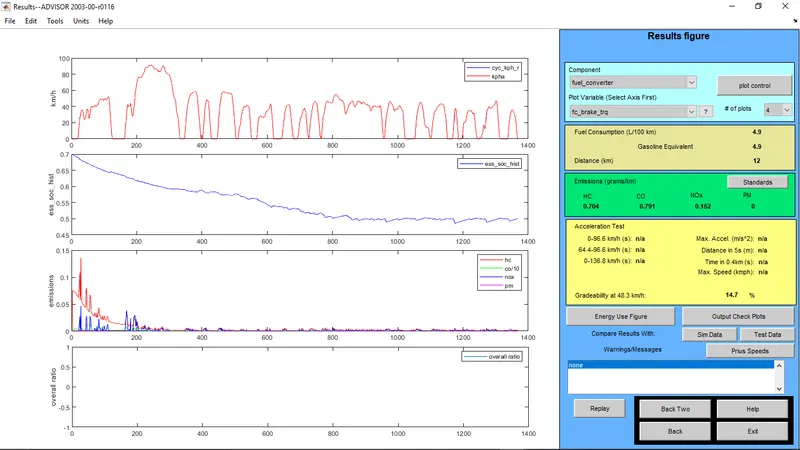
- The gradeability for 5 Mph or 8.05 Kmph is 14.7%.
CASE - 7:
- Speed: 35 Mph or 56.35 Kmph
- Duration: 10 s
SETUP:
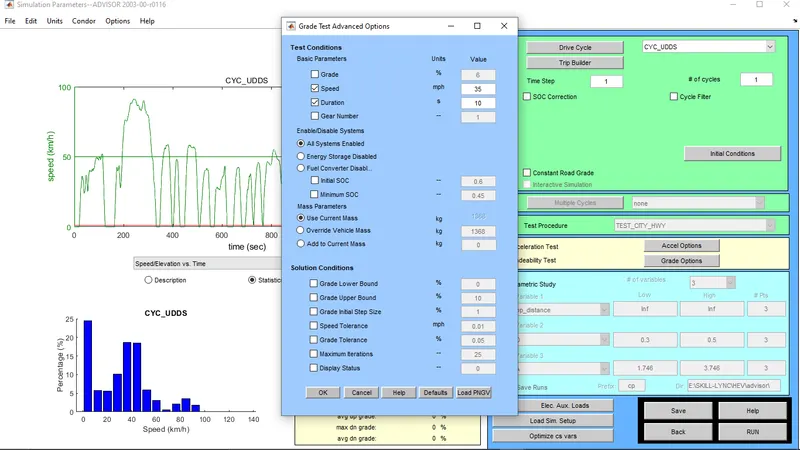
RESULT:
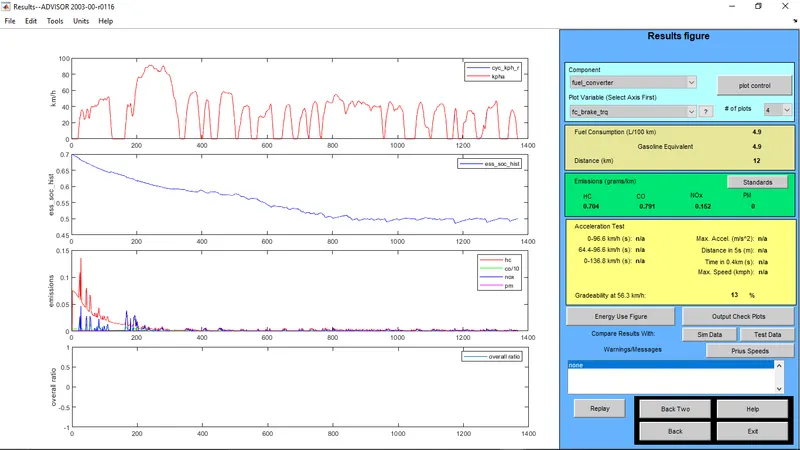
- The gradeability for 5 Mph or 8.05 Kmph is 13.0%.
CASE - 8:
- Speed: 40 Mph or 64.4 Kmph
- Duration: 10 s
SETUP:
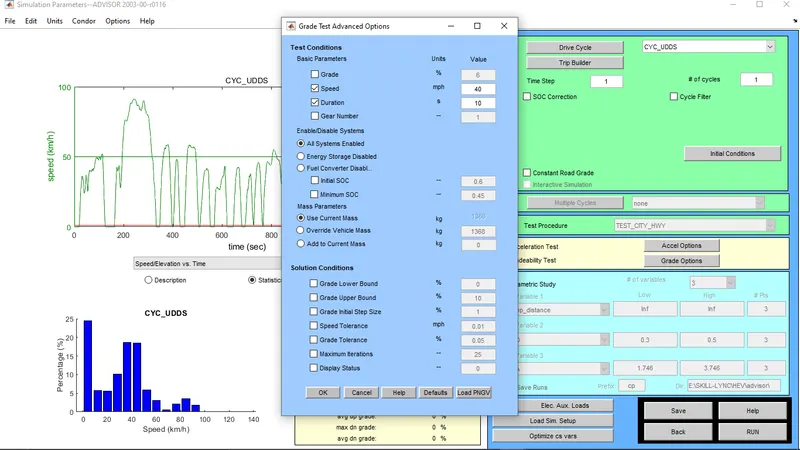
RESULT:
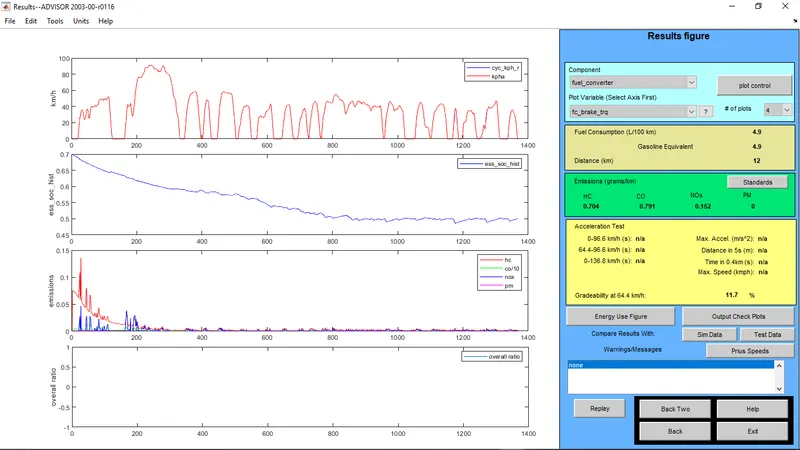
- The gradeability for 5 Mph or 8.05 Kmph is 11.7%.
CASE - 9:
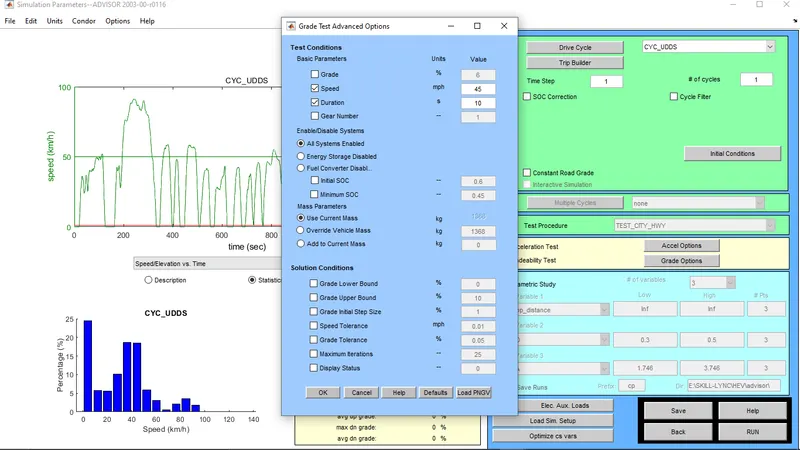
- Speed: 45 Mph or 72.45 Kmph
- Duration: 10 s
SETUP:
RESULT:
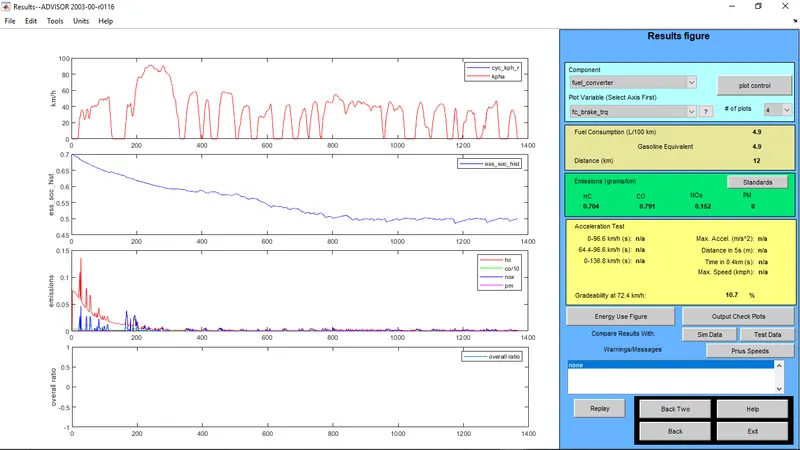
- The gradeability for 5 Mph or 8.05 Kmph is 10.7%.
CASE - 10:
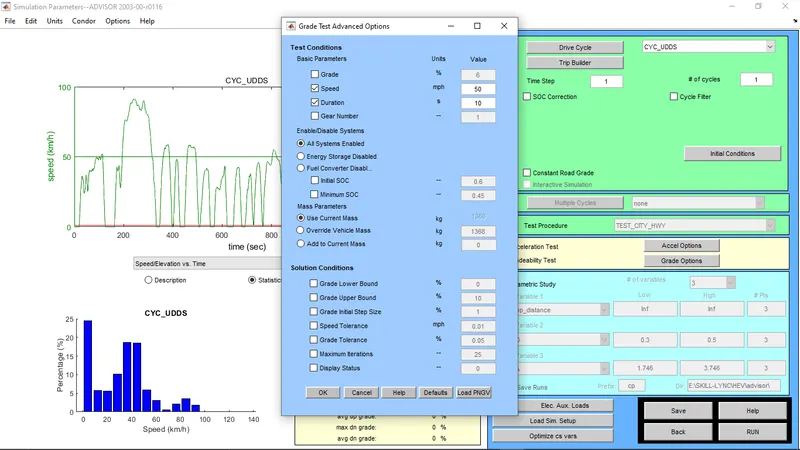
- Speed: 50 Mph or 80.5Kmph
- Duration: 10 s
SETUP:
RESULT:
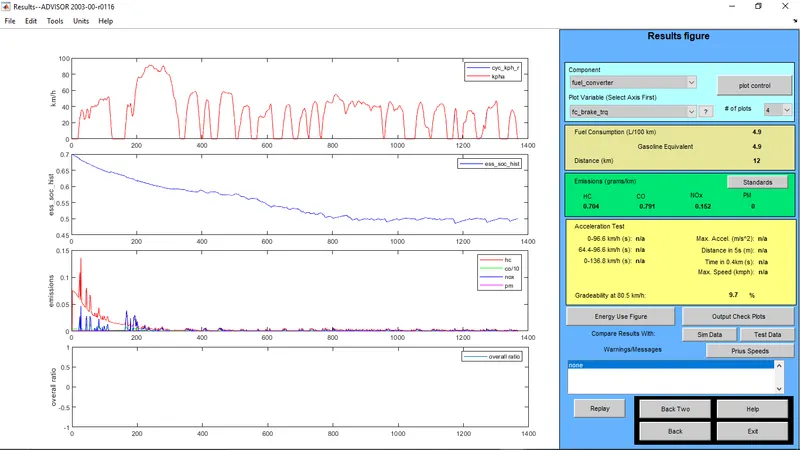
- The gradeability for 5 Mph or 8.05 Kmph is 9.7%.
TABULATION:
| SL.NO | SPEED (MPH) | SPEED (KMPH) | DURATION (S) | GRADEABILITY (%) |
| 01. | 5 | 8.05 | 10 | 32.8 |
| 02. | 10 | 16.1 | 10 | 30.3 |
| 03. | 15 | 24.15 | 10 | 24.4 |
| 04. | 20 | 32.2 | 10 | 19.8 |
| 05. | 25 | 40.25 | 10 | 16.5 |
| 06. | 30 | 48.3 | 10 | 14.7 |
| 07. | 35 | 56.35 | 10 | 13.0 |
| 08. | 40 | 64.4 | 10 | 11.7 |
| 09. | 45 | 72.45 | 10 | 10.7 |
| 10. | 50 | 80.5 | 10 | 9.7 |
CONCLUSION:
- In the above assignment the EV is tested to travel a distance of 45 Km with a cargo mass of 500 Kg with default battery capacity and it can be observed from the result that the Vehicle fails to travel the required distance with the default battery capacity.
- Then the battery capacity is increased and we can observe that with 28 units of battery and 345 Volts the EV is able to cover the required distance of 45 Km with a cargo mass of 500 Kg.
- The Parametric study of Gradeability Test for PRIUS HEV is carried out and we can observe that as the speed increases the gradeability decreases.