Week-3 Challenge: ADVISOR Tool
AIM:
Use ADVISOR tool and simulate the following
Objective:
- For EV_defaults_in file, if cargo mass is 500 kg with all other default conditions, can the vehicle travel for 45 km with FTP drive cycle? Conclude your observations.
- In the above case, try changing the battery capacity and repeat the simulation.
- Perform gradeability test with PRIUS_Jpn_defaults_in file. Compare your results in table and conclude.
ADVISOR:
Advanced vehicle simulator (ADVISOR) was first developed in November 1994 at the national renewable energy laboratory. It was designed as an analysis tool to assist the department of energy (DOE) in developing technologies for hybrid electrical vehicles (HEV) through the hybrid electric vehicle propulsion system contracts with ford, General Motors and Daimler Chrysler.
Its primary role is to high light the system- level interactions of hybrid electrical vehicle components and the impacts on vehicle performance and fuel economy.
ADVISOR usually predicts fuel use, gas emissions, acceleration performance and gradeability. In general the user takes two steps:
- Define a vehicle using measured or estimated component and overall vehicle data.
- Prescribe a speed versus time trace, along with road grade, that the vehicle must follow.
To open the ADVISOR firstly, open the MATLAB software and change its path directory to the folder where ADVISOR tool is download.
Then run the advisor.m file.
Enter advisor in command windows and type enter.
When the software will open, change its unit metric then the new window will open.
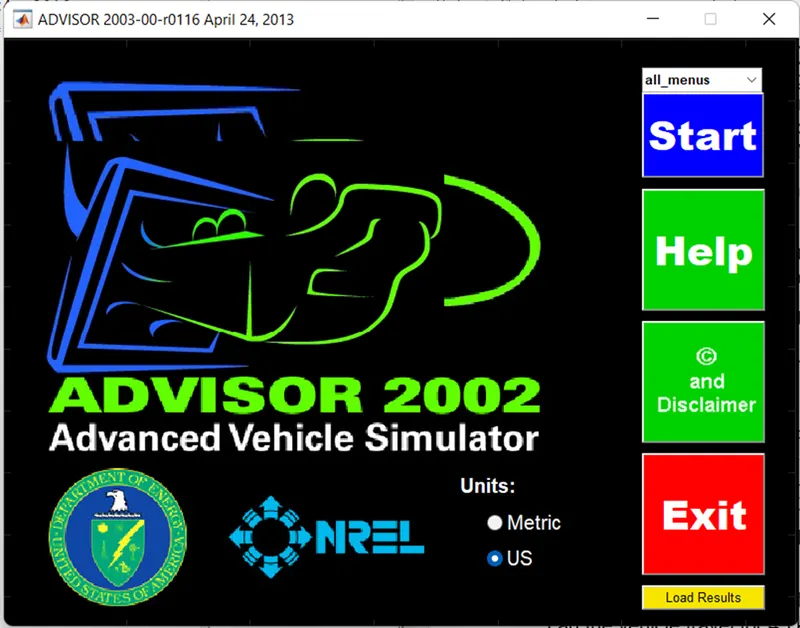
- For EV_defaults_in file, if cargo mass is 500 kg with all other default conditions, can the vehicle travel for 45 km with FTP drive cycle? Conclude your observations.
After the opening the advisor tool in the MATLAB go to ‘load file’ option to change the vehicle input and load ‘EV_defauts_in’ from drop down menu
Enter the cargo mass value=500 kg and leave all other inputs as defaults.
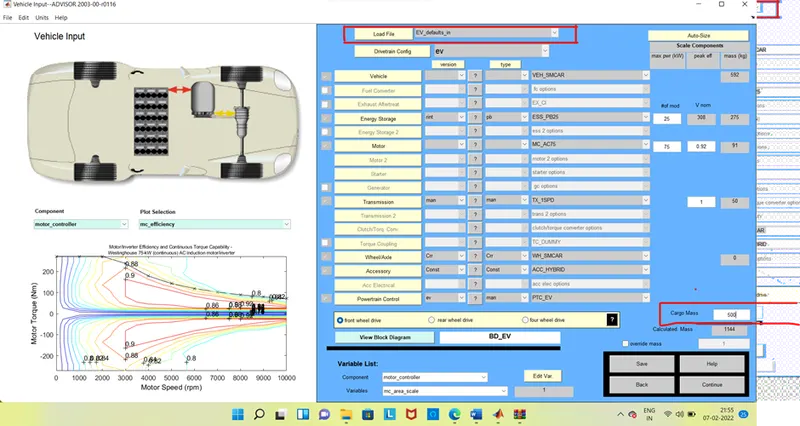
Now click the ‘continue’ button to go the next part.
In the drive cycle block load ‘CYC_FTP’ drive cycle and enter no of cycles is ‘1’.
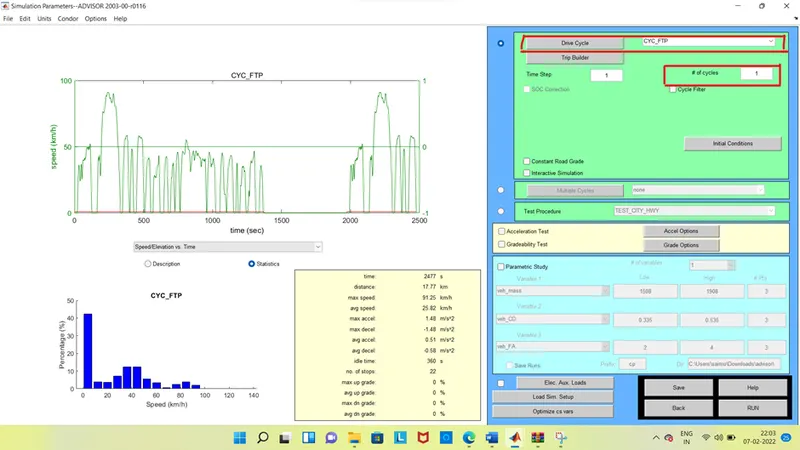
Click on the RUN button to perform the simulation and see the results. As shown fig.
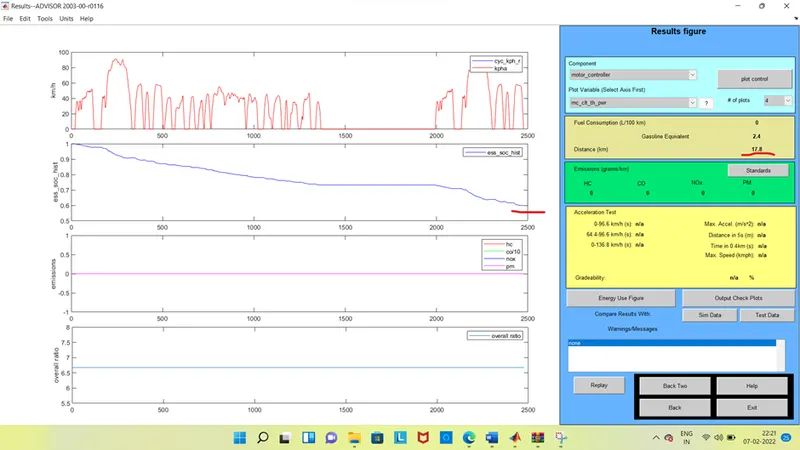
Here, we can see that the ‘distance covered’ by the vehicle is 17.8 km only. It can be observed that the ‘SOC’ is not 0 (0.6).
When we observe here that the distance is not enough to get our target and also the soc is not ‘0’ So, we can add more no of the cycle in this particular drive cycle.
Now, press the back button to go the previous page and enter no of cycles is ‘2’ and see the results as shown.
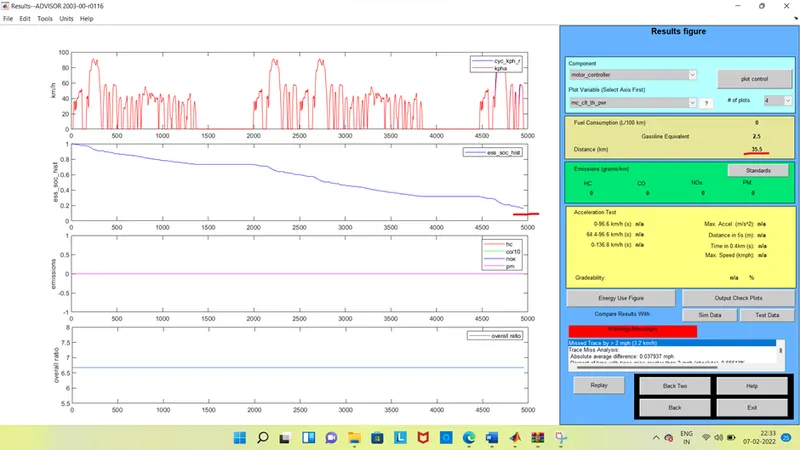
Here when we observe that the ‘distance covered’ by the vehicle is 35.5 km and also the ‘SOC’ is nearly equal to 0.2
Here also the distance covered is not enough to get the target and ‘SOC’ also not equal to ‘0’. So, we can add one more drive cycle.
Now, again press the ‘back’ button to go to the previous page and enter ‘no of cycles’ is 3 and see the results.
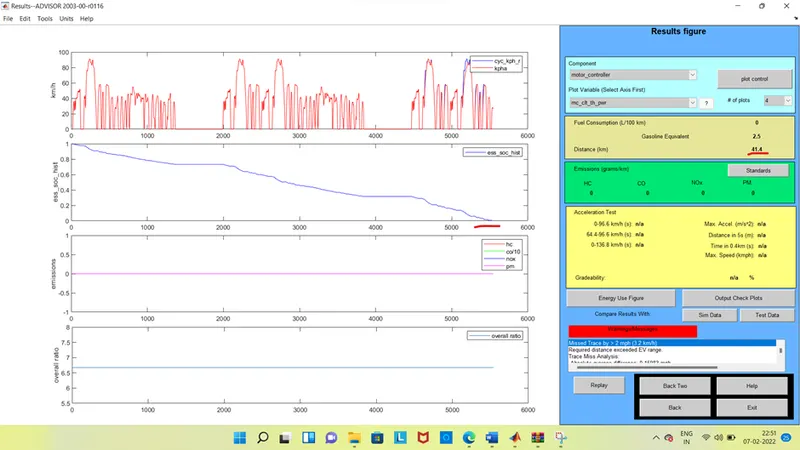
Here when we see that the ‘distance covered’ is 41.4 km. at the ‘state of charge’ (SOC) is 0 means that the battery is become 0.
From the result we can say that the EV_defaults_in can’t travel for 45 km, if cargo mass is 500 kg with all other default conditions, with FTP drive cycle.
- In the above case, try changing the battery capacity and repeat the simulation.
In the previous, we observed that ‘EV_defaults_in’ was not able to travel 45 km due to insufficient battery or SOC.
Therefore, in this part we are changing the battery value to reach target value. For this
Go to the first page of the tool and change the energy storage # of mod (module no of battery) by default, # of mod is 25, by changing the value to 26 and keeping all other parameters same as shown
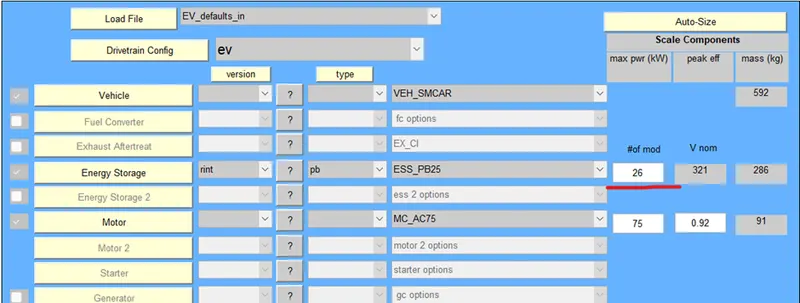
Click on the ‘continue’ button and again click on the run button and see the results. As shown.
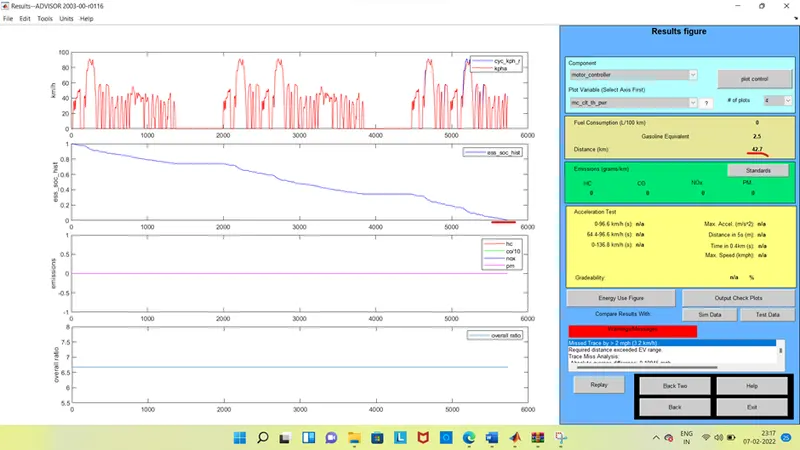
Here we can see that the result ‘distance covered’ by the vehicle is increased to 42.7 km, by using the full battery or SOC.
So by increasing the battery capacity the distance be increased.
Now again back to the first page and change the ‘energy storage’ ‘#of mod’ to 30 and see the results.as shown now.
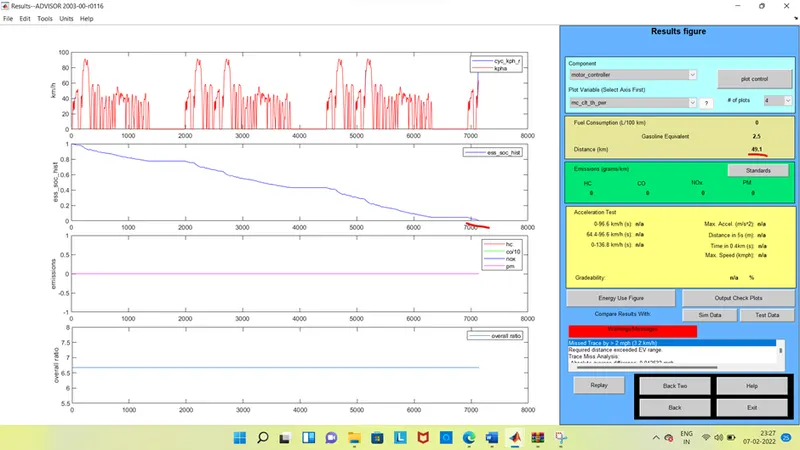
Now by seeing the results that the ‘distance covered’ by the vehicle is increased to 49.1 km.
Here we can see that the distance covered is more than the 45km. by changing the battery capacity to reach the near distance.
So by changing the #no of mod to 28 and see the result.
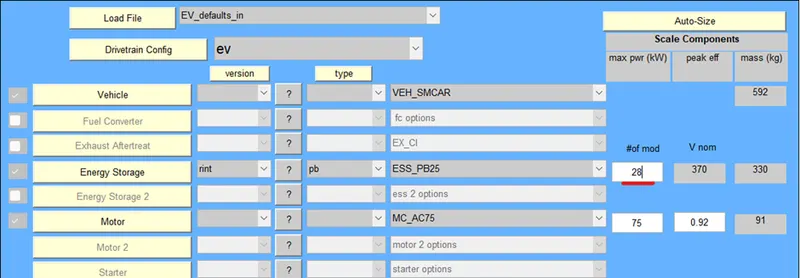
Click on the next and run button, and see the results.
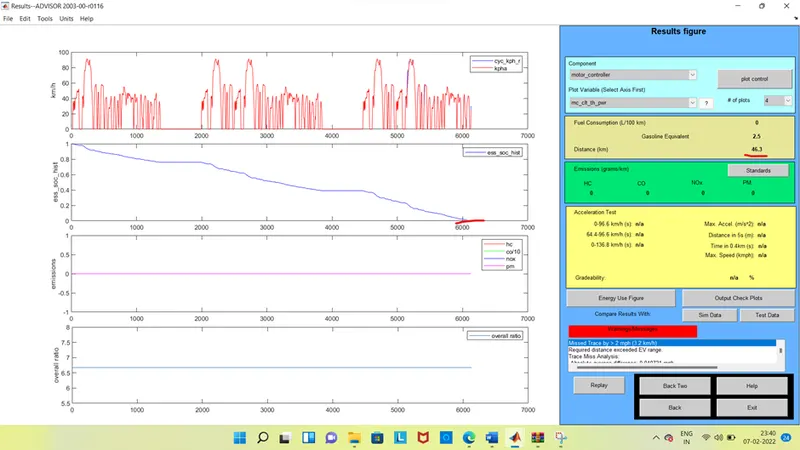
Here by seeing the results that the ‘distance covered’ by the vehicle is increased to 46.3km.
So, by using the battery capacity is 28, the distance be more than the 45 km. when we observe here that the soc is not gone to 0 up to 45 km.
- Perform gradeability test with PRIUS_Jpn_defaults_in file. Compare your results in table and conclude.
To perform the gradeability test, go to the first page of advisor tool and then load PRIUS_jpN_defaults_in file in vehicle input, by keeping all other parameters are same. And then click on continue.
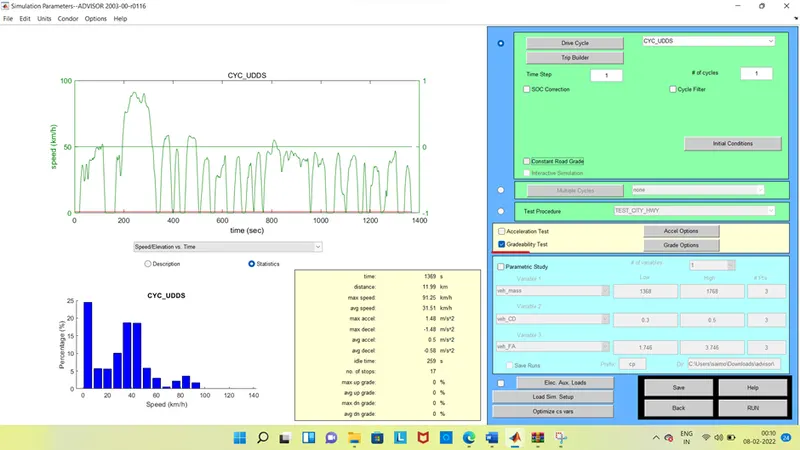
On the next page, choose the drive cycle ‘CYC_FTP’ and enter no of cycles is 1, now
Click on ‘gradeability test’ and open the grade option menu box. In the grade option box, we enter all necessary parameters for the gradeability test.
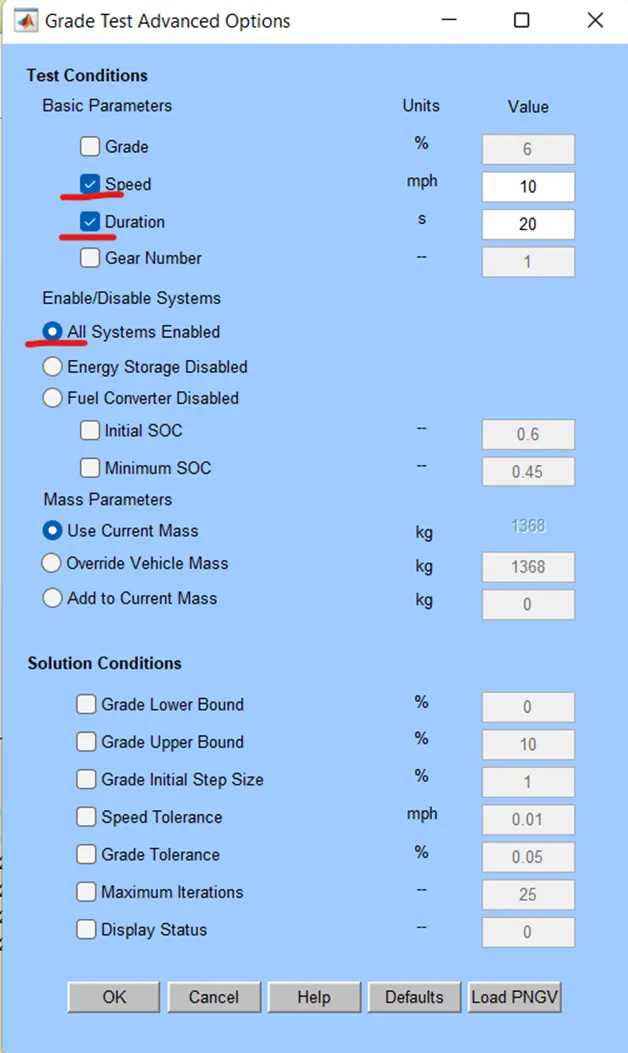
In grade test, enter parameters such as speed, duration and active all systems enabled. Leave all other parameters default and click on ok button. As shown.
Press the run button to run the simulation and see the results.
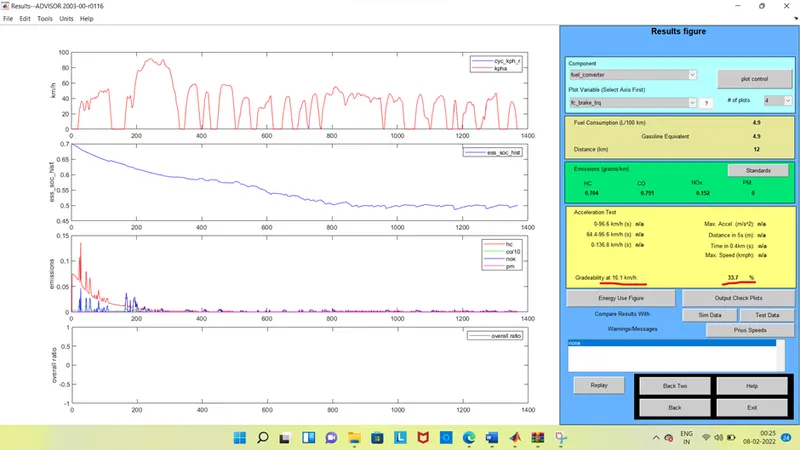
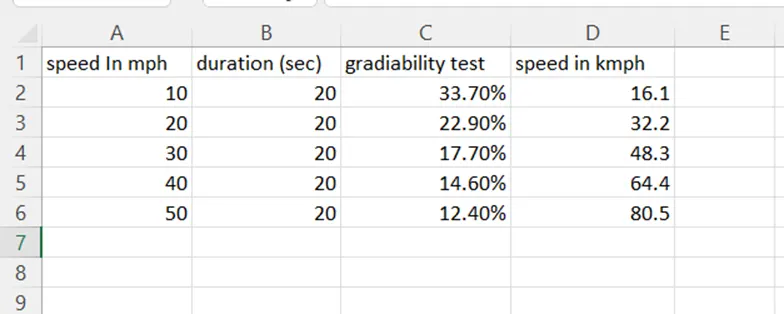
Therefore, for speed = 10 mph and time = 20 sec, the gradeability is 33.7% with 16.1kmph
For the comparison of results we are changing the speed for every 10mph by keeping the tie constant, and see the gradeability results as,
Speed = 20 mph, duration time = 20 sec
Speed = 30 mph, duration time = 20 sec
Speed = 40 mph, duration time = 20 sec
Speed = 50 mph, duration time = 20 sec
The results of these comparisons are as shown,
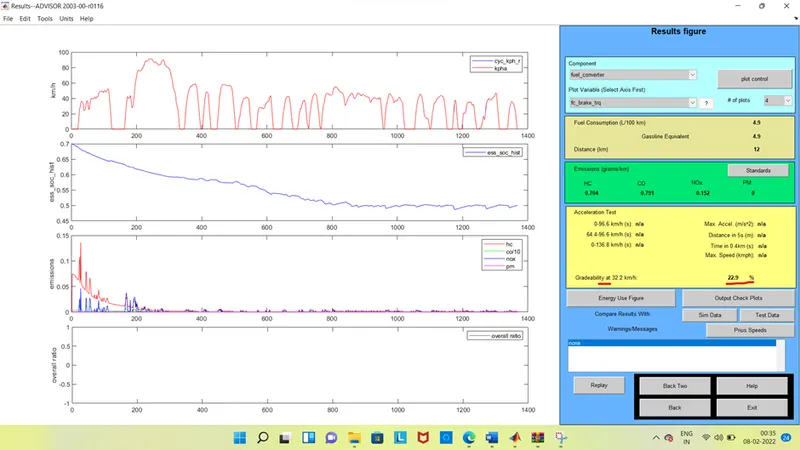
For Speed = 20 mph, duration time = 20 sec
the gradeability is 22.9% and speed is 32.2 kmph
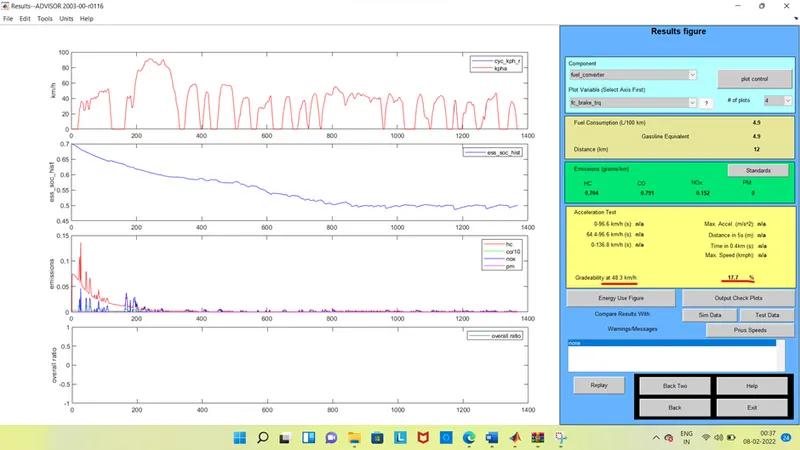
For Speed = 30 mph, duration time = 20 sec
The gradeability is 17.7% and speed is 48.3 kmph
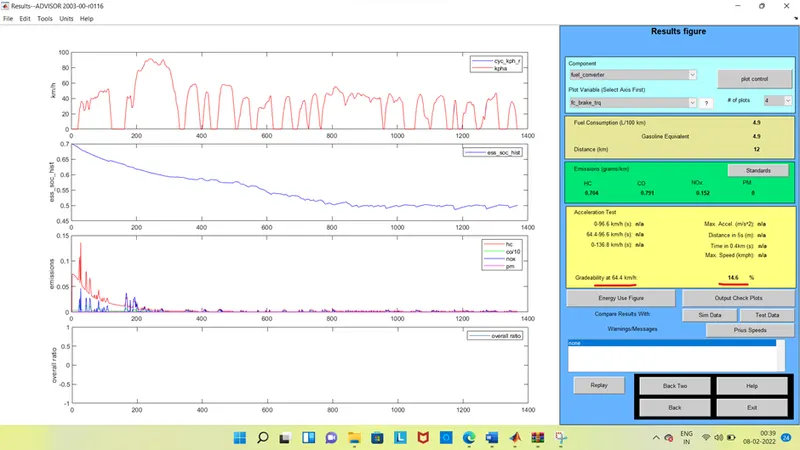
For Speed = 40 mph, duration time = 20 sec
The gradeability is 14.6% and speed is 64.4 kmph
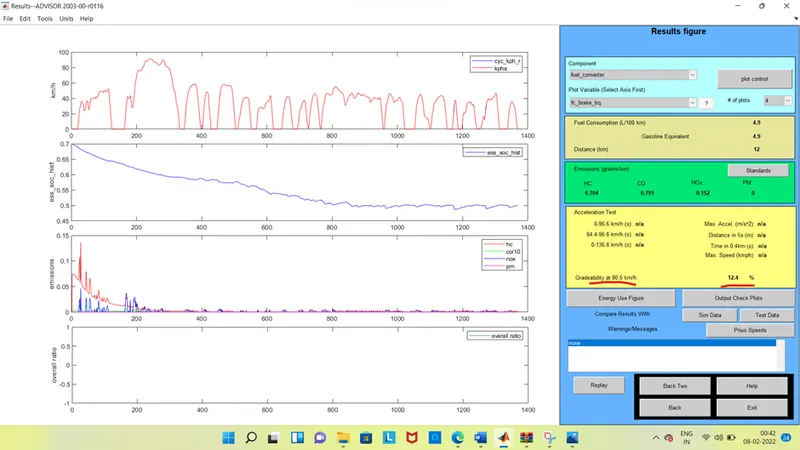
For Speed = 50 mph, duration time = 20 sec
the gradeability is 12.4% and speed is 80.5 kmph
here from the results we can say that by increasing the speed of the vehicle results In decreasing the gradeability.
Comparison table