Week 3 - 2D meshing for Sheet metal
OBJECTIVE:
To make 2D meshing for given sheet metal
CAD Model:
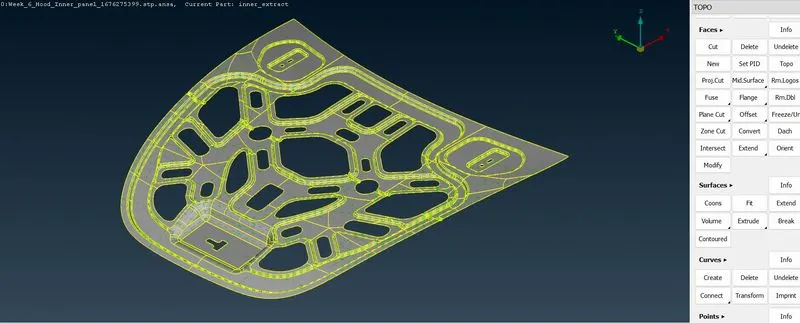
PROCEDURE:
1. First property have to check whether how many properties are there.
2. Do orient for given Model.
3. Topo>Faces>Orient.
4. Do geometry check if any errors arise clear it by using Cons> Paste or Fill holes else Face> Cut, New & Topo.
5. After geometry check, do measurements for confirming sheet metal having same thickness.
6. Mid Surface Extraction.
7. I did manual mid surface extraction by using Faces> Offset.
8. Value is given by thickness of sheet multiply by 50%
9. Actual thickness of plate is 0.75 hence the value given for extraction is -0.375.
10. Negative sign is because the arrow is upward in direction.
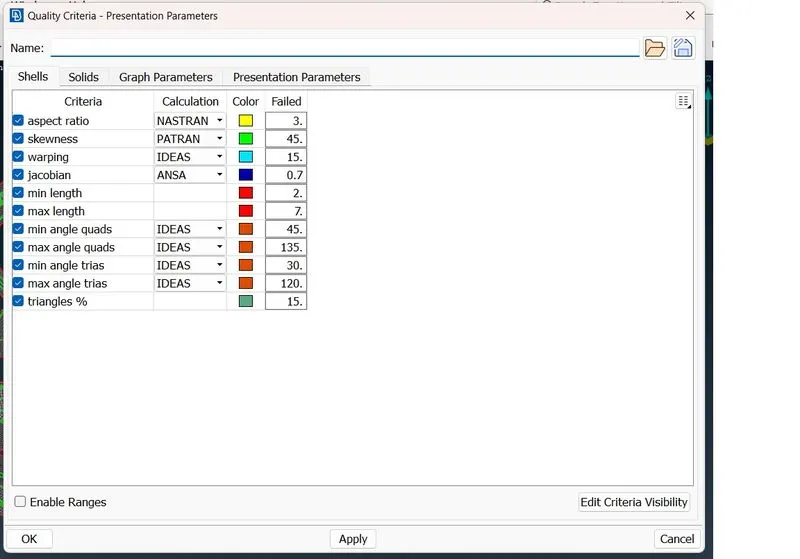
11. After extraction completed, give quality criteria for meshing.
12. After giving criterias model has to move for meshing.
13. Before meshing, clear unneccesary cons to avoid the quality issues.
14. After clearing do mesh by using Classic Mesh>Mesh generation>Best.
15. After completing the mesh do smooth for better mesh.
QUALITY CRITERIA:
Final Model Image:
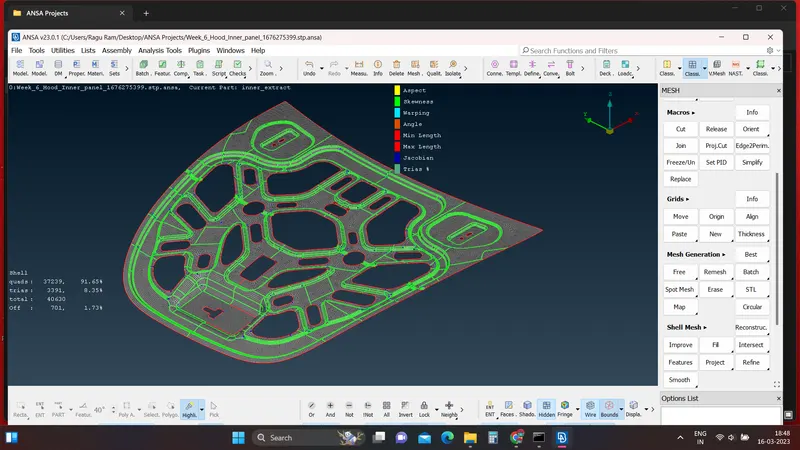
Result:
By following the above steps i had completed the mesh for above 2D model.
Google drive Link:
unable to upload my file so i attach the file link here.
https://drive.google.com/file/d/1XSQZ1g89iGW_ZonnwR32Etw3z01Lw5mZ/view?usp=share_link