Week 3.2 - 2R Robotic Arm Challenge
clear all
close all
clc

% inputs

ct = 1;
l1 = 1;
l2 = 0.5;
theta1 = linspace(0, 90, 10);
theta2 = linspace(0, 90, 10);

% calculate coordinates

x0 = 0;  y0 = 0;
for i = 1:length(theta1)
    for j = 1:length(theta2)

        x1 = l1*cosd(theta1(i));
        y1 = l1*sind(theta1(i));
        x2 = x1 + l2*cosd(theta2(j));
        y2 = y1 + l2*sind(theta2(j));

        plot([x0 x1], [y0 y1], [x1 x2], [y1 y2], 'linewidth', 3)
        axis([0 1.5 0 1.5])
        pause(0.3)

         M(ct) = getframe(gcf)
         ct = ct + 1;


    end
end

% Animation creation

movie(M)
videofile = VideoWriter('robotic arm.avi', 'Uncompressed AVI')
open(videofile)
writeVideo(videofile, M)
close(videofile)- clear all, close all, clc are used to remove pre-existing workspace variables, graphs, and comands in the command window
- In the input we initialize variables to their respective values and create an array of theta1 and theta2 using the linspace command.
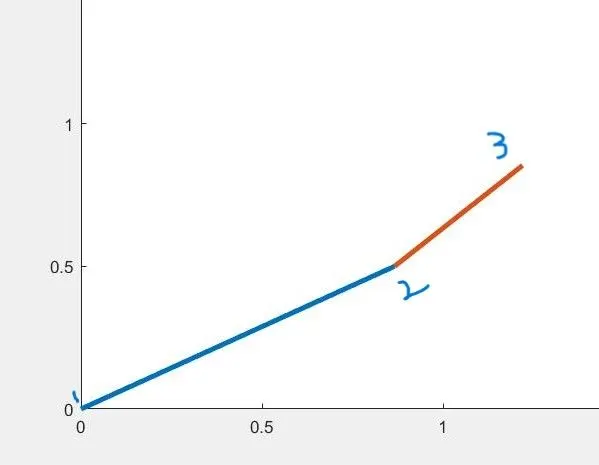
- Point 1 corresponds to coordinate x0 = 0 and y0 = 0
- point 2 corresponds to coordinates x1 and y1 which are calculated using trigonometric relations.
- point 3 corresponds to coordinates x2 and y2.
- Nested for loop is used to iterate over each and every item of theta arrays in order to find values of x1, x2, y1, y2 for corresponding values of thetas.
- command plot([x0 x1], [y0 y1], [x1 x2], [y1 y2], 'linewidth', 3) creates a two lines connected together of linewidth 3.
- "axis" command is used to specify the range of axis that needed to be displayed.
- "pause" is used to specify the time between two outputs of an iteration.
- M(ct) = getframe(gcf) is used to strore each frame as an element of array.
- movie(M) is used o create a movie
- VideoWriter() is used to create an empty video file.
- writeVideo() is used to write frames M to videofile.
https://drive.google.com/file/d/1TVSVVutzVeW32Mp3Q_Zml4RXAiZdkXZa/view?usp=sharing