Week 3.2 - 2R Robotic Arm Challenge
Objective:
- Write a program in Matlab that plots the 2R robotic arm at various angles.
- Stitch the plots to animate a movie the robotic arm to animate the working.
Problem Statement:
We have a two links of a robotic arm with defined lenght and we need to plot the arm on the graph to find the reachability of arm at different angulations.
also to create set of plots at various positions and to stitch all of them to produce a simulation of 2R robotic arm.
Solution procedure:
We need to find the cordinate of the all the link end points to draw an arm. in order to find the solution we have two arm arms here i.e: Link 1 and link 2
And we have three cordinate points to be calculated
(X0,Y0) (X1,Y1) and (X2,Y2)
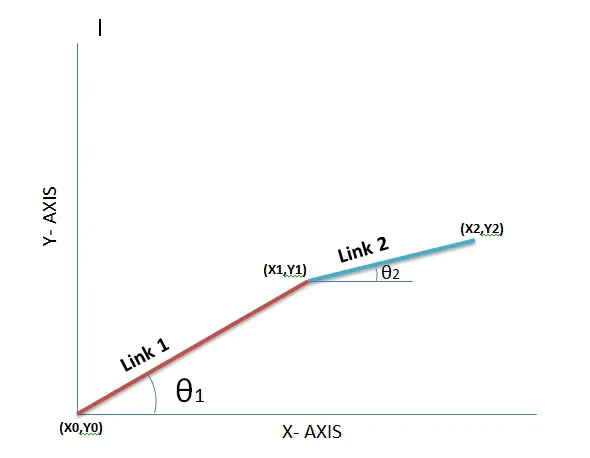
Since Base of the link 1 will be fixed and we will consider it to be an origin so
(X0,Y0)=(0,0)
End points of Link 1
As we have θ1 and link lenght details, using simple trignometry we can calculate the x1 and y1 cordinates.
X1=L1*cosθ1
Y1=L1*sinθ1
Manipulator points:
X2=X1+L1*cosθ2
Y2=Y1+L1*cosθ2
Using all the 3 cordinates points at various angulations we can create corresponding set of plots.
We can stitch all the obtained to make a simulation of 2R robotic arm.
Code:
% Program to animate 2R Robotic arm simulation
%Project By: Shivakumar G R

% Clearing all the windows

close all
clear all
clc

% Defining the length of robotic arms in m

l1=0.5;
l2=0.2;

% Base Coordintes of link 1
x0=0;
y0=0;
% Counter vriable to store the frames
ct=1;


% Defining the working angles of each arm

theta1=linspace(0,90,10);
theta2=linspace(0,90,10);

% Calcualting the co ordinates of each arm for simulation

% We use thw nested for loop to generate the working angle for both arms

for i=1:length(theta1)
    for j=1:length(theta2)

        % Co ordinates of interconnector of both arms
        x1=l1*cosd(theta1(i));
        y1=l1*sind(theta1(i));
        % Cordinates to define the manipulator
        x2=x1+l2*cosd(theta2(j));
        y2=y1+l2*sind(theta2(j));

        % Plotting the 2R Robotic arm co ordinate points
        plot([x0,x1],[y0,y1],[x1 x2],[y1 y2],'linewidth',2)
        axis([-0.2 1 0 1])
        title('Animation of 2R Robotic arm')
        pause(0.1)
        m(ct)=getframe(gcf);
        ct=ct+1;
    end
end

% Generating a movie using the frame obtained and save the animation
movie(m)
videofile=VideoWriter('Forward_kinematics','Uncompressed AVI');
open(videofile)
writeVideo(videofile,m)
close(videofile)
Result and conclusion:
Matlab program was executed to plot set of graph for 2R robotic arm at various conditions. all the plots were stitched to make an animation .
Following is an link to open animation
Screen shot of matlab code is attached