Week 3.2 - 2R Robotic Arm Challenge
1. Objective
The main objective of this challenge is to represent the function of 2R Robotic Arm by using MATLAB and to be represented as an animation.
2. Procedure to Code
- As the name suggests there are two arms linked together with a free rotation in the X-Y plane suggesting a 2D representation. For this challenge, the arm rotations are considered between 0 o to 90o.
- The Code starts with “clear,” “close all” and “clc” in-order to eliminate the chances of any previous code present before starting as MATLAB generally does not opens with the previously saved work.
- The lengths “l1”,” l2” are to be specified as represented in the code below for differentiating the different linked arms. Further the angles up to which the arms can rotate are to be specified. This can be done by using the function “linspace” which allows to input the limiting angles with a mention of difference between each angle point. And the starting coordinates of the linkages are to be mentioned where it is (0,0) as these are the fixed points.
- The main objective for this code is to represent the linkages at different angles in a 2D Plane. This could be achieved using the x1y1 and x2y2 coordinates mentioned below.
`x_1=l_1 cosθ_1`
`y_1=l_1 sinθ_1`
`x_2=x_1+ l_2 cosθ_2`
`y_2=y_1+l_2 sinθ_2` - Since the default angle values in MATLAB are in radians and to get the results in degrees, it is necessary to use ‘sind’ and ‘cosd’ while programming these formulas.
- Since x1y1 and x2y2 are the dynamic points which needs to be calculated for every position of these coordinates, It is better to use a “for” loop with the syntax for the lengths of angles mentioned above which can be stored in a new component named “THETA1” and “THETA2” respectively.
- Instead of mentioning these “for” loops in different lines, a loop within a loop can be created in-order to make the code efficient. For this, “i” and “j” are considered for the loop condition of lengths of angles “theta1” and “theta2” followed by the loop statements which are the formulas mentioned in point 4.
- Further all these coordinates are plotted as a graph using the plot function mentioning the line width of choice. (Point to be noted is that MATLAB will represent these different plots in different colours by default).
- Also, it is necessary to specify in the code the file format for the video and writing these figures into the video file as by default MATLAB generates images or figures for the executed code. This is mentioned in the last part of the code as mentioned below.
3. Code for 2R Robotic Arm
The code for the aforementioned procedure for 2R Robotic Arm is as follows.
% To write a program for Forward Kinematics of a Robotic arm
l1 = 1;
l2 = 0.5;

theta1 = linspace(0,90,10);
theta2 = linspace(0,90,10);

x0 = 0;   %fixed x-coordinate
y0 = 0;   %fixed y-coordinate
ct = 1;


for i = 1:length(theta1)
    THETA1 = theta1(i);
    for j = 1:length(theta2)
        THETA2 = theta2(j);
        x1 = l1*cosd(THETA1);  %X-coordinate for first Link
        y1 = l1*sind(THETA1);  %Y-coordinate for first Link
        x2 = x1 + l2*cosd(THETA2); %X-coordinate for second Link
        y2 = y1 + l2*sind(THETA2); %Y-coordinate for second Link

        % Plotting the 2D Robotic Arm
        plot([x0 x1],[y0 y1],[x1 x2],[y1 y2],'linewidth',4)
        axis([-0.1 1.5 0 1.5]) %used to set the coordinate axis for the represention
        pause(0.04)
        m(ct) = getframe(gcf); % This is to create a movie
        ct = ct+1;
    end
end

% creating an animation file
movie(m)
videofile = VideoWriter('forward_kinematics.avi','Uncompressed AVI');
open(videofile)
writeVideo(videofile,m)
close(videofile)
Video Link: 2R Robotic Arm
4. Code Execution Errors
- Error No.1:
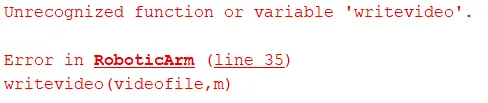
As MATLAB is case sensitive for these kinds of errors occur. This function is to be written as "writeVideo" to eliminate it. - Error No.2:
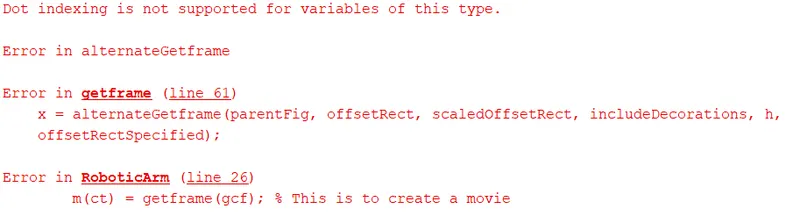
This kind of error occurs when when the animation is being played is terminated while running which doesnot allow the animation file to be saved. This can be eliminated by letting it run the animation completely.