Week 3.2 - 2R Robotic Arm Challenge
ROBOTIC ARM
AIM
- To plot the motion of robotic arm
THEORY
- Robotic arms are widely used in industry automation (automobile painting, welding etc.)
- A 2R robotic arm consists of 2 revolute join: 1. In the first arm begining 2. Where the two arm meets
- Based on the rotation of these two joins we get different lengthsnand the required co-ordinate
- The end of the second arm different attachments can be placed to get the required job done
- Understanding the motion of the robotic arm is very much essential in design.
Procedure
% Robotic Arm
clc
clear all
close
% The length of the first arm
l1 = 1
% The length of the second arm
l2 = 0.5
% Angle made by Arm 1 with the horizontal plane (x-axis)
theta1 = linspace(0,90,10)
% Angle made by Arm 2 with the horizontal plane (x-axis)
theta2 = linspace(0,90,10)
ct = 1
% i is used to iterate theeta1 or angle of arm 1
for i = 1:length(theta1)
    % j is used to iterate theeta2 or angle of arm 2
    for j = 1: length(theta2)
        % a iterates angle of arm 1
        a = theta1(i)
        % b iterates angle of arm 2
        b = theta2(j)
        % x0 and y0 denotes the starting point of arm 1
        x0 = 0
        y0 = 0
        % x1 denotes the x position of arm 1 end point
        x1 = l1*cosd(a)
        % y1 denotes the y position of arm 1 end point
        y1 = l1*sind(a)
        % x2 denotes the x position of arm 2 end point
        x2 = x1+l2*cosd(b)
        % y2 denotes the y position of arm 2 end point
        y2 = y1+l2*sind(b)
        plot([x0 x1],[y0 y1],[x1 x2],[y1 y2],'LineWidth',2)
        xlabel('x-Position')
        ylabel('y-Position')
        axis([-0.1 1.6 0 1.6])
        %pause(0.05)
        % M(ct) captures everything displayed in the figure from the plot
        M(ct) = getframe(gcf)
        % after every iteration ct will be iterated to next value
        ct = ct+1;

    end
end
% movie(M) arranges all the frames together
movie(M)
% videofile is a variable which creates a video file 'robo_arm.avi
videofile = VideoWriter('robo_arm.avi','Uncompressed AVI')
open(videofile)
% We transfer the data in M to the video file the video data is now written
% to the video file created
writeVideo(videofile,M)
close(videofile)
Output
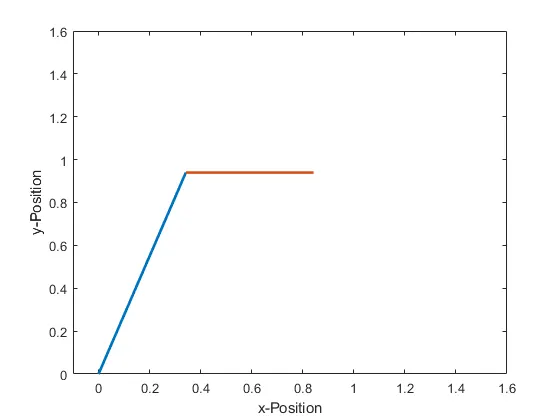
Video link: Vide Link
Results
The various position of robotic arm for every angular positions of the revolute join is ploted and compiled into a video file