Week 3.2 - 2R Robotic Arm Challenge
AIM:
Write a program in Matlab to simulate the forward kinematics of a 2R Robotic Arm, as shown in the video.
OBJECTIVE:
- Create an animation file of the plot.
- Step-wise explanation of your code.
- Mention the errors faced while programming.
- Steps taken to overcome those errors.
- Screenshots showing errors thrown in command window.
ROBOTIC ARM:
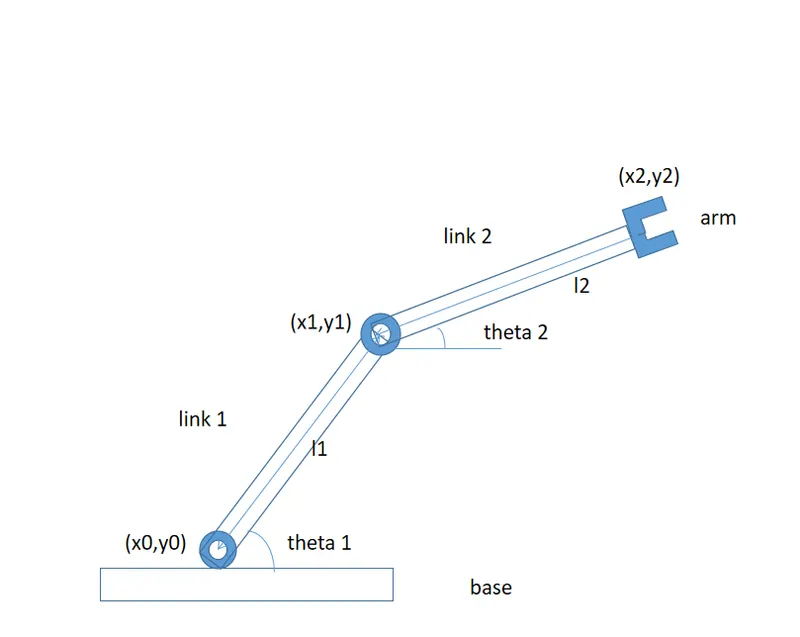
- A ROBOTIC ARM is a type of mechanical arm, usually programmable, with similar functions to a human arm; the arm may be the sum total of the mechanism or may be part of a more complex robot.
- The links of such a manipulator are connected by joints allowing either rotational motion (such as in an articulated robot) or translational (linear) displacement.
- he links of the manipulator can be considered to form a kinetic chain.
- The terminus of the kinematic chain of the manipulator is called the end effector and it is analogous to the human hand.
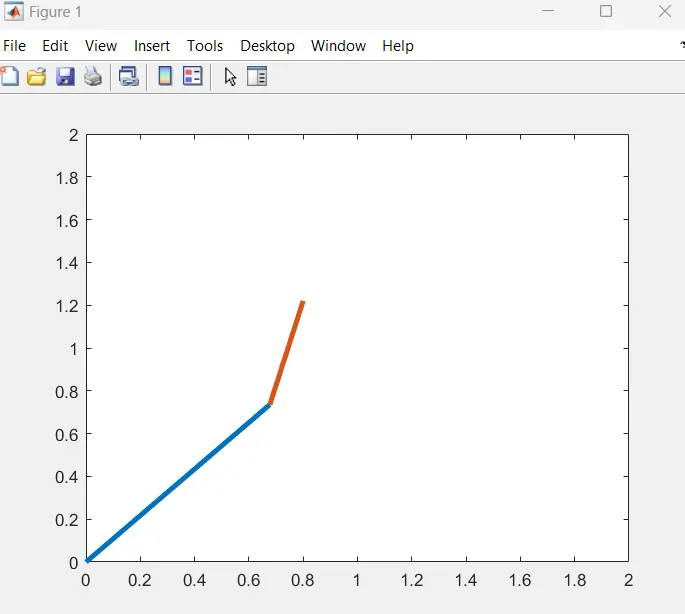
INPUTS:
length of link (l1) is l1 = 1.
length of link (l2) is l2 = 0.5.
COORDINATES:
(x0,y0)
- The starting point of the link 1 is attached to the base as the base is fixed, so the starting point of the link 1 cannot move as it is in fixed position so the value of 'X' and 'Y' will be '0'.
- x = 0.
- y = 0.
(x1,y1)
- The ending point of the link 1 is the starting point of the link 2. The length of link 1 is l1 and the angle between the base and link 1 is represented by an angle 'theta1'.
- x1 = l1*cosd(θ1).
- y1 = l1*sind(θ1).
(x2,y2)
- It is the ending point of link 2. The angle between link 1 and link 2 It is represented by an angle θ2">θ2 and length of link 2 is l2. The equation x and y will be,
- X2=X1+l2*cosd(θ2).
- Y2=Y1+l2*sind(θ2).
MATLAB CODE:
1. CODE FOR 2R ROBOTIC ARM (θ1 & θ2) ARE GIVEN MANUALLY
close all
clear all
clc
% matlab code for 2R robotic arm
% inputs
% for fixed theta 1 & 2 values

l1 = 1;
l2 = 0.5;

% the values are changed manually
theta1 = 45;
theta2 = 60;

% coordinates
x0 = 0;
y0 = 0;

x1 = l1*cosd(theta1);
y1 = l1*sind(theta1);

x2 = x1+l2*cosd(theta2);
y2 = y1+l2*sind(theta2);

% ploting
line([x0 x1],[y0 y1],'linewidth',3,'color','b')
line([x1 x2],[y1 y2],'linewidth',3,'color','r')
2. CODE FOR 2R ROBOTIC ARM FOR MULTIPLE VALUES (θ1 & θ2) (USING NESTED FOR LOOP)
close all
clear all
clc
% 2R robotic arm cahallenge
% For multiple values of theta 1& 2
% initializing inputs for theta 1 & 2
l1 = 1;
l2 = 0.5;

theta1 = linspace(0,90,20);
theta2 = linspace(0,90,20);

% using nested for loop for geting values for different values of theta
ct = 1;
for i = 1:length(theta1)
    THETA1 = theta1(i)

    for j = 1:length(theta2)
        THETA2 = theta2(j)
        x0 = 0;
y0 = 0;

x1 = l1*cosd(THETA1);
y1 = l1*sind(THETA1);

x2 = x1+l2*cosd(THETA2);
y2 = y1+l2*sind(THETA2);

% ploting
plot([x0 x1],[y0 y1],[x1 x2],[y1 y2],'linewidth',3)
axis([0 2 0 2])
pause(0.03)
M(ct) = getframe(gcf);
ct = ct+1;
    end
end

% creating movie using matlab
movie(M)
videofile = VideoWriter('robotic arm.avi','Uncompressed AVI')
open(videofile)
writeVideo(videofile,M)
close(videofile)
EXPLANATION:
- Matlab code is started with clear all, close all, clc command .
- The input value for θ1 & θ2 IS determined with a command linspace in this we create a degree of freedom from 0 to 90 with 20values between the degree of freedom.
- Then initialize the counter command using ct.
- To move the robotic arm continuously we are using for loop.
- Then enter the values of co-ordinates ([X0 X1], [Y0 Y1],[X1 X2], [Y1 Y2]).
- Then plot the values of ([X0 X1], [Y0 Y1],[X1 X2], [Y1 Y2]) with the 'linewidth',3.
- Then axis command is used for fixing axes - changing x-limits and y-limits.
- Then use pause command to slow down the output.
- Then we use getframe command to get individual frame and stored in variable M .
- (ct = ct+1; )Then incrementing the counter value by 1.
- The end command is used to end the for loops, this terminates the set of instructions.
- Using movie command we can create a movie with the help of individual frame.
- Using the different individual frames a new uncompressed avi file is created using videofile command.
- Then we are opening the videofile using the open command and closing the videofile using the close command.
ANIMATION VIDEO LINK:
ERRORS:
CASE SENSITIVE ERROR 1
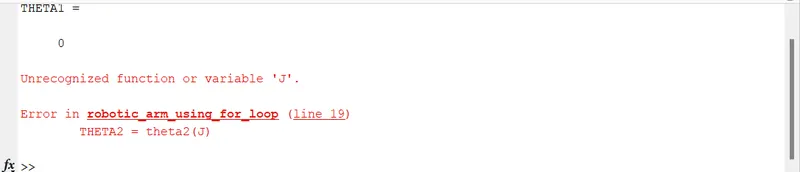
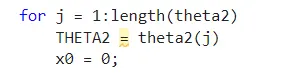
After changing the 'J' to small'j' the error is solved.
ERROR 2
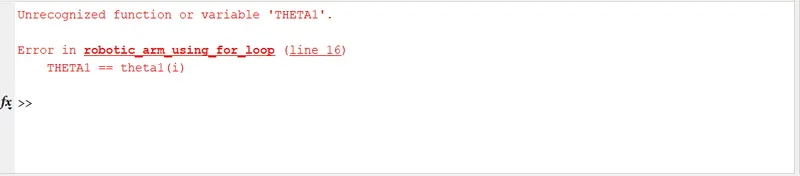

As i used double '==' the error poped up ,so removing one '='the error is resolved.
ERROR 3


In the line 33 the command was typed worngly as 'geframe' instead of 'getframe' after changing the error was resolved.