Week 3.2 - 2R Robotic Arm Challenge
Week 3.2 - 2R Robotic Arm Challenge
The following Matlab program is used to solve the forward kinematics of the 2R robotic arm manipulator.
THEORY :
Kinematics is the analysis of motion without considering the forces. Here, we need only geometric properties such as the length and degree of freedom of the manipulator bodies.
Forward kinematics refers to the use of the kinematics equation of a robot to compute the position of the end effector from specified values for the joint parameters.
If we know the geometry of the robot and all its joint points, we can do the math and figure out the position and orientation of any point on the robot. i.e, if we can figure out how the robot will move, then we can figure out its workspace (workspace refers to a possible location that the robot can reach).
These robots have various complex industrial application
- Welding in the automobile industry.
- Material handling.
- Assembly operations.
- Machine loading and unloading.
- Spray painting of automobile bodies.
PROJECT SETUP :
It consists of a base, two arms or kinematic links, and two rotational joints. These links will have motion in them when they are programmed.
Link one will make an angle theta1 with respect to the base, similarly, link two will make an angle theta2.
So we need to create a plot at various angular positions up to which these arms can move. For this, we need to find out the coordinates involved at the joints.
At the base, the coordinates will be (0,0), at the end of the first link and start of the second link the coordinates are(x1, x2), and finally, at the manipulator, the coordinates will be(x2, y2).
Whereas,
X0 = 0, Y0 = 0 (AT THE BASE)
X1 = L1*COS(THETA1), Y1 = L1*SIN(THETA1)
X2 = X1+L2*COS(THETA2), Y2 = Y1+L2*SIN(THETA2)
PROGRAM:

% forward kinematics of a 2R Robotic Arm
close all
clear all
clc

% inputs

%length of robotic arm
l1 = 1;
l2 = 0.5;

%Angle between the base and robotic arm
theta1 = linspace(0,90,10);
theta2 = linspace(0,90,50);

x0 = 0;
y0 = 0;

%for loop
ct = 1;
for i = 1:length(theta1)
    x1 = l1*cosd(theta1(i));
    y1 = l1*sind(theta1(i));


    for j = 1:length(theta2)


        x2 = x1 + l2*cosd(theta2(j));
        y2 = y1 + l2*sind(theta2(j));

        %plotting
        plot([x0 x1],[y0 y1],[x1 x2],[y1 y2],'LineWidth',3)
        axis([0 1.5, 0 1.5])
        pause(0.3)
        M(ct) = getframe(gcf);
        ct = ct + 1;


    end
end

%conversion of plot into video
movie(M)
videofile = VideoWriter('kinematic_arm_by_vidhan_shah.avi','Uncompressed AVI');
open(videofile)
writeVideo(videofile,M)
close(videofile)
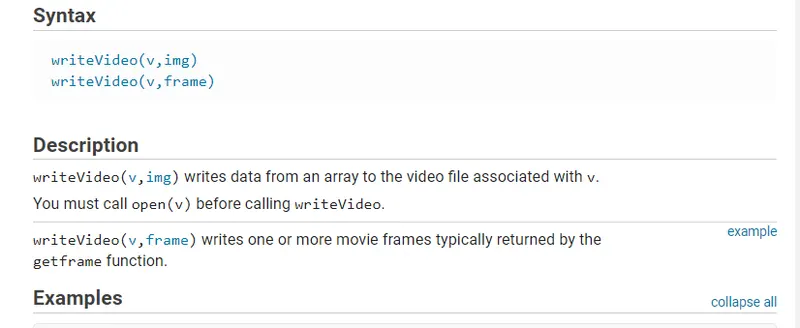
Errors while coding:-

Solution:-
I search for this in the search column in MATlab where I came to know that with writevideo I have to also write the name of the frame, So I did that and the code worked smoothly.
RESULT:
The final Animation can be seen in the given link below,
https://youtu.be/FKw3asP-Ryo