Week 3.2 - 2R Robotic Arm Challenge
OBJECTIVE:
Write a program in Matlab to simulate the forward kinematics of a 2R Robotic Arm.
THEORY:
In Forward Kinematics, we calculate the orientation of the effector with the help of joint angles. A simple 2R robotic arm is shown below:
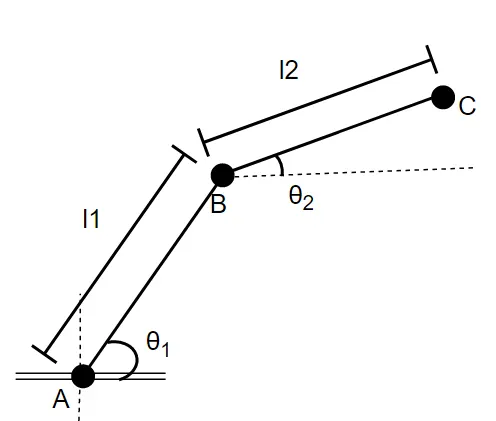
Thus, from `theta_1` and `theta_2`, we can calculate where the end of link two 'C' is located:
Position of A = origin (0,0)
Position of B = (x1,y1) = `(l1*costheta_1, l1*costheta_1)`
Position of C = (x2, y2) = `(x1 + l2*costheta_2, y1 + l1*costheta_2)`
We will write a program to compute the same.
CODE:
# Forward Kinematics of a 2R Robotic Arm

close all  # closes all plots
clear all  # clears variable from memory
clc          # clears command window

# Positional Parameters
theta = 0:5:90  # Angle made with x-axis: 0 - 90 degrees
l1 = 1;         # length of first link
l2 = 0.5;       # length of second link

frame = 1;      # to capture frame count

# iterating through theta1 and theta2 to plot all possible positions
for i = 1:length(theta)
  for j = 1:length(theta)

     theta1 = theta(i)  # current angle made by first link
     theta2 = theta(j)  # current angle made by second link

    # current position of the first link
     x1 = l1*cosd(theta1)
     y1= l1*sind(theta1)

     # current position of the second link
     x2 = x1+ l2*cosd(theta2)
     y2 = y1+ l2*sind(theta2)

     # plotting
     # Plot the first link, second link and a marker to denote the joint
     plot([0 x1],[0 y1], 'linewidth', 3 ,[x1 x2],[y1 y2], 'linewidth', 3, x1, y1, 'o', 'MarkerFaceColor','black')
     axis([0 l1+l2 0 l1+l2]) # setting axes domain to max length of arm


     filename=sprintf('Robotic_Arm/%05d.png',frame); # stores plot with frame number(frame)
     print(filename); # writes the plot image
     frame = frame+1; # incrementing frame number
  endfor
 endfor

# call ffmpeg to generate animation from all the plot images
system("ffmpeg -i Robotic_Arm/%05d.png -y Robotic Arm/animation.mpeg")
ANIMATION: