Week 2 Challenge : Surface meshing on a Pressure valve
Aim: To surface mesh the pressure Valve model using different element size 1mm, 3mm, and 5mm using ANSA software
Procedure:
- first of all import the pressure valve model in ansa software.
- our step 2 is the whole geometry clean up, the purpose of geometry clean up is some gaps are created while designing some cracks are founded in geometry so when he meshing the geometry that will be problematic so that the geometry clean up is essential.
- after opening the model then enabling the topo module and then making the geometry check and we found that many single and triple coons are there.
- we clear the all ripple coons and filled the cracks with surface coon, face cut and fill holes command
- After the geometry was clean up we separated all the ent converted into PID region because when we use any one component of the model then it will select the whole component not a single face of that component.
- then we intersect the spring and the column together and execute it.
- we found many of triple coons are regenerated and we would solve it again.
- after that, the whole geometry was ready for meshing
- then we select the mesh option.
- in that, we select the perimeter to define the value of the length and macros.
- we have defined the length and macros as 1 mm for the every component of the pressure valve model
- we select the spot meshing and meshing is done successfully.
- we have a task for 3 targets so we did it 3 times for 1mm, 3mm, and 5mm length.
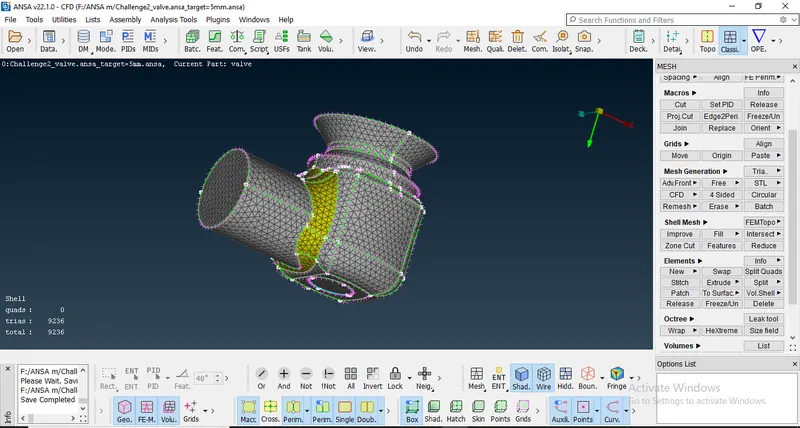
Results:
Target 1 mm length
https://drive.google.com/file/d/1vqf2tSgRlI0qq5Z3OeiHvaI9l0WVYu0n/view?usp=sharing
Target 3 mm length
https://drive.google.com/file/d/1al_gPybF76LDIESIyWXujRMoXetPaKVc/view?usp=sharing
Target 5 mm length
https://drive.google.com/file/d/1zjai4u3RES74FctPhGcsOfI70zEcV5lT/view?usp=sharing