Week 2- 2R Robotic Arm Challenge
first of all we takes a inputs
%length of both link
l1=1
l2=0.5
% define both angle
theta1 = linspace(0,90,10)
theta2 = linspace(0,90,10)
theta is provided with linspace command because we get 10 values between 0 and 90 degree to get a value much more clear
i = 1:length(theta1)
(i) will change from 1 to the length(theta) and is nothing but the 10 values between 0 to 90 degree
THETA1 = theta1(i);
j = 1:length(theta2)
THETA2 = theta2(j);
theta1 is array and THETA1 is a variable and array contain 10 values and between 0 to 90 and because of for loop each value of theta 1 will change 10 values
x0 = 0;
y0 = 0;
x1 = l1*cosd(THETA1);
y1 = l1*sind(THETA1);
x2 = x1+l2*cosd(THETA2);
y2 = y1+l2*sind(THETA2);
we have given a points equation for the calculation
% plotting
plot([x0 x1],[y0 y1],[x1 x2],[y1 y2],'linewidth',3)
axis([-0.1 1.5 0 1.5])
pause(0.1)
M(ct) = getframe(gcf);
ct = ct+1;
plot command is for ploting the graph with the starting and end co-ordinates
both axis is defined X from -0.1 to 1.5 and y is 0 to 1.5
animation is going to show correctly thats why we use pause command and ghraph is shown in frame we use getframe and ct is for increment forloop execution.
movie(M)
videofile = VideoWriter ('forword_kinematic.avi','uncompressed AVI');
open(videofile)
writeVideo(videofile,M)
close(videofile)
clear all
close all
clc

%inputs
l1 = 1
l2 = 0.5

theta1 = linspace(0,90,10);
theta2 = linspace(0,90,10);

ct=1;
for i = 1:length(theta1)
    THETA1 = theta1(i);
    for j = 1:length(theta2)
        THETA2 = theta2(j);
        x0 = 0;
        y0 = 0;

        x1 = l1*cosd(THETA1);
        y1 = l1*sind(THETA1);

        x2 = x1+l2*cosd(THETA2);
        y2 = y1+l2*sind(THETA2);

        % plotting


        plot([x0 x1],[y0 y1],[x1 x2],[y1 y2],'linewidth',3)
        axis([-0.1 1.5 0 1.5])
        pause(0.1)
        M(ct) = getframe(gcf);
        ct = ct+1;
    end
end

movie(M)
videofile = VideoWriter ('forword_kinematic.avi','uncompressed AVI');
open(videofile)
writeVideo(videofile,M)
close(videofile)
output:
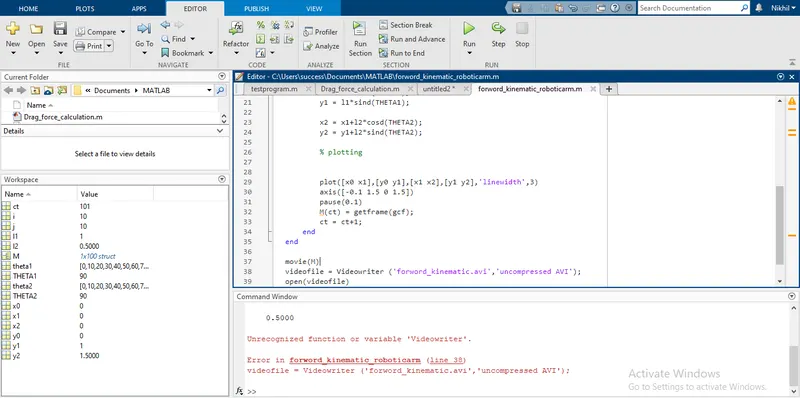
to make a video avi movie and save we use the movie command
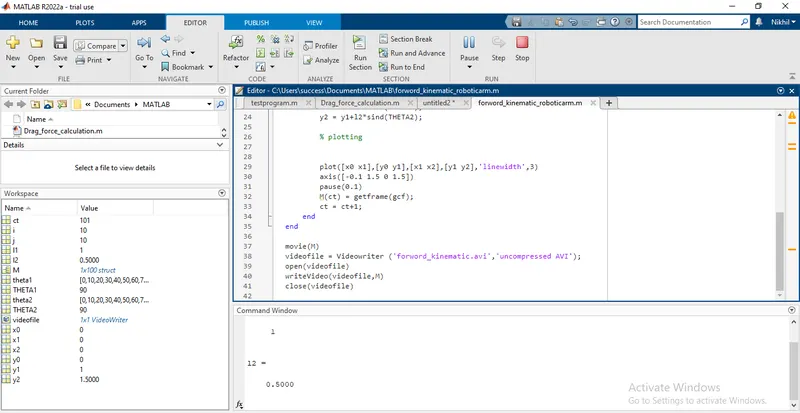
error in line 38 to create a movie