Week -2
EV BATCH-17
>>Make a Simulink model of Doorbell using solenoid
Aim:
To Make a Simulink model of Doorbell using solenoid and To Create a situation where the switch is closed for 2 seconds and then released
Blocks:
- Pulse Generator
- Voltage Source
- Solenoid
- Switch
- Electrical and Mechanical References
- Converters
- Ideal Translational Motion Sensor
- Scope
- Display
Simulation Block:
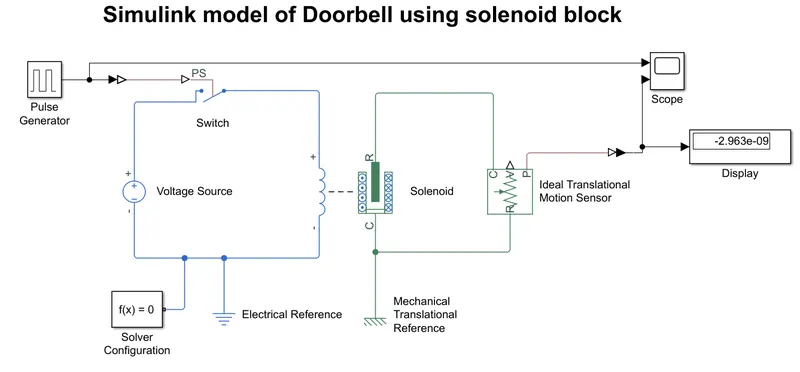
Explanation:
- When open the matlab then go to simulink and open the Blank model then go to library browser and take it out the required blocks and made connections
-
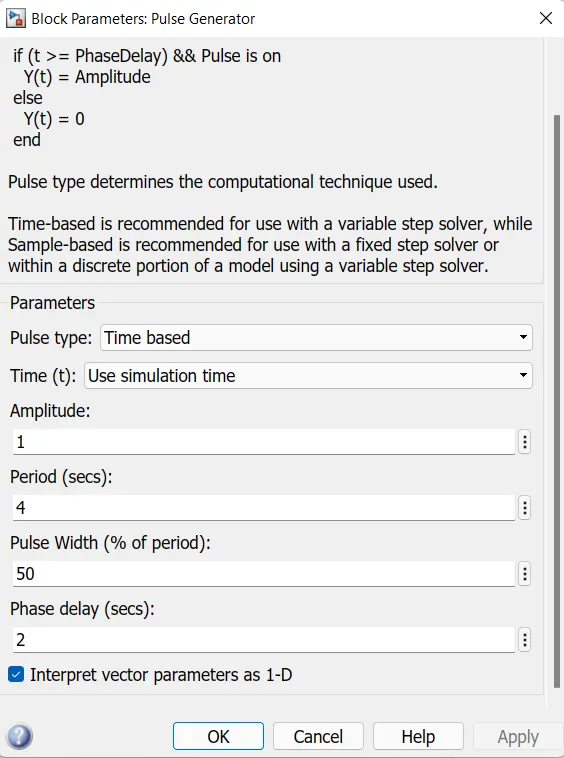
Then the pulse generator is used to give the signal input where, Amplitude=1, Period=4 sec, Pulse width= 50%, and Phase Dealy 2sec as shown in the below
-
After that, the input signal is converted into physical form with the use of "Simulink-PS Converter" and further send to the switch of the electrical circuit.
-
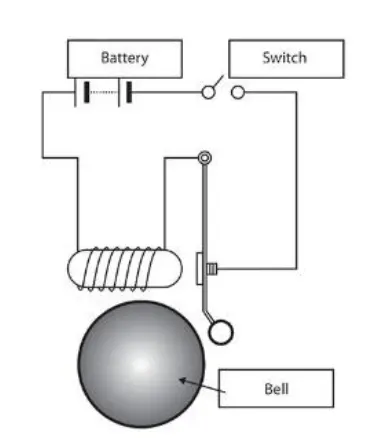
The electrical circuit consists of a solenoid, a battery, and a switch. One end of the solenoid is connected to the battery and its other end is connected to the switch. An electrical reference is provided in the electrical circuitas shown in below
-
Then the mechanical part of the solenoid is connected to an ideal translation motion sensor and mechanical translational reference.
-
The of the sensor makes a connection with the "PS-Simulink Converter" to provide the output in signal form. Further, the converter is connected with scope to display our output signal.
-
A solver configuration is connected to an electrical circuit to solve all parameters before the beginning of the simulation.
Results:
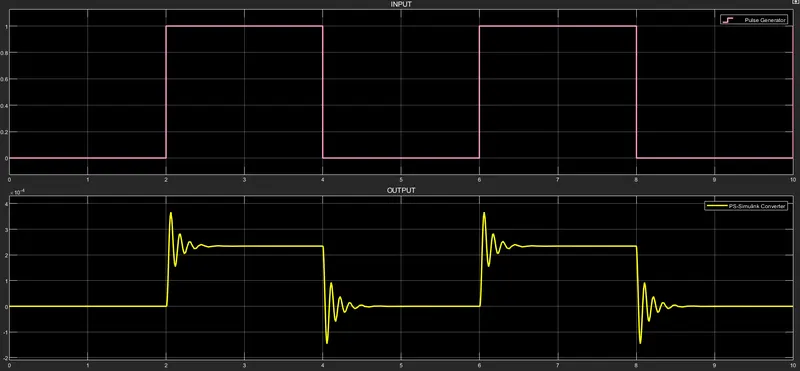
Conclusion:
Hence concluded that when the switch was ON then after 2sec it can be OFF. When the ON condition the bell start ringing and that after 2sec it will also OFF. This overall process will take place by using the solenoid
--------------------------O-----------------------
>> Use a thermistor to sense the temperature of a heater & turn on or turn off the fan
Aim:
To Use a thermistor to sense the temperature of a heater & turn on or turn off the fan by Satisfying the below conditions
Temperature source: 20 °C from 0 to 10 seconds, 27 °C from 10 to 30 seconds, 23 °C from 30 to 50 seconds
Fan conditions: ON if the temperature above 25 °C, OFF otherwise
Blocks Used:
- Repeating Sequence Stair (Producing temp Sequence Input)
- Controlled Temperature Source (Maintaining specified temp)
- Voltage Source (Giving the power supply)
- Voltage sensor (Sensing tghe voltage)
- Thermistor
- Resistor
- Switch
- Consistent Blocks
- Scope
- Display
- Solver Configuration
- Converters
Simulation Block:
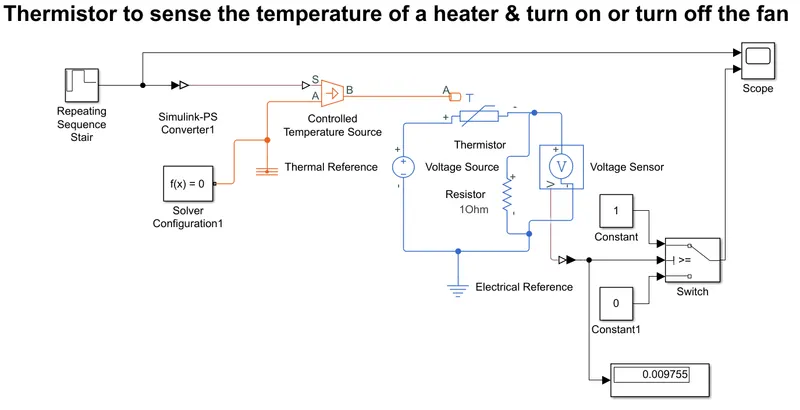
Explanation:
- When open the matlab then go to simulink and open the Blank model then go to library browser and take it out the required blocks and made connections
- Giving the 12v DC power Supply to the Circuit and the Repeating Sequence Stair give the some signal according our condition
- Then the Thermistor connection which senses the temperature of a heater and passes the signal to a switch where a threshold limit is already set that is shown in below
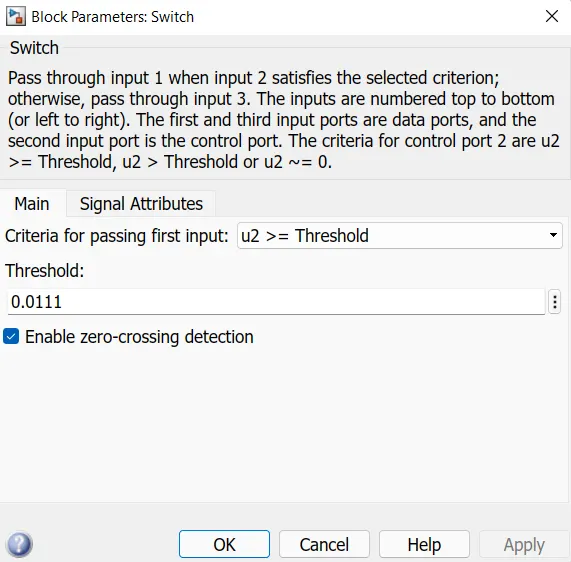
- If the temperature is above or equal to the threshold limit, then it gives "1" as output which is "Switch On". If the temperature is below the threshold limit, then it will give "0" as output which means "Switch Off". The input signal is generated with the help of a "Repeating Sequence Stair" block.it shown in below figure
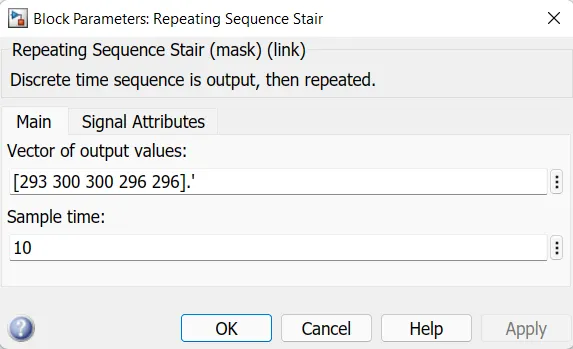
- Then this signal is created according to the conditions given in this challenge. The conditions are as following:
Temperature source Conditonis given by:
20 °C from 0 to 10 seconds is give as 293K
27 °C from 10 to 30 seconds is given as 300k
23 °C from 30 to 50 seconds is given as 296K
Fan conditions condition is given by:
ON if the temperature above 25 °C, OFF otherwise.
-
Here the temperature is converted in Kelvin from degree Celcius because the signal converter does not take °C value as input. I also have to set the signal unit as "Kelvin" in Simulink-PS Converter. The formula for conversion: 1°C= 273.15 K
- Then check parameters and conform the values and connectins then run the simulations (Stop time was 50Sec)
- Observe the results and take the graphs
Results:
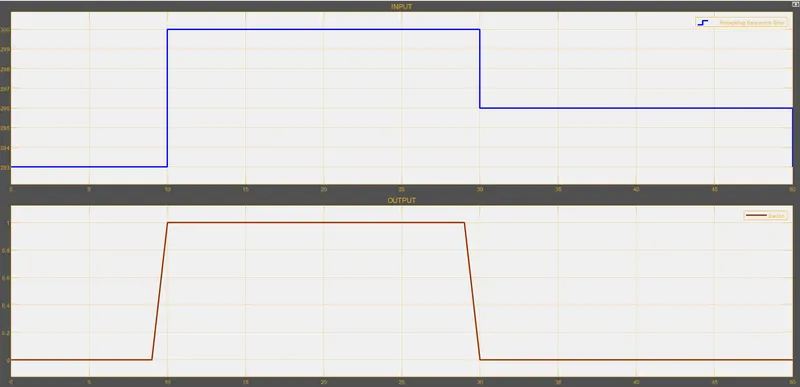
Conclusion:
Lets conclude that the fan was turns ON when the Temp was above the 25 °C and it turns OFF when temp was below the 25 °C. In the above shown results the output says that 0 means OFF condition and 1 Means ON condition