Week 2- 2R Robotic Arm Challenge
Aim :
To Write a program in Matlab to simulate the forward kinematics of a 2R Robotic Arm.
Objective :
- Write a program to simulate forward kinematics of a 2R Robotic Arm
- To create a Movie/Animation from the plots obtained from the program
Theory:
A robotic arm is a type of mechanical arm, usually programmable , with similar functions to a human arm; the arm may be the sum total of the mechanism or may be part of a more complex robot. The links of such a manipulator are connected by joints allowing either rotational motion (such as in an articulated robot) or translational (linear) displacement. The links of the manipulator can be considered to form a kinematic chain. The terminus of the kinematic chain of the manipulator is called the end effector and it is analogous to the human hamd.
In this project, we consider a 2R robotic arm. A 2R robotic arm represents a robotic arm with two rotations. i.e. it has two links which rotate or work over a two-dimensional plane with each of links having a single degree of freedom.
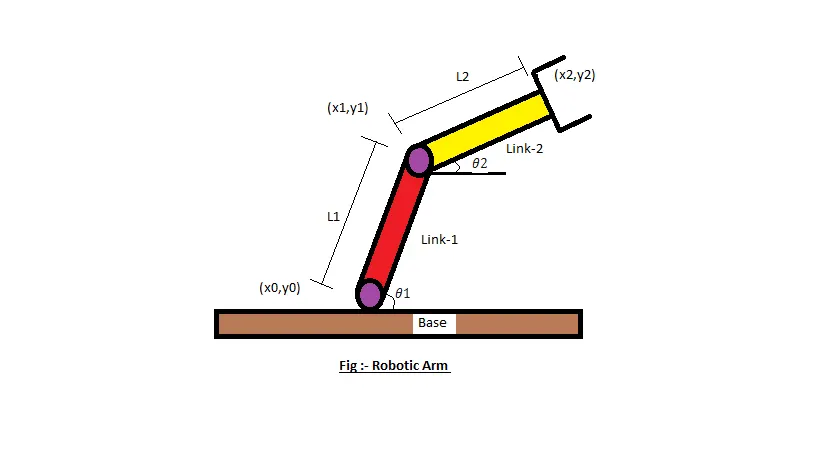
In above image of 2R robotic arm there are 4 important components,
- The Base, which is clamped to the surface and all other links are joined through hinge joint.
- Link 1 (l1) making theta_1 with horizontal.
- Link 2 (l2) making theta_2 with horizontal.
- The device attached to the manipulator which interacts with its environment to perform tasks is called the end-effector.
Code Explanation:
- Providing the input variables - l1,l2,(x_0,y_0),theta_1&theta_2
- Initializing the value ct as 1, which will be used in creating the animation later in the code
- Using two for loops iterating the values of the desired variables and calculate the coordinates of both the arm at different instances, which done with the help of the fomula mentioned in the next section.
- Plotting all the coordinate values at different instances and adjusting the axis accordingly.
- Using the pause command to make the animation appealing
- Incrementing the ct value by +1 each time it executes for loop.
- All figures are assigned to a variable M, one at a time using ct
- Ending both for loops.
- using movie commandis to combine all the figures saved in the M file to make an animation/movie
- At end saving the movie in .avi format
INPUTS :
- For our program we have assumed the length of link 1 and link 2 to 1. m and 0.5 m.
- In order to simulate the robotic arm it is necessary to vary theta_1 & theta_2 to obtain a desired animation.
- The coordinates of base is assumed to be at origin (x_0,y_0)=(0,0)
- The coordinates of end points of link 1 (l1) can be found by using trignometry as,
`x1=l1⋅cos(θ1) and y1=l1⋅sin(θ1)`
- Similarly, the coordinates of end point of link 2 (l2) can also be found from trignometry as,
`x2=x1+l2⋅cos(θ2) and y2=y1+l2⋅sin(θ2)`
MATLAB code:
clear all
close all
clc

%Inputs
l1=1;                                %length of link1,in meters
l2=0.5;                              %length of link2, in meters
theta1=linspace(0,90,12);            %angle between the base line and link1
theta2=linspace(0,90,12);            %angle between the base line and link2

%Calculations & Plots
ct=1;

for i=1:length(theta1)
    T1=theta1(i);

    for j=1:length(theta2)
        T2=theta2(j);

        %Coordinates
        x0=0;
        y0=0;

        x1=l1*cosd(T1);
        y1=l1*sind(T1);

        x2=x1+l2*cosd(T2);
        y2=y1+l2*sind(T2);

        %Plotting
        plot([x0,x1],[y0,y1] , [x1,x2],[y1,y2],'Linewidth',2)
        axis([-0.1 2 0 1.5])
        pause(0.01)
        M(ct)=getframe(gcf);
        ct=ct+1;
    end

end

movie(M)
Videofile=VideoWriter('Robotic_arm.avi','Uncompressed AVI');
open(Videofile)
writeVideo(Videofile,M)
close(Videofile)
Results:
- There was no error or problem faced while working on this exercise.
- The animation of forward kinematics of a 2R robotic arm is created and presented.