Week 2- 2R Robotic Arm Challenge
1. Aim:- To write a code in matlab to simulate the forword kinematics of 2R Robotic Arm.
2. Theory:-
Forword Kinematics,
Forword kinematics is the process of calculating the frames of robotic links, given a configuration and robot's kinematic structure as input. It is generally refers to the use of kinematics equations of a robot to compute the position of end effector from specified values for the joint parameters. The kinematic equations of the robots are used in robotics, computer games and animations.
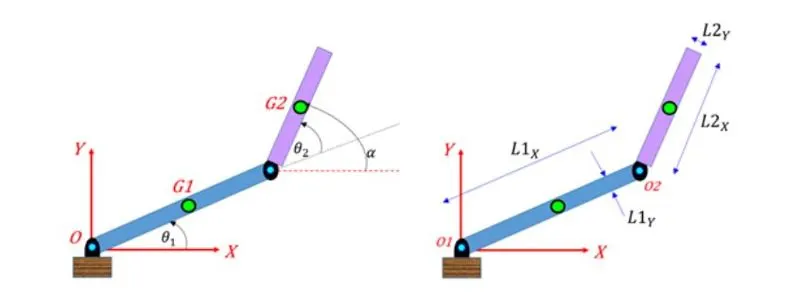
3. Objectives:-
1. To generate the code and simulate the forword kinematics of 2R Robotics arm.
2. Generate an animation file for the plot.
4. Inputs:-
1. Length of link 1(L1)
2. Length of link 2(L2)
3. Theta with respect to x-axis for link 1(theta1)
4. Theta with respect to x-axis for link 2(theta2)
5. Starting co-ordinate of link1(x0,y0)
6. Starting co-ordiante of link2/End co-ordinate of link1(x1,y1)
7. End co-ordiante of link2(x2,y2)
5. Code:-
%Generate a code to simulate the forword kinematics of 2R Robotic arm.
clear all
close all
clc
%Inputs
L1 = 2; %...............Length of first link in meters.
L2 = 0.75; %...............Length of second link in meters.
theta1 = linspace(0,90,10); %..............Angle for first link in degrees.
theta2 = linspace(0,90,10); %..............Angle for second link in degrees.
ct=1; %..............Count for each iteration.
for i=1:length(theta1)
THETA1=theta1(i);
for j=1:length(theta2)
THETA2=theta2(j);
x0=0;
y0=0; %...............Co-ordinates for first link, first end.
x1= L1*cosd(THETA1);
y1=L1*sind(THETA1); %...............Co-ordinates for first link, second end as well second link first end.
x2=x1+L2*cosd(THETA2);
y2=y1+L2*sind(THETA2); %...............Co-ordinate for second link second end.
plot([x0 x1], [y0 y1], [x1 x2], [y1 y2],'linewidth',3) %....Plotting link1 and link2 positions.
grid on %....Make grid visible.
axis(-0.1 3 0 3) %....Change axis limits.
pause(0.03)
m(ct)=getframe(gcf); %....Generating frames from getframe command
ct=ct+1;
end
end
movie(m) %....Generate a movie in matlab.
Videofile=VideoWriter('Forword_Kinematics_with_For _Loop.avi','Uncompressed AVI');
open(Videofile) %....open the videofile.
writeVideo(Videofile,m) %....Generate an vdoe by steching all the frames.
close(Videofile) %....Close the videofile.
6. Results:-