Week 2- 2R Robotic Arm Challenge
Aim
To write a code in Matlab to simulate the forward kinematics of a 2R robotic arm and to generate an animation file of the plot.
Forward Kinematics of 2R robotic arm
Forward kinematics refers to the use of kinematic equations to compute the position of end-effector of a robot using the specified values for joint parameters [1]
Here we have a robotic arm with two rotational linkages and two kinematics kinkages L1 pertaining angle θ1 to base and link L2 pertaining angle θ2 to the base.
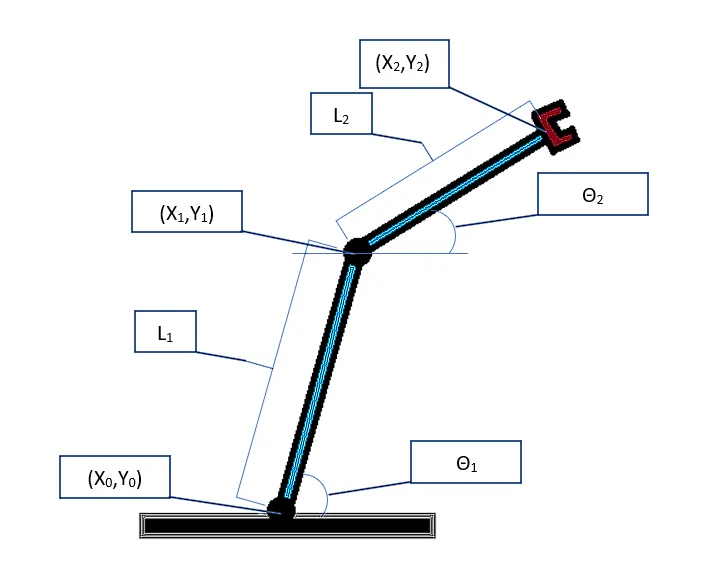
Figure 1. 2R Robotic Arm
The links have only one degree of freedom. The co-ordinates of the links and manipulator are
- At base, X0 = 0 ; Y0 = 0
- At the end of link L1, X1 = L1*Cos(θ1) ; Y1 = L1*Sin(θ1)
- At the end of link L2, X2 = X1+L2*Cos(θ2) ; Y2 = Y1+L2*Sin(θ2)
Code
Since cordinates [x2,y2] have to be calculated for every single value of theta 2, which inturn has to be varied in accordance with every single value of theta 1, a 'for' loop is employed to calculate the end-effector's position for every value of theta 1 and theta 2.
%% Forward kinematics of a robotic arm

close all
clc

%Inputs
l1=1.25; % length of link 1
l2=0.75; % length of link 2

% Angular limits for links
theta1= linspace(0,90,10); % for link 1
theta2= linspace(0,90,10); % for link 2


% Since cordinates [x2,y2] have to be calculated for every single value of theta 2, which inturn has to be varied in accordance with every single value of theta 1, a 'for' loop is employed to calculate the end-effector's position for every value of theta 1 and theta 2.

ct=1;
for i= 1:length(theta1)
    THETA1=theta1(i);
    for j= 1:length(theta2)
        THETA2= theta2(j);

        x0=0;
        y0=0;

        x1= l1*cosd(THETA1);
        y1= l1*sind(THETA1);
        x2= x1+ l2*cosd(THETA2);
        y2= y1+ l2*sind(THETA2);


        % Plotting the values
        plot([x0 x1],[y0 y1],[x1 x2],[y1 y2],'linewidth',3);
        grid on
        axis([-0.1 2.5 0 2.5])
        title('Forward Kinematics of 2R Robotic Arm')
        legend('Link 1','Link 2')
        xlabel('X Axis')
        ylabel('Y Axis')
        pause(0.05);
        M(ct)= getframe(gcf);  % This allows to capture every single figure for end-effector's position in a variable. For every iteration of i,j substantially the counter (ct) value is incremented, i.e. figure1 is saved then figure2, later figure3 and so on for the length of the loop
        ct=ct+1;
    end
end
movie(M)
videofile = VideoWriter('forward_kinematics_of_robotic_arm.avi','Uncompressed AVI');
open(videofile)
writeVideo(videofile,M)
close(videofile)
The plots are obtained using the counter variable and are plotted using plot(x,y) command. The generated plots are then stitched to form an animation video file of .avi format.
Result - Video file Link
https://youtu.be/HkbQCt0ay-U
References