Week 2- 2R Robotic Arm Challenge
objective To write program on the Robotic Arm.
%simulation of Forward kinematics of a 2R Robotic Arm.
clc,clear,close all
% theta1 is in degree.
% theta 1 is the angle of link 1 with respect to x axis
Theta1=linspace(0,90,10);
%theta 2 is in degree.
% theta 2 is the angle of link 2 with respect to x axis
Theta2=linspace(0,90,10);
%length of first Arm=L1.
L1=1;
%length of second Arm=L2.
L2=0.5;
%lets fixed the one side of first rod at origin.
x0=0;
y0=0;
% ct is counter variable it helps in proper indexing in which the captured frame will be indexed sequentially
% it follows the proper order when comes to movie creation.let initialize it with 1.
ct=1;

%for every value of Arm1 movement,Arm2 will rotate from 0 to 90 degree for this to be happen we run nested for loop.
for i=1:length(Theta1)
    % here we first run the value of theta1 from 0 to 90 degree in 10 equal parts.
    % for every parts we asing the value of theta1 to find the x1 y1 value
    % which is the other end of Arm1.

    x1=L1*cosd(Theta1(i));%for i=1 Theta1=0;i=2 THeta1=10 and so on ...
    y1=L1*sind(Theta1(i));% same here we find y1 for every value of theta1
    % this is second for loop which gives position of ARm2 for each value of Arm1
    for j=1:length(Theta2)
        x2=x1+L2*cosd(Theta2(j));%for i=1 Theta2=0;i=2 THeta2=10 and so on ...
        y2=y1+L2*sind(Theta2(j));% same here we find y2 for every value of theta1

        plot([x0 x1],[y0 y1],[x1 x2],[y1 y2],'linewidth',2);
        %here we plot the Arm1 and Arm2 by providing the cordinates of end points of both the links.
        %first for Arm1 whose value varies from cordinate(x0,y0) to(x1,y1).
        %than for Arm2 whose value varies from cordinate(x1,y1) to(x2,y2).
        axis([-0.1 1.5 0 1.5]);
        % here we are defining the axis so that the graph will not move
        % while running the program by this we fix the maximun and minimum
        % value of x and y coordinate in graph.
        pause(0.03);% this command is use to hold the graph for a while so that each postion can be visible comfortably

        %gcf refers to give the current figure to capture it as a frame for movie creation.
        %getframe captures the figure as a frame for movie creation.
        %M(ct) is enable to make an array from every frame it captured and counter variacle(ct) give proper indexing to that array.
        M(ct)=getframe(gcf);
        %here counter varable is increased by value unit value so that it
        %arrange the frame value properly
        ct=ct+1;
    end
end
%movie(M) it playes the movie frames in array M ones
movie(M)
%VideoWriter is the command it use to make the movie file with the specified name and specified format.
%its general syntax is v = VideoWriter( filename , profile ) .
% the above generated file can be names as videofile.
videofile=VideoWriter('Forward_kinematics.avi','Uncompressed avi');%videowriter command is use to create video file of specified name and format.
open(videofile)%it is used to open the specified file here videofile
writeVideo(videofile,M)%writevideo command is use to create videofile with the frame captured in 'M' array
close(videofile)%close command is used to close the specified file
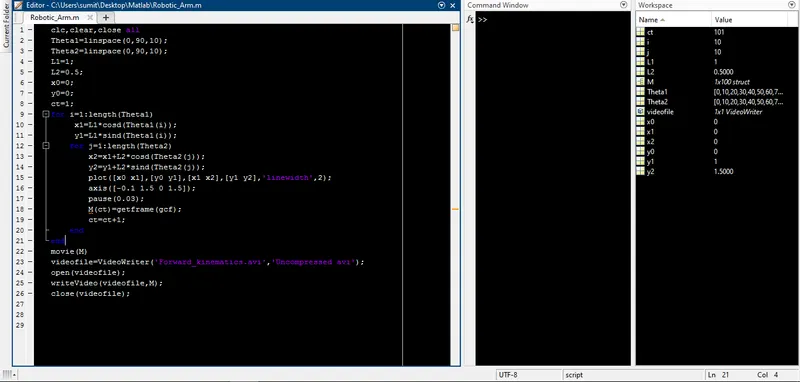
above provide the detailed step by step explanation of the code and the code written in matlab.
below provided the link of output of the program in google drive
https://drive.google.com/file/d/1MBvAg4kkdNPvgJCSB86ytRdJ6u6Nn0ZX/view?usp=sharing