Week 2- 2R Robotic Arm Challenge
Aim:
1. To simulate the manipulator's workspace attached to the robotic arm.
2. To create an animation of the simulation.
The robotic arm consists of two links.
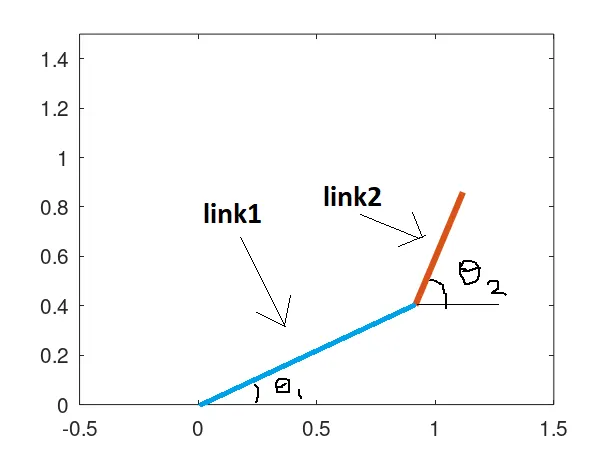
One end of the first link is fixed to the base at (0,0) and rotates about the fixed point. Depending upon the value of theta1(angle made by the link1 with the horizontal axis), the other end moves accordingly. The second end of the first link is attached to link2. Similarly, the second link moves depending upon the theta2(angle made by the link2 with horizontal axis).
The workspace refers to all the possible locations a manipulator can reach up to and plays a significant role in the kinematics of robotics.
Matlab code:
clear all
close all
clc
% finding the possible locations/workspace that the robotic arm can reach
%inputs
l1=1; %length of link 1
l2=0.5; %length of link 2
theta1=linspace(0,90,20); %the angle made by the link 1 with horizontal axis
theta2=linspace(0,90,20); %the angle made by the link 2 with the horizontal axis
x0=0; % x and y coordinates of the starting point of link1
y0=0;
ct=1;
for i=1:length(theta1)
x1=l1*cosd(theta1(i));
y1=l1*sind(theta1(i));
for j = 1:length(theta2)
x2=x1+l2*cosd(theta2(j)); % x and y coord of the ending point of link2
y2=y1+l2*sind(theta2(j));
plot([x0 x1],[y0 y1],[x1 x2],[y1 y2],'linewidth',3);
axis([-0.5 1.5 0 1.5]);
pause(0.1);
M(ct)=getframe(gcf); % capturing the current figure plot in M array
ct=ct+1;
end
end
movie(M) % to play the movie
videofile=VideoWriter('forward_kinematics.avi','Uncompressed AVI'); %write video data to an AVI file that uses Motion JPEG compression.
open(videofile);
writeVideo(videofile,M); %Write video data to file
close(videofile);
Explanation of the code:
1. First the lengths of the links,theta1, and theta2 are mentioned. theta1 and theta2 are arrays that consist of various angles made by the links. linspace cmd is used to generate the array.
2. Then the locations of links are calculated using