Week 2- 2R Robotic Arm Challenge
1.AIM :
To simulate the forward kinematics of 2R Robotic Arm in Matlab.
2.GOVERNING EQUATION :
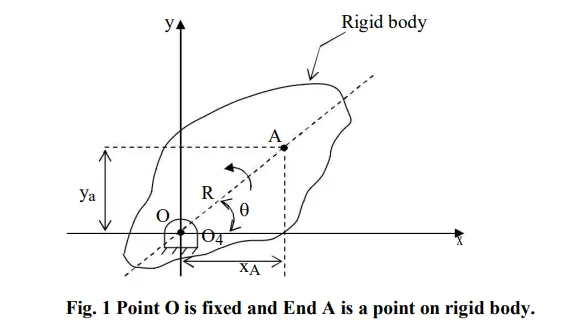
Consider rigid link rotating about a fixed centre O, as shown in fig. The distance between O and A is R, and OA makes an angle 'θ' with x-axis.
XA = R cosθ
YA = R sinθ
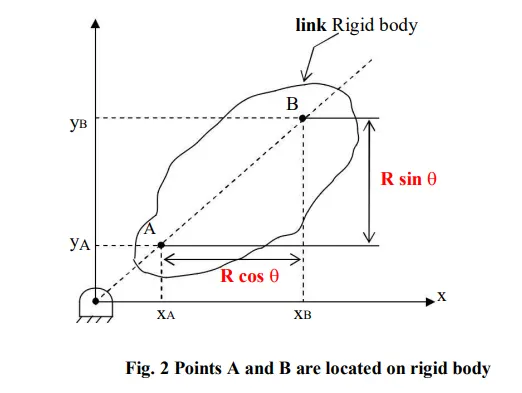
XB = XA + R cosθ
YB = YA + R sinθ
3.OBJECTIVE OF THE PROJECT :
1. Write a program to simulate forward kinematics of a 2R Robotic Arm
2. To create an Animation of the plots obtained from the program
4.BODY OF THE CONTENT :
Kinematics studies the motion of bodies without consideration of the forces or moments that cause the motion. Robot kinematics refers the analytical study of the motion of a robot manipulator. Formulating the suitable kinematics models for a robot mechanism is very crucial for analyzing the behaviour of industrial manipulators. A manipulator is composed of serial links which are affixed to each other revolute or prismatic joints from the base frame through the end-effector. Calculating the position and orientation of the end-effector in terms of the joint variables is called as forward kinematics. In order to have forward kinematics for a robot mechanism in a systematic manner, one should use a suitable kinematics model.
A robotic arm is a type of mechanical arm, usually programmable, with similar functions to a human arm, the arm may be the sum total of the mechanism or may be part of a more complex robot. The links of such a manipulator are connected by joints allowing either rotational motion (such as in an articulated robot) or translational (linear) displacement.
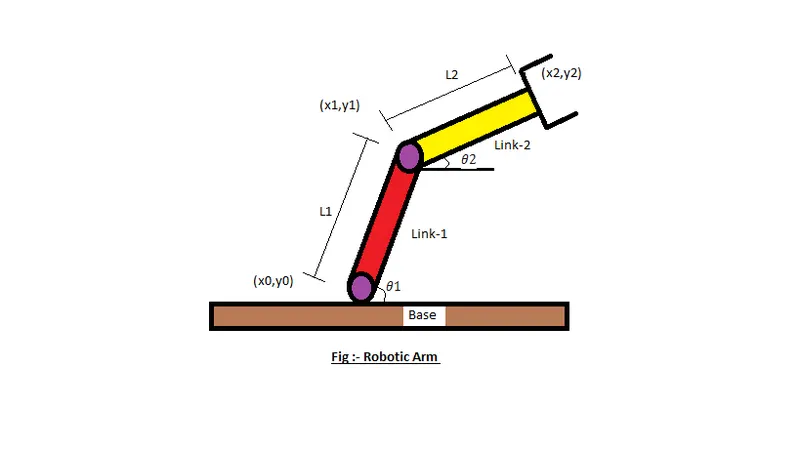
Consider a 2R robotic arm. It has two links which rotate or work over a two-dimensional plane with each of links having a single degree of freedom.
CODE :
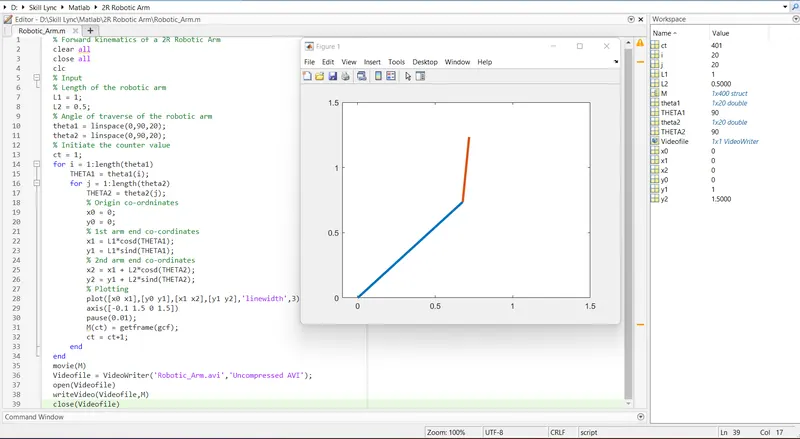
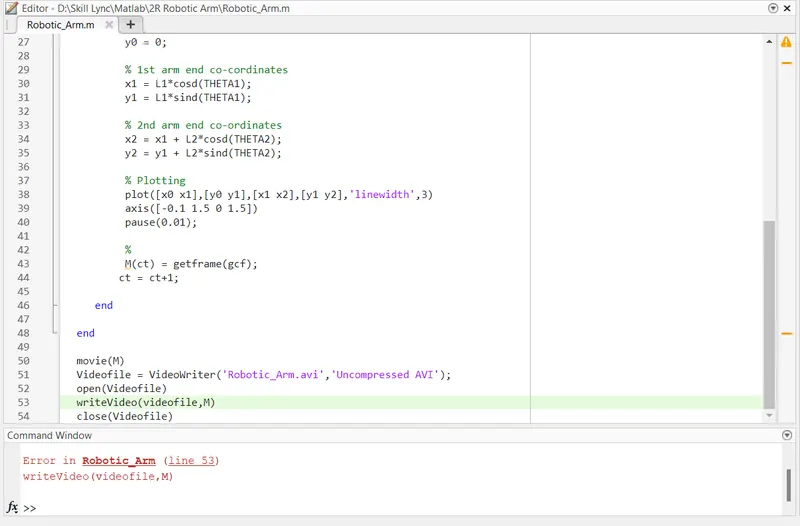
- for loop, in general refers to anything whose start and end points are connected. That is, once you begin from the start point and proceed further, you will reach the finish line just to find that it once again guides you to the same point where you started. Proceeding further means that you are repeating your same action again & again. In here the value of 'i' is going to change from 1 to length of 'theta1', and value of 'j' is going to change from 1 to length of 'theta2'. As the values of 'i' & 'j' changes theta1 and theta2 are taken from original arrays and are assigned to variables 'THETAT1' and 'THETA2' which contains only one value and not an array, loop counter variables are used to access particular value. For each value of theta1 i.e each position of link 1, link 2 can take multiple positions depends on theta2.
- plot command is used to plot the graphs of the each coordinates.
- axis command is used for fixing axes, x- limits and y-limits.
- pause command is used to slow down the output.
- getframe command is used to get individual frame and stored in variable M.
- movie command is used to create a movie of the individual frame.
- VideoWriter command is used to create a Vídeo file of the movie created and save in the PC.