Week 2- 2R Robotic Arm Challenge
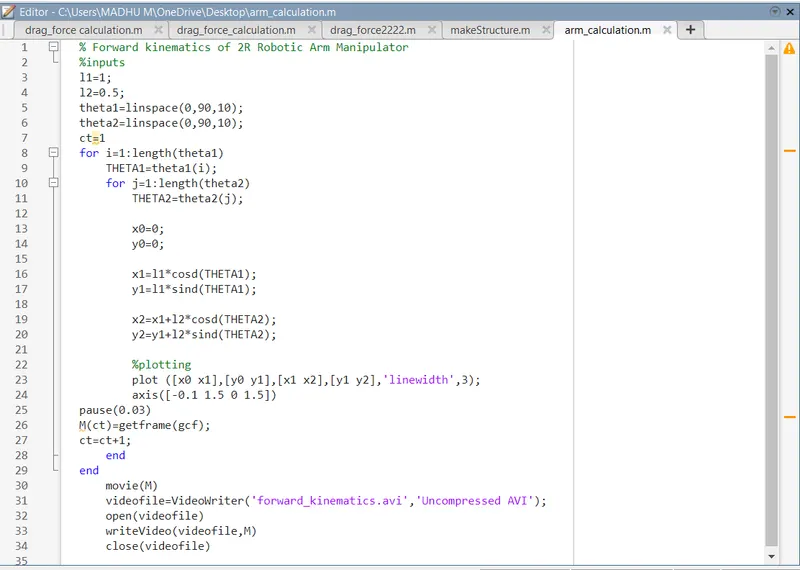
Program in Matlab to simulate the forward kinematics of a 2R Robotic Arm.
FORWARD KINEMATIC AVI FILE LINK:
Explanation of the code:
% inputs
l1 = 1;
l2 = 0.5;
theta1 = linspace(0,90,10);
theta2 = linspace(0,90,10);
Here,
- THETA1 and THETA2 is the variable which contains 1 value. Thete1 and theta2 is the value from 0 to 90 degrees. Using for loop command to repeat the value of the theta1 and theta2 which has 40 values.
x1 = l1*cosd (THETA1);
y1 = l1*sind (THETA1);
x2 = x1 + l2* cosd(THETA2);
y2 = y1 + l2* sind(THETA2);
Here,
X1,y1 and x2,y2 are the starting point coordinates and endpoint coordinates of link1 respectively.
%plotting
plot ([x0 x1] ,[y0 y1] ,[x1 x2],[y1 y2],'linewidth',3]
axis([-0.1 1.5 0 1.5])
pause(0.03)
M(ct) = getframe(gcf);
ct = ct+1;
end
end
- Using plot command to plot the graph with the given statement.
- Using axis command to set the x and y limits
- Using pause command to set an interval at each position
- Using an array M and adding the getframe (gcf) function to create an animation of all the parts.
Converting the animation plot of the above code:
Movie(M)
videofile = videowriter ('forward_kinematics.avi' , 'uncompressed AVI');
open(videofile)
writevideo(videofile,M)
close(videofile)
Here,
- At the end of for loop matlab is going to make a movie with all the frames with movie (M) command
- Creating the video with the command videofile
- Opening the video file with open(videofile)command and then write the captured frame with the writevideo command and then close the video by close (videofile)command.