Week 2- 2R Robotic Arm Challenge
AIM:
- A program in Matlab to simulate the forward kinematics of a 2R Robotic Arm
CONCEPT:
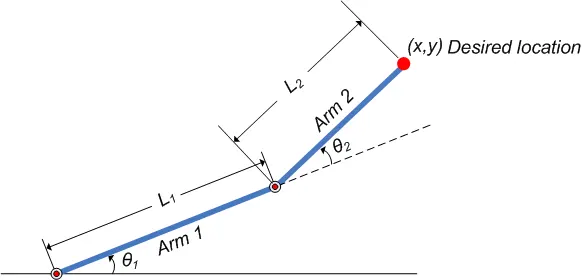
- A Robot arm is a known as, manipulator. In 2D arm structure it has two links and 2 joints, One is fixed on the base and the other one is moveable.
- In basic, a robot arm consists of the parts: base, joints, links, and a end manupulator.
- End part of the link is made for different purposes, like grabbing the parts, welding structure, machining tool and etc. . .
- This arm is exactly work like the human arm, it can work on the different angle with respect to its working range area.
OBJECTIVE:
- The Main objective of the program is to create a program of define the work space of an 2D Robotic arm using forward kinematics, with the help of MATLAB.
BODY OF THE CONTENT:
- SOFTWARE USED – MATLAB
{MAIN CODING OF THE PROGRAM}
% kinematics of 2D robotic arm program

clear all
close all
clc

% Input variables
L1 = 1.2;
L2 = 0.7;

theta1 = linspace(0,90,10);
theta2 = linspace(0,90,10);

ct = 1;
for i = 1:length(theta1)
    THETA1 = theta1(i);
    for j = 1:length(theta2)
        THETA2 = theta2(j);
        x0 = 0;
        y0 = 0;

        x1 = L1*cosd(THETA1);
        y1 = L1*sind(THETA1);

        x2 = x1+L2*cosd(THETA2);
        y2 = y1+L2*sind(THETA2);

        % plotings
        plot([x0 x1],[y0 y1],[x1 x2],[y1 y2],'linewidth',3);
        axis([-0.1 2 0 2]);
        title('Kinematics of 2D Robotic Arm manupulator');
        m(ct)=getframe(gcf);
        ct = ct+1;
        pause(0.03);
    end
end

movie(m)
videofile = VideoWriter('forward_kinamatics.avi','Uncompressed AVI');
open(videofile)
writeVideo(videofile,m)
close(videofile)
CODING EXPLANATION:
- First few line are the 'Basic commands' of the coding.
- clear all command is used to clear all the variables from the current workspace.
- close all command is used to Close all figures whose handles are visible
- Defining the user-defined inputs.
- l1 & l2 are Length of Link 1 and length of Link 2 respectively.
- linspace - The linspace function generates linearly spaced vectors.
- Using For Loop funtion to muliple values of the arrays.
- Assign theta1 and theta2 values in an intervel of 10 using the linspace command.
- The coordinates of x0 and y0 is 0 and the other x1,x2 y1,y2 are assigned as per the basic tricnometry
- perform the loop variabes properly inside the for loop command.
- Using the Plot command to create a plotting 'Graph of 2D Robotic arm' .
- In this plotting we have two links so in this program 2 looping functions are inside there.
- linewidth command is used to given the width of the line which is going to be plotted on a graph.
- title is for giving title to the graph.
- axis is for assigning axis to the plot.
- pause command stops MATLAB execution temporarily.
- movie command used to make a movie.
- .avi is extension in which the video file gets saved.
- close command closes the video file in the end.
OUTPUT RESULTS:
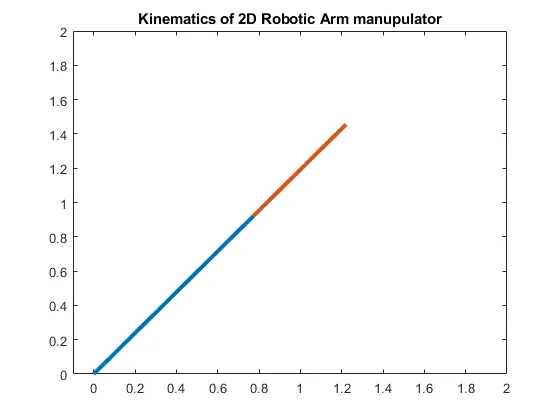
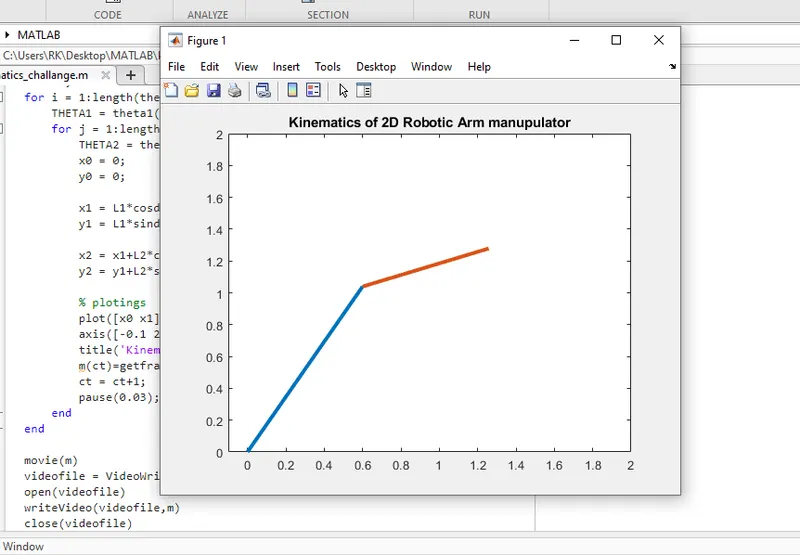
VIDEO ANIMATION FILE LINK: (Uploaded to the Youtube link below)
ERRORS FACED WHILE PROGRAMING:
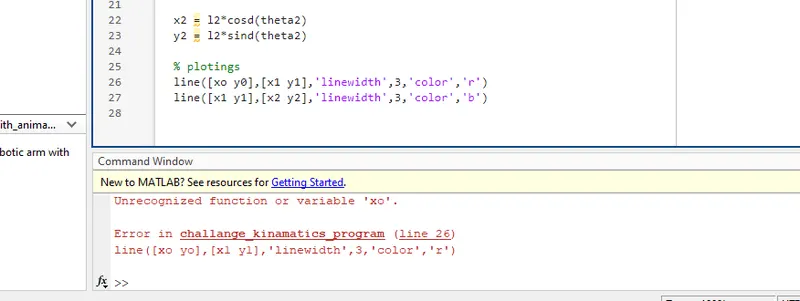
- This is an error when i typing the command i made a typo error, i did not notice it untill the command window thrown an error when try to execute the program
- And then i realize i put an 'O' instead of putting '0' there after that replacing it the error resolved
CONCLUSION:
- As a conclusion of this program taught me a lot of basic ideas about how the robotics arms are working and how they are made up of.
- In the programing point i learnt a bit more clear about the FOR LOOP function and how it works with this animation part, that was really awesome.
- Eventhough i am new to programing the tutorial video was very clear and helped me a lot to understand this functioning.