Project 1 - Parsing NASA thermodynamic data
AIM:
- Write a program to Parsing NASA thermodynamic data file using Matlab.
CHALLANGE EXPECTAIONS:
- Write a function that extracts the 14 co-efficients and calculates the enthalpy, entropy and specific heats for all the species in the 'NASA Thermodynamic Data file'.
- Calculate the molecular weight of each species and display it in the command window.
- Plot the Cp, Enthalpy and Entropy for the local temperature range (low temperature : high temperature) specific for each species.
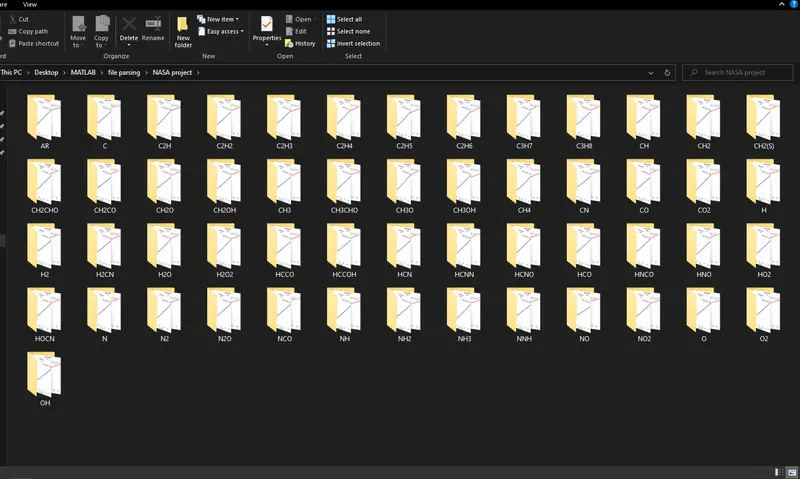
- Save the plots as images with appropriate names and dump them in separate folders for each species with suitable name. All these should be generated automatically.
FORMULAE USED:
{formulae of Specific heat, Enthalpy, Entropy calculation}
- Cp - Specific Heat
- H - Entropy
- S - Enthalpy
- T - Temperature
- R - Universal Gas constant
- a - Coeffecients of Different species
BODY OF THE CONTENT:
{SOFTWARE USED - MATLAB}
PROGRAM OF FILE PARSING
close all
clear all
clc

% Reading the 'THERMODYNAMIC NASA' file
% Using fopen to read the file
f = fopen('THERMO.dat','r')

% Skiping the first 5 lines using for loop
for o = 1:5

    fgetl(f);

end

% Parsing of all the species from the file
for i = 1:53 % To parse every species block one by one upto 53 species, which is present incide the data file.

% Using fgetl to access the first line of the first species 'O'
a = fgetl(f);

% Spliting the string 'a'
b = strsplit(a, ' ');

species_name = b{1};

% Defining the length of 'b' to variable 'z', to specify the position of low, high, middle temperature
z = length(b);

% Extracting the local temperature
low_temp = str2double(b{z-3});
high_temp = str2double(b{z-2});
mid_temp = str2double(b{z-1});

% Extracting the co_efficients
% Line 1
co_line1 = fgetl(f);

% Finding the positions of E in 'Line 1'
pos_e1 = strfind(co_line1,'E'); % Seperating the first coefficient values using 'E'

% All coefficients of Line 1
a1 = str2double(co_line1(1:pos_e1(1)+3));
a2 = str2double(co_line1(pos_e1(1)+4:pos_e1(2)+3));
a3 = str2double(co_line1(pos_e1(2)+4:pos_e1(3)+3));
a4 = str2double(co_line1(pos_e1(3)+4:pos_e1(4)+3));
a5 = str2double(co_line1(pos_e1(4)+4:pos_e1(5)+3));

% Line 2
co_line2 = fgetl(f);

% Finding the positions of E in 'Line 2'
pos_e2 = strfind(co_line2,'E');

% All coefficients of Line 2
a6 =  str2double(co_line2(1:pos_e2(1)+3));
a7 =  str2double(co_line2(pos_e2(1)+4:pos_e2(2)+3));
a8 =  str2double(co_line2(pos_e2(2)+4:pos_e2(3)+3));
a9 =  str2double(co_line2(pos_e2(3)+4:pos_e2(4)+3));
a10 =  str2double(co_line2(pos_e2(4)+4:pos_e2(5)+3));

% Line 3
co_line3 = fgetl(f);

% Finding the positions of E in 'Line 3'
pos_e3 = strfind(co_line2,'E');

% All coefficients of Line 3
a11 =  str2double(co_line3(1:pos_e3(1)+3));
a12 =  str2double(co_line3(pos_e3(1)+4:pos_e3(2)+3));
a13 =  str2double(co_line3(pos_e3(2)+4:pos_e3(3)+3));
a14 =  str2double(co_line3(pos_e3(3)+4:pos_e3(4)+3));

% Creating the folder automatically to save the Species Files
mkdir(['C:UsersRKDesktopMATLABfile parsingNASA project',species_name]);

% Universal Gas constant(R)
R = 8.3144598;

% Calculation of Cp, H, S (Specific Heat, Enthalpy, Entropy)
% a1-a7 (high temperature coeffecients), a8-a14 (low temperature coeffecients)
T = linspace(low_temp,high_temp,1000);

for k = 1:length(T)

    if T(k)>mid_temp

       % High temperature coeffecients
       Cp(k) = (a1 + a2*T(k) + a3*T(k)^2 + a4*T(k)^3 + a5*T(k)^4)*R;
       H(k) = (a1 + (a2*T(k))/2 + (a3*T(k)^2)/3 + (a4*T(k)^3)/4 + (a5*T(k)^4)/5 + a6/T(k))*R*T(k);
       S(k) = (a1*log(T(k)) + a2*T(k) + (a3*T(k)^2)/2 + (a4*T(k)^3)/3 + (a5*T(k)^4)/4 + a7)*R;

    else

       % Low temperature coeffecient
       Cp(k) = (a8 + a9*T(k) + a10*T(k)^2 + a11*T(k)^3 + a12*T(k)^4)*R;
       H(k) = (a8 + (a9*T(k))/2 + (a10*T(k)^2)/3 + (a11*T(k)^3)/4 + (a12*T(k)^4)/5 + a13/T(k))*R*T(k);
       S(k) = (a8*log(T(k)) + a9*T(k) + (a10*T(k)^2)/2 + (a11*T(k)^3)/3 + (a12*T(k)^4)/4 + a14)*R;
    end

end

% Changing the directory and saving the file
cd(['C:UsersRKDesktopMATLABfile parsingNASA project',species_name]);

% Plotings

figure(1);
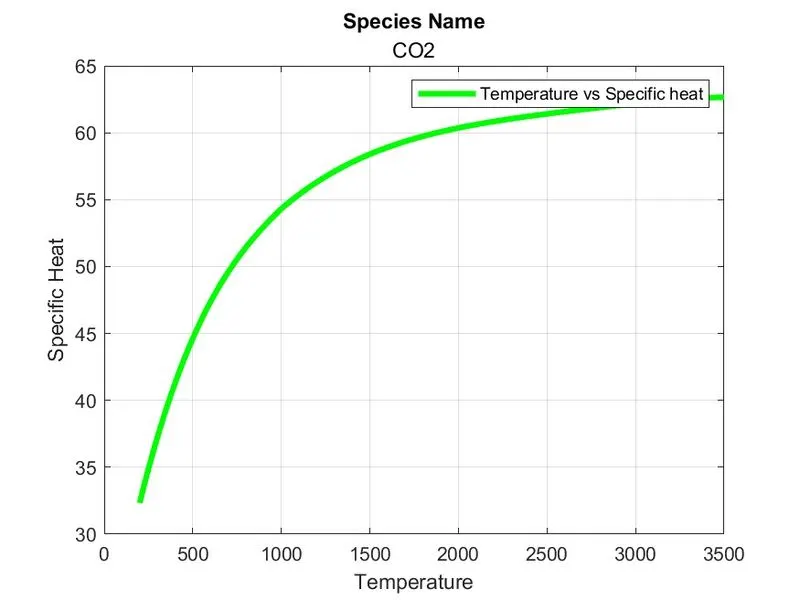
plot(T, Cp,'LineWidth',3,'Color','g');
xlabel('Temperature');
ylabel('Specific Heat');
title('Species Name',species_name);
legend('Temperature vs Specific heat');
grid on;
saveas(1, 'Specific heat', 'jpg');

figure(2);
plot(T, H,'LineWidth',3,'Color','b');
xlabel('Temperature');
ylabel('Enthalpy');
legend('Temperature vs Enthalpy');
title('Species Name',species_name);
grid on;
saveas(2, 'Enthalpy', 'jpg');

figure(3);
plot(T, S,'LineWidth',3,'Color','r');
xlabel('Temperature');
ylabel('Entropy');
legend('Temperature vs Entropy');
title('Species Name',species_name);
grid on;
saveas(3, 'Entropy', 'jpg');

% Calculating the molecular weight of each species
elements = ['H','C','N','O','A'];
atomic_wt = [1,12,14,16,40];
molecular_wt = 0;

for l = 1:length(species_name); % This loop makes sure that value of i is exactly the number of elements in the species. If it is O, then i is 1 and if it is CH2CHO i is 53
    for m = 1:length(elements); % This loop makes sure that value of j is according to the placement of the elements in the elemants array
        if strcmpi(species_name(l),elements(m)); % This line compare the values of i value of i value for species with j value and runs only if the condition satisfies
            molecular_wt = molecular_wt + atomic_wt(m);
            position = m; % Storing j value in another variable
        end
    end
    p = str2double(species_name(l)); % Converting the string to number
    if p>1
        molecular_wt = molecular_wt + atomic_wt(position)*(p-1); % In order to get the right atomic weight for a species, (f-1) is done, Error correction.
    end

end

sprintf('Molecular weight of %s is %d', species_name, molecular_wt)

end

fclose(f)
EXPLANATION OF CODE:
- In this program i am pharsing the data of 'THERMODYNAMIC NASA' file.
- close all, clear all, clc are the basic commands of the program.
- close all - Close all figures whose handles are visible.
- clear all - To clear all the variables from the current workspace.
- clc - Clear all the texts from the command window.
- fopen - This command used to open up a purticular data file and also we can 'read' and 'write' that data with help of this command.
- In the data file we do not need the first five line which global temperature and other stuffs, so i used a 'for loop' to skip the first five lines of the thermal data.
- fgetl - This command is used to take an entire line from a data file.
- Here i am using the 'for loop' to parse every species block one by one upto 53 species, which is present incide the data file.
- strsplit - This command used to split up a string
- Using strsplit the first line of the Oxygen split into several parts
- str2double - This command used to convert the string into numbers
- Extracting every '14 coeffecients' inside the first block with the name of a1-a14.
- Defining the Universal Gas constant(R).
- After that I am using another 'for loop' to find out the Cp(Specific heat), S(Enthalpy), H(Entropy) Values.
- mkdir - To make new directory folders for every species and saving the plot diagrams inside individual the folders
- cd - To change the file directory to the next folder to save the next species plots
- title - For giving title to the graph
- Linewidth - The line width command is given to the width of the line which is going to be plotted on a graph
- plot - This command is used to Plot Graph
- legend - It is used for indication of the line
- saveas - To save the generated plots to the corresponding folders.
- sprintf - To prints the molecular weights of the species in the command window.
- fclose - To close the current file.
OUTPUTS OF THE PROGRAM:
{Auto saved plots Screenshot}
Plots for o2:
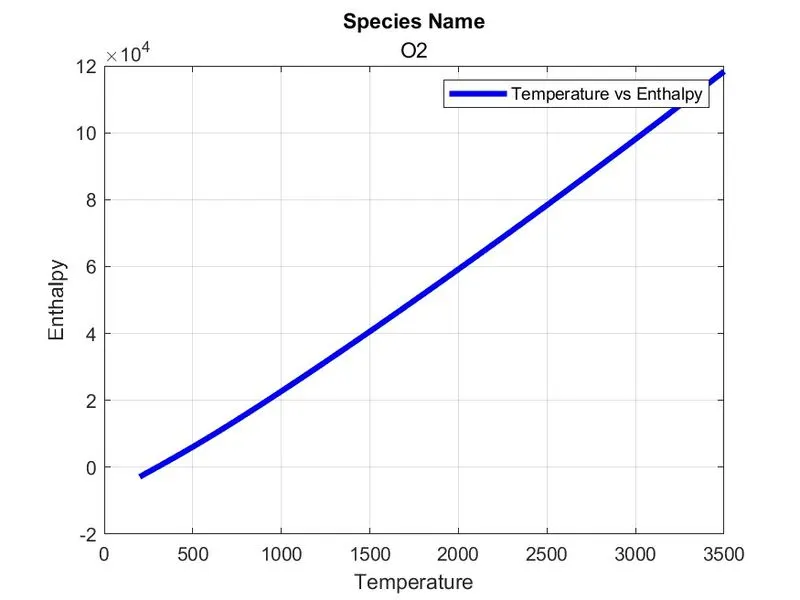
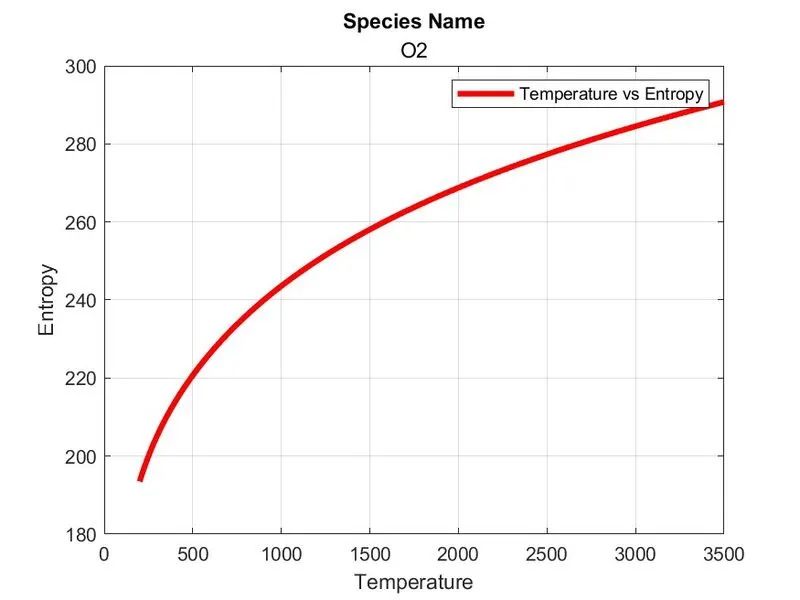
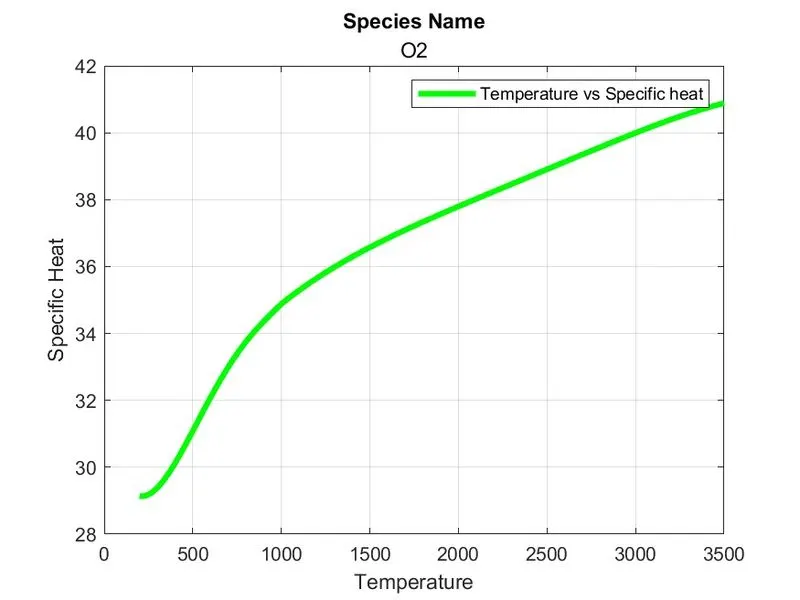
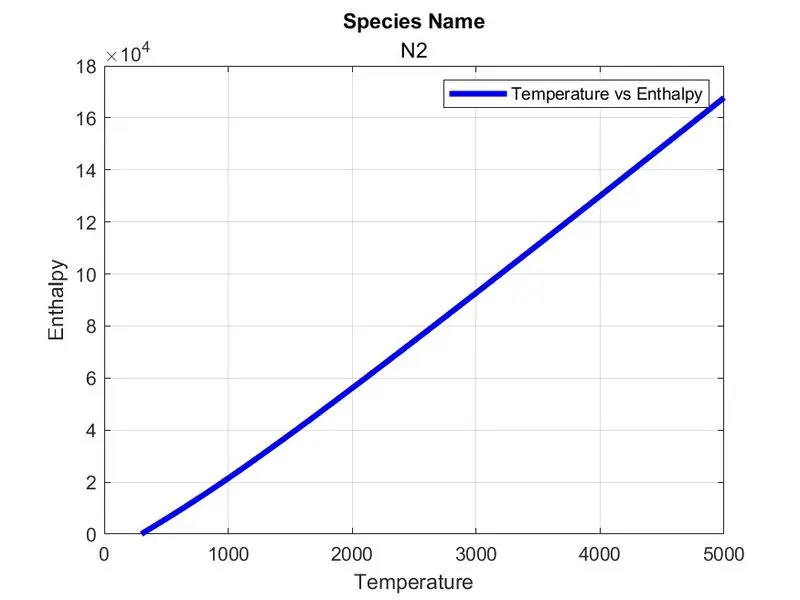
Plots of N2:
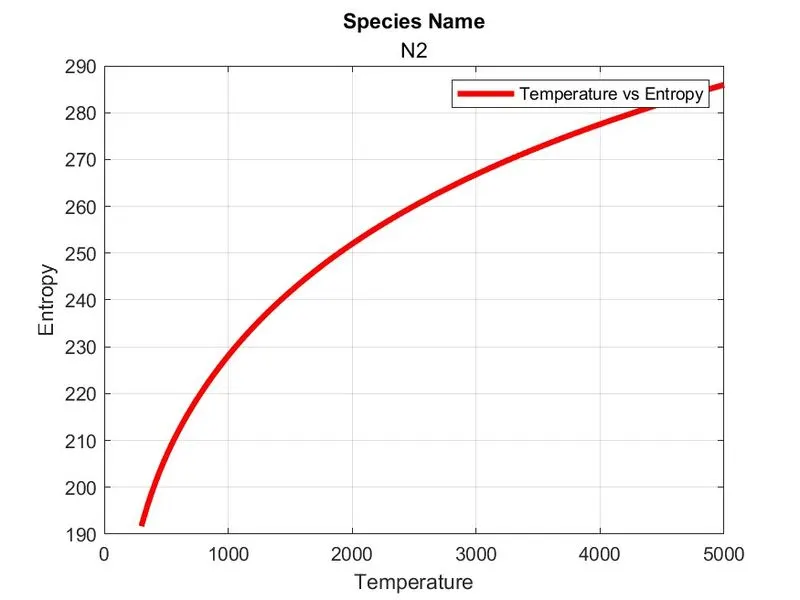
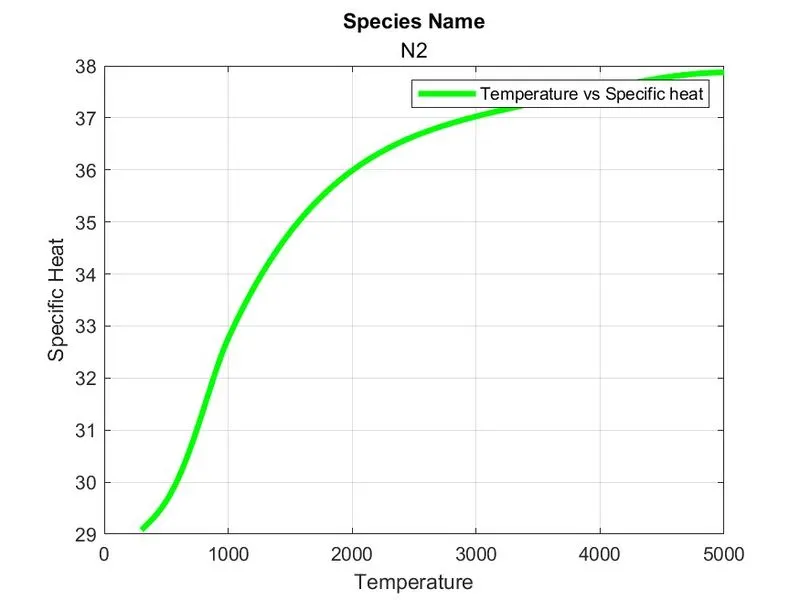
Plots of Co2:
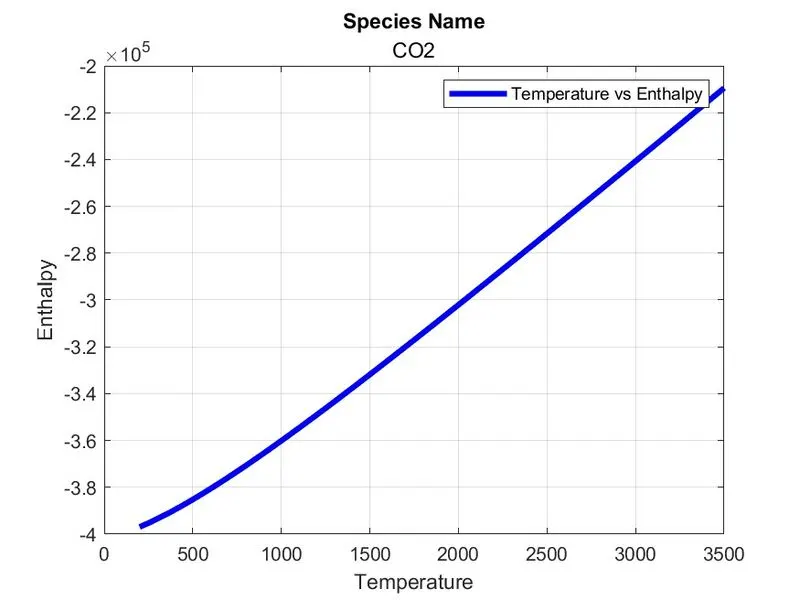
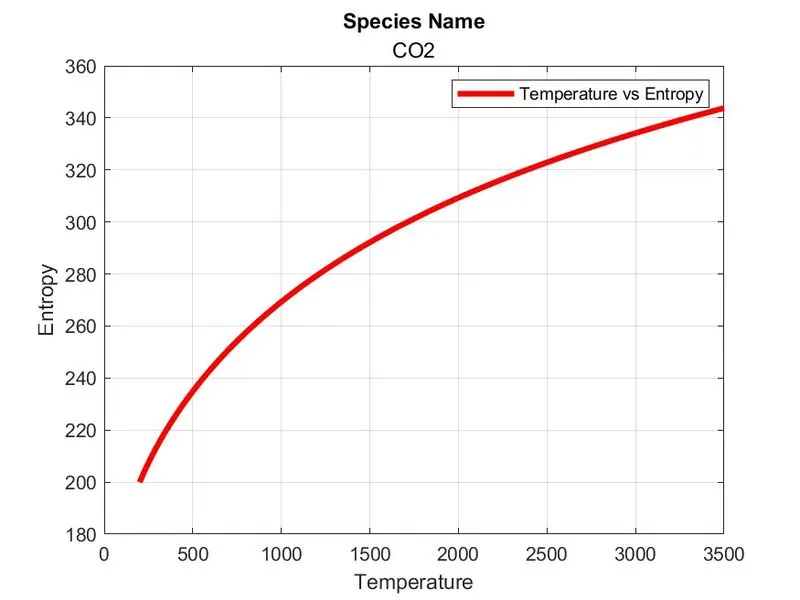
SCREENSHOT OF OUTPUT SAVED AUTOMATICALLY INSIDE THE FOLDER:
ERROR OCCURS WHILE PROGRAMING:
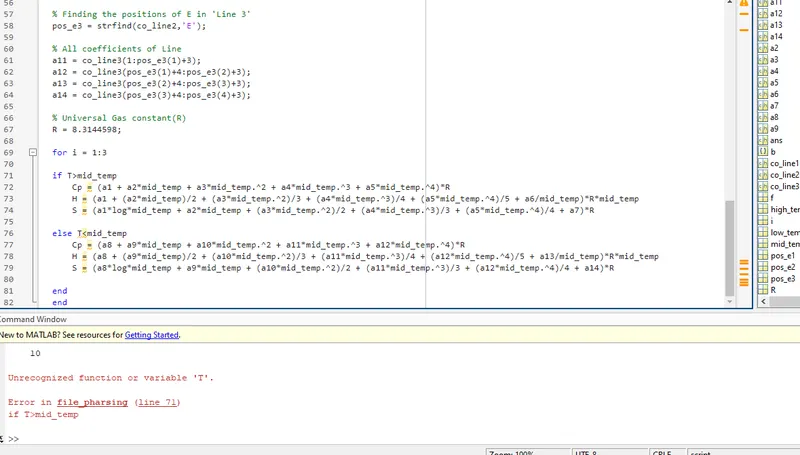
- In this errror i missed to set the values of 'T-temperature'. after I gave the values to the variable 'T' the error resolved.
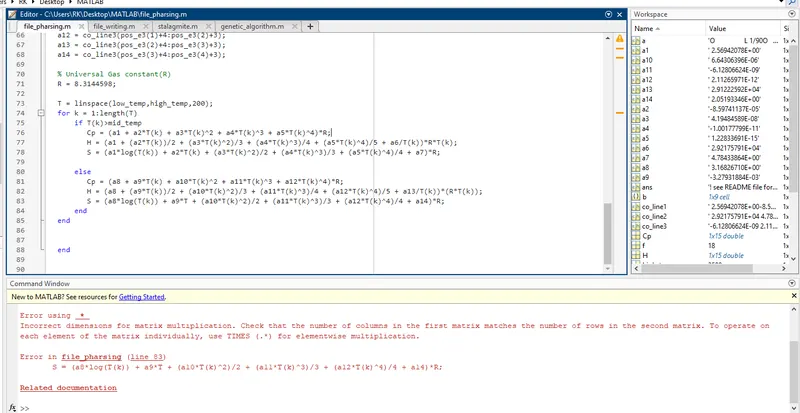
- This is a minor error, I wrongly used the element wise operator, so the error pop out. I correct it after the problem resolved.
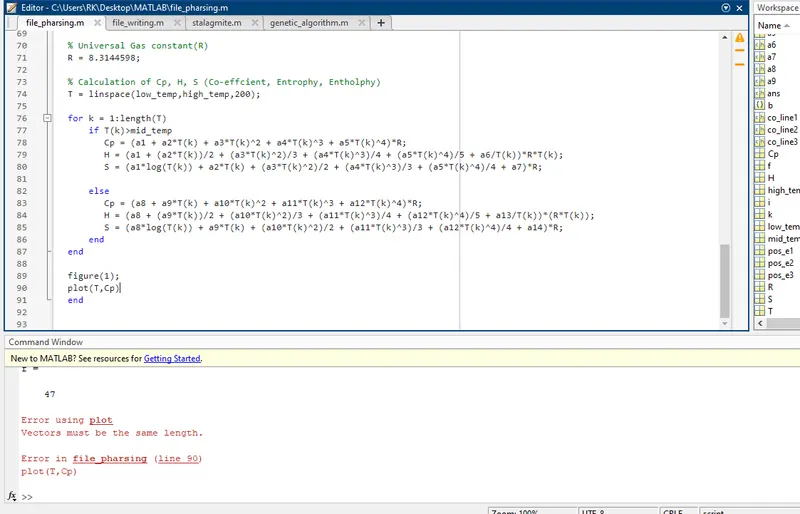
- When i try to plot the Tand Cp values, the error comes out, actually i forgot index the values of cp(k), H(k), S(k). So the length of the Vectors not matched with each other, i corrected it and error gets resolved
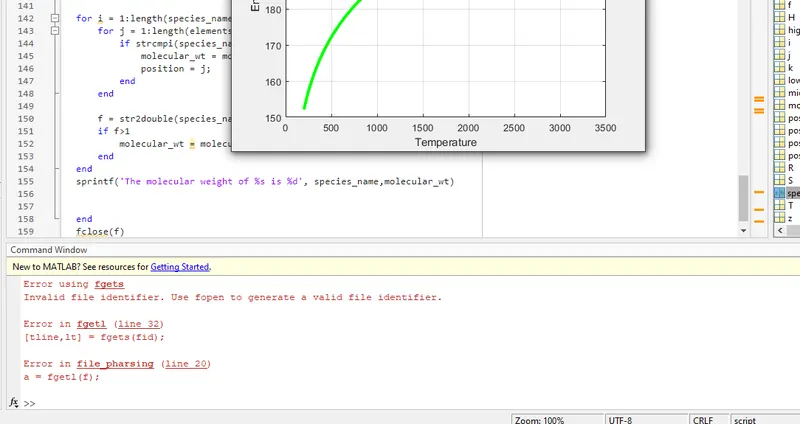
- In this error i wrongly used the variable 'f' which is already used. I re-repeat the same alphabet f to another variable. After the long debugging this was the error and after i correct it. The error gets resolved.
CONCLUSION:
- On the conclusion of this program, it was a great experience. When it comes to file pharsing this is my first experience.
- From this program i learned how to read and write a data file and performing the activities.
- In this program i learned new commands and new techiques to create programs.