Week 2- 2R Robotic Arm Challenge
clear all
close all
clc

%2R Robotiarm Program Simulation
%Input
l1 = 1; %m
l2 = 0.5; %m
t1 = linspace(0,90,35); %degree
t2 = linspace(0,90,35); %Degree

%Data Generation

ct = 1;
for i = 1:length(t1)
    T1 = t1(i);
    for j = 1:length(t2)
       T2 = t2(j);
       x0 = 0;
       y0 = 0;

       x1 = l1*cosd(T1);
       y1 = l1*sind(T1);
       x2 = x1+l2*cosd(T2);
       y2 = y1+l2*sind(T2);

       %plotting

       plot([x0 x1], [y0 y1], [x1 x2], [y1 y2], 'linewidth',3);
       axis([-0.1 2 0 2]);
       xlabel('X axis','color',[0 0 0]); ylabel('Y axis','color',[0 0 0]);
       pause(0.01);

       %frame capture
       M(ct) = getframe(gcf);
       ct = ct+1;
    end
end
movie(M);
videofile = VideoWriter('Robotic Arm.avi', 'Uncompressed AVI');
videofile.FrameRate = 30;

%Write and save video
open(videofile);
writeVideo(videofile, M);
close(videofile);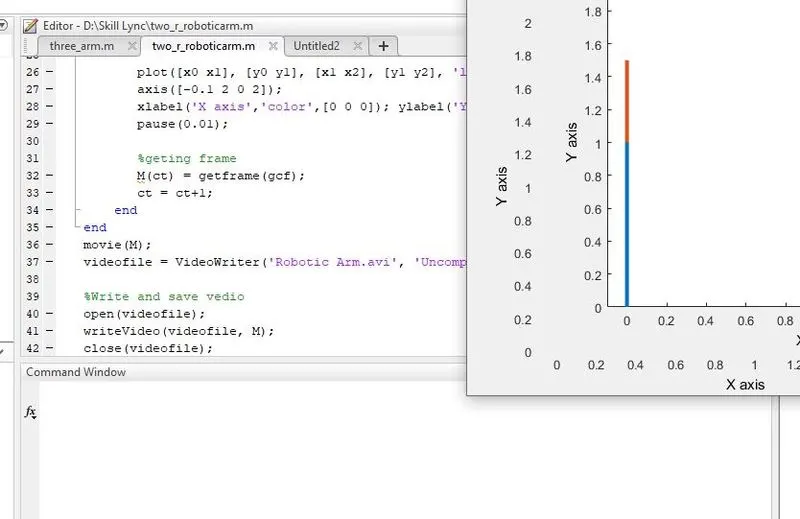
Explanation:
Defining the constant variable ‘l1’ and ‘l2’ by assigning values (l1=1 and l2=0.5).
l1 = 1; %m
l2 = 0.5; %m
Defining the angle made by angle Arm-1 (t1) and arm-2 (t2) by using ‘linspace’ to provide a set of angles in between 00 and 900. Here a total of 35 number of angles are considered.
t1 = linspace(0,90,35); %degree
t2 = linspace(0,90,35); %Degree
Opening for loop and defanging the integer ‘i’ from 1 to length of the array ‘t1’. Defining a new variable ‘T’ which takes each angle assigned in ‘t1’ one by one, when each time the loop repeats.
for i = 1:length(t1)
T1 = t1(i);
A new for loop is opened within the first one, and the same process is repeated for the second angle made by the arm-2. ‘i’ is replaced by ‘j’ to avoid any possible errors and inconsistency.
for j = 1:length(t2)
T2 = t2(j);
The end coordinate points of each arm are expressed in terms of mathematical expression.
x0 = 0;
y0 = 0;
x1 = l1*cosd(T1);
y1 = l1*sind(T1);
x2 = x1+l2*cosd(T2);
y2 = y1+l2*sind(T2);
The plot command in used to pot arm-1 and arm-2 and a pause time(pause(0.01)) is given to pause the frame shift. ‘xlabel’ and’ylabel’ is used to name the axis, and ‘axis’ is used to mark the range
plot([x0 x1], [y0 y1], [x1 x2], [y1 y2], 'linewidth',3);
axis([-0.1 2 0 2]);
xlabel('X axis','color',[0 0 0]); ylabel('Y axis','color',[0 0 0]);
pause(0.01);
animation is made by introducing a new vector ‘M’ and each frame is called and the current frame is stored inside the vector ‘m’, and on repeating the loop each time a new frame is added to ‘M’. Integer ‘ct’ is define and assigned as 1 initially before the frame capture code so that each time it increment a new frame is stored in ‘M’.
%geting frame
M(ct) = getframe(gcf);
ct = ct+1;
end
end
The animation is saved by converting it to a video file or a movie. For that, each frame in ‘M’ is called through the command ‘movie’. The video is crated by writing all the objects into a video data to AVI by a command called ‘VideoWriter(_,_)’ in addition a name for the file (here Robotic Arm.avi) and a profile(here Uncompressed AVI) is given.
end
end
movie(M);
videofile = VideoWriter('Robotic Arm.avi', 'Uncompressed AVI');
Once the AVI file is made the file is opened and the data in the array ‘M’ is written to the file ‘videofile’ by using a command called ‘writeVideo’ and the opened file is closed at last.
Errors:
Error -1
Undefine variable ‘lenth’
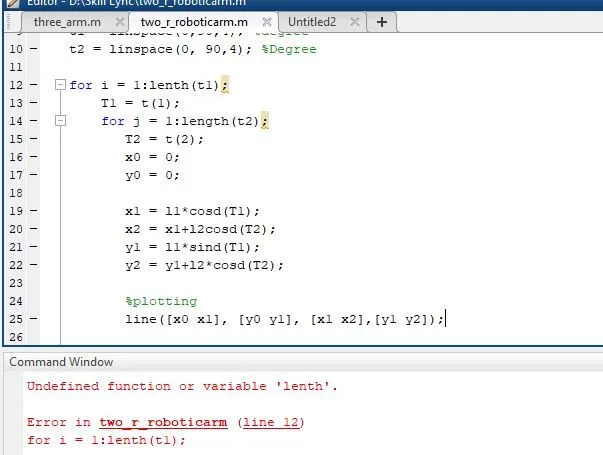
Solution: the variable ‘lenth’ is replaced by ‘length’(Spelling error).
Error 2
Undefined function or variable error ‘t’.
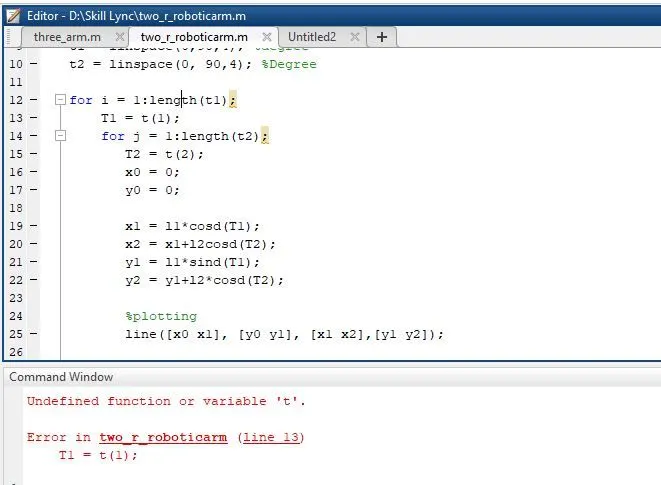
Solution: ‘t’ was not defined because it should be ‘t1’ additionally ‘t1(1)’ is changed to ‘t1(i)’ so that all the elements corresponding to ‘t1(i)’ can be viewed.
Error 3
Error using line command.
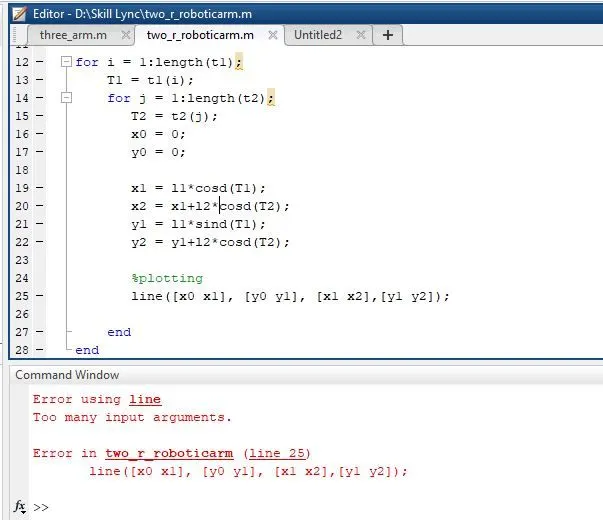
Solution: The ‘line’ command is replaced by the ‘plot’ command, ich which case the ‘pause’ command can also be used.
Error 4
Wrong solution and plot,
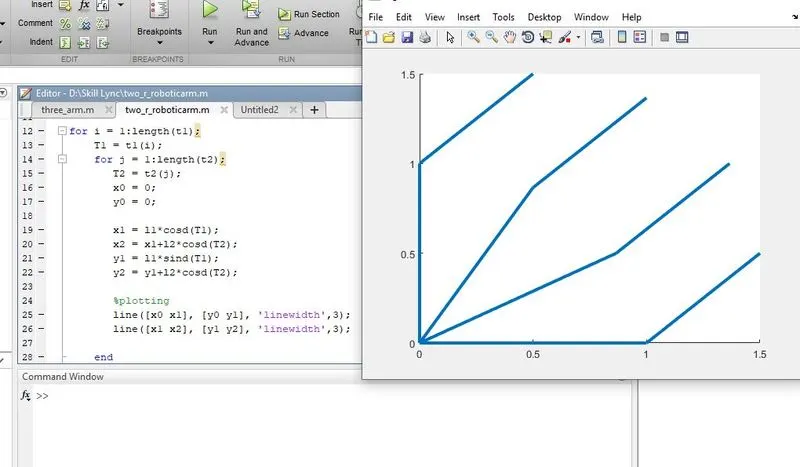
Solution: The plot was completely different because of the wrong mathematic expression for ‘y2’. The expression for ‘y2’ is corrected by substituting ‘cosd’ with ‘sind’.
Error 5
Undefined variable error.
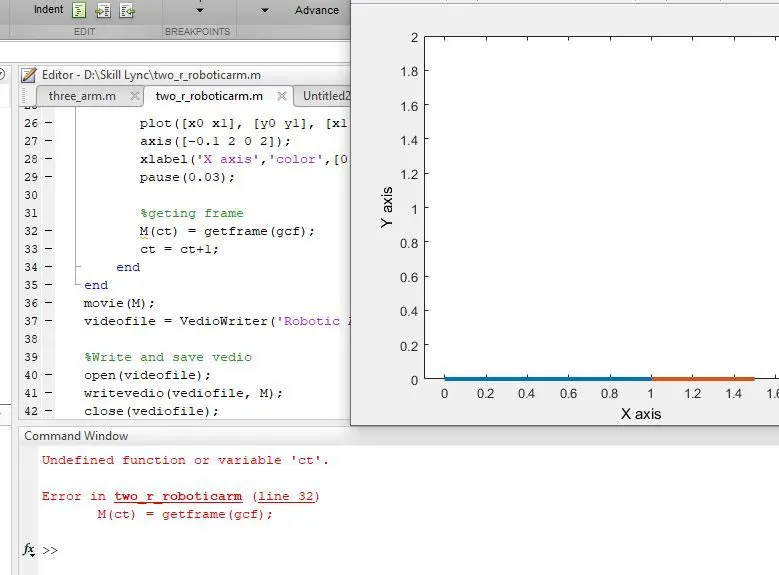
Solution: the variable ‘ct’ was not defined or assigned any values initially. The error is solved by assigning ‘ct=1’ earlier in the code sheet.
Error 6
Undefined variable ‘VedioWriter’
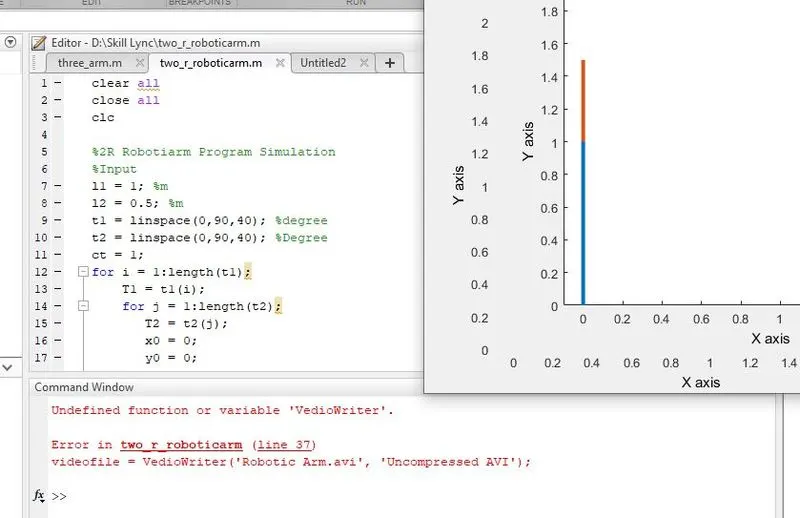
Solution the command ‘VedioWriter’ is changed to ‘VideoWriter’ to solve the error.
Final Video link: https://youtu.be/DaFZEcLn2ck