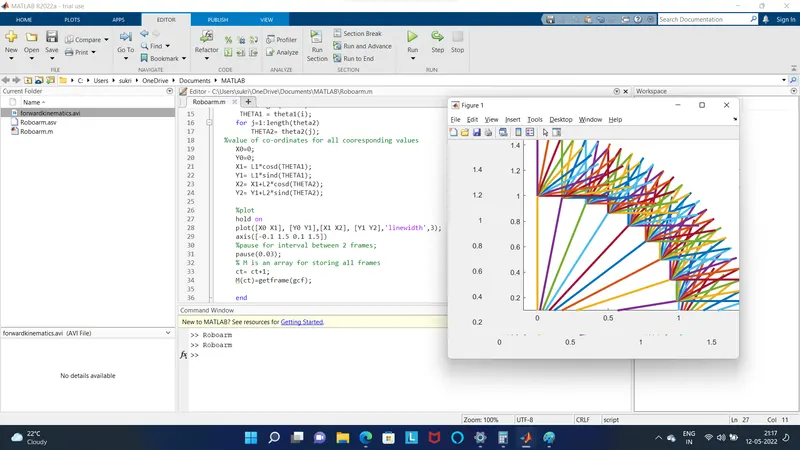
Week 2- 2R Robotic Arm Challenge
Simulation of forrward kinematics of a 2R Robotic arm using Matlab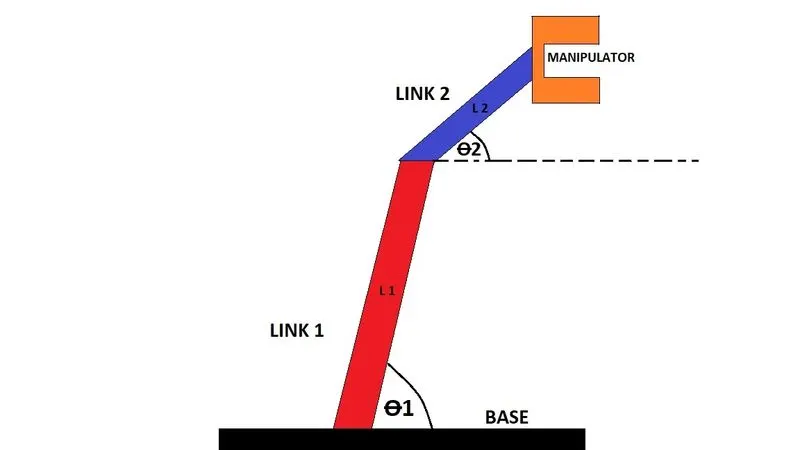
This simple 2R mechanism consists of 2 robotic arms of different length L1 & L2 making different angles θ1 & θ2 respectively with the base . The End is attached with a manipulator that performs any task life lifitng , welding scanning etc.
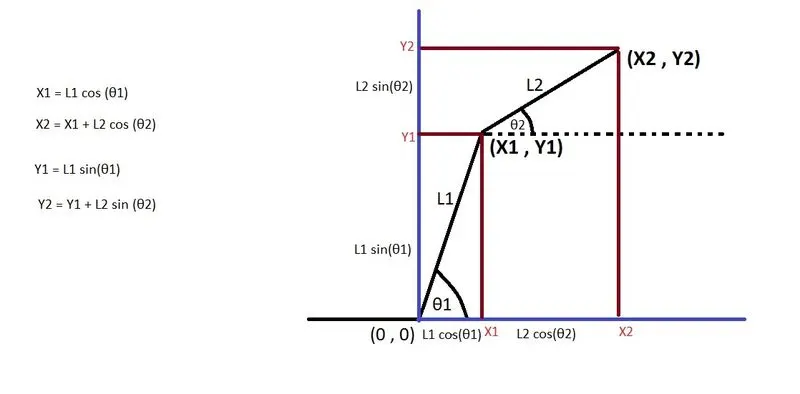
To simulate the forward kinematics of this robotic arm we will assume the base of the robot to be at the co-ordinate (0,0) , joint of link 1 and link 2 at ( X1, Y1) and the manipulator to be at the point (X2, Y2 ). For the simulation we will assume different values of θ1 and θ2 and will find the locastion of (X1,Y1) and (X2,Y2) based on the values. This program uses trignometric projection for calculating the position of both cordinate points.
%forward kinematic of a 2R robotic arm manipulator

%lenghth of link1 , link2
L1=1;
L2=0.5;

%input
theta1= linspace(0,90,10);
theta2= linspace(0,90,10);
%counter variable is an index to an array for storing the frames
ct=1;
%loop for varying the value of theta1 and cooresponding all values of
%theta2
for i=1:length(theta1)
    THETA1 = theta1(i);
   for j=1:length(theta2)
       THETA2= theta2(j);
%value of co-ordinates for all cooresponding values
   X0=0;
   Y0=0;
   X1= L1*cosd(THETA1);
   Y1= L1*sind(THETA1);
   X2= X1+L2*cosd(THETA2);
   Y2= Y1+L2*sind(THETA2);

   %plot
   plot([X0 X1], [Y0 Y1],[X1 X2], [Y1 Y2],'linewidth',3);
   axis([-0.1 1.5 0.1 1.5])
   %pause for interval between 2 frames;
   pause(0.03);
   % M is an array for storing all frames
   M(ct)=getframe(gcf);
   ct= ct+1;
   end
end
%create a movie of all saved frames
movie(M)
%creating a video fill with file name and format
videofile = VideoWriter('forwardkinematics.avi','Uncompressed AVI');
%open the file name
open (videofile);
%write the frames into the video file
writeVideo(videofile,M);
%close the video file
close(videofile);
Step 1
Define the length of the links
Step 2
Define 2 arrays theta1 and theta2 to store the value of angles namely - [10 20 30 40 50 60 70 80 90]
Step 3
Define a loop to vary the angles from 0-90 and define variables THETA1 and THETA2 to store the current value from theta1 and theta2 respectively
Step 4
Define the co-ordinates [X0 Y0] [X1 Y1] [X2 Y2]
Step 5
Generate the plot using three points for every scenario using 'linewidth' as 3.
Define the axis limit for both X and Y axis
Define the delay between 2 frames to visualize the changes
Step 6
Capture the frame using 'getframe' command and store it in an array M
Step 7
Increment 'ctr' which controls the index of M
Step 8
Create a movie form array M
Step 9
Create a vidoe file 'forwardkinematics.avi' with uncompressed avi format using 'VideoWriter' command
Step 10
Open the video file
Wrtie the array M into the video file
close the video file .
Errors faced
-Using 'hold on' command
- Colour of all plots are random it creates all plots in same frame one after the other
-Correction - remove the hold on command