Week 2- 2R Robotic Arm Challenge
AIM:
To write a program a program using MATLAB to simulate the forward kinematics of a 2R Robotic arm.
INTRODUCTION:
Kinematics is the relationship between the positions, velocities and accelerations of the links of a manipulator.
The Forward kinamatics is when the kinematical data are known for the joint coordinations. The variables of the end-effactor in a given Cartesian space are to be computed.
Robotic arms are machines that are programmed to execute a specific task or job quickly, efficiently and extremely accurately. Generally, motor-driven, they are most often used for the rapid, consistent performance of heavy and highly repetitive proceures over extended periods of time andare especially valued in the indusrial production, manufacturing, maching and assembly sectors. A typical industial robot arm includes a series of joints, articulations and manipulators that work together to closely resemble the motion and functionality of a human arm (at least from a purely mechanical perspective). aa programmable robotics arm can be a complete machine in and of itslef, or it can functions as an individual robot part and more complex piece of equipment.
A robotic joint provides relative motion between two links of the robot. Each joint, or axis, provides a certain degree-of-freedom(DOF) of motion. In most cases, only one degree-of-freedom is associated with each joint. Therefore the robot's complexity can be classified according to the total number of degrees-of-freedom they possess. Figure 1 shows the graphical reprensentation and placement of arms/links andd joint.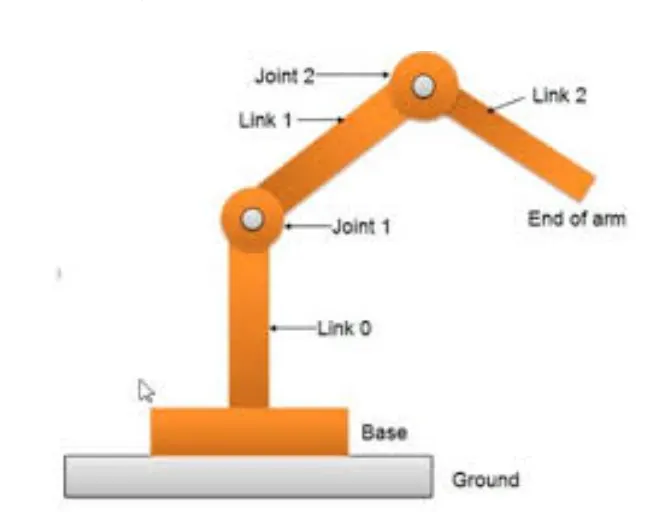
Figure 1: joint-link scheme for robot manipulater
The formula for calculating the link arm is showing below in Figure 2
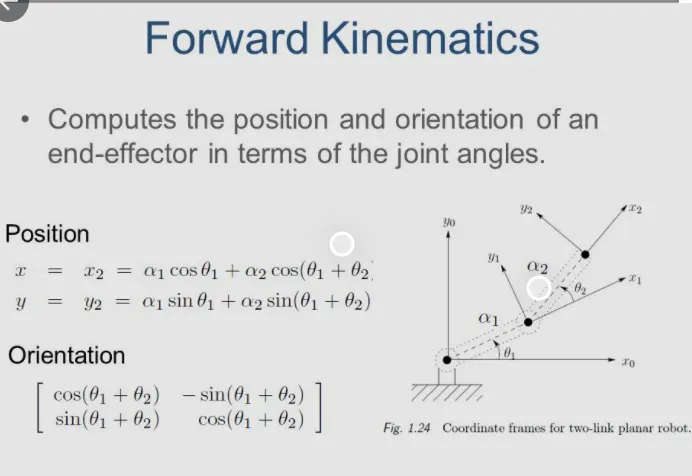
Figure 2: Formula for calclating the forward kinematics of a 2-link robotic arm.
As seen in formula to calculate the position of x1,x2 has to calculated. using trignometry, x1 is defined as = length of the first link arm*cos(angle of the first arm). the same process goes to finding y2. y1 is defined as = length of the first arm sin*(angle of the first arm).
Code to wite the progrrams:
First of all start the programming using clear all, close all and clc, to clear all the previous programming.
clear all: clears the data in workspace.
close all : closes all the plots and graph of previous programm.
clc : clears the command window with all inputs and outputs.
Than after for the coed is to define the inputsand its value. Lenght og the arm 1 and 2 are defined. the angle `theta1`and `theta2` are defined using the command linspace, used semicolon to prevent unnaccesarry results.
theta1 = linspace(0,90,10);
theta2 = linspace(0,90,10);
that means MATLAB will generate a row vector 90 of 10 points linearly spaced between and includinn 0 and 90.
Next stpe is to set up a counter. A counter is variable that counts an event in a loop. A for loop wass used for this project, a for loop s a repetetion contol structure that allows you to efficiently write a loop that needs to execute a specific number of times.
The formula for calculating forward x1,x2,y1,y2 are shown in fig.2. In MATALB we will apply the formula using coeds as inputs are defined using commands.Using cosd and sind to get output in angle. For loop i is used to determine the length and angle of arm 1 and for loop j is used to determin the length and angle for the arm 2.
for i = 1:length(theta1)
THETA1 = theta1(i);
for j = 1:length(theta2)
THETA2= theta2(j);
x1 = l1*cosd(THETA1);
y1 = l1*sind(THETA1);
x2 = x1+l2*cosd(THETA2);
y2 = y1+l2*sind(THETA2);
Now, plot a graph for all the x and y coordinates with axis. A pause command is used for pausing the command for a certain time, for this project a pause of 0.3s was used.
plot([x0 x1],[y0 y1],[x1 x2],[y1 y2],'linewidth',3)
axis([0 1.5 0 1.5])
pause(0.3)
M command is used was used to capture the current frame every time the loop runs.The final step of the loops is to add a + 1 to the ct variable; this will increment the frame everytime the loop runs.Use end command to finish the loop.
Final step of the code is to create a movie of the animation of the robotic arm, so the movie command was use. The videoWriter cammand was used to assign the video format, for this project .avi was used as format.The open command was used to open the video.writevideo command to was used to write the video with plot frames.Finally, the close command to close the video file.
movie(M)
Videofile = VideoWriter('forward_kinematics.avi','Uncompressed AVI')
open(Videofile)
writeVideo(Videofile,M)
close(Videofile)
Codes:
clear all
close all
clc

%inputs
l1 = 1;
l2 = 0.5;
theta1 = linspace(0,90,10);
theta2 = linspace(0,90,10);
ct=1
for i = 1:length(theta1)
    THETA1 = theta1(i);
   for j = 1:length(theta2)
     THETA2= theta2(j);
     x0 = 0;
     y0 = 0;

     x1 = l1*cosd(THETA1);
     y1 = l1*sind(THETA1);

     x2 = x1+l2*cosd(THETA2);
     y2 = y1+l2*sind(THETA2);

%plotting
     plot([x0 x1],[y0 y1],[x1 x2],[y1 y2],'linewidth',3)
     axis([0 1.5 0 1.5])
     pause(0.3)

     M(ct) = getframe(gcf)
     ct=ct+1;
   end
end


movie(M)
Videofile = VideoWriter('forward_kinematics.avi','Uncompressed AVI')
open(Videofile)
writeVideo(Videofile,M)
close(Videofile)
Errors while programming :
The error I faces was ct programm. I fergote create a counter for the plot.So that movie didnt make because it didnt get and frams.
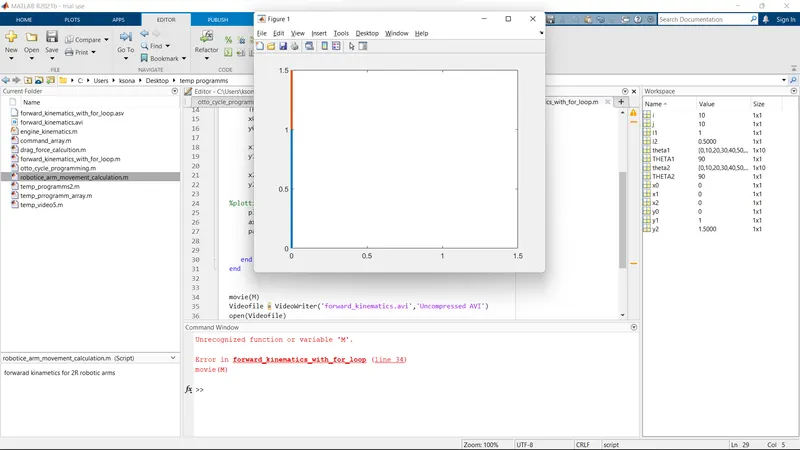
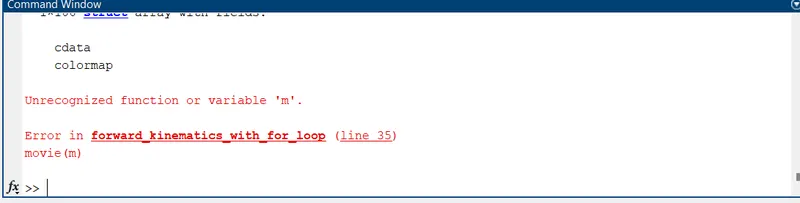
Than for programming for the movie I wrote the command['movie(m)]
and in the frame there was M so MATLAB didt recognized the variable.
ANIMATION VIDEO:
Here I uploaded the video in google drive and given the link of the drive video,
https://drive.google.com/drive/folders/1aYHWl1DLQc4JxpMnjG9ztKrhkqHvFDoT?usp=sharing