Week 2- 2R Robotic Arm Challenge
Report:-
Aim:-
The aim of this challenge is to calculate the forward kinematics of the 2r robotic arm manipulator and make an animation of the result using Matlab
Procedure:-
The 2r robotic arm manipulator has 2 links and 2 rotating joints and we have to calculate the end position of the manipulator so, to perform the calculation for the forward kinematics of the 2r robotic arm manipulator, let us assume
Length of first link l1 = 1m
Length of second link l2 = 0.75m
Angle made by first link wrto ground theta1= (0~90) (random 10 values between 0 and 90)
Angle made by second link wrto ground theta2= (0~90) (random 10 values between 0 and 90)
Coordinates of the links:-
At the base = x0, y0
At the end of the first link = x1, y1
At the end of the second link = x2, y2
As the angle made by link 1 and link 2 are theta1 and theta2 respectively so
x0 = 0
y0 = 0
x1 = l1*cosd(theta1)
y1 = l1*sind(theta1)
x2 = l2 + l1*cosd(theta2)
y2 = l2 + l1*sind(theta2)
(We use sind and cosd instead of sin and cos, as in Matlab sin and cos expect the value of the angle in radian whereas sind and cosd expect values of angle in degrees)
as we have to calculate the position of the manipulator for various values of theta1 and theta2 we use the for loop 2 times, one for values of theta1 to get the values of x1, y1 with loop counter (i) and second for values of theta2 to get the values of x2, y2 with loop counter (j) and for every loop we increase the counter by 1 till the loop ends, so
i = 1:length(theta1) ( : is a range operator)
so
i=1 to 10 (as the length of theta1 is 10)
similarly,
j= 1:length(theta2)
so
j=1 to 10 (as the length of theta2 is 10)
if the loop counter is ct than
loop counter ct=ct+1 (as loop counter increases every time)
in every loop, the new value of theta will be saved in THETA1 & THETA2.
Now, for plotting the graph of the result we use the plot command with coordinates of the first link and then the coordinate of the second link, in the graph which spreads from 0 to 2 on the x-axis as well as from 0 to 2 on the y-axis, with the pause of 0.03 sec to see the change in every loop, so as to save every frame of the figure window we use the variable (m) so,
m(ct)=getframe(gcf)
now after the for loop end we have got the various frame required now we will convert the saved frame into a video file with the command
movie(m)
and to save it as a video file we have to give it a name, format & resolution in which it will be saved with the command
videofile= videowriter(‘r2 robotic arm.avi’, ’uncompressed AVI’)
open(videofile)
writevideo(videofile,m)
close(videofile)
Conclusion:-
As the result, for every value of theta1, we get 10 values of theta 2, so when all the frames are combined together they give the video of all the possible positions of the end manipulator.
%program to simulate 2r robotic arm
close all
clear all
clc

% inputs
l1 = 1;
l2 = 0.75;
theta1 = linspace(0,90,10);
theta2 = linspace(0,90,10);

ct=1;
for i = 1:length(theta1)
    THETA1 = theta1(i);
        for j = 1:length(theta2)
            THETA2 = theta2(j);
            x0 = 0;
            y0 = 0;
            x1 = l1*cosd(THETA1);
            y1 = l1*sind(THETA1);
            x2 = x1 + l2*cosd(THETA2);
            y2 = y1 + l2*sind(THETA2);

            %plotting
            plot([x0 x1],[y0 y1],[x1 x2],[y1 y2],'LineWidth',3)
            axis([0 2 0 2])
            pause(0.03)
            m(ct)  = getframe(gcf);
            ct=ct+1;
        end
end

movie(m)
videofile = VideoWriter(' r2 robotic arm.avi', 'Uncompressed AVI');
open(videofile)
writeVideo(videofile,m)
close(videofile)
possible position of the end manipulator of the 2r robotic arm
Result
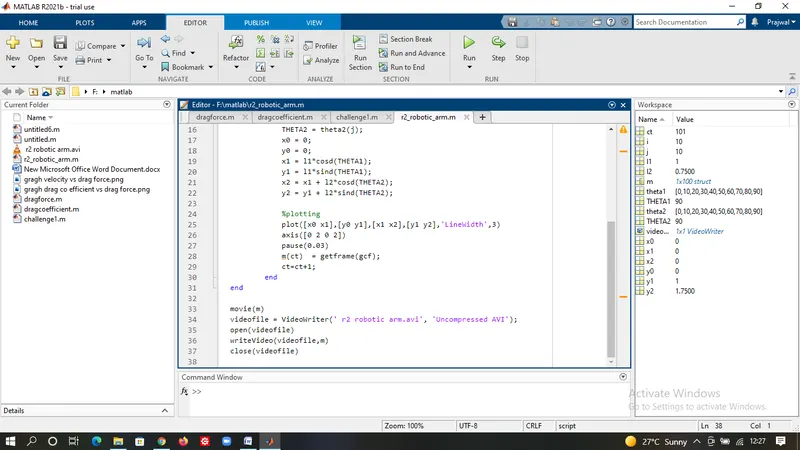
Errors Faced during the compilation of the code
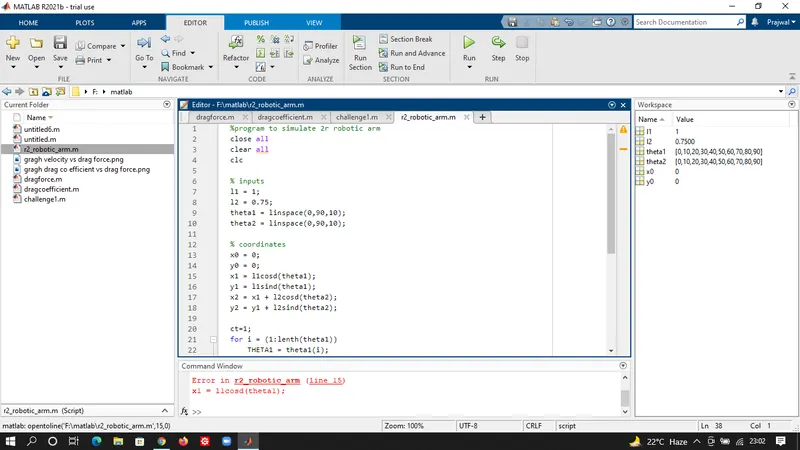
the error in the above image is missing (*) sign between l1 & cosd(theta1), l1 & sind(theta1), l2 & cosd(theta2) & l2 & sind(theta2), so to over come the error (*) was used where it was missing.
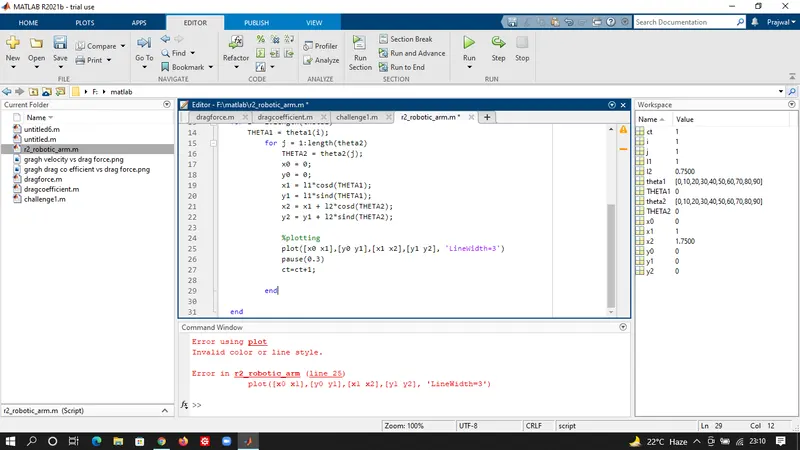
the error in the above image is the use of (=) between linewidth command and the value of the linewidth, which is not required, so to overcome the error (=) was replaced with a (,)