Week 2- 2R Robotic Arm Challenge
FORWARD KINEMATICS PROGRAM FOR 2R ROBOTIC ARM
l1=4; %length of first arm
l2=2; %length of second arm
theta1=linspace(0,90,6);    %Change in angle of first arm
theta2=linspace(0,90,4);    %Change in angle of second arm
x0=0;y0=0;
ct=1;

for i=1:length(theta1)              %Finding length of theta1(Total number of index values in theta1=6)
                                    %length of theta1 is found to access
                                    %values inside index of theta1
    t1=theta1(i)                    %t1=(accessing values of index in theta1)
    x1=l1*cosd(t1);y1=l1*sind(t1);  %Finding the coordinates of first arm l1 with respect to change in angle
    for j=1:length(theta2)          %Finding length of theta1(Total number of index values in theta1=4)
                                    %Comment same as above for (i=1:length(theta1))

         t2=theta2(j)                %Comment same as above for t1=theta1(i)
  x2=x1+l2*cosd(t2);y2=y1+l2*sind(t2);  %Finding the coordinates of second arm l2 with respect to change in angle
                                        %For every change in angle of first arm l1,the angle of second arm l2 changes as per the values of theta2 given in input
                                        %So, total output will be the
                                        %multiple of size of theta1 and
                                        %theta2
                                        %Total output=6x4=24, if we use
                                        %figure

    plot([x0 x1],[y0 y1],[x1 x2],[y1 y2],'linewidth',2); %plotting the first and second arm against angle so as to get desired output

    axis([-0.1 7 0 7])          %shifting x axis origin to -0.1 so as to get output look clear

    M(ct)=getframe(gcf)         %Combining all the figure(say 24) output as the iteration of for loop goes on
    pause(0.3)                  %Setting the time of 0.3 seconds between first and secong figure
    ct=ct+1;                    %Counter incrementing as the for loop goes on
                                %Counter to access the figures
    end
end
movie(M)                        %Creating movie with variable M

videofile1=VideoWriter('forward_kinematics_revision.avi','Uncompressed AVI'); %Creating video file name
open(videofile1)            %opening video file
writeVideo(videofile1,M)   %Writing/Saving video file in matlab folder where the matlab program exist
close(videofile1)           %closing video file
OUTPUT SCREENSHOT OF ONE INSTANT ONLY
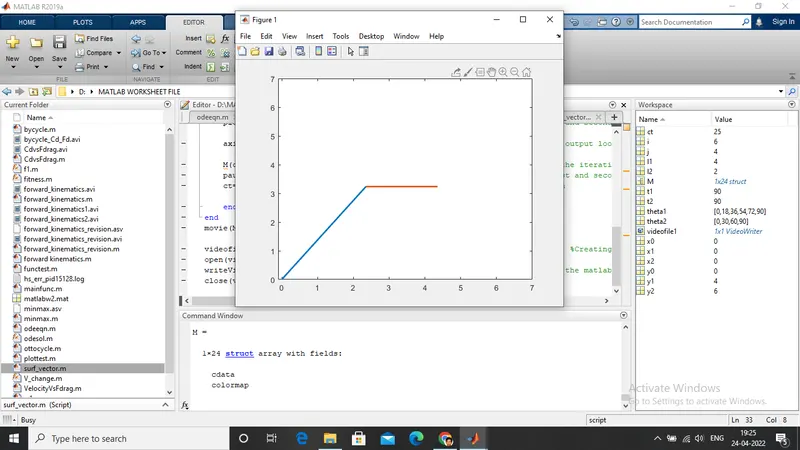
THE OUTPUT OF ALL RESULT IS SHOWN IN VIDEO THAT I UPLOADED IN YOUTUBE https://youtu.be/s4tsNcq1b14