Week 2- 2R Robotic Arm Challenge
REPORT ON SIMULATION OF A 2R ROBOTIC ARM
AIM
To simulate a 2R Robotic arm using MATLAB SOFTWARE
INPUT VARIABLES
Length of first link l1 = 1.5
length of second link l2 = 1
Angle between link1 and the horizontal surface theta1 = linspace(0,90,15)
Angle between link1 and link2 theta2 = linspace(0,90,15)
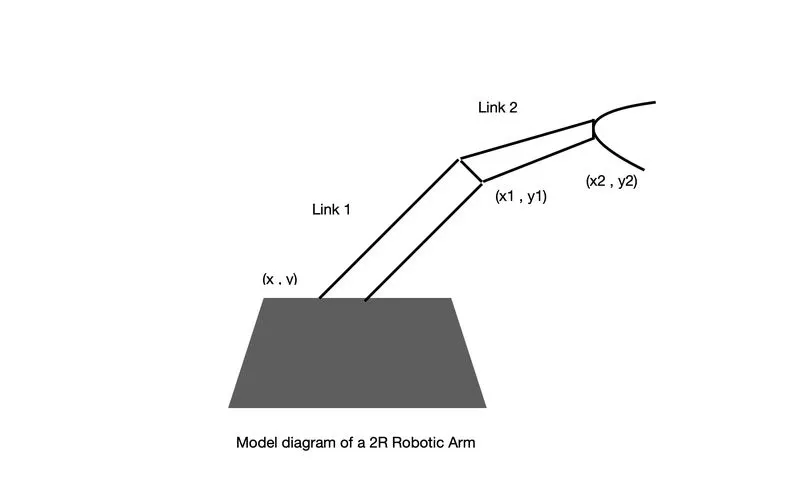
EQUATIONS USED.
Coordinates = (x,y) (x1,y1) (x2,y2)
x = 0
y = 0
x1 = l1*cosd(theta1)
y1 = l1*sind(theta1)
x2 = x1 + l2*cosd(theta2)
y2 = y1 + l2*sind(theta2)
BODY OF CONTENT
The programming language used is MATLAB
The program is as follows
%forward kinematics of a 2R robotic arm

%inputs
%length of first link
l1 =1.5;
%length of second link
l2 = 1;
%angle made between link1 and surface
theta1 = linspace(0,90,15);
%angle made between link1 and link2
theta2 = linspace(0,90,15);
ct = 1

for i =1:length(theta1);
    THETA1 = theta1(i);
    for j =1:length(theta2);
        THETA2 = theta2(j);
%coordinates
        x = 0;
        y = 0;                   ........> coordinates at origin (x,y)

x1 = l1*cosd(THETA1);
y1 = l1*sind(THETA1);            .........> coordinates at the end point of link1 (x1,y1)

x2 = x1+l2*cosd(THETA2);
y2 = y1+l2*sind(THETA2);         .........> coordinates at the end point of link2 (x2,y2)


%plotting
plot([x x1],[y y1],[x1 x2],[y1 y2],'linewidth',3)
axis([0 3 0 3])
pause(0.001)
m(ct) = getframe(gcf)
ct = ct+1;

    end

end
%creating a video using a videofile
movie(m)
videofile  = VideoWriter('forwardkinematics.avi','Uncompressed AVI')
open(videofile)
writeVideo(videofile,m)
close(videofile)- In the above program first the length of the links 1 and 2 , angle between the surface and link1 i.e theta1 and angle between link1 and 2 i.e theta2 are given as input.
where link 1 = 1.5m and link 2 = 1 m.
- The angle theta1 = linspace(0,90,15) where linspace command is used to ensure that the interval between 0 and 90 is constant i.e the interval between each consecutive values between 0 and 90 degrees will be constant . In other words there will be 15 angles between 0 and 90 degrees which has equal intervals with eachother.
- Similarly theta2 = linspace(0,90,15) works on the same manner
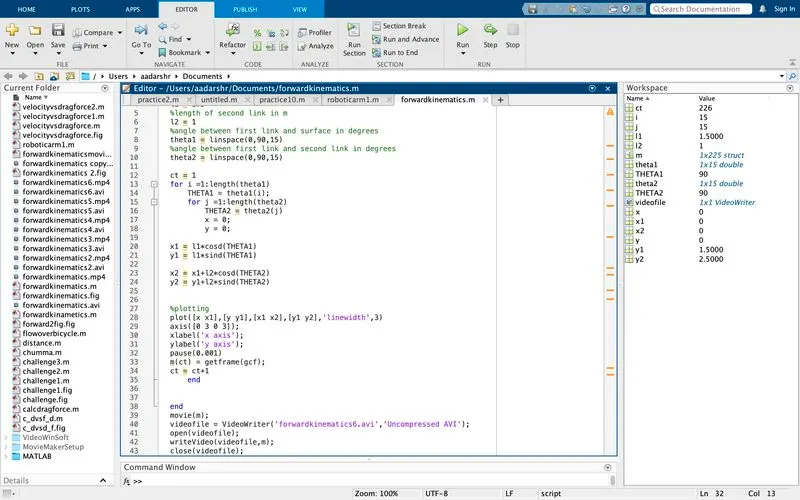
- A variable called 'ct' is used to count all the frames which is given an initial value of 1. It counts a total number of 225 frames (1 to 226)
- Then the' for loop' command is given in the following manner
for i =1:length(theta1)THETA1 = theta1(i);for j =1:length(theta2)THETA2 = theta2(j)x = 0;y = 0;x1 = l1*cosd(THETA1)y1 = l1*sind(THETA1)
-
x2 = x1+l2*cosd(THETA2)y2 = y1+l2*sind(THETA2)%plottingplot([x x1],[y y1],[x1 x2],[y1 y2],'linewidth',3)axis([0 3 0 3]);xlabel('x axis');ylabel('y axis');pause(0.001);m(ct) = getframe(gcf);ct = ct+1endend
- The for loop command helps to run a value in a loop i.e. in the above command the value of i is given values from 1 to length(theta1) which is equal to 1 to 15, where length(theta1) is the number of values between 0 and 90 degrees. The theta1(i) is the movement of link1 from 0 to 90 degrees. This theta1(i) is stored into variable called THETA1.
- Then another for loop, j is stored inside the first for loop. The j loop ensures the motion of the second link again from 0 to 90 degrees. Theta2(j) is the movement of second loop. This theta2(j) is stored into a variable called THETA2.
- Here the loop works for a total of 225 times i.e. for every rotation of link 1, link 2 rotates from 0 to 90 degrees. Thus 15*15 = 225 times both the links rotate in total. Since ct is initially set to 1 'ct' counts a total of 226 individual frames.
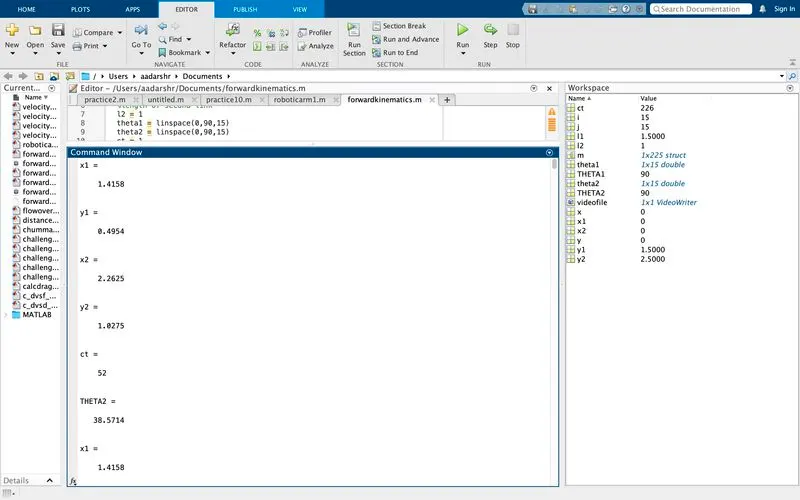
- Since the initial point of the robot arm is from origin x and y are given initial values as 0.
- Then x1 is calculated using the formula x1 = l1*cosd(THETA1) and y1 = li*sind(THETA1) where 'cosd(THETA1)' and 'sind(THETA1)' ensures that the values are in degrees. If 'd' is not given as a command then the values obtained will be in radians.
- Similarly x2 and y2 are calculated only exception is that x1 and y1 are added along with cosd(THETA2) and sind(THETA2) for x2 and y2 respectivelty.
- After this 'plotting command' is initiated
- Plotting command is used to plot the values in 2D plot and it also helps to simulate the diagram in the required manner.
- plot([x x1],[y y1],[x1 x2],[y1 y2],'linewidth',3)
- In the above command the coordinates [x x1], [y y1], [x1 x2],[y1 y2] are placed in a single command, so that the plot comes out as shown below
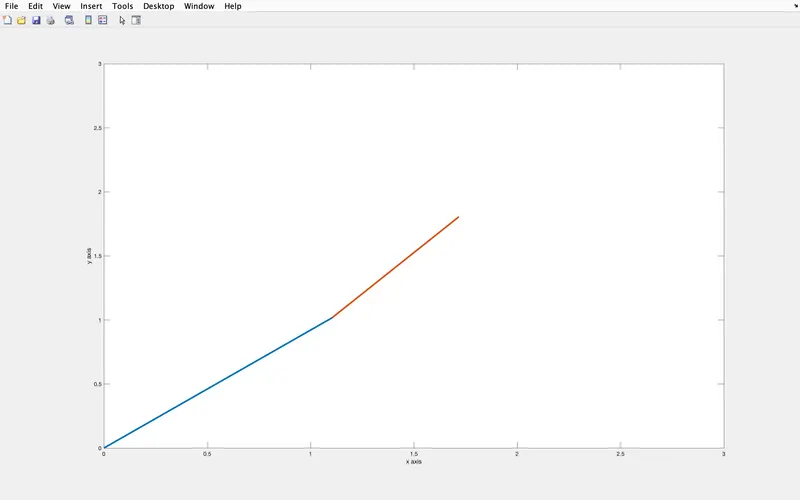
Here the blue line indicates link1 and red line indicates link2
- If the command is given as
plot([x x1],[y y1],'linewidth',3)
plot([x1 x2],[y1 y2],'linewidth',3)
The above command plots in the following manner
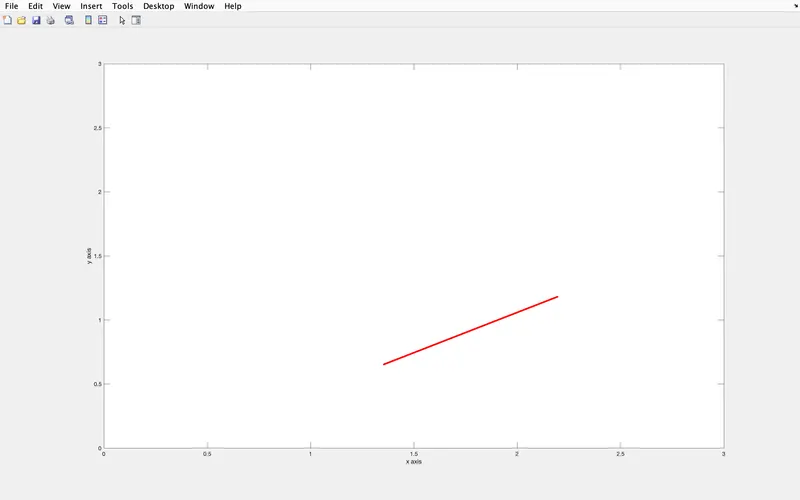
Here only the red line that is link2 is visible ,this is because the command for link2 is the one which executed at last. Thus we plot both links in a single diagram.
- Then we use the axis command which is used fix the x and y axis from 0 to3 i.e.
axis([0 3 0 3]);
- Then the pause command is used to pause the movement or vary the rate of motion of link1 and 2 , if the pause command is given as pause(0.001), the rate of motion of the 2 links will be faster as shown in the video below
- If the pause command is as follows : pause(0.01) then the motion of the 2 links becomes slower as shown below
- In the above program the individual frames are saved into an array i.e.'m' and then a command called 'getframe' is used to get the current figure window
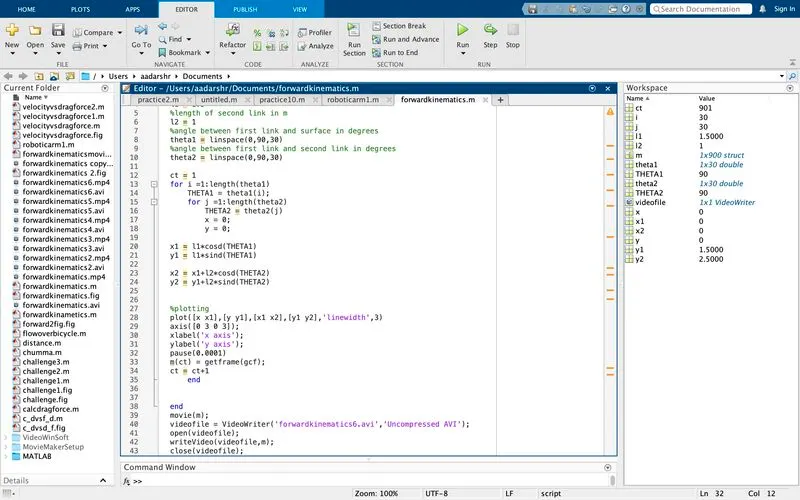
- After each loop 'ct' is incremented with a value of 1 to save the next frame. The 'ct' saves a value of 225 frames. It depends on the intervals of theta1 and theta2 i.e. if 'theta1 = linspace(0,90,30) and 'theta2 = linspace(0,90,30) then 'ct' will have 900 values with ct = 901 as shown in the command and workspace window.
- Then the i loop and j loop is eneded using the 'end' command
%creating a video using a videofile
movie(m)
videofile  = VideoWriter('forwardkinematics.avi','Uncompressed AVI')
open(videofile)
writeVideo(videofile,m)
close(videofile)- In the above command a movie is created and saved as 'forwardkinematics.avi' using a videofile
- This videofile is opened using 'open(videofile)' command and is written into the array 'm' using the 'writevideo(videofile,m)' command
- Then the videofile is closed using 'close(videofile)' command
OUTPUT OF EACH PROGRAM
%forward kinematics of a 2R robotic arm

%inputs
%length of first link
l1 =1.5;
%length of second link
l2 = 1;
%angle made between link1 and surface
theta1 = linspace(0,90,15);
%angle made between link1 and link2
theta2 = linspace(0,90,15);
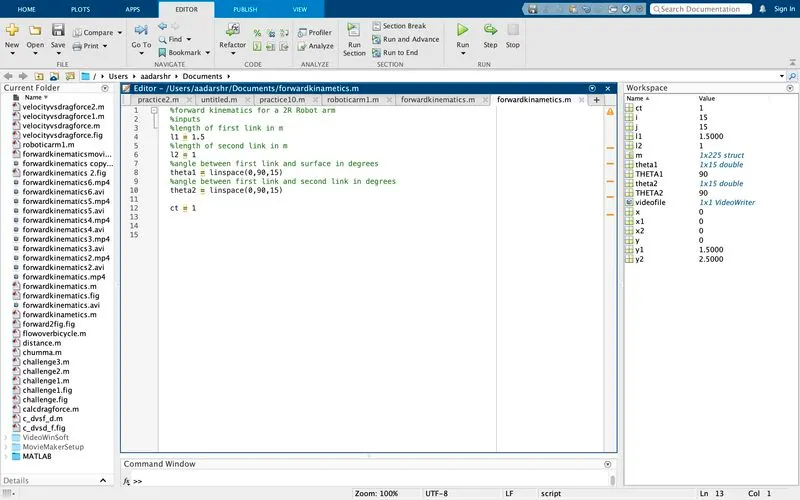
ct = 1
OUTPUT
%forward kinematics of a 2R robotic arm

%inputs
%length of first link
l1 =1.5;
%length of second link
l2 = 1;
%angle made between link1 and surface
theta1 = linspace(0,90,15);
%angle made between link1 and link2
theta2 = linspace(0,90,15);
ct = 1

for i =1:length(theta1);
    THETA1 = theta1(i);
    for j =1:length(theta2);
        THETA2 = theta2(j);
%coordinates
        x = 0;
        y = 0;                   ........> coordinates at origin (x,y)

x1 = l1*cosd(THETA1);
y1 = l1*sind(THETA1);            .........> coordinates at the end point of link1 (x1,y1)

x2 = x1+l2*cosd(THETA2);
y2 = y1+l2*sind(THETA2);         .........> coordinates at the end point of link2 (x2,y2)
        end

end
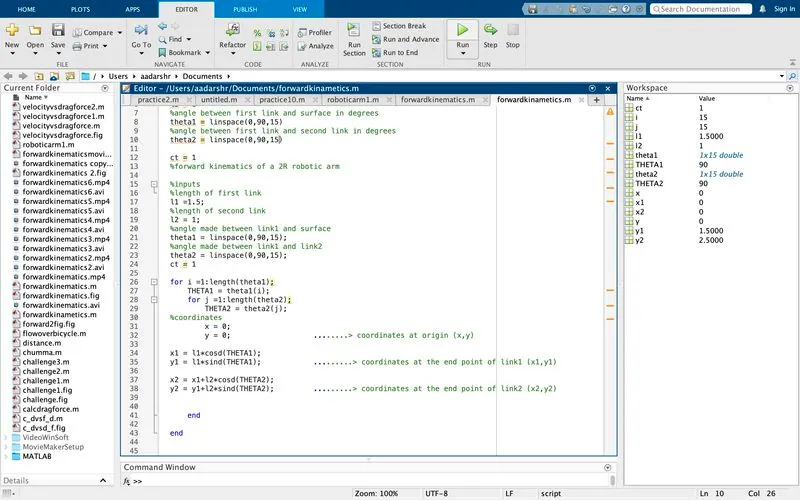
OUTPUT
%forward kinematics of a 2R robotic arm

%inputs
%length of first link
l1 =1.5;
%length of second link
l2 = 1;
%angle made between link1 and surface
theta1 = linspace(0,90,15);
%angle made between link1 and link2
theta2 = linspace(0,90,15);
ct = 1

for i =1:length(theta1);
    THETA1 = theta1(i);
    for j =1:length(theta2);
        THETA2 = theta2(j);
%coordinates
        x = 0;
        y = 0;                   ........> coordinates at origin (x,y)

x1 = l1*cosd(THETA1);
y1 = l1*sind(THETA1);            .........> coordinates at the end point of link1 (x1,y1)

x2 = x1+l2*cosd(THETA2);
y2 = y1+l2*sind(THETA2);         .........> coordinates at the end point of link2 (x2,y2)


%plotting
plot([x x1],[y y1],[x1 x2],[y1 y2],'linewidth',3)
axis([0 3 0 3])
pause(0.001)
m(ct) = getframe(gcf)
ct = ct+1;

    end

end
%creating a video using a videofile
movie(m)
videofile  = VideoWriter('forwardkinematics.avi','Uncompressed AVI')
open(videofile)
writeVideo(videofile,m)
close(videofile)
OUTPUT
%forward kinematics of a 2R robotic arm

%inputs
%length of first link
l1 =1.5;
%length of second link
l2 = 1;
%angle made between link1 and surface
theta1 = linspace(0,90,30);
%angle made between link1 and link2
theta2 = linspace(0,90,30);
ct = 1

for i =1:length(theta1);
    THETA1 = theta1(i);
    for j =1:length(theta2);
        THETA2 = theta2(j);
%coordinates
        x = 0;
        y = 0;                   ........> coordinates at origin (x,y)

x1 = l1*cosd(THETA1);
y1 = l1*sind(THETA1);            .........> coordinates at the end point of link1 (x1,y1)

x2 = x1+l2*cosd(THETA2);
y2 = y1+l2*sind(THETA2);         .........> coordinates at the end point of link2 (x2,y2)


%plotting
plot([x x1],[y y1],[x1 x2],[y1 y2],'linewidth',3)
axis([0 3 0 3])
pause(0.0001)
m(ct) = getframe(gcf)
ct = ct+1;

    end

end
%creating a video using a videofile
movie(m)
videofile  = VideoWriter('forwardkinematics.avi','Uncompressed AVI')
open(videofile)
writeVideo(videofile,m)
close(videofile)
OUTPUT
%forward kinematics for a 2R Robot arm
%inputs
%length of first link in m
l1 = 1.5
%length of second link in m
l2 = 1
%angle between first link and surface in degrees
theta1 = linspace(0,90,20)
%angle between first link and second link in degrees
theta2 = linspace(0,90,20)

ct = 1
for i =1:length(theta1)
    THETA1 = theta1(i);
    for j =1:length(theta2)
        THETA2 = theta2(j)
        x = 0;
        y = 0;

x1 = l1*cosd(THETA1)
y1 = l1*sind(THETA1)

x2 = x1+l2*cosd(THETA2)
y2 = y1+l2*sind(THETA2)


%plotting
plot([x x1],[y y1],[x1 x2],[y1 y2],'linewidth',3)
axis([0 3 0 3]);
xlabel('x axis');
ylabel('y axis');
pause(0.1)
m(ct) = getframe(gcf);
ct = ct+1
    end


end
movie(m);
videofile = VideoWriter('forwardkinematics2(S).avi','Uncompressed AVI');
open(videofile);
writeVideo(videofile,m);
close(videofile);
OUTPUT
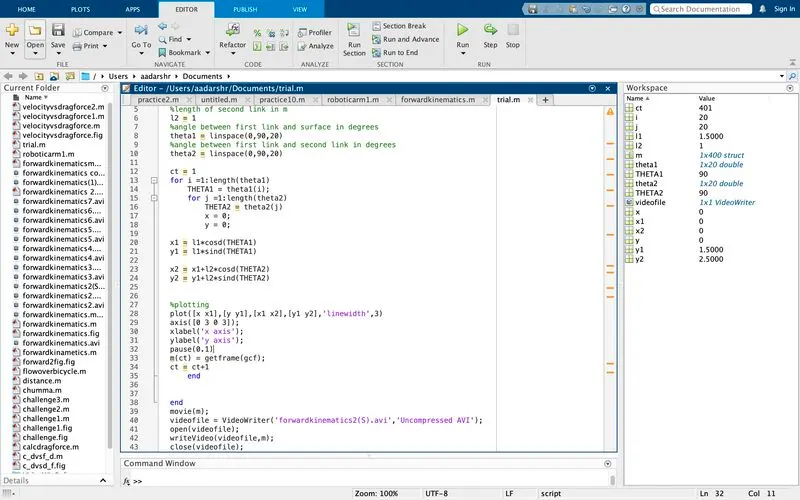
ERRORS OCCURED
Forgot to put an END command while programming. The end command is used to complete a loop i.e. if a value is from 1 to 10 the loop will continue to run without an end this results in the popping of the following error message
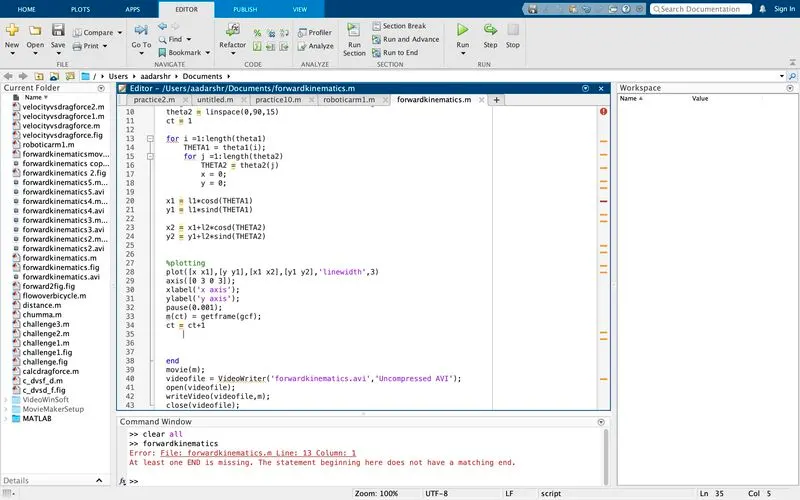
Due to this the program will not run and the program will never get executed.
After putting the END command , the program got executed.
- Forgot to put parantheses on plot command
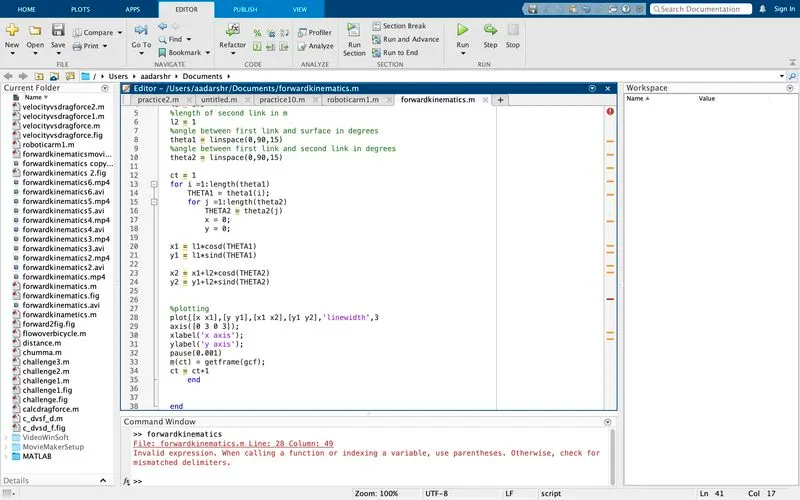
While commanding the plot command the end parantheses was forgotten resulting in the following error message
INVALID EXPRESSION. WHEN CALLING A FUNCTION OR INDEXING A VARIABLE USE PARANTHESES. Without the parantheses the plot command is incomplete and will not get executed.
After putting the parantheses.
The program got executed because the parantheses ensures that the values such as the coordinates, linewidth and size included in the plot.
RESULT
The video link of the 2R Robotic Arm is: https://youtu.be/v0IFANJ6TTc
CONCLUSION
The program to simulate a 2R Robotic Arm using MATLAB software is successfully completed and the same is checked with various input values.
The drawback of this program is that it works in 2D only . To improve the motion more degrees of freedom are to be introduced
%forward kinematics of a 2R robotic arm

%inputs
%length of first link
l1 =1.5;
%length of second link
l2 = 1;
%angle made between link1 and surface
theta1 = linspace(0,90,15);
%angle made between link1 and link2
theta2 = linspace(0,90,15);
ct = 1

for i =1:length(theta1);
    THETA1 = theta1(i);
    for j =1:length(theta2);
        THETA2 = theta2(j);
%coordinates
        x = 0;
        y = 0;                   ........> coordinates at origin (x,y)

x1 = l1*cosd(THETA1);
y1 = l1*sind(THETA1);            .........> coordinates at the end point of link1 (x1,y1)

x2 = x1+l2*cosd(THETA2);
y2 = y1+l2*sind(THETA2);         .........> coordinates at the end point of link2 (x2,y2)


%plotting
plot([x x1],[y y1],[x1 x2],[y1 y2],'linewidth',3)
axis([0 3 0 3])
pause(0.001)
m(ct) = getframe(gcf)
ct = ct+1;

    end

end
%creating a video using a videofile
movie(m)
videofile  = VideoWriter('forwardkinematics.avi','Uncompressed AVI')
open(videofile)
writeVideo(videofile,m)
close(videofile)