Week 2- 2R Robotic Arm Challenge
MATLAB PROGRAM TO STIMULATE FORWARD KINEMATICS OF A 2R- ROBOTIC ARM
AIM:
To stimulate and to create the animation video for the forward kinematics of a 2R- Robotic arm
Software used:
Matlab-2022
Procedure:
To create the stimulation, initially we need to know about the robotic arm details such as its length (l) and the angle of inclination (θ). In this program, we have assumed that the robot has two links of lengths l1 & l2 and both the links have some angle of inclinations θ1 & θ2.
Coordinates:
To determine the kinematics, the coordinates of both the links are much important.
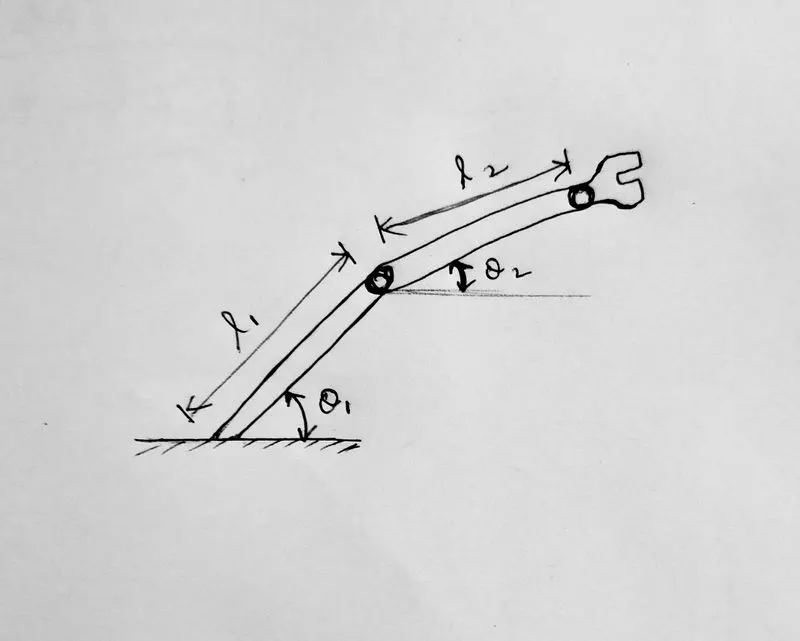
Now by looking at the above image, we can easily fix the co-ordinates. The co-ordinates for the given links will comes as follows:
x0=0, y0=0
x1= l1*cos θ , y1= l1*sin θ
x2= x1+(l2*cos θ) , y2=y1+(l2*sin θ)
Now when we plot all these coordinates in the MATLAB by using the following codes:
%inputs
l1=1;
l2=0.5;
theta1=45;
theta2=30;
%coordinates
x0=0;
y0=0;
x1=l1*cosd(theta1);
y1=l1*sind(theta1);
x2=x1+l2*cosd(theta2);
y2=y1+l2*sind(theta2);
%plotting the values as line to visualise the arm clearly
line([x0 x1],[y0 y1],'linewidth',3,'color','b');
line([x1 x2],[y1 y2],'linewidth',3,'color','r');
Codes explaination:
- Inputs are provided to the matlab in the name of variables l1,l2,theta1,theta2 with the given values.
- Then the co-ordinates are given as the next set of variables
- Then to plot the both lines ‘line’ code is used along with the co-ordinates and the ‘linewidth’ code is used to define the width of the line which is plotted and ‘color’ code represent the colour of the line.
- The 'cosd' code is used to use cosine formula. the d is included to convert the values of sin or cos in radian mode
Now when you run this program you will get the following output for the given length & θ values:
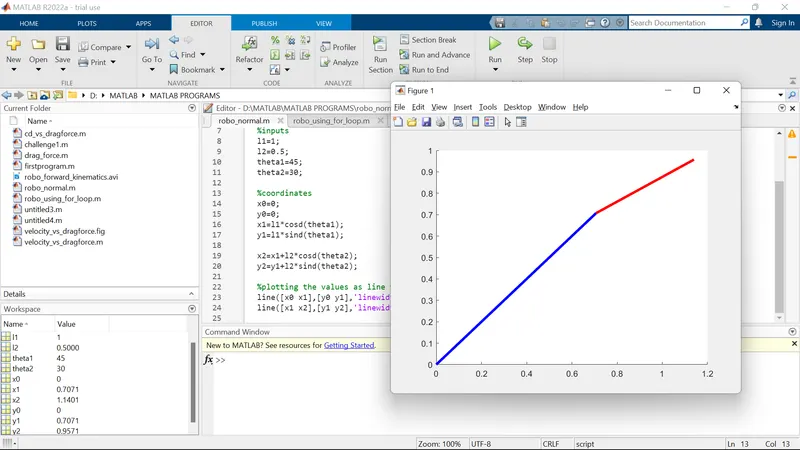
Note: Blue colour represent the l1 for the given code ‘b’ in the matlab & ‘r’ code represent the l2 link which is red.
But to stimulate the links for the different θ values, we need to include 'for' loop in the above program.
To stimulate the lines using 'for' loop:
As discussed earlier, we have to stimulate both the links for the different values of θ1 & θ2, ‘for’ loop is used. And also ‘linspace’ code is used to provide n number for values between two given inclination values.
for i=1:length(theta1)
THETA1=theta1(i);
for j=1:length(theta2)
THETA2=theta2(j);
Codes explaination:
These lines of codes represents that for different values of θ1, we will have different values for θ2 as well.
Now when we include the the previous co-ordinates inside these for loop, we will get the as follows:
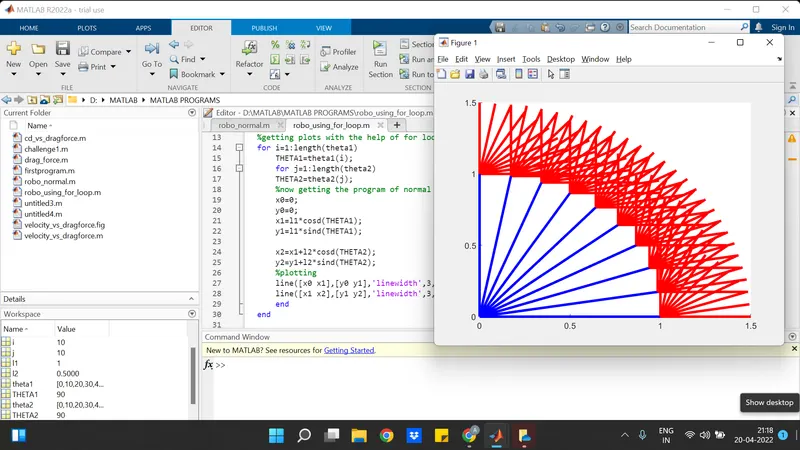
for i=1:length(theta1)
THETA1=theta1(i);
for j=1:length(theta2)
THETA2=theta2(j);
%now getting the program of normal plots with x and y cordinates
x0=0;
y0=0;
x1=l1*cosd(THETA1);
y1=l1*sind(THETA1);
x2=x1+l2*cosd(THETA2);
y2=y1+l2*sind(THETA2);
Now when we use the ‘plot’ code for plotting, only the recent plot command will get executed. So we can use ‘holdon’ code to execute both the plotting commands. Also the another way to plot these lines is by using the ‘plot’ code in the same program line. And hence the final program will look line:
% Program to stimulate forward kinematics of a 2R robotic arm with explainations
clear all
close all
clc
%inputs
l1=1;
l2=0.5;
theta1=linspace(0,90,10);
theta2=linspace(0,90,10);
| These four lines represent the inputs for the program which defines the length and inclination values. The 'linspace' code is used to get n number of values in between the given two inclination values |
%getting plots with the help of for loop
ct=1
for i=1:length(theta1)
THETA1=theta1(i);
for j=1:length(theta2)
THETA2=theta2(j);
| In these lines, the new values for different theta values are attained with the help of the for loop and the i and j are the loop counters, which will loop the theta values and the 'ct' code will take the next next values. |
%now getting the program of normal plots with x and y cordinates
x0=0;
y0=0;
x1=l1*cosd(THETA1);
y1=l1*sind(THETA1);
x2=x1+l2*cosd(THETA2);
y2=y1+l2*sind(THETA2);
%plotting
plot([x0 x1],[y0 y1],[x1 x2],[y1 y2],'linewidth',3);
axis([0.1 1.5 0 1.5]);
pause(0.03);
| This 'plot' code is used to plot the co-ordinate points and 'linewidth' code is used to define the width of the plotting line, 'axis' code is used to define the axis poins of x and y axis, and the 'pause' code is used to slow down or fastup our animation. |
%to get an smooth animated video
M(ct)=getframe(gcf);
ct=ct+1;
end
end
| The M(ct) code is used to save the counter with the saved animation and ct=ct+1 will take up the next next values |
%to generate a movie
movie(M);
videofile=VideoWriter('robo_forward_kinematics.avi','Uncompressed AVI');
open(videofile);
writeVideo(videofile,M);
close(videofile)
Explanation of codes:
plot([x0 x1],[y0 y1],[x1 x2],[y1 y2],'linewidth',3);
axis([0.1 1.5 0 1.5]);
The above two lines of the program is used to plot the respective coordinates and the axis end points.
ct=ct+1;
This code is used to counter the values starting from 1.
M(ct)=getframe(gcf);
This line of the code represent the movie file with the smooth frame.
movie(M);
videofile=VideoWriter('robo_forward_kinematics.avi','Uncompressed AVI');
open(videofile);
writeVideo(videofile,M);
close(videofile)
These four lines of codes represent to create a videofile, write a videofile, and get an animated video
Errors faced:
- Forgot to add the ‘end’ code for the for loop.
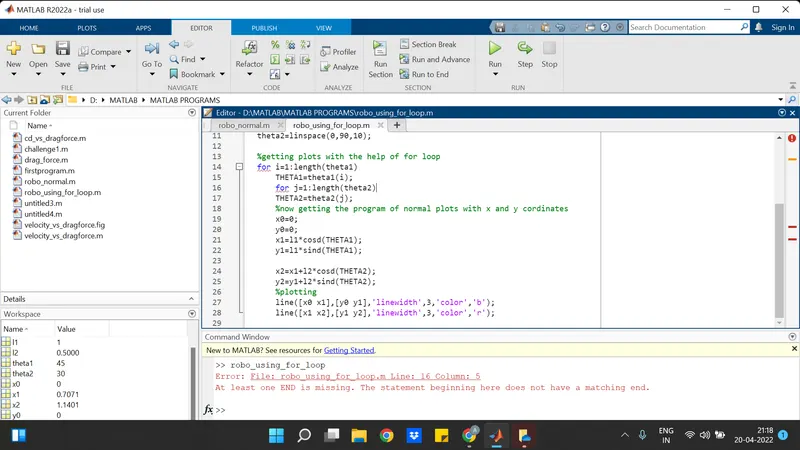
- Wrongly mentioned the ‘videowriter’ code
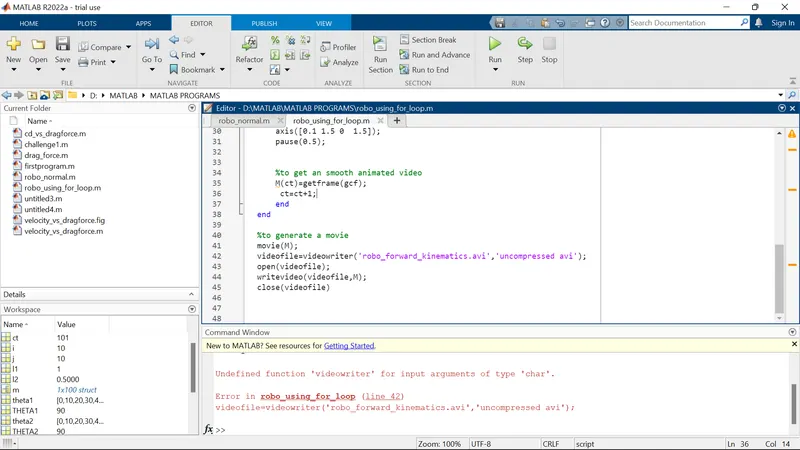
Steps done to overcome the errors:
- Checked the error line and will again look at the video once again
- Tried sometimes to change the characters of 'videowriter' code and atlast found the correct sequence of letters.
RESULTS:
When executing the final program, the smooth animated video of the stimulation of the forward kinematics of 2R- robotic links is processed.
video link: https://drive.google.com/file/d/1PY5wPV1CZJn6RIeFWvy1vVHBcWRPh5P8/view?usp=sharing
YOUTUBE LINK: https://youtu.be/e0mr-6iCsj4
Program to animate the forward kinematics of a 2R robotic arm:
% Program to stimulate forward kinematics of a 2R robotic arm

clear all
close all
clc

%inputs
l1=1;
l2=0.5;
theta1=linspace(0,90,10);
theta2=linspace(0,90,10);

%getting plots with the help of for loop
ct=1
for i=1:length(theta1)
    THETA1=theta1(i);
    for j=1:length(theta2)
    THETA2=theta2(j);
    %now getting the program of normal plots with x and y cordinates
    x0=0;
    y0=0;
    x1=l1*cosd(THETA1);
    y1=l1*sind(THETA1);

    x2=x1+l2*cosd(THETA2);
    y2=y1+l2*sind(THETA2);
    %plotting

    plot([x0 x1],[y0 y1],[x1 x2],[y1 y2],'linewidth',3);
    axis([0.1 1.5 0  1.5]);
    pause(0.03);


    %to get an smooth animated video
    M(ct)=getframe(gcf);
     ct=ct+1;
    end
end

%to generate a movie
movie(M);
videofile=VideoWriter('robo_forward_kinematics.avi','Uncompressed AVI');
open(videofile);
writeVideo(videofile,M);
close(videofile)