Week 2- 2R Robotic Arm Challenge
Aim: To simulate the forward kinematics of a 2R robotic arm
Principle :
A 2R robotic arm has 2 links and 2 rotational axis
one link is connected to the base while other link is connected to the first link.
link1 moves at angle thetha1 and link2 moves at an angle thetha 2.
The position of the link 1 and link2 is x0,y0,x1,x2,y1,y2.
since the starting point of the link1 is connected to the base its position will be zero. Hence
x=0,y=0.
The position of the ending point of the link1 will be
x1 = l1cosd(thetha1)
y1 = l1sind(thetha1)
where l1 and l2 are length of the link1 and link2 respectively.
The ending point of the link1 and starting point of the link2 is same
The position of the ending point of the link2 is
X2 = x1+l2cosd(thetha2)
y2 = y1+l2sind(thetha2)
Program
clear all
close all
clc

%inputs
l1 =1;
l2= 0.5;

% angles for link1 and link2
theta1 = linspace(0,90,40);
theta2 = linspace(0,90,40);

ct = 1;
for i = 1:length(theta1)
    Thetha1= theta1(i);
    for j=1:length(theta2)
        Thetha2 = theta2(j);

        x0=0;
        y0=0;

        x1=l1*cosd(Thetha1);
        y1=l1*sind(Thetha1);

        x2=x1+l2*cosd(Thetha2);
        y2=y1+l2*sind(Thetha2);

        plot([x0,x1],[y0,y1],[x1,x2],[y1,y2],'linewidth',3);
        axis([-0.1 1.5 0 1.5]);
        pause(0.1);
        M(ct) = getframe(gcf);
        ct = ct +1;
    end
end
movie(M)
videofile = VideoWriter('animation.avi','Uncompressed AVI');
open(videofile)
writeVideo(videofile,M)
close(videofile)
Explanantion of the code
clear all function is used to clear all the variables and memory cache
close all function is used to clear the plots and graphs
clc is used to clear the command window
l1 and l2 are the inputs of the length of the robotic arm
Since both link1 and link2 moves at the various angle of theta linspace command is used
The linspace function in MATLAB provides us with an array/matrix comprising the desired number of values starting from and ending at a declared value.
Since each value of thetha 1 and thetha 2 is to be executed For loop is used
where i and j are the variables
to exit the for loop end command is used
After the values are generated we need to plot a graph hence Plot command is used
Pause command is used to determine the speed of the animation
once the animation is done we need to caputure the frames.for that we use
M(ct)=getframe(gcf)
The frames are stored in a array called M
Onced the frame are stored we need to create a movie hence function M is used
once the movie is created we need to save a video file with a name hence videowriter command is used where is the name of the video and format is entered
Open(videofile) open video file saved
close(videofile) closes the video
Problems faced:
once the Plot is created .The movement of link2 was not showing properly
To rectify Axis command is used to fix the axis in detremined value
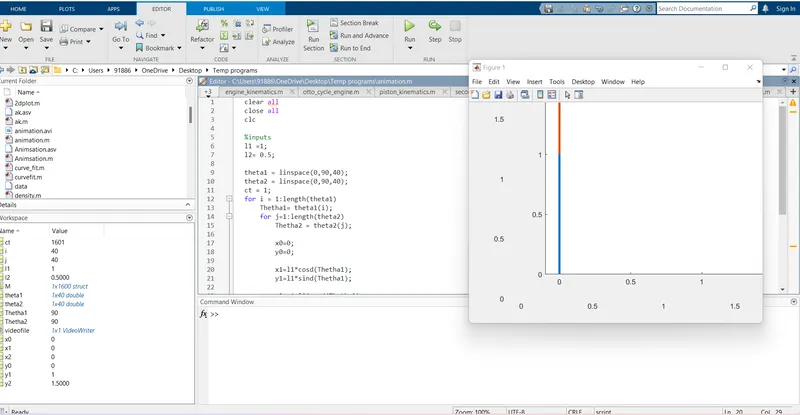
Output
The animation for the above program is shared in the link below
https://drive.google.com/file/d/1kqu3boNy1qi3mxCkDaNWM3ozBAGAYp8F/view?usp=sharing
The display of output screen