Week 2- 2R Robotic Arm Challenge
Aim : Write a program in Matlab to simulate the forward kinematics of a 2R Robotic Arm.
Theory :
Forwarded Kinematics :- This is the process of obtaining coordinates in a 2D Plane (cartesian coordinates)of motion of Kinematic Pair. Here in this programing we will be giving 1 Degree of Freedom to the kinematic arm for its motion (ie rotation) by giving it angular constraints. The usage of the technology of the Robotic Arm has been expanded with the growing era. These are used in the applications such as Building consructions, Assembly lines of various industries such as Automotive, Food and Baverages, Pharmaceutical etc.
As per the aim we will be employing two arms (links) of different radius or of same radius with one end of the first arm being fixed to the base of the 2D Plane with Z axis being the axis of rotation and rotation being taken up on the XY Plane of the cartesian coordinate.
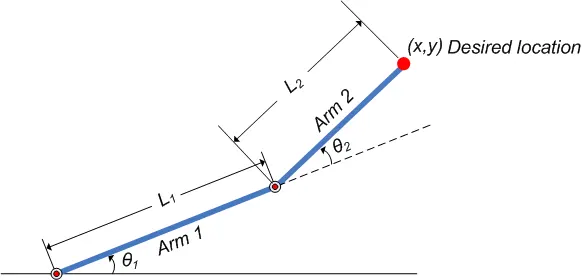
It can be seen in the figure that the mechanism consists of 2 links each with different length. we, as required, will be providing the length of the arm in the coading and as per its location of operation we will be providing the angular constraints. This 2D robotic arm will not be allowed to move in vertical and horizontal directions. As we can see from the figure that Theta 1 is the angle traced by the arm 1 while its motion and theta 2 is traced by arm 2 while its motion during the operation of the mechanism.
The Code
clc
clear all
close all
%Defining the parameters of the two arms and declaring the angular constraints
l1=1;
l2=0.5;
% 10 angular positions are being defined
th1= linspace(0, 90, 10);   % Theta 1 is for the angle for arm 1 ( 1st arm)
th2= linspace(0, 90, 10);   % Theta 2 is for the angle for arm 1 ( 2nd arm)
ct=1;
% involving the loop for successive iteration of robotic arm along the angular position.
for i=1:length(th1)
    TH1=th1(i);
    for j=1:length(th2)
        TH2=th2(j);
        x0=0;
        y0=0;
        x1=l1*cosd(TH1);
        y1=l1*sind(TH1);

        x2=x1+l2*cosd(TH2);
        y2=y1+l2*sind(TH2);
        plot([x0 x1],[y0,y1],[x1 x2], [y1 y2], 'LineWidth',3)
        axis([-0.1 1.5 0 1.5])
        pause(0.033)
        M(ct)=getframe(gcf);    % declaring the variable M to store the successive positioning of the arm
        ct=ct+1;
    end
end
% creating the video file for the representation on motion of Robotic Arm
movie(M)
videofile= VideoWriter('fowrootic_arm.avi','Uncompressed AVI')
open(videofile)
writeVideo(videofile,M)
close(videofile)
Explaination of the Code :-
1. Initially 3 function CLC, CLEAR ALL, CLOSE ALL was defined the functions are defined below :-
CLC - Clear all the residual data from the previous coding on the command screan.
CLEAR ALL - clear up the system memory.
COSE ALL- Close all the previous running windows for graphs and GIFs
2. length of the two arms of the Mechanism is declared as l1&l2. l1=1,l2=0.5.The angular input is defined for the two arm in the form of an array with start angle is 0 degree and stop angle is 90 degree. the interval between the start angle and the stop angle given is 10.
3. initially a counter is declared with the initial value of 1 to count the no of times the For Loop has been executed. The start position of the arm is declared as (0,0) on the cartesian plane. As Theta 1 will be controlling the position of arm 1 the following Equation is used to locate the Xcoordinate and Y coordinate of the arm 1:-
x1=l1*cosd(TH1)
y1=l1*sind(TH1)
Since arm 2 will move irrespective of arm 1 we have given another angular constraint to as theta 2. For its independent motion and taking into account its connectivity to arm following Equation is used to locate the Xcoordinate and Y coordinate of the arm 1:-
x2=x1+l2*cosd(TH2)
y2=y1+l2*sind(TH2)
4. Further the necessary requirement is to plot the curve . As we need to plot two arm simultaneously the code mentioned at line 23 as plot([x0 x1],[y0,y1],[x1 x2], [y1 y2], 'LineWidth',3). Pause with 0.33 sec has been given to the execution of every curve which is being plotted in the graph for its continuous motion. The same has been captured in the Frame by declaring the variable M.
5. After storing every graph generated frame in the variable, we create a avi format file in the drive which has the function in the hard disc. The created avi file will be the required which consist of the animation of the movement of the animation.
OUTPUT:- The output of the code is as follows:-
https://youtu.be/dM4PRN6IA88. Given youtube link may be referred to check out the output of the code.
Error while coading the Given Programme :-
1. While declaring the code the 'ct' the counter for execution of the For Loop was declared as zero. Since the same is being used inthe function get frame therefore it cannot be initially declared as zero. Else the figure given below can be refferd for the error which will generate while running this program :-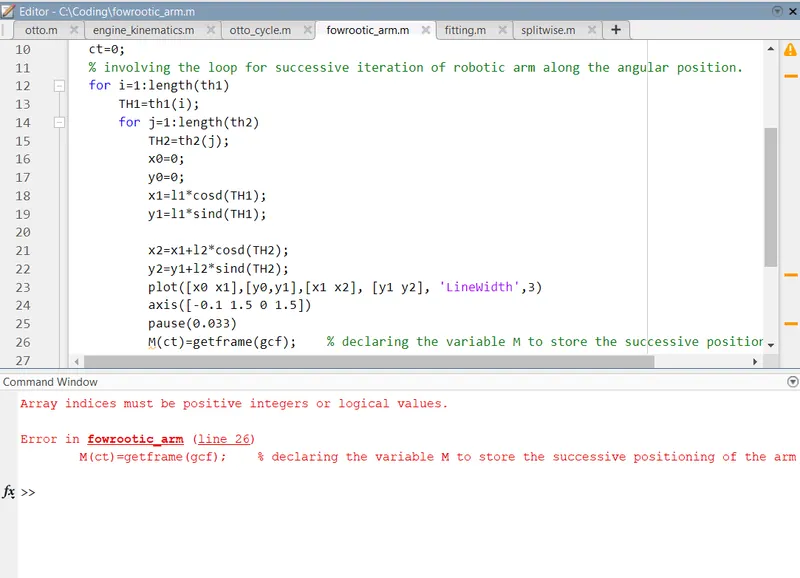
so to overcome this error one must not declare the counter of the loop as zero. It must be declared as 1 and this it should be used for storing the getframe function.