2R Robotic Arm Plotting using MATLAB.
The below attached is the program in Matlab to simulate the forward kinematics of a 2R robotic arm.
% A program in Matlab to simulate the forward kinematics of a 2R Robotic Arm
clear all
close all
clc

% Inputs
l1 = 1;
l2 = 0.7;

theta1 = linspace (0,90,10);
theta2 = linspace (0,90,10);
ct = 1;
for i = 1:length(theta1)
    THETA1 = theta1(i);
    for j = 1:length(theta2)
        THETA2 = theta2(j);
        x0 = 0;
        y0 = 0;

        x1 = l1*cosd(THETA1);
        y1 = l1*sind(THETA1);

        x2 = x1+l2*cosd(THETA2);
        y2 = y1+l2*sind(THETA2);

        % Plotting
        plot([x0 x1],[y0 y1],[x1 x2],[y1 y2],'linewidth',3)
        axis([-0.1 1.5 0 1.5])
        pause(0.06)
        M(ct) = getframe(gcf);
        ct = ct+1;
    end
end
movie(M)
videofile = VideoWriter('forward_kinematics.avi','Uncompressed AVI');
open(videofile)
writeVideo(videofile,M)
close(videofile)
This is the final code with no errors.
Code Explanation:
So I started off by giving the heading line for the project as "A program in Matlab to simulate the forward kinematics of a 2R Robotic Arm"
Before Writing a code, it's important to start with clear all, close all, and clc commands so I wrote those down.
In the next step of the code, we defined the inputs and their values. Length of arm1 and arm 2 of the robot were both defined, both theta 1 and theta 2 for the arms were defined by using the linspace command (the function of the linspace command it generates equally spaced vectors like an array). So in the case of theta 1 and theta 2, linspace(0,90,10) means that Matlab will generate a row vector 90 of 10 points linearly spaced between and including 0 and 90 i.e. (0 10 20 30 40 50 60 70 80 90).
In the next steps, I was going to include the for loop command for the project, before that I included a counter command (a counter command is a variable that counts an even in the loop). Now that I have included the counter command the for loop command can do it work properly (a for loop is a repetition control structure that allows you to efficiently write a loop that needs to execute a specific number of times).
Now in for loop command, I will assign the variable "i" as 1 is to the length of theta1 and, as this theta1 will have multiple angle values we will give it a new variable "THETA1" now same for variable "j" it is also 1 is to the length of theta2 and it will be "THETA2". After all this, I wrote down the x0 and y0 values and the formulas required for the calculation of x1,x2,y1, and y2.
The next is the plotting of the graph with all the values of x0,y0,x1,y1,x2, and y2 in the next line I included the axis command for the proper plotting of the graph. A pause command was also included for the pausing of the command for a certain time, for this project the pause time included was 0.03s. Then the M command was included to capture the frames every time the for loop runs and in the final step +1 was added to the counter variable "ct" this will help to increment the frames every time the for loop runs. Now to end both the for loops the end command was included in the final part.
Now to create the movie of the animation of the robotic arm, I used the movie command. On the next line, the videofile command was used to give the name for the video file. The format of the video file was in .avi, now on the next line the open command was used to open the video file and then the write command was included to write the video with the plotted frames and in the end, the close command was included to close the file.
The bellow drive link contains the movie animation of the robotic arm.
https://drive.google.com/file/d/10tmxsAm7TEC4fmcwkhnrPdge-i43Z6hU/view?usp=sharing
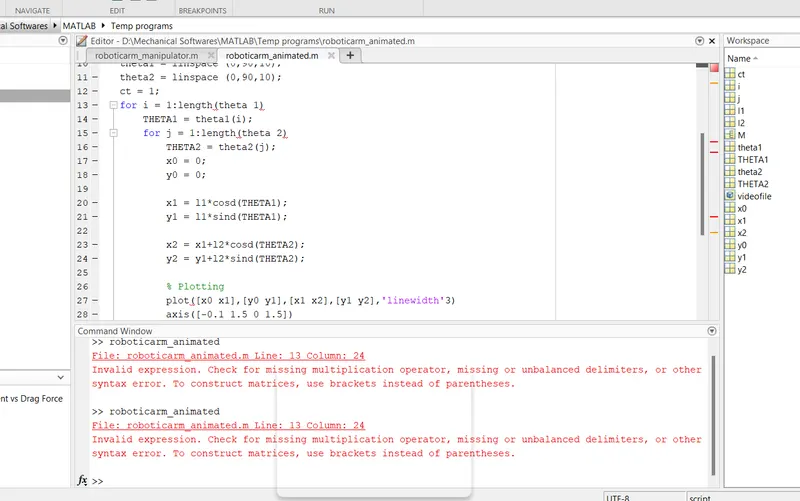
Errors I faced while programming:
The 1st error was on line no.13 and line no.15 it was a small typo I wrote "theta1" as "theta 1" and the same for "theta2" as "theta 2".
The next error was on line no.27 where I missed including a "," after the linewidth command.
I rectified the programs by making changes and all the errors were removed.