Week 2- 2R Robotic Arm Challenge
Aim: To write a program to simulate the forward kinematics of 2R robotic arm manupulator using MATLAB
Theory: Robotics is an Emerging Feald To know about robotics we need to know the kinematics of the linkages
if we are able to figure out how the robot is going to move then we cen figure out the work space.
The work space refores to the posible location that the robot cen reach.
there is a lot meny Appications like welding,brasing,holding,cutting ,joining
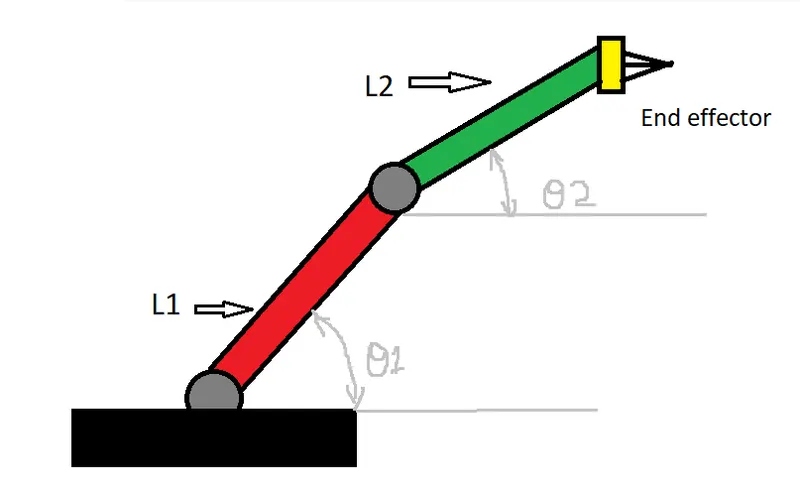
A 2R Robotic arm contains a 2 links & 2 rotational joints,
The link 1 is going to make an angle of theta1 with respect to x axis,
and link 2 is going to make an angle of theta2 with respect to x axis.
Procedure to write a program :
step 1)To start the program in matlab we need to clear the privious calculations,to do that we have 3 commonds
clear all : To clear the work space priviously,
close all : To close the plots priviously,
clc : To clear the command window.
step2) To give the following inputs where link1 is 1mt and link 2 is 0,5mt
theta1 is 90 digrees & theta 2 is 90 digrees using linspace command
the linspace command used to provide the equal gap points with in the range.
theta1=linspace(0,90,10)
theta2=linspace(0,90,10)
step3) To make a For loob
In order to change the angle of theta manually we use for loop to male the theta value chanes by program
for each value of the theta 1 we are looping the value of theta 2. As the values of i changes we need to take theta1 and theta2 from the original arrays and then we need to assign to the vereables called THETA 1 AND THETA2
which is capitalised where the capital or upper case theta is a 1 vareable it wont be an array
hear the cordinates of starting point of link 1 is defined
and the cordinates of starting and ending points of link 2 have define
hear we use cosd and sind is used to give the angle in digrees.
step 4) plot the graph using the input and output links of the joints using plot command and line width of 3
lable the axis of the graph from x-axis and from y-axis
use pouse command to for pousing the program for a certain time before processing the new values.
step 5)Now to creat an animation we need to use M(ct) where ct is the counter vereable which is given above the for-loop
for incriment of the frame 1 is added
now to assigne the file name and file formate in .AVI. VideoWriter command is used. and to open the video file open(videofile) command is used And to write the vide with plot frame writerVideo command is used and to close the video close(videofile) command is used
step 6) After the program is don. click the run button or F5 shortcut on keybord to run the command then it will run the command and displays the animation and then the video and then the video is going to save on the file in which the program file path is alredy saved
The following 4. Errors that i faced wile programing:
ERROR-1. The folliwing error that i faced wile i placed ct=ct+1; before (M)ct=getframe(gcf);
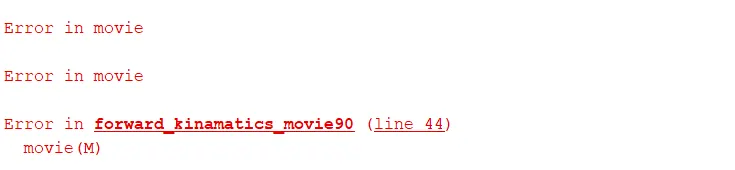
To over come the above error i changed the positions ct=ct+1; after (M)ct=getframe(gcf);
2. The following error which i got in the command window wile i forget to use end command for the second for loop

To over come the above error i placed end command after the for loob
3. The following error that i faced To give file name and formate videowriter
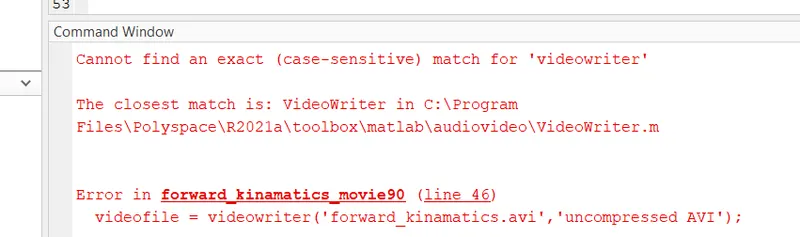
To over come the the above error i used capital V and capital W in the VideoWriter
4. The following error that i faced To make the plots togather and frame command writevideo
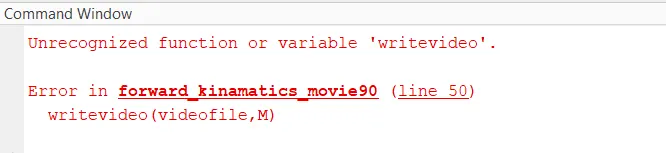
To over come above error i used capital V in the command writeVideo
code:
clear all
close all
clc

%Following inputs
%length of link1
l1 = 1;
%length of link2
l2 = 0.5;

%Angle between x-axis and link1
theta1 = linspace(0,90,10);
%Angle between x-axis and link2
theta2 = linspace(0,90,10);

ct=1;
for i=1:length(theta1)
    THETA1=theta1(i);
    for j=1:length(theta2)
        THETA2=theta2(j);

       %cotdinates
       x0=0;
       y0=0;
       x1=l1*cosd(THETA1);
       y1=l1*sind(THETA1);
       x2=x1+l2*cosd(THETA2);
       y2=y1+l2*sind(THETA2);

      %ploting
      plot([x0 x1],[y0 y1],[x1 x2],[y1 y2],'linewidth',3)
      axis([-1.5 1.5 0 1.5])
      pause(0.1)

      % For creating animation
      M(ct) = getframe(gcf);
      ct=ct+1;

    end
end

  % To create movie
  movie(M)
  % To give file name and formate
  videofile = VideoWriter('forward_kinamatics.avi','uncompressed AVI');
  % To open video
  open(videofile)
  % To make the plots togather and frame
  writeVideo(videofile,M)
  % To close the video
  close(videofile)
Reasult: Hence the step wise explanation, errors that i faced with screenshot and to overcome those errors are provided
And the youtube link of the forward kinematics of a 2R Robotic Arm simulation of animatin video is given below