Week 2- 2R Robotic Arm Challenge
AIM:
- To write a program in Matlab to simulate the forward kinematics of a 2R Robotic Arm.
OBJECTIVE:
- a program in Matlab to simulate the forward kinematics of a 2R Robotic Arm.
- the You tube link for an animation which i got after the simulation of program.
THEORY:
Robotic Arms are machines that are programmed to execute a specific task or job quickly, efficiently, and extremely accurately. Generally motor-driven, they’re most often used for the rapid, consistent performance of heavy and/or highly repetitive procedures over extended periods of time, and are especially valued in the industrial production, manufacturing, machining and assembly sectors.
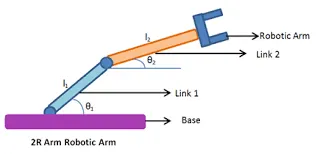
fig. Robotic Arm
PROSEDURE:
- First start the program in MATLAB with
clear all(clear all the previous data)
close all(close all the previous plot or figure)
clc(clear the command window)
- Now give the inputs as
l1 = length of link1
l2 = length of link2
theta1 = angle made by link1 with respect to base
theta2 = angle made by link2 with respect to base
- in order to simulate the program we need to give the coordinate of the links like it origin is (0,0) and tha theta value varies from 0 to 90 or as desire for the different position of robotc arms.
PROGRAM:
% program for forward kinematics of 2R robotic arm manipulator
clear all
close all
clc

%inputs
l1 = 1;
l2 = 0.5;

theta1 = linspace(10,90,10);
theta2 = linspace(10,90,10);

ct = 1
for i = 1 : length(theta1)
    THETA1 = theta1(i)

    for j = 1 : length(theta2)
        THETA2 = theta2(j)

       % co-ordinates
        x0 = 0;
        y0 = 0;

        x1 = cosd(THETA1);
        y1 = sind(THETA1);

        x2 = x1 + cosd(THETA2);
        y2 = y1 + sind(THETA2);
       % plotting

        plot([x0 x1],[y0 y1],[x1 x2],[y1 y2],'linewidth',3);
        axis([0 2 0 3]);
       pause(0.03)
       M(ct) = getframe(gcf);
        ct =ct+1;
    end
end

movie(M);
videofile = VideoWriter("forward_kinamatic_arm.avi","Uncompressed AVI");
open(videofile);
writeVideo(videofile,M);
close(videofile);
ERRORS:
No errors found when i executed this code.
RESULT & CONCLUSION:
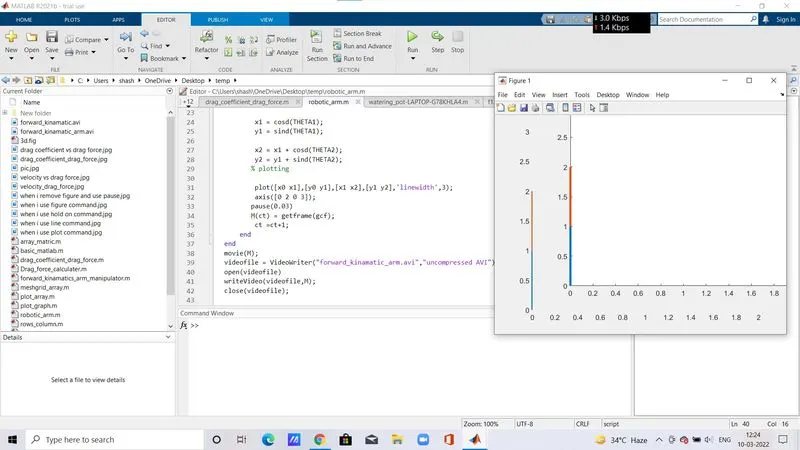
YOUTUBE LINK:
https://www.youtube.com/watch?v=DQ6jj6n8Yyc