Week 2- 2R Robotic Arm Challenge
Program to simulate the forward kinematics of a 2R Robotic Arm
% Forward kinematics of a 2R Robotic Arm
clear all
close all
clc
L1 = 1
L2 = 0.5
theta1 = linspace(0,90,5)
theta2 = linspace(0,90,5)
ct=1
for i = 1:length(theta1)
    Theta1 = theta1(i)
    for j = 1 :length(theta2)
        Theta2 = theta2(j)
x0 = 0
y0 = 0
X1 = L1*cosd(Theta1)
Y1 = L1*sind(Theta1)
X2 = X1 + L2*cosd(Theta2)
Y2 = Y1 + L2*sind(Theta2)
%Plotting
plot([x0 X1],[y0 Y1],[X1 X2],[Y1 Y2],'linewidth',2)
axis([-0.1 1.5 0 1.5])
pause(0.3)
M(ct) = getframe(gcf)
ct=ct+1
    end
end
movie(M)
videofile = VideoWriter('forward_kinematics.avi','Uncompresses AVI')
open(videofile)
writeVideo(videofile,M)
close(videofile)
You tube link for an animation is provided below
Step-wise explanation of your code
- The length of first robotic arm is given as L1 and the length of second robotic arm is given as L2.
- The angle between x axis and both arm theta 1 and theta2 are given with the help of linspace command which will provide 5 different values of theta between o to 90 degree.
- After that contour command is use.
- Then the for loop is used for two times due to which 25 figures will be generated.
- The different values of theta1 and theta2 will help to proved different values of X1,X2,Y1,Y2,
- The first arm will be plotted in xaxis between -0.1 to 1.5 and the second arm will be plotted in yaxix between 0 to 1.5
- Then now to create a movie we will save all these frames in an array called M
- Now will generate a file where we will save it with the name of forward_kinematics.avi
- After that we will open the file and close videofile.
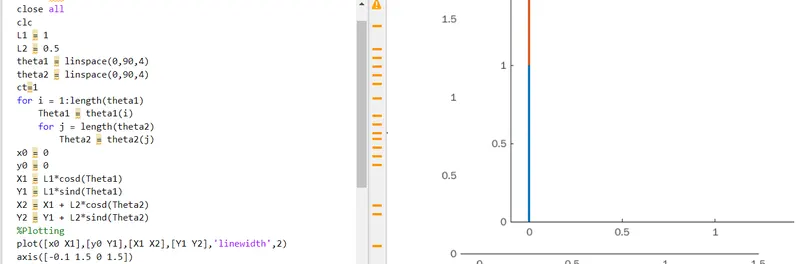
The errors faced while programming was that when writing the close I faced a problem is applying the second loop in which I forgot to write the proper code I again checked the code several times them after rechecking it again and again I got the error.The screenshot of the code having error and result is given below