Week 2- 2R Robotic Arm Challenge
AIM:
Write a program in MATLAB to simulate forward kinematics of a 2R robotic arm.
FORMULA USED:
x1=l1*cos(theta1)
y1=l1*sin(theta1)
x2=x1+l2*cos(theta2)
y2=y1+l2*sin(theta2)
where, x1 is the x coordinate of end of first arm/start of second arm
y1 is the y coordinate of end of first arm/start of second arm
x2 is the x coordinate of end of second arm
y2 is the y coordinate of end of second arm
l1 is the length of first arm
l2 is the length of second arm
theta1 is the angle made by first arm to the horizontal
theta2 is the angle made by second arm to the horizontal
Note that these formulae are different in MATLAB involving cosd and sind to compute angles which are in degrees.
The formulae can be easily found out by simple geometry and trigonometry.
OBJECTIVE:
Create an animation file of the plot.
CODE:
%2R robotic arm
%2 arms(2 lines,3 points,2 angles)
%Lines/length of arms(l1, l2)
%Points/end points of arms(x0,y0),(x1,y1),(x2,y2)
%Angles of arms from horizontal(theta1, theta2)


l1=1;
l2=0.75;
%To know different positions of 2R robotic arm, different values of
%theta(different positions of arms) are required
theta1=linspace(0,90,18);
theta2=linspace(0,90,18);

ct=1;
%for loop for different positions of first arm
for i=1:length(theta1)
    THETA1=theta1(i);
    %for loop for diffrerent positions of second arm for each position of
    %first arm
for j=1:length(theta2)
    THETA2=theta2(j);
    %Coordinates
    x0=0;
    y0=0;

    x1=l1.*cosd(THETA1);
    y1=l1.*sind(THETA1);

    x2=x1+l2.*cosd(THETA2);
    y2=y1+l2.*sind(THETA2);

    %Plotting
    plot([x0 x1],[y0 y1],[x1 x2],[y1 y2],'linewidth',4)
    %Manual allocation of range of the axes in the plot
    axis([-1 2 -1 2])
    pause(0.01)
    M(ct)=getframe(gcf);
    %M is a variable used to store images for video
    ct=ct+1;
end
%end of 2nd for loop
end
%end of 1st for loop

%Video file of plot
movie(M)
videofile=VideoWriter('Robotic_arm_challenge.avi','Uncompressed AVI');
open(videofile)
writeVideo(videofile,M)
close(videofile)
EXPLANATION:
1. Comment
2. Comment
3. Comment
4. Comment
5. Comment
6.
7.
8. Length of the first arm is assigned variable 'l1'(1 metre). Output is suppressed by use of semicolon.
9. Length of the second arm is assigned variable 'l2'(0.75 metre). Output is suppressed by use of semicolon.
10. Comment
11. Comment
12. 'theta1' is the variable assigned to angle made by first arm to the horizontal. linspace command assigns 'theta1' a set of values from 0 to 90 degrees with a gap of 5 degrees(90/18=5).
Output is suppressed by use of semicolon.
13. 'theta2' is the variable assigned to angle made by second arm to the horizontal. linspace command assigns 'theta1' a set of values from 0 to 90 degrees with a gap of 5 degrees(90/18=5).
Output is suppressed by use of semicolon.
14.
15. Variable 'ct' is necessary to be defined here to avoid error in the code. THe significance of ct is explained later in this report.
Output is suppressed by use of semicolon.
16. Comment
17. For plotting of different positions of first arm, one at a time, for loop is required.
'i' is the index for the loop, to plot for every position of the first arm,for loop must run as many times as the number of values 'theta1' has, thus 'i' should change for every angle of the first arm.
'length(theta1)' is the number of different values of 'theta1' which according to linspace command are 18. From this line, the code will be repeated as many times as 'i', i.e. 18 to the line where first loop ends.
18. 'theta1' has to be changed every time on completion of one instance of for loop, thus 'theta1(i)' is used to change 'theta1' to next value.
Substituting the value of angle as-it-is in the calculations can complicate the code and is not good for presentation of the code. Thus a new variable 'THETA1' is assigned to the changed value of 'theta1'.
Output is suppressed by use of semicolon.
19. Comment
20. Comment
21. It should be noted that for one position of first arm, second arm can move from 0 degree to 90 degrees. Thus, a second for loop inside of the first for loop is necessary to plot all the positions of robotic arm.
As similar to first arm, positions of second arm are required to be plotted one at a time. The values of 'theta2' vary in a similar fashion as values of 'theta1'.
It should also be noted that variable 'i' is already in use by the first for loop and hence cannot be used as the index here, thus variable 'j' is used.
From this line, the code will be repeated 'j' times i.e. 18 until the line where second loop ends.
22. 'theta2' varies similarly as 'theta1', the explanation of line 18 is perfectly applicable here also. Care should be taken to insert the correct index of the loop which is 'j'.
Output is suppressed by use of semicolon.
23. Comments
24. Abscissa of first point is assigned a variable x0(0). Output is suppressed by use of semicolon.
25. Ordinate of first point is assigned a variable y0(0). Output is suppressed by use of semicolon.
26.
27. Abscissa of second point, i.e. the end point of first arm and starting point of second arm is assigned variable 'x1' and calculated by using simple trigonometry.
As value of 'theta1' changes for each instance of for loop, 'x1' will be changed. Output is suppressed by use of semicolon.
28. Ordinate of second point, i.e. the end point of first arm and starting point of second arm is assigned variable 'y1' and calculated by using simple trigonometry.
As value of 'theta1' changes for each instance of for loop, 'y1' will be changed. Output is suppressed by use of semicolon.
29.
30. Abscissa of third point, i.e. the end point of second arm is assigned variable 'x2'. By geometry, formula for 'x2' can be found and inserted in MATLAB. Output is suppressed by use of semicolon.
31. Ordinate of third point, i.e. the end point of second arm is assigned variable 'y2'. 'y2' can be calculated similarly as 'x2'. Output is suppressed by use of semicolon.
32.
33. Comment
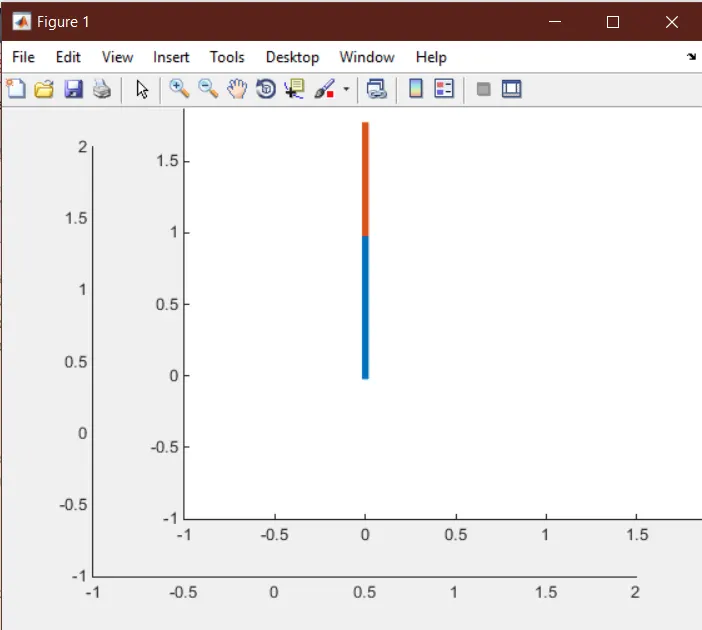
34. 'plot' command is used to plot the position of first and second arms, the first line will be plotted between points (x0,y0) and (x1,y1). The second line will be plotted between (x1,y1) and (x2,y2).
Thus the position of first arm and second arm will be knwon for one instance of first and second loops. For all positions this command will be executed 324 times due to the loops(18*18=324). Linewidth is assigned to be 4.
35. Comment
36. If the range of axes is not allocated then MATLAB will take it as default starting with zero. This could cause the extreme positions of the arms hard to notice on the graph.
Thus axis command helps to assign range to the axes. The syntax is similar as used in plot command, first start and end x-coordinates are defined and then start and end y-coordinate are defined.
37. pause(n) command pauses the running of the code for n seconds and waits user response. In this case, no such response is needed. For clear visualization of the robotic arm, this command is necessary.
38. The 'getframe' command takes a snapshot of the current plot and returns it into a movie frame. With for loop, 'getframe' can be used to assemble many such frames for playback.
'gcf' returns the handle of current figure. With 'getframe' command, the stored handle of the figure can be queried directly. In this case, 'M' variable stores the figures obtained by 'gcf' and 'getframe'.
This line is also necessary to be repeated to get a number of frames for compilation of video. Without 'M(ct)' M variable only stores one figure/frame and the video can not be compiled. Output is suppressed by use of semicolon.
39. Comment
40. For all the figures/frames to be stored in the variable 'M', it is necessary for 'ct' to progress with every instance of for loop, thus every time a plot is done, it is converted to frame and stored in 'M', 'ct' is incremented.
'M' needs to store 324 images, thus 'ct' needs to be incremented 324 times. Output is suppressed by use of semicolon.
41. end command in the code specifies the end of one for loop. After compiling the code upto here, MATLAB will retrun to the first line of the for loop and increment the count index variable and continue to run the for loop for all instances of count index variable.
In MATLAB, the loop which is started last needs to be ended first, thus this is the end of second for loop. This loop is repeated 18 times for every instance of the first for loop.
42. Comment
43. After this command, MATLAB will go back to line 17 and run the program from line 17 to line 43 with the second for loop included. These for loops together will plot 324 plots and convert them to frames and store them in variable 'M'.
44. Comment
45.
46. Comment
47. 'movie(s)' command plays the frames/array of frames stored in the variable s. This command works together with 'getframe' and 'gcf' to create a video. The variable s needs to be an array of movie frames.
48. 'VideoWriter' command constructs a VideoWriter object to write video data to an AVI file that uses Motion JPEG compression. The set of properties such as compressed or uncompressed can be changed by specifying a profile set.
49. 'open' command opens the file for changes, editing or writing.
50. 'writeVideo' writes the file(in this case video file) after the 'open' command with the help of Video Writer. In this case it uses the variable 'M' which already has frames stored in it.
51. 'close(videofile)' completes the code after open and write operations. It is necessary to close the file to save the frames otherwise the video file will not be saved and will show void.
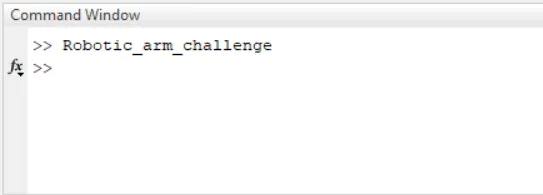
OUTPUT:
https://drive.google.com/file/d/1Bg1VlK3Y00SxJgFfJpxTVU7Z4PxQQt1G/view?usp=sharing
ERRORS:
1. Closing the Figure1 window during animation.
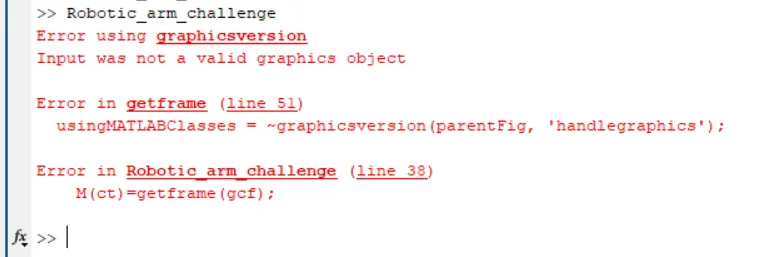
2. In the code, usinf 'clear all', 'close all' and 'clc' commands(This is a MATLAB message and not an error).

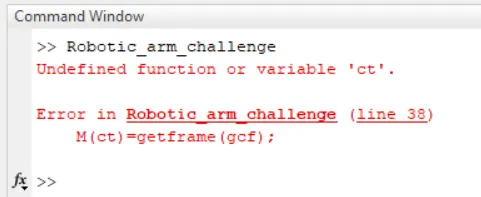
3. Not defining the variable 'ct' in line 15.
4. Assigning wrong order to the coordinates of range of axes in line 36.
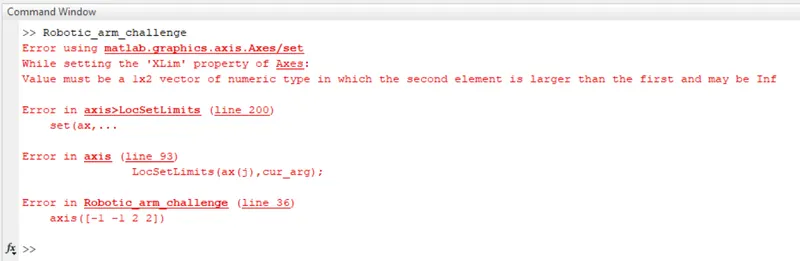
5. In line 38, if 'M' is not preallocated before the start of the for loop(This is a MATLAB message and not an error).
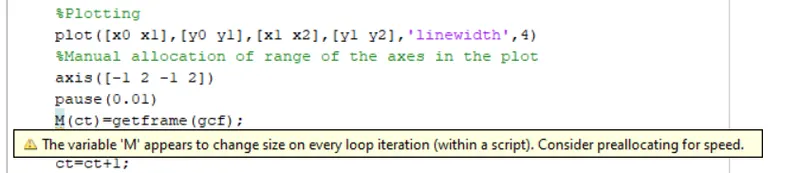
SOLUTION FOR ERRORS:
1. Do not close the Figure window while animation or while code is being compiled by MATLAB and animation stops.
2. For lesser compilation time of the code, do not use 'clear all', 'close all' and clc in the program.
3. Pre define the variable 'ct' before the first for loop.
4. Follow the correct syntax, assign start of x and end of x, then assign start of y and end of y.
5. Preallocate the variable 'M' before the for loop.
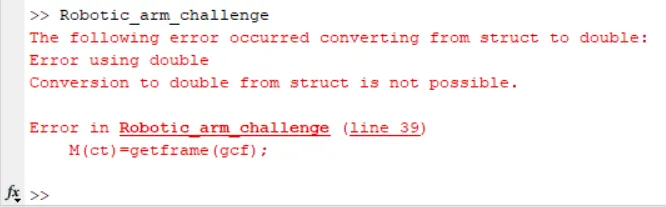
i. Define 'M' as M=zeros(1,324).
MATLAB shows error that 'conversion to double from struct is not possible'.
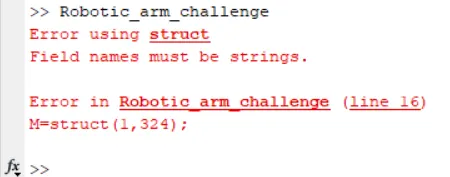
ii. Define 'M' as M=struct(1,324).
MATLAB shows error that 'field names must be strings'.
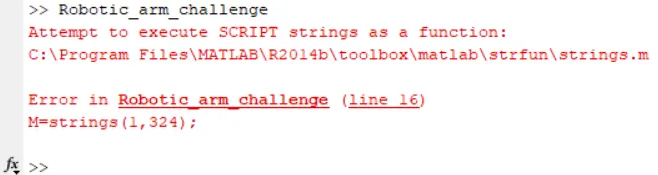
iii. Define 'M' as M=strings(1,324).
MATLAB shows error that 'script STRINGS can not be used as a function'.
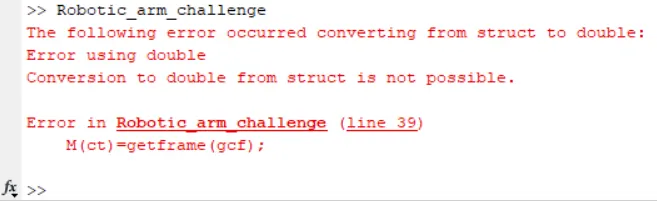
iv. Define 'M' as M=ones(1,324).(After consulting with technical support)
MATLAB shows error that 'conversion to double from struct is not possible'.
v. Do not preallocate 'M'.(After consulting with technical support)