Week 2- 2R Robotic Arm Challenge
AIM : To Write a program in Matlab to simulate the forward kinematics of a 2R Robotic Arm.
OBJECTIVE :
- Write a program to simulate forward kinematics of 2R Robotic Arm.
- To create a Movie /Animation from the plots obtained from the program.
THEORY :
A robotic arm is a type of mechanical arm, usually programable, with similar functions to a human arm; the arm may be the sum total of the mechanism or may be part of a more complex robot. The links of such a manipulator are connected by joints allowing either rotational motion (such as in an articulated robot) or translational (linear) displacement The links of the manipulator can be considered to form a kinematic chain. The terminus of the kinematic chain of the manipulator is called thend effector and it is analogous to the human hand. However, the term "robotic hand" as a synonym of the robotic arm is often proscribed.
in this project , we consider a 2R robotic arm .A 2R robotic arm consists of 2 rotation i.e it has 2 links which rotate or work over 2dimensional plane with each of links having single degree of freedom.both the links are ristricted to a `90^circ` roation with respect to the axes.
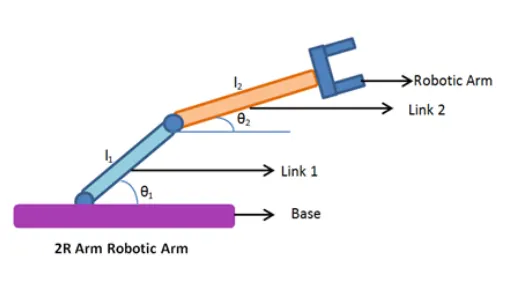
figure shows the 2R Robotic Arm
- let L1 and L2 be the length of Link-1 and Link-2 respectively.
- let `theta`1 be the angle formed by link-1 with horizontal.
- Let `theta2` be the angle formed by link-2with horizontal.
- Let the starting and end co-ordinate of link-1 be(x0,y0)and (x1,y1)
- Let the starting and end co-ordinate of link-2 be(x1,y1)and (x2,y2).
- where (x0,y0)position of link 1(0,0)
- (x1,y1)where x1=l1*`costheta1`,y1=l1*`sintheta1`.
- position of link-2 (x2,y2) where x2=x1+l2*`costheta2`, y2=y1+l2*`sintheta2`.
CODE EXPLANATION :
- Programming language used is Matlab online
- starting the Matlab using the comments
- declaring the input variables
- predefining the length/values of robotic arm i.e. l1 and l2
- providing the values for theta 1 and theta 2 using linspace command for theta 0 to90degree for 10 value
- now using the for loop for iterating the values to repeat specified number of times
- now using again the for loop for providing the movement to the second robotic arm
- providing the values for the poistion and co-oridnate for link-1 and link-2 and defining the co-ordinate of both the robotic arm
- plotting the graph of all the cordinate values and axis specifies the limits for the current axes
- pause command for Pause playback or recording
- getframe(gcf) captures the current axes as it appears on the screen as a movie frame
- ending the for loop
- movie(M) plays the movie frames in array M once. To create a movie frame from the current figure or axes, see getframe
- At end the save the movie in .avi format.
MATLAB CODE :
clear all % clears the variable in the work space
close all  %close one or more figure
clc        % clears the screen

% program for forward kinematics of 2R  robotic arm manipulator
%input
l1 = 1;
l2 = 0.5;
theta1 =linspace(0,90,10); %generates 10 points. The spacing between the points is(0,90)
theta2 = linspace(0,90,10);

ct=1;

for i=1:length(theta1) %for loop to repeat specified number of times
    THETA1 = theta1(i);
    for j=1:length(theta2)
        THETA2 =theta2(j);

      %position of link 1
        x0 =0;
        y0 =0;
        x1 =l1*cosd(THETA1);
        y1 =l1*sind(THETA1);
       %position of link 2
        x2 = x1 +l2*cosd(THETA2);
        y2 = y1+l2*sind(THETA2);

       %plotting the graph
       plot([x0 x1],[y0 y1],[x1 x2],[y1 y2],'linewidth',3) % creates the 2-D plot
       axis([-0.1 1.5 0 1.5 ])  % specifies the limits for the current axes
       pause(0.1)     %Pause playback or recording

       M(ct) =getframe(gcf); %captures the current axes as it appears on the screen as a movie frame
          ct=ct+1;
    end

end
%  plays the movie frames in array M once. To create a movie frame from the current figure or axes, see getframe.
movie(M)
Videofile = VideoWriter('forward_kinematics_of_manipulator.avi','Uncompressed AVI');
open(Videofile)
writeVideo(Videofile,M)
close(Videofile)
ERROR AND COMMAND WINDOW EXECUTION :
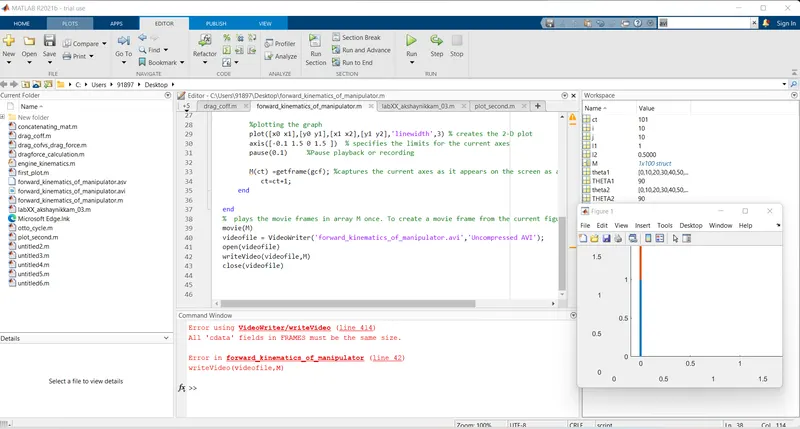
Error using the videowriter/writevideo is solved by changing the video to the Video as there was a typo in uppercase V.
COMMAND WINDOW EXECUTION :
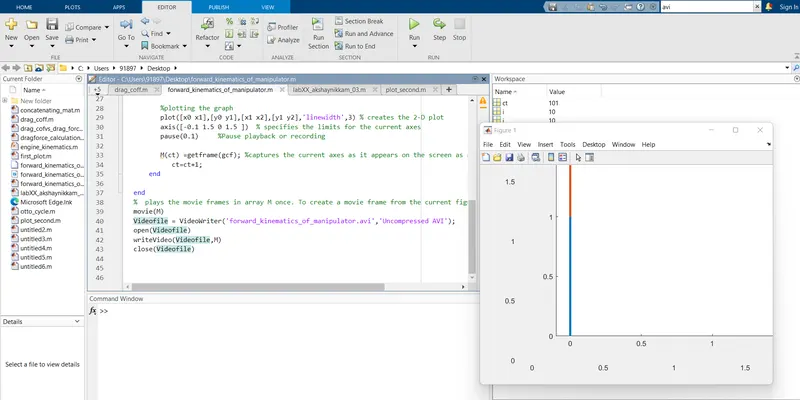
RESULT/CONCULSION :
Thus we have simulated 2R robotic arm by using the matlab programming and created a Movie/animation from the plots obtained from the program
below is the link given for the program output for Movie/Animation of 2R Robotic Arm.