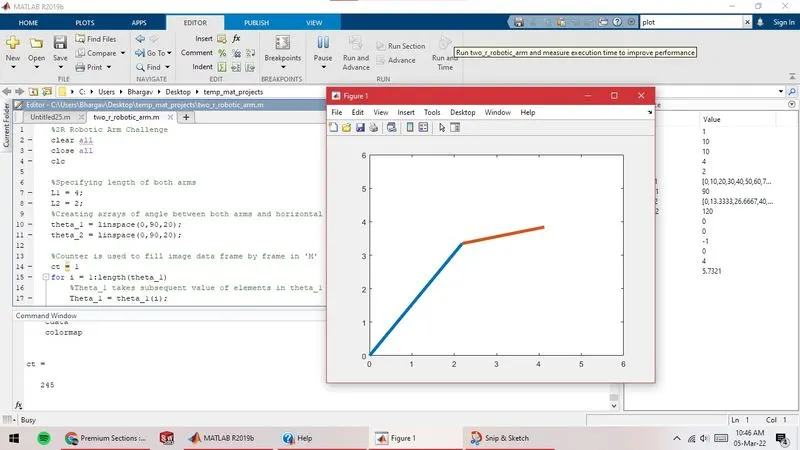
Week 2- 2R Robotic Arm Challenge
%2R Robotic Arm Challenge
clear all
close all
clc

%Specifying length of both arms
L1 = 4;
L2 = 2;
%Creating arrays of angle between both arms and horizontal
theta_1 = linspace(0,90,20);
theta_2 = linspace(0,90,20);

%Counter is used to fill image data frame by frame in 'M'
ct = 1
for i = 1:length(theta_1)
    %Theta_1 takes subsequent value of elements in theta_1 array in each loop
    Theta_1 = theta_1(i);

    for j = 1:length(theta_2)
        %Theta_2 takes subsequent value of elements in theta_2 array in each loop
        Theta_2 = theta_2(j);

       %Specifying end points of line(arms):
       %Arm 1:(x0,y0),(x1,y1); Arm 2:(x1,y1),(x2,y2)
        x0 = 0;
        y0 = 0;
        x1 = L1.*cosd(Theta_1);
        y1 = L1.*sind(Theta_1);
        x2 = x1 + L2.*cosd(Theta_2);
        y2 = y1 + L2.*sind(Theta_2);

        %Plotting the lines for each loop; specifying the axes
        plot([x0 x1],[y0 y1],[x1 x2],[y1 y2],'linewidth',4)
        axis([0 6 0 6])

        %Filling up image data in subsequent elements of array 'M' at the end of each loop
        M(ct) = getframe(gcf)
        ct = ct+1
    end
end

%movie command plays frame sequence in figure window.
movie(M)

%Use VideoWriter to create a video file giving it's name & extension/file type
%writeVideo writes the created movie from array 'M' to the video file.
videofile = VideoWriter('Forward_Kinematics.avi')
open(videofile)
writeVideo(videofile,M)
close(videofile)
Report:
Video link: https://drive.google.com/file/d/19SposFpmgM1L39aSIyn2I-suP6Tgjtdf/view?usp=sharing
- Step-wise explaination: (also written in the code as comments)
- Specifying length of both arms. (L1 & L2)
- Creating arrays of angle between both arms and horizontal. (theta_1 & theta_2 array)
- Counter variable (ct) is used to fill image data frame by frame in 'M'.
- Creation on Theta_1 variable in first for loop. Theta_1 takes subsequent value of elements in theta_1 array in each loop.
- Creation on Theta_2 variable in first for loop. Theta_2 takes subsequent value of elements in theta_2 array in each loop.
- Specifying end points of line(arms): Arm 1:(x0,y0),(x1,y1) & Arm 2:(x1,y1),(x2,y2) using trigonometric formulae.
- Plotting the lines for each loop using 'plot' & specifying the size of axes.
- Filling up image data in subsequent elements of array 'M' at the end of each loop using counter (ct).
- Ending the loop.
- Use VideoWriter to create a video file giving it's name & extension/file type. (Forward_Kinematics.avi)
- writeVideo writes the created movie from array 'M' to the video file.
- Saved video file can be seen using a video player app.
- Errors faced:
- Counter (ct=ct+1) got written before 'getframe' command.
So, the first element in 'M' array didn't got filled with any image data. This happend because counter variable got updated before storing the image data to 'M'.
Corrective steps:
Write 'getframe' command before ct=ct+1.
Screenshot: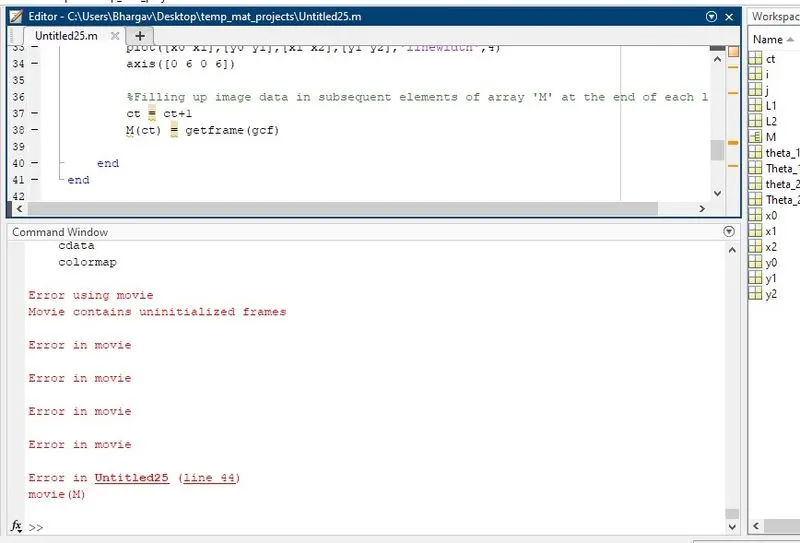
- Using 'line' command for plotting showed all positions on robotic arm in a single figure window.
This happened because unlike the 'plot' function, 'line' adds the line to the current axes without deleting other graphics objects or resetting axes properties.
Correction: Used plot function to get individual plots in same figure window.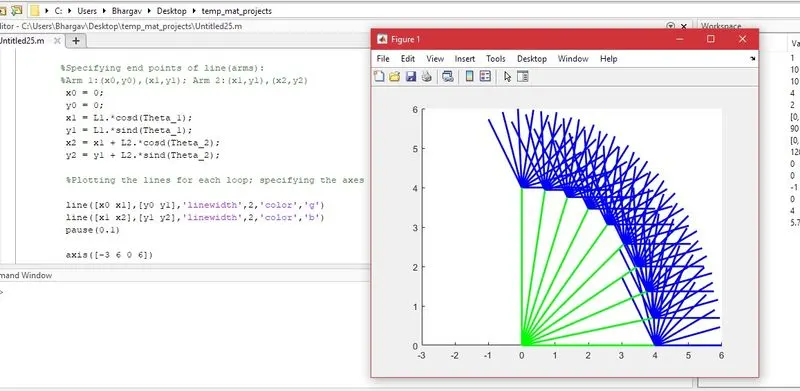
- Typos in writeVideo command. These commands are case-sensitive.
Correction: Correct the typos!
- Counter (ct=ct+1) got written before 'getframe' command.
- Screenshots: (Screenshot while running the code)