Week 2- 2R Robotic Arm Challenge
Program to simulate the forward kinematics of a 2R Robotic Arm
% Program to simulate the forward kinematics of a 2R Robotic Arm

clear all
close all
clc

% Inputs
% Assign the values for the length of the two arms link 1 and link 2
length_1 = 2;
length_2 = 1;

% Assign the array of values for the angle made by link 1 and link 2
theta_1 = linspace(0,90,20);
theta_2 = linspace(0,90,20);

% Origin point
x0 = 0;
y0 = 0;

% Initialization the variable
count=1;

% Find the co-ordinates of x1 y1 of link 1 and x2 y2 of link 2
% program to calculate the x1,y1,x2 and y2

for i = 1 : length(theta_1)
    THETA_1 = theta_1(i);
    for j = 1 : length(theta_2)
        THETA_2 = theta_2(j);
        x1 = length_1 * cosd(THETA_1);
        y1 = length_1 * sind(THETA_1);
        x2 = x1 + length_2 * cosd(THETA_2);
        y2 = y1 + length_2 * sind(THETA_2);

        % To animate the plot

        plot([x0 x1], [y0 y1],[x1 x2],[y1 y2],'linewidth',3)
        axis([-0.1 3.5 0 3.5]);
        xlabel('x-axis');
        ylabel('y-axis');
        pause(0.03)
        M(count) = getframe(gcf);
        count=count+1;
    end
end

% To create a video file
movie(M)
videofile = VideoWriter('forward kinematics of a 2R Robotic Arm.avi','uncompressed avi');
open(videofile)
writeVideo(videofile,M)
close(videofile)
The You tube link for an animation
Stepwise explanation of code
Line 1 ‘clear all’ It clear all the memory of the temporary variable and clear the workspace.
Line 2 ‘close all’ It closes all the plots.
Line 3 ‘clc’ It clear the command window.
Line 9 & 10 Assign the values for the length of the two arms link 1 and link 2.
Line 13 & 14 Using ‘linspace’ command, assign the range of values for theta 1 and theta 2 made by link 1 and link 2 respectively.
Line 17 & 18 Initialization the origin point (x0,y0).
Line 21 Initialization the variable count. The count variable is used to gather the information from each plot.
Line 26 create a for loop to find the answer for each value of theta 1. “length (theta_1)” means the no. of value stored in theta 1.
Line 27 Assign the array theta 1 to the variable ‘THETA_1’. ‘THETA_1’ in capital letter holds the individual value of the array theta_1 for each irritation of ‘I’ (MATLAB is case sensitive. So, theta_1 and THETA_1 are different variable).
Line 28 create a for loop to find the answer for each value of theta 2. “length (theta_2)” means the no. of value stored in theta 2.
Line 29 Assign the array theta 1 to the variable ‘THETA_2’. ‘THETA_2’ in capital letter hold the individual value of the array theta_2 for each irritation of j ( MATLAB is case sensitive. So, theta_2 and THETA_2 are different variable).
Line 30 to 33 The formula to find the co-ordinates of the link 1 and link 2 for the respective angle of theta 1 and theta 2.
Line 37 ‘plot’ command is used to plot the co-ordinates of (x0,y0), (x1,y1), (x2,y2).
Line 38 Using the ‘axis’ command set the limits of the axis.
Line 39 & 40 Labeling the x axis and y axis
Line 41 ‘pause’ command is use to pause the execution for n seconds.
Line 42 Assign a new array called ‘M’. To record the data of each frame by getting data from each plot using ‘getframe(gcf)’ command. Here ‘gcf’ means get the current figure.
Line 43 Incrementing the count variable to get each plot data.
Line 44 & 45 Terminate the for loop by using the ‘end’ command.
Line 48 To play the recorded movie using the ‘movie’ command. Already the array M stored the data of each frame.
Line 49 To save the movie, create a video file and give the filename and the specific the file format.
Line 50 Open the created video file.
Line 51 Write the video data to the file stored in M.
Line 52 Close the video file.
Mention the errors faced while programming and Steps taken to overcome those errors.
Error 1 : In the middle of programming while typing in for loop . To verify the above coding are correct. i run the program without giving the end keyword. So MATLAB shows an error.
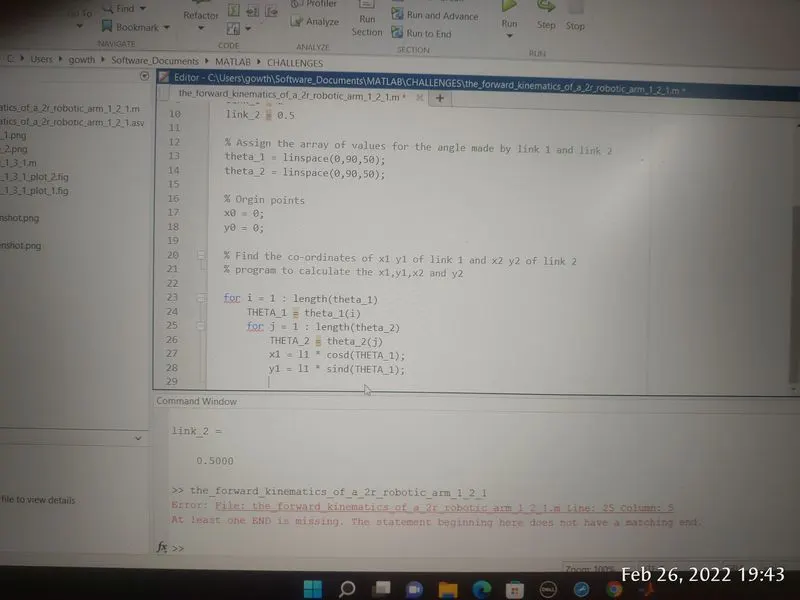
Solution 1 : I give the end statement and then run the program.
Error 2 : "x1 = l1 * cosd(THETA_1);" l1 is the error.
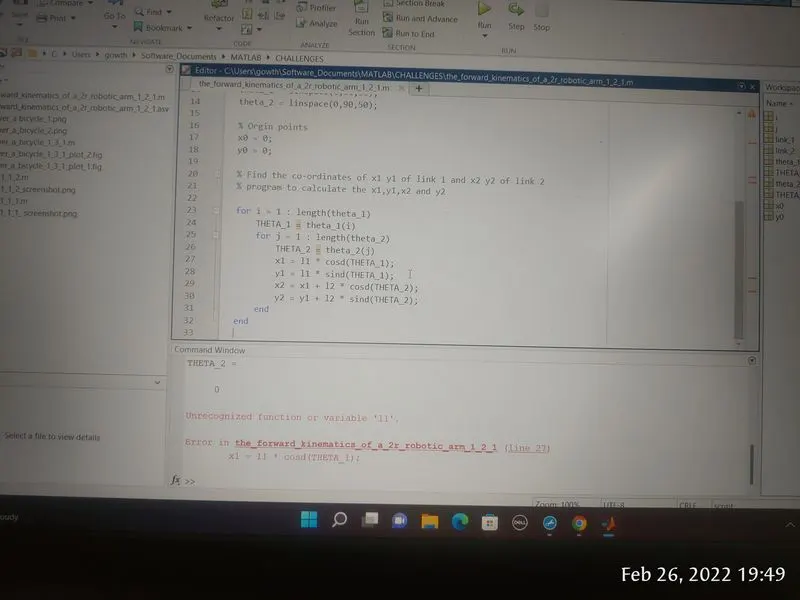
Solution 2 : While i assign the values for length of the link. i give the variable name as length_1 and length_2. After that i changed the variable name in formula
Error 3 : Invalid expression. when calling a fuction or variable. use parentheses.
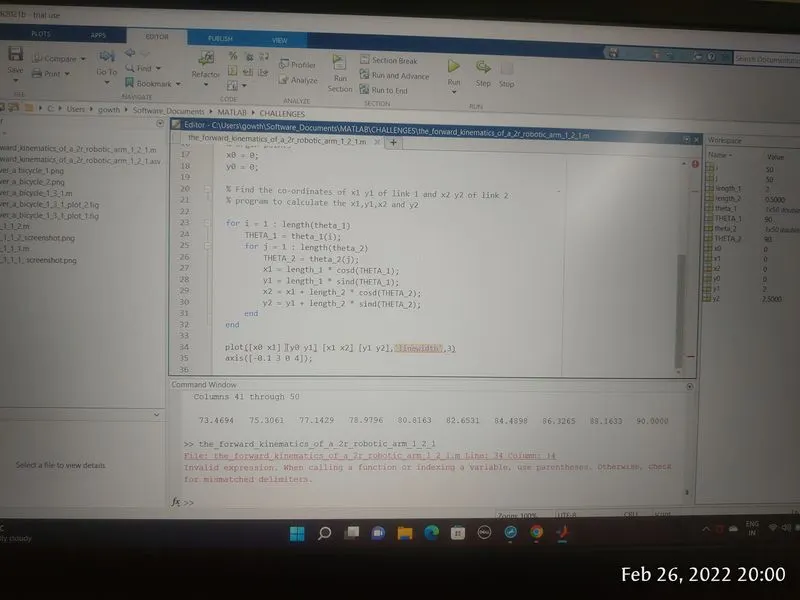
Solution 3 : After that I use the parentheses while calling the variable or function