Project 1 - Parsing NASA thermodynamic data
AIM: write a Matlab code to parse the NASA Thermodynamic data file and then calculate the thermodynamic properties of various gas species.
OBJECTIVE:
- Write a function that extracts the 14 co-efficient and calculates the enthalpy, entropy and specific heats for all the species in the data file.
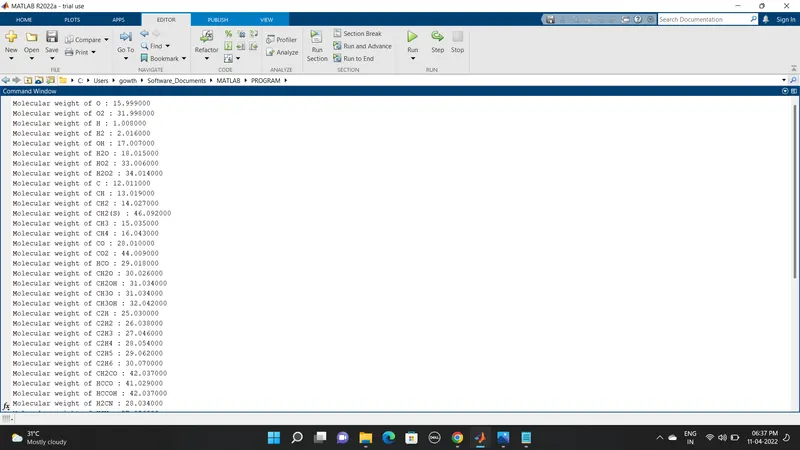
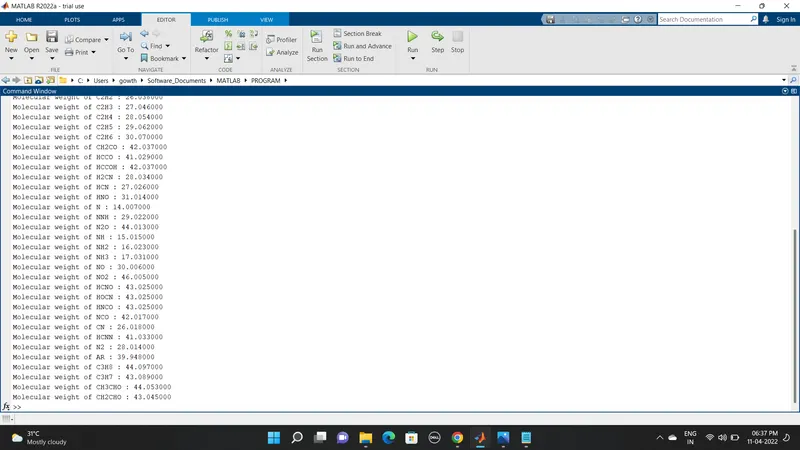
- Calculate the molecular weight of each species and display it in the command window.
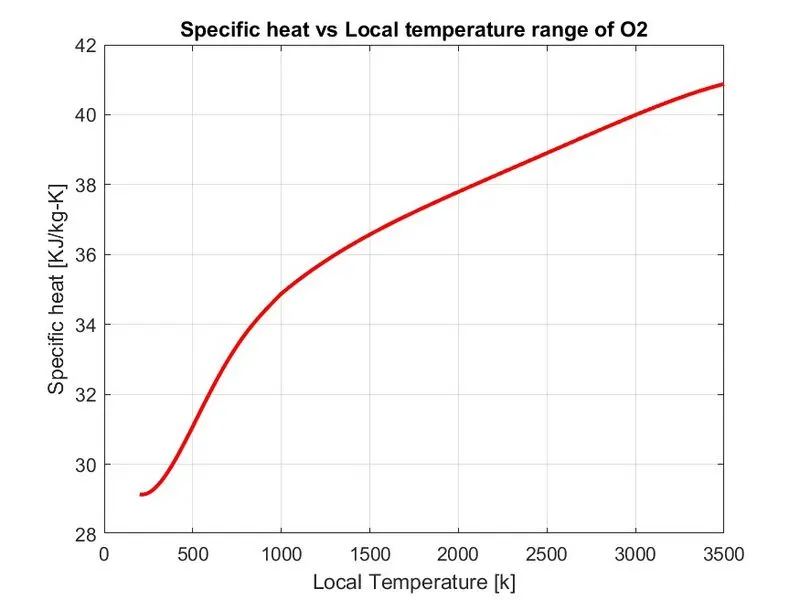
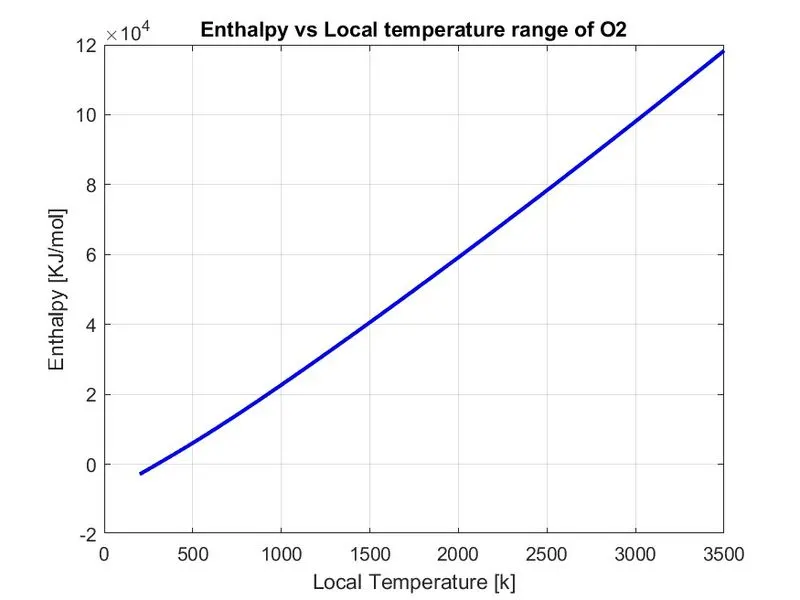
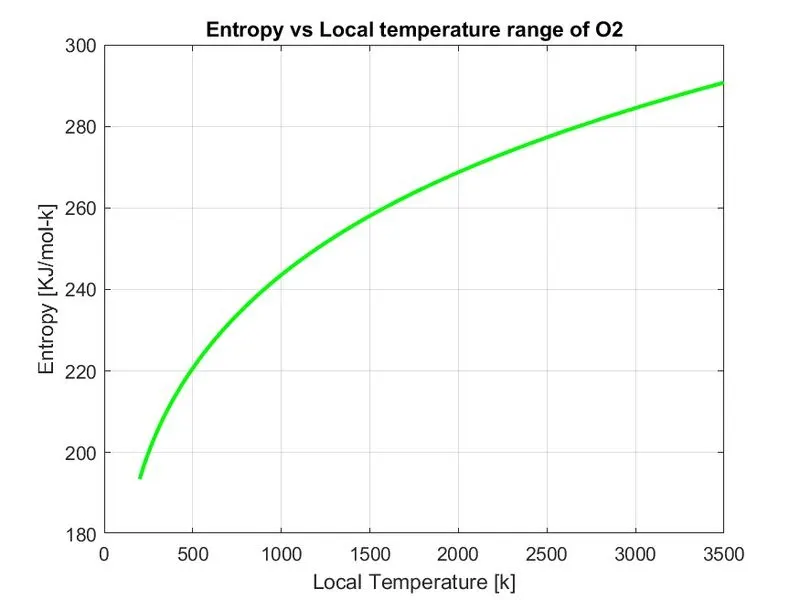
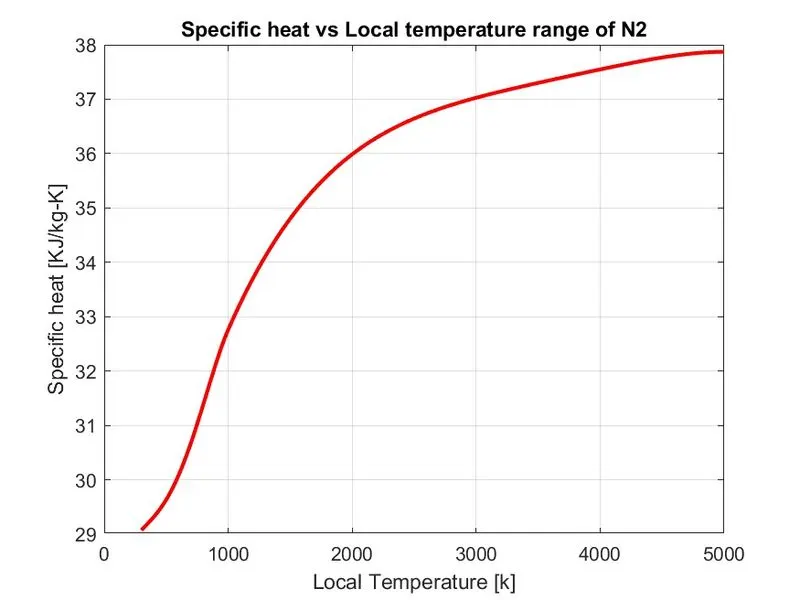
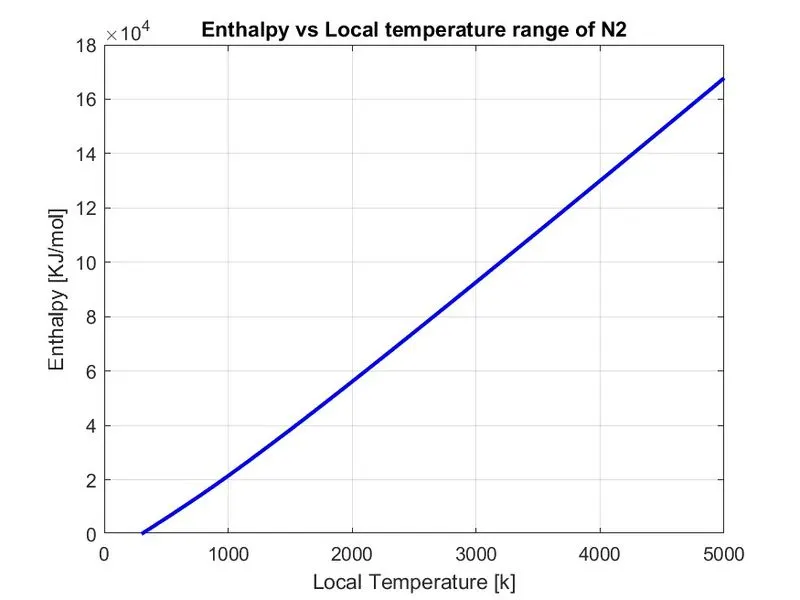
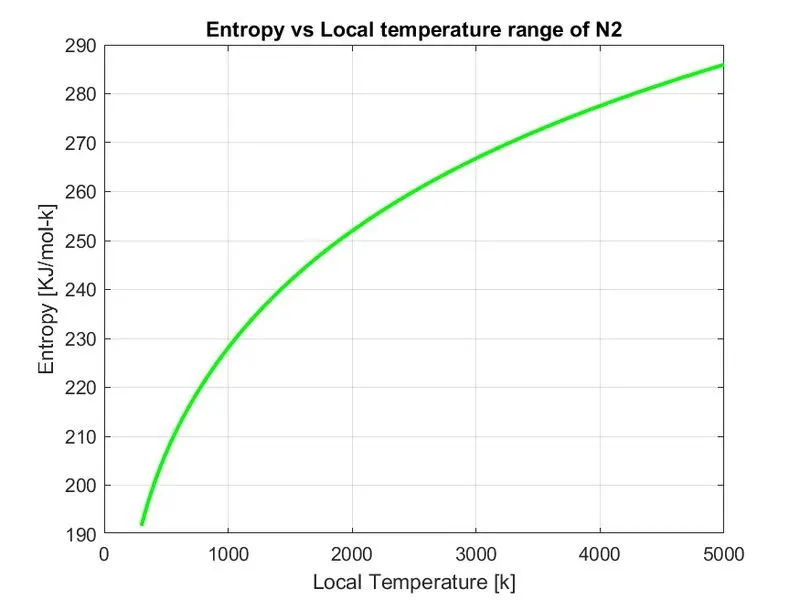
- Plot the Cp, Enthalpy and Entropy for the local temperature range (low temperature: high temperature) specific for each species.
- Save the plots as images with appropriate names and dump them in separate folders for each species with suitable name. All these should be generated automatically.
- The main program that you will submit will just take the "THERMO.dat" file as an input and generate Cp, H and S plots.
- Screenshot of the window where all the folders are saved.
- Plots for o2, N2 and Co2 species (your program should be case insensitive, if it is going to take the species name as an input).
FILE PARSING:
Parsing, syntax analysis, or syntactic analysis is the process of analysing a string of symbols, either in natural language, computer languages or data structures,
Parsing in computer languages refers to syntactic analysis of the input code into its components parts in order to facilitate the writing of compilers and interpreters. It can be used to describe split or separation.
Parsing a file means reading in a data stream of some sort and building an in-memory model of the semantic content of that data. This aims at facilitating performing some kind of transformation on the data.
NASA Thermodynamic File:
NASA Thermodynamic File consist of 14 co-efficient of 53 species in that file. The name is saved as “THERMO.dat” file. This file is taken as input and the parse these 14 co-efficient to find the Specific heat, Entropy & Enthalpy using given formula.
Where
R = Universal Gas Constsnt
T = Temperature
Cp = Specific Heat [KJ/kg-K]
S = Entropy [KJ/mol-K]
H = Enthalpy [KJ/mol]
a(i) = Co – efficient (i = 1,2.......14)
Specific Heat:
Specific Heat is the amount of heat that must be added to one unit of mass of the substance in order to cause an increase of one unit in temperature. The SI unit of specific heat capacity is joule per kelvin per kilogram, J⋅kg−1⋅K−1.
Equation for specific heat:
Cp = R*(a1 + (a2*T) + (a3*(T). ^2) + (a4*(T). ^3) + (a4*(T). ^3) + (a5*(T). ^4))
Enthalpy:
The enthalpy (H) of a thermodynamic system is defined as the sum of its internal energy and the product of its pressure and volume.
Equation for enthalpy:
H = R*T.*(a1 + ((a2*T)/2) + ((a3*(T). ^2)/3) + ((a4*(T). ^3)/4) + ((a5*(T). ^4)/5) + ((a6. /T)))
Entropy:
Entropy is a state of disorder, randomness, or uncertainty of a system. It is the measure of a system's thermal energy per unit temperature that is unavailable for doing useful work.
Equation for entropy:
S = R*(a1* log(T) + (a2*T) + ((a3* (T). ^2)/2) + ((a4*(T). ^3)/3) + ((a5*(T). ^4)/4) + a7)
Program:
clear all
close all
clc

% Initializing the gas constant value
R = 8.314;

% open the file
f1 = fopen('THERMO.dat','r');

% reading first line
txt_line = fgetl(f1);

% Reading global temperature and split it
s = strsplit(fgetl(f1),' ');

% Global temperature values
global_low_temp = str2double(s(2));
global_mid_temp = str2double(s(3));
global_high_temp = str2double(s(4));

% Read the header lines
for i = 1:3
    txt_line_1 = fgetl(f1);
end

% Open a file to write thw molecular weight of each species
m_wt_file = fopen('Molecular Weight.txt','w');

% Read the coefficent of each molecule and perform the calculations
for j = 1:53                 % create a loop for total number of species
    txt_line_2 = fgetl(f1);

    % To find the spieces name (molecule)
    A = strsplit(txt_line_2,' ');   % spliting the cell array
    species = (A{1});        % finding the species

    % Finding the molecular weight of the molecule
    atomic_symbol = ['H','C','O','N','A','S'];    % ATOMIC ELEMENTS HYDROGEN, CARBON, OXYGEN, NITROGEN, ARGON, SULPHUR
    atomic_weight = [1.008 12.011 15.999 14.007 39.948 32.065];
    wt = 0;

    for p = 1:length(species)      % loop runs to the length of species
        for q = 1: length(atomic_symbol)        % loop run to the length of atomic symbol
            if strcmp(species(p),atomic_symbol(q))     % to compare the two strings
                wt = wt + atomic_weight(q);
                position = q;
            end
        end
        n = str2double(species(p));   % now we going to find there is more than one species

        if n > 1
            wt = wt + atomic_weight(position) * (n-1);
        end
    end

    fprintf('Molecular weight of %s : ',species)
    fprintf('%f\n',wt)

    % writing molecular weight in a file
     fprintf(m_wt_file,'Molecular Weight of %s is %d\n',species,wt);

    % To find the local temperature
    local_low_temp = str2double(A{end-3});
    local_high_temp = str2double(A{end-2});
    local_mid_temp = str2double(A{end-1});

    % Creating the local temperature range
    T = linspace(local_low_temp,local_high_temp,1500);

    % Finding the 14 coefficient
    % Reading next three lines of coefficient
    sub_line_1 = fgetl(f1);
    sub_line_2 = fgetl(f1);
    sub_line_3 = fgetl(f1);

    % To find the char E
    a = strfind(sub_line_1,'E');
    b = strfind(sub_line_2,'E');
    c = strfind(sub_line_3,'E');

    % Finding first 7 high temperature coefficient
    a1 = str2double(sub_line_1(1:a(1)+3));
    a2 = str2double(sub_line_1(a(1)+4:a(2)+3));
    a3 = str2double(sub_line_1(a(2)+4:a(3)+3));
    a4 = str2double(sub_line_1(a(3)+4:a(4)+3));
    a5 = str2double(sub_line_1(a(4)+4:a(5)+3));
    a6 = str2double(sub_line_2(1:b(1)+3));
    a7 = str2double(sub_line_2(b(1)+4:b(2)+3));

    %Finding second 7 low temperature coefficient
    a8 = str2double(sub_line_2(b(2)+4:b(3)+3));
    a9 = str2double(sub_line_2(b(3)+4:b(4)+3));
    a10 = str2double(sub_line_2(b(4)+4:b(5)+3));
    a11 = str2double(sub_line_3(1:c(1)+3));
    a12 = str2double(sub_line_3(c(1)+4:c(2)+3));
    a13 = str2double(sub_line_3(c(2)+4:c(3)+3));
    a14 = str2double(sub_line_3(c(3)+4:c(4)+3));

    % Creating function for the given equation

     for k=1:length(T)
      if T(k)>local_mid_temp
          cp(k)= (a1+a2.*T(k)+a3.*T(k).^2+a4.*T(k).^3+a5.*T(k).^4)*R;
          H(k)= R*T(k).*(a1+((a2*T(k)/2))+((a3*T(k).^2)/3)+((a4*T(k).^3)/4)+((a5*T(k).^4)/5)+((a6./T(k))));
          S(k)= (a1.*log(T(k))+a2.*T(k)+a3.*(T(k)^2)/2+a4.*(T(k)^3)/3+a5.*(T(k)^4)/4+a7)*R;
      else
          cp(k)= (a8+a9.*T(k)+a10.*T(k).^2+a11.*T(k).^3+a12.*T(k).^4)*R;
         H(k)= R*T(k).*(a8+((a9*T(k)/2))+((a10*T(k).^2)/3)+((a11*T(k).^3)/4)+((a12*T(k).^4)/5)+((a13./T(k))));
          S(k)= (a8.*log(T(k))+a9.*T(k)+a10.*(T(k)^2)/2+a11.*(T(k)^3)/3+a12.*(T(k)^4)/4+a14)*R;
      end
     end

     % Plotting cp, H and S with respect to Local temperature
     % Saving in a seperate folder for each species
    cd('C:\Users\gowth\Software_Documents\MATLAB\PROGRAM\nasa_thermo\species') % changing directory
    mkdir(species) ;  % creating folder
    cd(species);

    % Plot 1 cp vs T
    %figure('name','Specific heat vs Local temperature range')
    figure(1)
    plot(T,cp,'linewidth',2,'color','r')
    xlabel('Local Temperature [k]')
    ylabel('Specific heat [KJ/kg-K]')
    title(sprintf('Specific heat vs Local temperature range of %s',species))
    grid on
    saveas(figure(1),'Specific Heat.jpg');

    % Plot 2 H vs T
    figure(2)
    plot(T,H,'linewidth',2,'color','b')
    xlabel('Local Temperature [k]')
    ylabel('Enthalpy [KJ/mol]')
    title(sprintf('Enthalpy vs Local temperature range of %s',species))
    grid on
    saveas(figure(2),'Enthalpy.jpg');

    % Plot 3 S vs T
    figure(3)
    plot(T,S,'linewidth',2,'color','g')
    xlabel('Local Temperature [k]')
    ylabel('Entropy [KJ/mol-k]')
    title(sprintf('Entropy vs Local temperature range of %s',species))
    grid on
    saveas(figure(3),'Entropy.jpg');

    cd('C:\Users\gowth\Software_Documents\MATLAB\PROGRAM')
end

fclose(m_wt_file);
OUTPUT:
Screenshot of Command Window 1 :
Continue Screenshot of Command Window 2 :
Plots of O2 :
Plots of N2 :
Plots of CO2 :
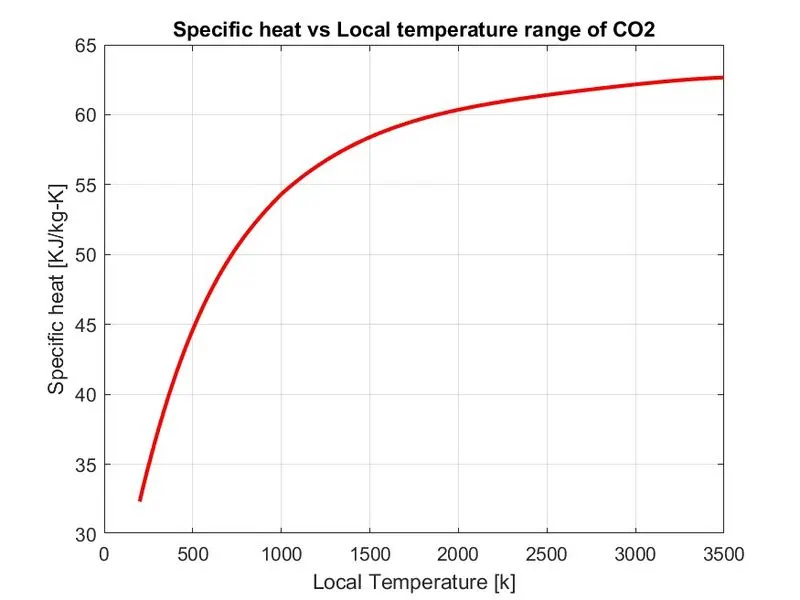
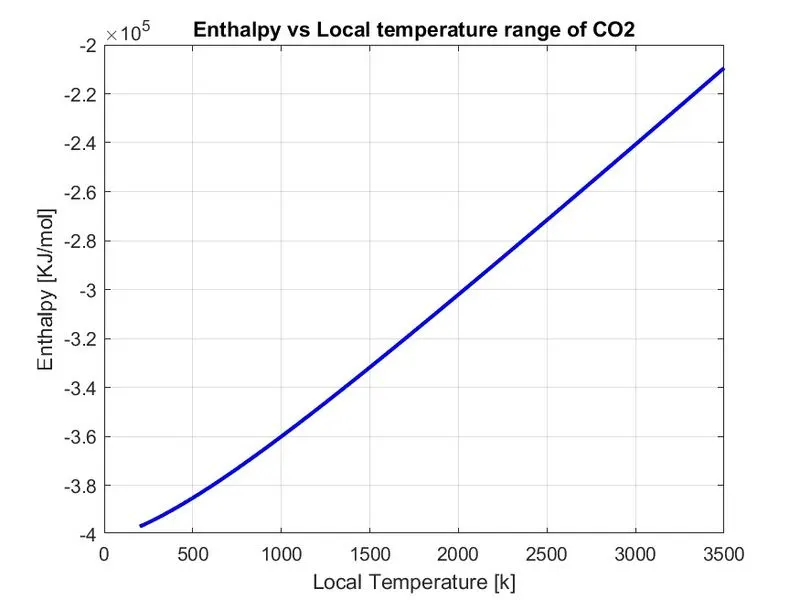
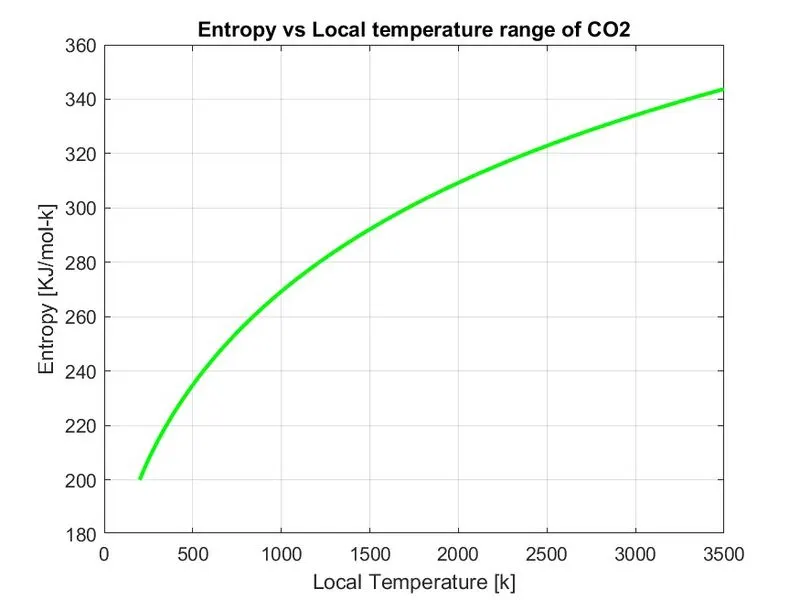
Screenshot of the window screen where all folders are saved

Step-wise explanation
- First, we initializing the gas constant R value. Then the thermodynamic data file’THERMO.dat’ was open using the ‘fopen’ command and to handle the file data the file handler as ‘f1’. Read the file.
- To read the first text line in the file ‘fget’ command is used.
- Again, using the ‘fgetl’ command read the global temperature and then use the ‘strsplit’ command and space as ‘delimiter’ obtain the individual temperature by splitting and then convert the string into numbers using ‘str2double’ command.
- By creating a ‘for’ loop ignore the next three text lines.
- Open a new file to write the molecular weight of each species in ’Molecular weight.txt’ and file handler as ‘m_wt_file’
- Create a ‘for’ loop to read the co-efficient of each species and perform the calculation for given equations.
- Read the line and extract the species name using ‘strsplit’ and use the space as delimiter.
- Using a nested for loop, calculate the molecular weight of the species and display it in command window.
- Write the molecular weight calculate for the species in the text file ‘Molecular weight.txt’ using ‘fprintf’ command.
- Now extract the local temperatures and then convert it from string to number using ‘str2double’ command.
- Create an array of temperature values in between the local minimum and local maximum using the ‘linspace’ command.
- To find the 14 co-efficient in the given lines. The ‘strfind’ command is used to find the position of ‘E’ in the string and co-efficient are separated with respect to position of ‘E’.
- In the 14 co-efficient first 7 co-efficient are high temperature co-efficient and the next 7 are low temperature co-efficient.
- Now again use a for loop to put each value in the equation.
- ‘if else’ command is used to get the corresponding values of the co-efficient with respect to the local mid temperature. If the temperature value above the local mid temperature, then the higher temperature co-efficient are used else low temperature values are used.
- After all the values of Specific heat, Enthalpy, Entropy for corresponding temperature values obtained.
- For saving the output plot for each species in a separate folder. First change the directory in which the plots are going to save using ‘cd’ command.
- Using ‘mkdir’ command, create a folder in the species name for easy understanding. Now open the created folder using ‘cd’ command.
- Now, all the values of Specific heat, Enthalpy, Entropy are plotted against the local temperature values to get ‘Specific Heat vs Temperature’, ‘Enthalpy vs Temperature’, ‘Entropy vs Temperature’.
- All three plots are saved in the corresponding species folder.
- Before the next iteration begins the change the directory to the program folder to read the data from the ‘THERMO.dat’
- The above codes from line 34 to line 153 are put in a loop which repeats 53 times (number of species in the given file) and calculate the Molecular weight, Specific heat, Enthalpy, Entropy for each species. The molecular weight is displayed in the command window during respective iterations.
Mention the errors faced while programming.
Error 1 :
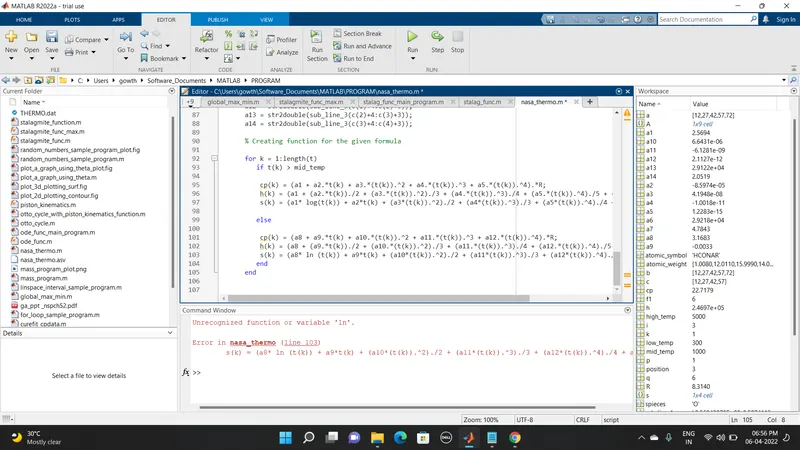
Solution 1 :
After error shown, in the place of 'ln' changed to 'log'. The error solved.
Error 2 :
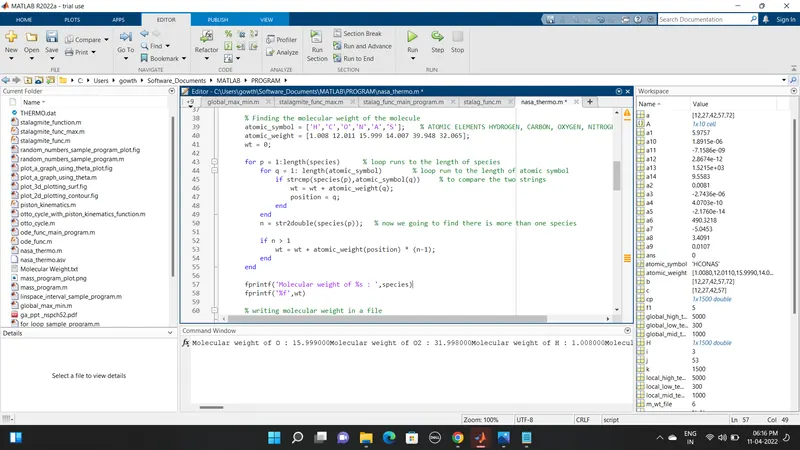
Solution 2 :
Actually its not an error. But the output in the command window is not proper. So, I added '\n' in the line 58 to print the next molecular weight in the next line.
Reference :