Week 2- 2R Robotic Arm Challenge
Aim: To write a program in matlab to simulate the forward kinematics of a 2R Robotic arm and create a animating video.
Objectives:
- Write a program to simulate the forward kinematics of a 2R robotic arm.
- Create an animation file of the plot.
- Upload an animation on You tube and provide the You tube link for an animation in your report.
Introduction:
Robotic arm
From manufacturing to automotive to agriculture, industrial robotic arms are one of the most common types of robots in use today.
They are used in factories to automate execution of repetitive tasks, such as applying paint to equipment or parts; in warehouses to pick, select, or sort goods from distribution conveyors to fulfill consumer orders; or in a farm field to pick and place ripe fruits onto storage trays. And as robotic technologies develop and industrial environments become more connected, the capabilities of robotic arms expand to enable new use cases and business operation models.
So,in this concept we can write a program to create 2R robotic arm and creating the video for that.
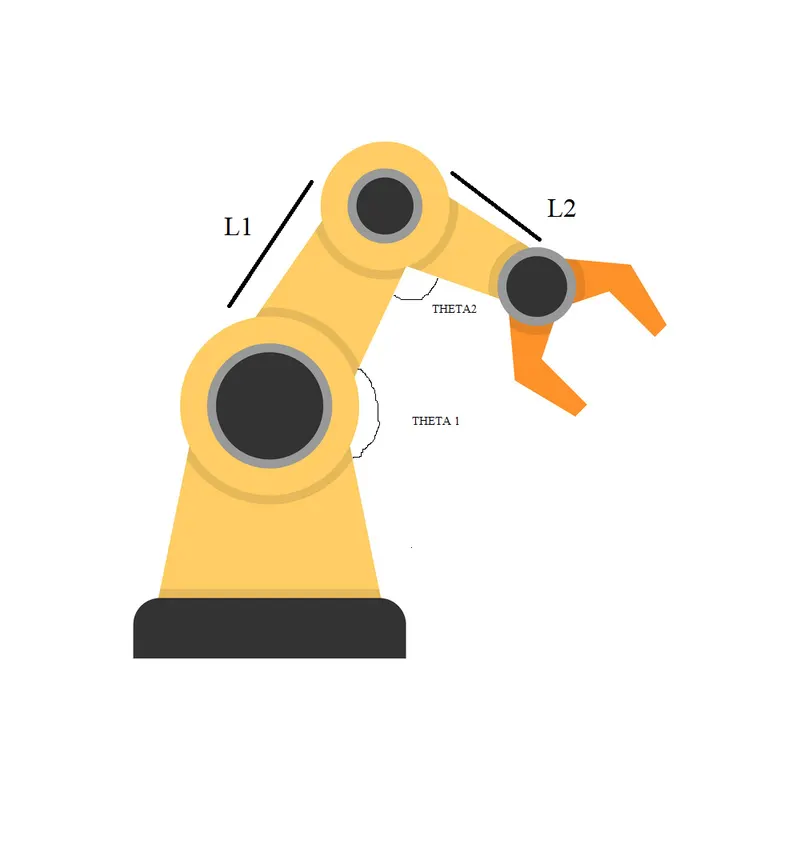
Given data:
L1=2m (legth of the arm)
L2=0.6m (length of the arm)
objectives.1
% Forward kinematics of 2R  robotic arm manipulator

clear all
close all
clc

l1 = 2 % first link of the arm length
l2 = 0.6 % Second link of the arm length

% The value of theta should be 5(deg) to 80 (deg) with 20 degree values
theta1 = linspace(5,80,20);
theta2 = linspace(5,80,20);

 % to explore each and every position  of the image
ct=1
% for loop
for i= 1:length(theta1);
    THETA1=theta1(i);
    for j = 1:length(theta2);
        THETA2=theta2(j);

% coordinate the point of x0,y0
x0 = 0;
y0 = 0;

% co-ordinate the point of x1,y1
x1 = l1*cosd(THETA1);
y1 = l1*sind(THETA1);

% Co-ordinate the point of x2,y2
% The end of x1 is the starting of x2 so i take sum of x1 & x2
x2 = x1+l2*cosd(THETA2);

% the end of y1 is the starting of y2 so i take sum of y1 & y2
y2 = y1+l2*sind(THETA2);

% Plotting
plot([x0 x1],[y0 y1],[x1 x2],[y1 y2],'linewidth','3')
axis([0 2.5 0 2.5])

% Pausing of all frames at time interval of 0.03 seconds.
pause(0.03);

M(ct) = getframe(gcf);

ct=ct+1;

 end
end
% create a movie
movie(M);

% create a video file then named as 'forward_kinematics'
videofile = VideoWriter('forward_kinematics.avi','Uncompressed AVI');

% open the created videofile
open(videofile);

% writting at the videofile using writevideo
writeVideo(videofile,M);

% closing the video file
close(videofile);
Code Explanation:
line 3-5:
clear all,close all,clc
line 7-8:
The values of length L1 & L2 has been assumed.
line 10-12:
In this command there are totally 20 number of values has been assumed theta1 & theta 2 at the range of (5 to 80) degree using 'linspace' command.
line 14:
counter command is used,ct=1 which means to get a frame of each and every position of the images.
line 16-20
For loop command is used when the i value has been taken as length of theta1 (length of theta.1 is 20).Then j value has been taken as length of theta2 (length of theta.2 is 20).using of for loop command we can got 20 answers,when only one answer can takes place at a time.so while using of loop command we can get 20 different values of theta1 & theta2 totally 20*20=400 values we get.
line 22-24:
Using of for loop we can get the 400 values at line 16-20 after that we can co-ordinate that point,when x0=0,y0=0 the coordinates are mentioned as 0 because the base of robotic arm is not moving.
line 26:28
Co-ordinate of x1 & y1
based on the theta position (refer trignomentry for right angle tringle) cos and sin can equate with x & y.
Then x1=L1*cos(THETA1) THETA1 has 10 different values.
Then y1=L1*sin(THETA2) THETA2 has 10 different values.
line 30-35:
co-ordinate of x2 &y2
when the end of x1 and y1 is the begining of x2 and y2 so we can sum the x1,y1 with x2,y2.
x2= x1+L2*cos(THETA1) THETA1 has 10 different values.
y2= y1+L2*sin(THETA2) THETA2 has 10 different values.
line 37-45
- plotting the finded values
- stricting of all position of the figure in one array by using R(ct)=getframe(gcf) 'M' refers name of the array.
- ct = ct+1 the counter of an image which adding of images getting from the loop one by one.
line 51 to line 64
Creating the animation video:
- Create a movie by using M(movie). "M https://youtu.be/q2BtKFSPFyI" refers name of the array which having stiching of figures.
- Create a empty video file and given name as 'ode pendulam' by using video writer command (videofile =VideoWriter('ode pendulam','Uncompressed AVI').
- Open the video file by using open(videofile) command.
- Then attach the stitching of all images to the empty video file by using writeVideo(videofile,M) command.
- Close the video file by using the close(video) command.
Objectives.3 Youtube line has been mentioned below