Week 2- 2R Robotic Arm Challenge
Aim:
To write a program in Matlab to simulate the forward kinematics of a 2R Robotic Arm, as shown in the video.
- Create an animation file of the plot.
Upload an animation on You tube and provide the You tube link for an animation in your report.
Robotic Arm
Forward kinematics Forward kinematics for a robot arm involves figuring out a function that takes as its inputs the angles of each joint and computes the position of the end point `P_i`:
Heres a diagram os a two-link robot arm. On the left we define the arm lengths `L_1` and `L_2`, and the joint angles `theta_1` and `theta_2`. On the right we have defined three reference frames. The inertial (global) reference frame is marked with the axes `X_0`and `Y_0`.
The body reference frame for link 1 has axes `x_1` and `y_1`and is rotated with respect to the inertial reference frame by `theta_1`. The body reference frame for arm link 2,
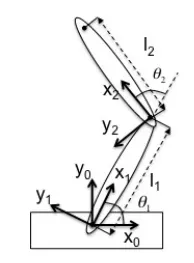
marked with `x_2`and `y_2`, is translated `L_1`units down along x-axis of link 1 to point in body reference frame 1 and is then rotated by `theta_2`. To figure out where the point `X_2` (end effector) is in the inertial reference frame, first were going to figure out where it is in frame, which is easy:
`X_2=[[L_2],[0]]`
The velocity is determined by taking the derivative of the position respect to time. so the position in the end of the link is known using known familiar variables:
`x_1=L_1*cos(theta_1)`
`y_1=L_1*sin(theta_1)`
`x_2=x_1+L_2*cos(theta_2)`
`y_2=y_1+L_2*sin(theta_2)`
Code:
- The whole code was written on MATLAB.
- The animation is restricted to an angle with a range 0 to 90 degrees with values inbetween, this limit applies to both theta1 and theta2.
- A set of values for "theta1" and "theta2" are created from a difference formula which uses "theta_start" & "theta_end".
- A nested 'for loop' is used to calculate x1,y1 & x2,y2 using the idex values of "theta1 or theta2" and initial condition x0 and y0.
- Loop counter is used to automatically obtain the get current frame command to store plots as an image. These images are stitched together to form an animated movie
- After the end of the 2 for loops we write the video by giving it a name.
close all
clear all
clc

% inputs
l1=1;
l2=0.5;

theta1=linspace(0,90,10); %reducing the number of plots
theta2=linspace(0,90,10); %reducing the number of plots

ct=1;
for i=1:length(theta1)
    THETA1=theta1(i);
    for j=1:length(theta2)
        THETA2=theta2(j);
        % coordinates
        x0=0;
        y0=0;

        x1=l1*cosd(THETA1);
        y1=l1*sind(THETA1);

        x2=x1+l2*cosd(THETA2);
        y2=y1+l2*sind(THETA2);

        %plotting
        % plot command only produces a plot after every iteration
        plot([x0 x1],[y0 y1],[x1 x2],[y1 y2],'linewidth',3)
        axis([-1.5 1.5 0 2])
        % we can use 'hold on' command
        pause(0.03)
        M(ct)=getframe(gcf);
        ct=ct+1;
    end
end

movie(M)
videofile=VideoWriter('forward_kinematics.avi','uncompressed AVI');
open(videofile)
writeVideo(videofile,M)
close(videofile)
Youtube animation link: