Week 2- 2R Robotic Arm Challenge
AIM
Program in Matlab to simulate the forward kinematics of a 2R Robotic Arm and
- To Create an animation file of the plot animation on You tube/google drive and provide the You tube link/google drive link.
THEORY
Kinematics
Kinematics is the study of the motion of points, objects, and groups of objects without considering the causes of its motion. The study of kinematics is often referred to as the “geometry of motion.” In mechanical engineering, Kinematics is mainly used in robotics and biomechanics to describe the motion of systems composed of joined parts such as an engine, a robotic arm, or the skeleton of the human body. The study of kinematics can be abstracted into purely mathematical expressions, which can be used to calculate various aspects of motion such as velocity, acceleration, displacement, time, and trajectory.
Forward Kinematics
Forward kinematics refers to the use of the kinematic equations of a robot to compute the position of the end-effector from specified values for the joint parameters in other words, Forward kinematics is the process of calculating the frames of a robot's links, given a configuration and the robot's kinematic structure as input. The forward kinematics of a robot can be mathematically derived in closed form, which is useful for further analysis during mechanism design.
Robotics
Robotics involves design, construction, operation, and use of robots The goal of robotics is to design machines that can help and assist humans. Robotics develops machines that can substitute for humans and replicate human actions. Robots can be used in many situations for many purposes,like including inspection of radioactive materials, bomb detection and deactivation, manufacturing processes, or where humans cannot survive.
Robotic Arm
A robotic arm is a type of mechanical arm, usually programmable with similar functions to a human arm. the arm may be the sum total of the mechanism or may be part of a more complex robot. The links of such a manipulator are connected by joints allowing either rotational motion or translational displacement. Robotic arms can be used for all manner of industrial production, processing and manufacturing roles, any task in which extremely precise, fast and repeatable movements are required. A model of robotic arm is shown below.
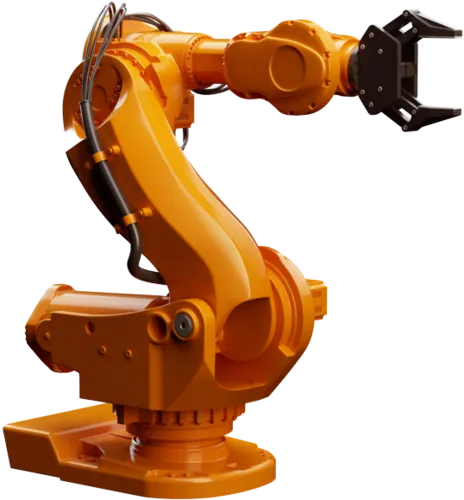
Links: Links are rigid bodies that gives structure to the robot.
Joints: Joints are the movable parts of the robots that connects the links of the robot. Joints cause relative motion between adjacent links.
Manipulator: Manipulator is the last link of the robot arm that interacts with the environment. The last link can be gripper tool to do pick and place actions or a welding gun or simply a magnet.
Here we are discussing about 2R Robotic Arm. A Simple representation of 2R robotic arm is given
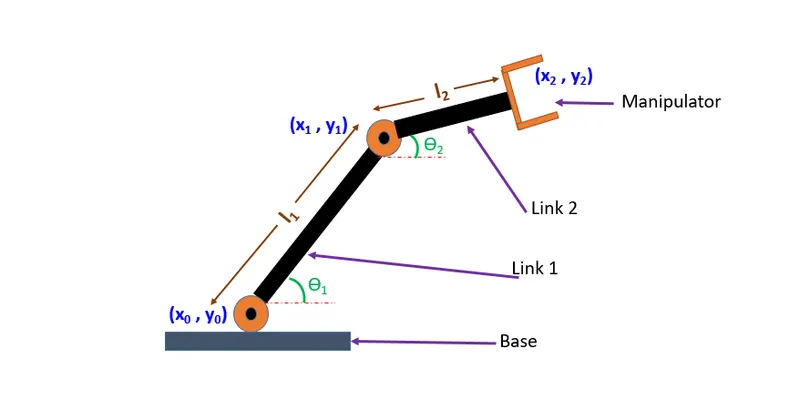
`underset(1)(l)`: length of link 1
`underset(2)(l)`: length of link 2
Position Of Link 1
Starting Coordinates = (x0,y0) = (0,0)
Ending Coordinates = (x1,y1)
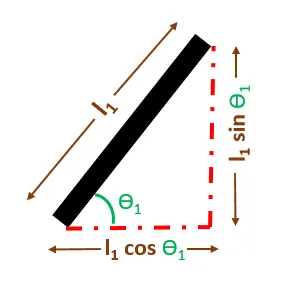
x1 = `underset(1)(l)cosunderset(1)theta`
y1 = `underset(1)(l)sinunderset(1)theta`
Position Of Link 2
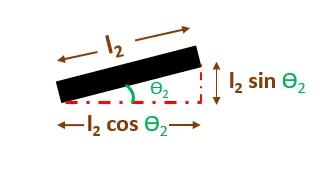
Start point of link 2 is the end point of link 1
starting coordinates = (x1,y1)
Ending Coordinates = (x2,y2)
x2 = x1 + `underset(2)(l)cosunderset(2)theta`
y2 = y1 + `underset(2)(l)sinunderset(2)theta`
PROGRAMMING LANGUAGE
Matlab
ALGORITHM
- Start
- Clearing the workspce, clossing all figures and plots, clearing the command window.
- Initialize values for lengths of link 1 and link 2
- Creating an array for both the angles theta1 and theta2 by using linspace command.
- Initialize counter as 1 for incrementing the value in every iteration of for loop.
- For each each value of theta1 & theta2 robotic arm will take different positions.So for each value of theta1 & theta2 we are creating the plot and add to make an animation for that we are ausing for loop
- for each value of theta1, theta2 can take multiple values, that is each position of link1, there is multiple position of link2 which depends on theta2. For that we are using second for loop
- As the value of 'i' changes taking theta1 & theta2 from original arrays and assigning it to a variable THETA1 & THETA2. THETA1 & THETA2 are variable that ontain one value. theta1 & theta2 is an array contain 10 values
- Initialising and defining x-coordinates and y-coordinates.
- plot the x and y axis
- define the axis
- capture each plot during every iteration
- Make each and every frames into a video of uncompressed avi format
- End
PROGRAM
% program for the forward kinematics of 2R robotic arm
clear all
close all
clc

%inputs
l1 = 1;    %length of link1 in meters
l2 = 0.5;  %length of link2 in meters

%creating an array for theta1 & theta2 by using linspace
theta1 = linspace(0,90,10);
theta2 = linspace(0,90,10);
ct = 1; %counter for incrementing the value in every iteration of for loop
for i=1:length(theta1)
    THETA1 = theta1(i);
    for j=1:length(theta2)
    THETA2 = theta2(j);

    %coordinates of link1
    x0 = 0;
    y0 = 0;
    x1 = l1*cosd(THETA1);
    y1 = l1*sind(THETA1);

     %coordinates of link2
    x2 = x1 + l2*cosd(THETA2);
     y2 = y1 + l2*sind(THETA2);

%Plotting
plot([x0 x1],[y0 y1],[x1 x2],[y1 y2],'linewidth',3);
axis([-2 4 0 3]);   %defining the axis
pause(0.03);
M(ct) = getframe(gcf); %capturing current figure
ct = ct+1;
    end
end
%creating the movie file in avi format
movie(M)
anim = VideoWriter('robotic_arm.avi','Uncompressed AVI');
open(anim)
writeVideo(anim,M)
close(anim)
ERRORS OBSERVED
- Error: While defining the coordinates, coded with theta1 & theta2 instead of THETA1 & THETA2 which results in imperfect plot.
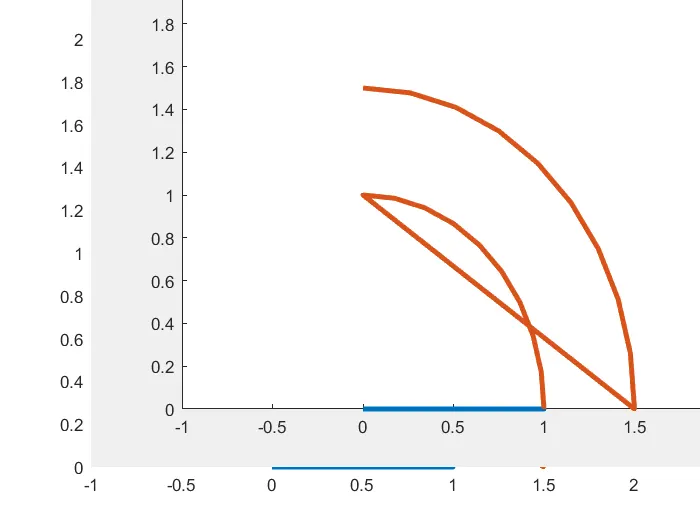
Correction: Replaced theta1 and theta2 with THETA1 & THETA2.
- Error: Instead of "writeVideo" i have typed "WriteVideo" resulting an error
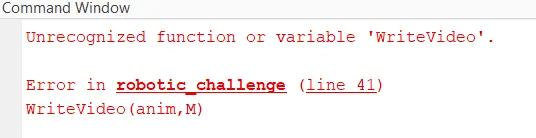
Correction: Replaced "WriteVideo" with "writeVideo"
OUTPUT
The animation video of 2R Robotic arm can be seen by clicking the link below.
https://drive.google.com/file/d/1D8Oc-NOTsJAPwc-_VQBtnns43b980XP9/view?usp=sharing
CONCLUSION
Program to simulate the forward kinematics of 2R Robotic Arm has been run successfully and created link in Google drive to show the animation.