Project 1 - Parsing NASA thermodynamic data
AIM
- To write a function that extracts the 14 co-efficients and calculates the enthalpy, entropy and specific heats for all the species in the data file.
-
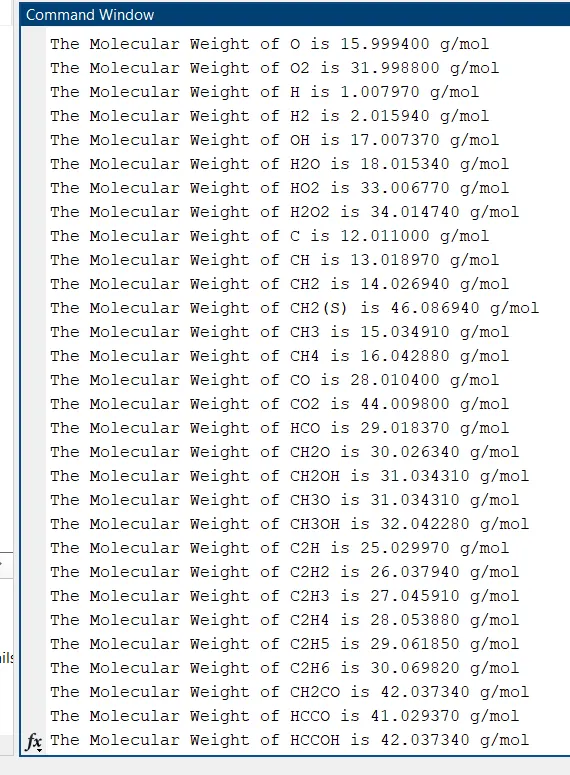
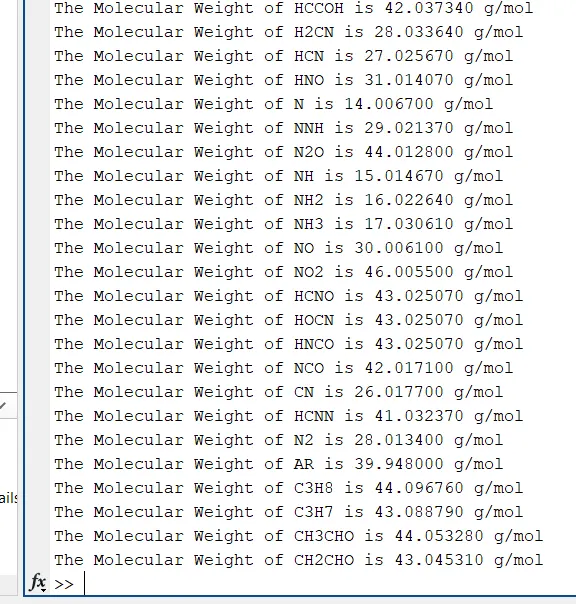
To calculate the molecular weight of each species and display it in the command window.
-
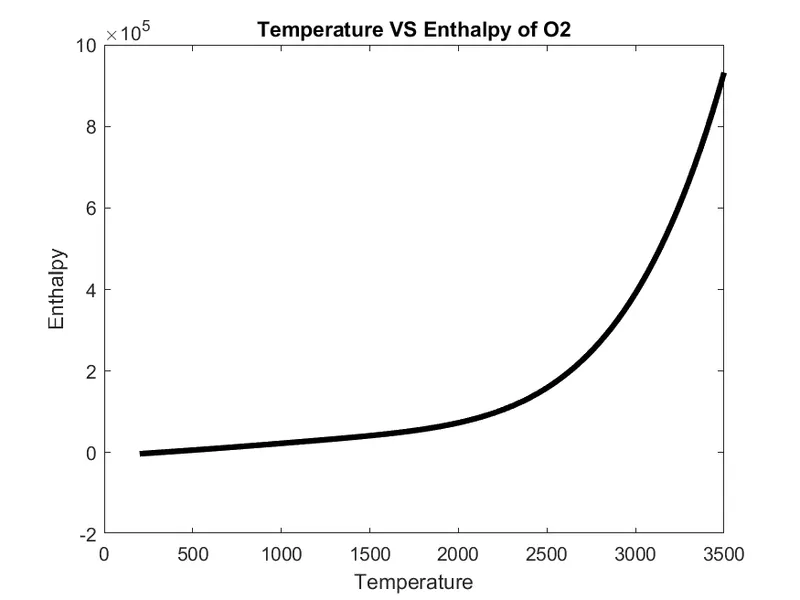
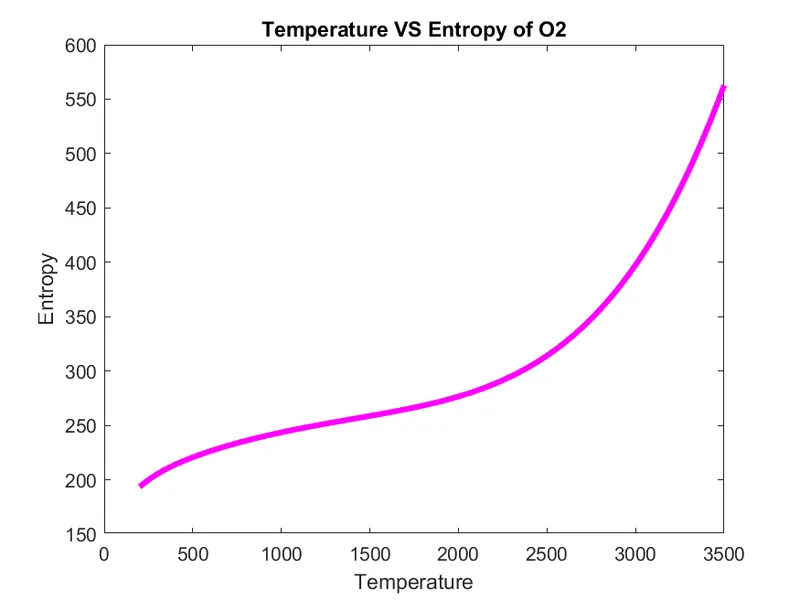
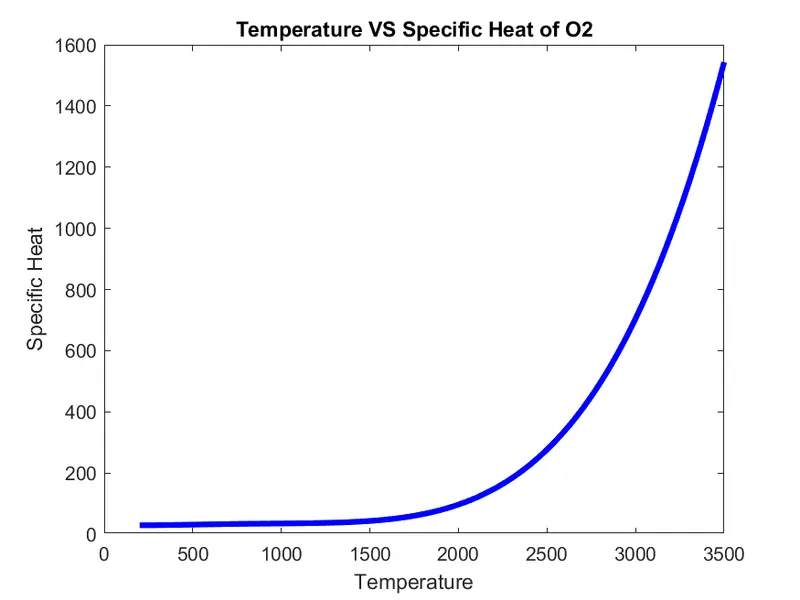
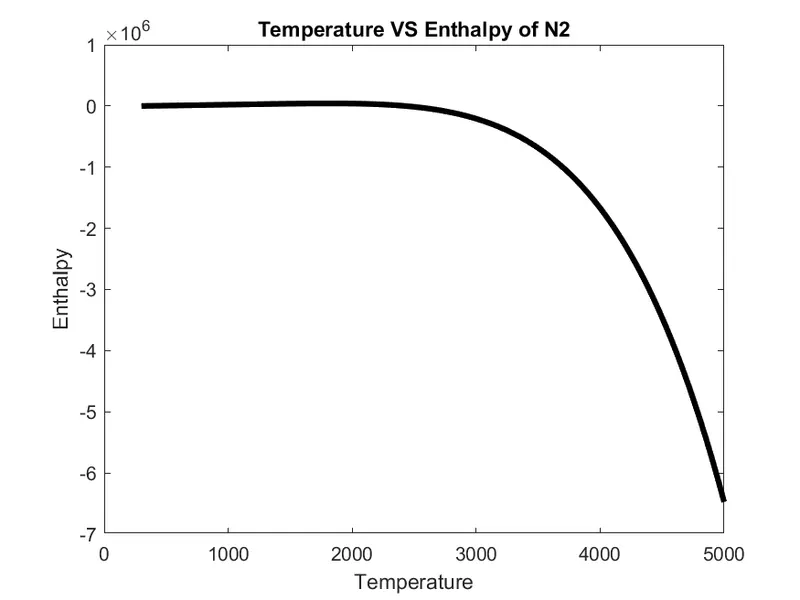
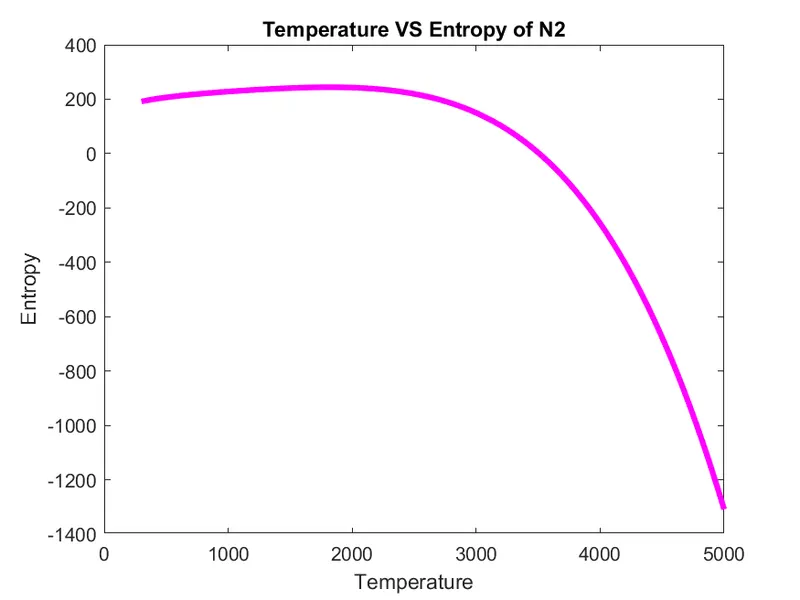
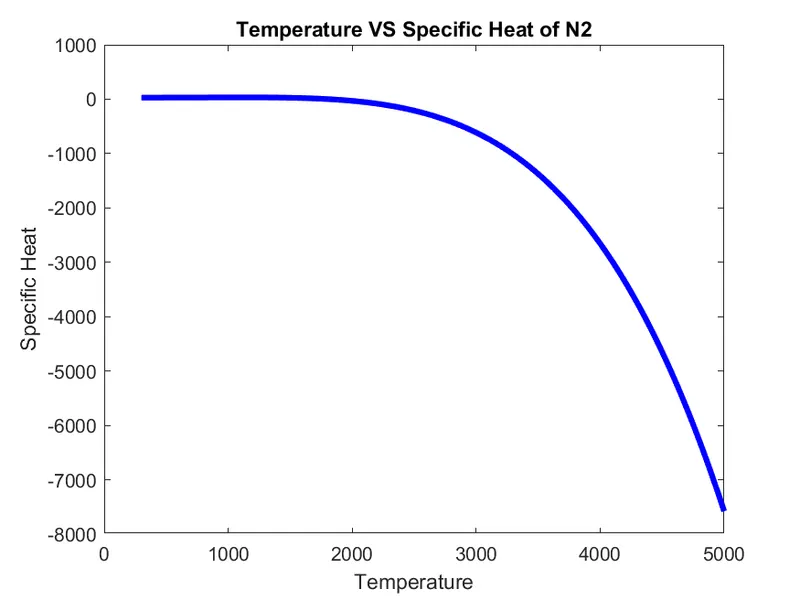
To plot the Cp, Enthalpy and Entropy for the local temperature range specific for each species.
-
To save the plots as images with appropriate names and save them in separate folders for each species with suitable name.
THEORY
Data Parsing
Since the introduction of big data into our modern business models, the need for data extraction, analysis, and processing has become increasingly essential to companies across all industries. As the collection of data increases, so does the need to read and understand it. Similarly, natural languages require translation to effectively communicate interpersonally, computer and programming languages also require such processes. This is where data parsing comes in.Data parsing is a process in which a string of data is converted from one format to another. In its simplest form, parsing data transforms unstructured and sometimes unreadable data into structured and easily readable data.
Specific Heat
The specific heat is the amount of heat per unit mass required to raise the temperature by one degree Celsius. Specific heat is usually measured in Joules per gram per degree Celsius (J/g oC) or can also have the unit Calorie. The relationship between heat and temperature change is usually expressed in the form shown below:
`Q = mc gradT`
where Q= heat added (Joules)
m= mass (grams)
c= specific heat(J/g oC)
`grad T`=change in temperature (Tfinal – T initial)
Here Specific heat can be calculated by using the formula
`(CP)/R = underset(1)(a) + underset(2)(a)T + underset(3)(a)T^2 + underset(4)(a)T^3 + underset(5)(a)T^4`
Enthalpy
a property of a thermodynamic system, is the sum of the system's internal energy and the product of its pressure and volume. In other words Enthalpy is the measurement of energy in a thermodynamic system. The quantity of enthalpy equals to the total content of heat of a system, equivalent to the system’s internal energy plus the product of volume and pressure. Enthalpy is an energy-like property or state function—it has the dimensions of energy and is thus measured in units of joules or ergs, and its value is determined entirely by the temperature, pressure and composition of the system.
When a process begins at constant pressure, the evolved heat (either absorbed or released) equals the change in enthalpy. Enthalpy change is the sum of internal energy denoted by U and product of volume and Pressure, denoted by PV, expressed in the following manner.
H = U + PV
Enthalpy is also described as a state function completely based on state functions P, T and U. It is normally shown by the change in enthalpy (ΔH) of a process between the beginning and final states.
ΔH=ΔU+ΔPV
If the pressure and temperature don’t change throughout the process and the task is limited to pressure and volume, the change in enthalpy is given by,
ΔH=ΔU+PΔV
The flow of heat (q) at constant pressure in a process equals the change in enthalpy based on the following equation,
ΔH=q
Here Enthalpy can be calculated by using the formula
`H/(RT) = underset(1)(a) + underset(2)(a)T/2 + underset(3)(a)T^2/3 + underset(4)(a)T^3/4 + underset(5)(a)T^4/5 + underset(6)(a)/T`
Entropy
Entropy is the measure of the disorder of a system. It is an extensive property of a thermodynamic system, which means its value changes depending on the amount of matter that is present. In equations, entropy is usually denoted by the letter S. It is a state function, It depends on the state of the system and not the path that is followed. The greater disorder will be seen in an isolated system, hence entropy also increases. When chemical reactions take place if reactants break into more products, entropy also gets increased. A system at higher temperatures has greater randomness than a system at a lower temperature. From these examples, it is clear that entropy increases with a decrease in regularity.
Entropy order: gas>liquid>solids
During entropy change, a process is defined as the amount of heat emitted or absorbed isothermally and reversibly divided by the absolute temperature. The entropy formula is given as;
`gradS = underset(rev,iso)(q)/T`
If we add the same quantity of heat at a higher temperature and lower temperature, randomness will be maximum at a lower temperature. Hence, it suggests that temperature is inversely proportional to entropy.
Total entropy change, `underset(t otal)(gradS) = underset(surroundi ngs)(gradS) + underset(system)(gradS)`
Total entropy change is equal to the sum of entropy change of system and surroundings. If the system loses an amount of heat q at a temperature T1, which is received by surroundings at a temperature T2. So `underset(t otal)(gradS)` can be calculated.
`underset(system)(gradS) = q/(underset(1)(T)`
`underset(surroundi ng)(gradS) = q/(underset(2)(T)`
`underset(t otal)(gradS) = (q)/(underset(1)(T)` + `q /(underset(2)(T)`
Here Enthalpy can be calculated by using the formula
`S/R = underset(1)(a)lnT + underset(2)(a)T + underset(3)(a)T^2/2 + underset(4)(a)T^3/3 + underset(5)(a)T^4/4 + underset(7)(a)`
R is the Universal Gas Constant
Molecular Weight
The molecular weight or molecular mass (m) is the mass of a given molecule. It is calculated in practice by summing the atomic weights of the atoms making up the substance’s molecular formula. it is measured in daltons (Da or u). Different molecules of the same compound may have different molecular masses because they contain different isotopes of an element. Molecular masses are calculated from the atomic masses of each nuclide present in the molecule. The units used is grams per mole. For example, molecular weight of water is 18.01528 g/mol.
PROGRAMMING LANGUAGE
Matlab
ALGORITHM
FUNCTION FOR SPECIFIC HEAT
- Start
- Creat a function which can take inputs
- Check temperature greater than local medium temperature using if command
- If the condition is true, calculate the specific heat using first equation specified.
- Else calculate by using second equation specified.
- Exit
FUNCTION FOR ENTHALPY
- Start
- Creat a function which can take inputs
- Check temperature greater than local medium temperature using if command
- If the condition is true, calculate the enthalpy using first equation specified.
- Else calculate by using second equation specified.
- Exit
FUNCTION FOR ENTROPY
- Start
- Creat a function which can take inputs
- Check temperature greater than local medium temperature using if command
- If the condition is true, calculate the entropy using first equation specified.
- Else calculate by using second equation specified.
- Exit
FUNCTION FOR MOLECULAR WEIGHT
- Start
- Creat a function which can take inputs
- Create an array of string as element name
- Create an array for atomic weight with respect to element name
- Initialize molecular weight as zero at starting
- Start for loop compare species name and element name using strcmp
- Convert species name from string to number and allocate to a variable.
- Check if that variable is greater than zero using if command
- If the condition is true calculate the molecular weight using the specified formula
- Exit
MAIN PROGRAM
- Start
- Clear the workspace, closing all figures and plots, clearing the command window
- Opening the file ‘THERMO.dat’ in read mode
- Read the first comment line using fgetl
- Read global temperature line and split into cell array using strsplit
- Define global low, mid and high temperature and convert it into numbers using str2double command
- Ignore the next 3 comment line by using fgetl command
- Start the for loop
- Read the first line, split the line and define species name
- Define local low, mid, high temperatures and convert it into numbers using str2double command
- Find higher and lower coefficients present in each of four lines and allocate to respective variables in number format
- Define universal gas const R
- Create an array for temperature from local low temp to local high temp with 100 values by using linspace command
- Calculate specific heat, enthalpy, entropy and molecular weight by calling the respective functions
- Plot Temperature VS specific heat, enthalpy, entropy graph
- Create a new directory and save these graph as images in respective folders by using mkdir and saveas command
- Print the molecular weight in command window
- This for loop will work for all the 53 species
- End of for loop
- Closing the file
- Exit
PROGRAM
FUNCTION FOR SPECIFIC HEAT
%Function to find specific heat
%Creating a function for specific heat which can take inputs

function sp_h = specific_heat(a1,a2,a3,a4,a5,a8,a9,a10,a11,a12,R,t,loc_md_temp)

%comparing the temperature with local mid temperature
%checking the condition is true using if command

if t>loc_md_temp

%calculating specific heat by defining function
    sp_h = (a1 + (a2.*t) + a3.*(t.^2) + a4.*(t.^3) + a5.*(t.^4)).*R;
else
    sp_h = (a8 + a9.*t+ a10.*(t.^2) + a11.*(t.^3) + a12.*(t.^4)).*R;
end
FUNCTION FOR ENTHALPY
%Function to find Enthalpy
%Creating a function for enthalpy which can take inputs

function h = enthalpy(a1,a2,a3,a4,a5,a6,a8,a9,a10,a11,a12,a13,R,t,loc_md_temp)

%comparing the temperature with local mid temperature
%checking the condition is true using if command

if t>loc_md_temp

%calculating enthalpy by defining function
    h =(a1 + a2.*(t./2)+a3.*(t.^2/3)+a4.*(t.^3/4)+a5.*(t.^4/5)+a6./t).*R.*t;
else
    h =(a8 + a9.*(t./2)+a10.*(t.^2/3)+a11.*(t.^3/4)+a12.*(t.^4/5)+a13./t).*R.*t;
end
FUNCTION FOR ENTROPY
%Function to find Entropy
%Creating a function for entropy which can take inputs

function s = entropy(a1,a2,a3,a4,a5,a7,a8,a9,a10,a11,a12,a14,R,t,loc_md_temp)

%comparing the temperature with local mid temperature
%checking the condition is true using if command

if t>loc_md_temp

%calculating entropy by defining function
    s = (a1.*(log(t)) + a2.*t + a3.*((t.^2)/2) + a4.*((t.^3)/3) + a5.*((t.^4)/4) + a7).*R;
else
    s = (a8.*(log(t)) + a9.*t + a10.*((t.^2)/2) + a11.*((t.^3)/3) + a12.*((t.^4)/4) + a14).*R;
end
FUNCTION FOR MOLECULAR WEIGHT
%Function to find molecular weight
%Creating a function for molecular weight which can take inputs

function mol_wgt = mole_wei(species_name)

%define name of the elements in an array
ele_nam = ['H','C','N','O','S','A'];

%creating an array of molecular masses
at_ms = [1.00797,12.011,14.0067,15.9994,32.06,39.948];

%initializing molecular weight at starting as zero
mol_wgt = 0;
for i=1:length(species_name)
    for j=1:length(ele_nam)

%comparing 2 strings-species name amd element name
        if strcmp(species_name(i),ele_nam(j))
            mol_wgt= mol_wgt+at_ms(j);
            x=j;
        end
    end
    k = str2double(species_name(i));
        if k>1
%defining the function
            mol_wgt = mol_wgt+at_ms(x)*(k-1);
        end

end
MAIN PROGRAM
%Parsing Nasa's thermodynamic data file
clear all
close all
clc
%opening the data file
d = fopen('THERMO.dat','r');
%reading the first line
fgetl(d);
%reading teperature line
t_l= fgetl(d);
%spliting the line to cell array
tempe = strsplit(t_l,' ');
%finding global low, mid, high temp
gl_lw_tmp = str2double(tempe{2});
gl_md_tmp = str2double(tempe{3});
gl_hi_tmp = str2double(tempe{4});
%ignoring the comments in next 3 lines
for i = 1:3
    fgetl(d);
end
for i=1:2
%reading first line
s = fgetl(d);
s1 = strsplit(s);
%finding species name
species_name = s1{1};
%finding local temperatures
y = strfind(s,'.');
%local low temperature
llw_temp = s(y(1)-3:y(1)+3);
loc_lw_temp = str2double(llw_temp);
%local mid temperature
lmd_temp = s(y(3)-4:y(3)+3);
loc_md_temp = str2double(lmd_temp);
%local high temperature
lhi_temp = s(y(2)-4:y(2)+3);
loc_hi_temp = str2double(lhi_temp);

%Reading second line
l1 = fgetl(d);
%finding string E
a = strfind(l1,'E');
%finding higher coefficients
a1 = l1(1:12+3);
a1 = str2double(a1);
a2 = l1(a(1)+4:a(2)+3);
a2 = str2double(a2);
a3 = l1(a(2)+4:a(3)+3);
a3 = str2double(a3);
a4 = l1(a(3)+4:a(4)+3);
a4 = str2double(a4);
a5 = l1(a(4)+4:a(5)+3);
a5 = str2double(a5);

%Reading third line
l2 = fgetl(d);
b = strfind(l2,'E');
a6 = l2(1:12+3);
a6 = str2double(a6);
a7 = l2(b(1)+4:b(2)+3);
a7 = str2double(a7);
%finding lower coefficients
a8 = l2(b(2)+4:b(3)+3);
a8 = str2double(a8);
a9 = l2(b(3)+4:b(4)+3);
a9 = str2double(a9);
a10 = l2(b(4)+4:b(5)+3);
a10 = str2double(a10);

%Reading fourth line
l3 = fgetl(d);
c = strfind(l3,'E');
a11 = l3(1:12+3);
a11 = str2double(a11);
a12 = l3(c(1)+4:c(2)+3);
a12 = str2double(a12);
a13 = l3(c(2)+4:c(3)+3);
a13 = str2double(a13);
a14 = l3(c(3)+4:c(4)+3);
a14 = str2double(a14);

%inputs
R = 8.3145;  %Universal gas const
%creating array for temperature using linspace command
t = linspace(loc_lw_temp,loc_hi_temp,100);
%Calculating Specific Heat by calling specific_heat function
sp_h = specific_heat(a1,a2,a3,a4,a5,a8,a9,a10,a11,a12,R,t,loc_md_temp);

%Calculating Enthalpy by calling enthalpy function
h = enthalpy(a1,a2,a3,a4,a5,a6,a8,a9,a10,a11,a12,a13,R,t,loc_md_temp);

%Calculating Enthropy by calling entropy function
s = entropy(a1,a2,a3,a4,a5,a7,a8,a9,a10,a11,a12,a14,R,t,loc_md_temp);

%creating directory with location address
mkdir('C:\Users\sande\Documents\MATLAB\Challenges\Nasa_Project\Species',species_name)
warning('off','MATLAB:MKDIR:DirectoryExists');
%Plotting Temperature vs Specific Heat
figure(1)
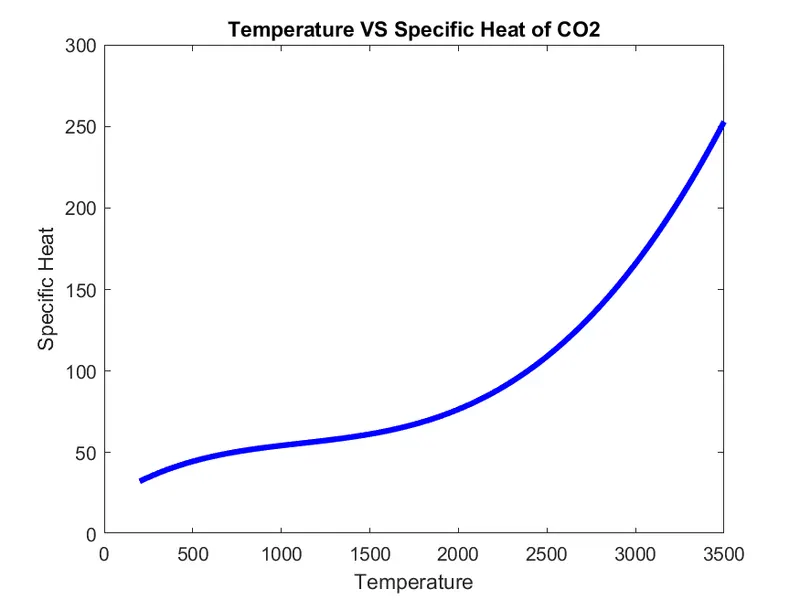
plot(t,sp_h,'linewidth',3,'Color','b')
xlabel('Temperature')
ylabel('Specific Heat')
title(sprintf('Temperature VS Specific Heat of %s',species_name))

%Plotting Temperature vs Enthalpy
figure(2)
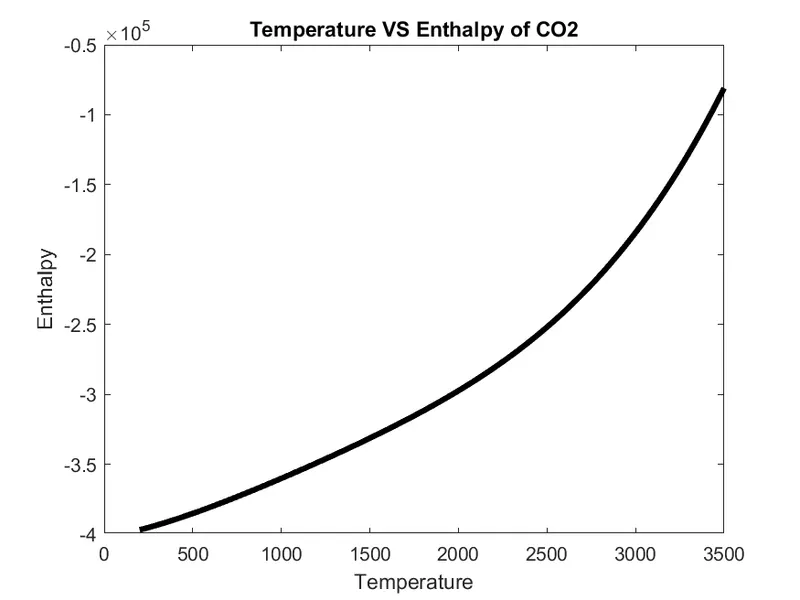
plot(t,h,'linewidth',3,'Color','k')
xlabel('Temperature')
ylabel('Enthalpy')
title(sprintf('Temperature VS Enthalpy of %s',species_name))

%Plotting Temperature vs Entropy
figure(3)
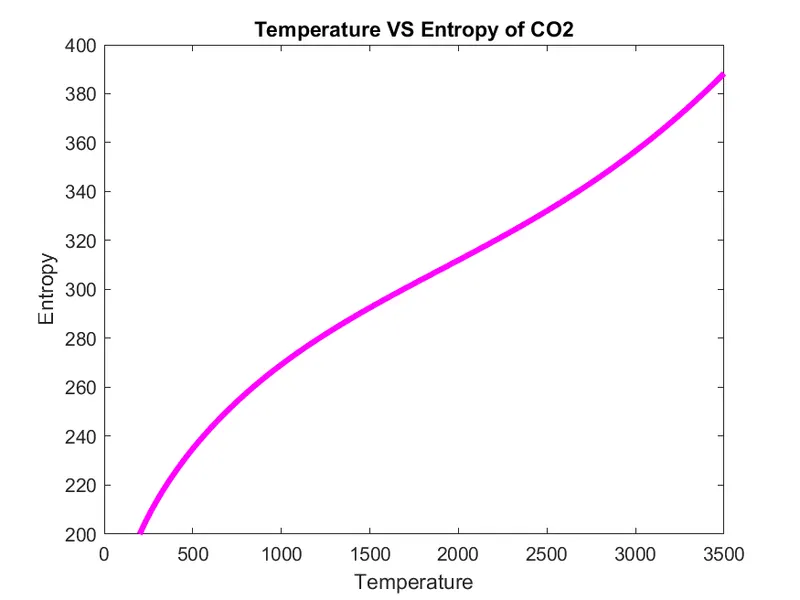
plot(t,s,'linewidth',3,'Color','m')
xlabel('Temperature')
ylabel('Entropy')
title(sprintf('Temperature VS Entropy of %s',species_name))

sav_fil = (['C:\Users\sande\Documents\MATLAB\Challenges\Nasa_Project\Species\',species_name]);
cd(sav_fil)
%saving the file using saveas in png format
saveas(1,'specific heat.png')
saveas(2,'Enthalpy.png')
saveas(3,'Entropy.png')
%changing the directory
cd('C:\Users\sande\Documents\MATLAB\Challenges\Nasa_Project')

%Calculating Molecular weight by calling the function
mol_wgt = mole_wei(species_name);

%Printing molecular weight
fprintf('The Molecular Weight of %s',species_name);
fprintf('%s %f %s\n',' is',mol_wgt,'g/mol');
end
fclose(d);
OUTPUT
- MOLECULAR WEIGHT IN COMMAND WINDOW
- SAVED FOLDERS

Google Drive Link to the Folder:
https://drive.google.com/drive/folders/1NmcAqW5cZwWkJT7VO7yc-JVizL07azy9?usp=sharing
- PLOTS
For O2
For N2
For CO2
ERRORS OCCURED
ERROR:
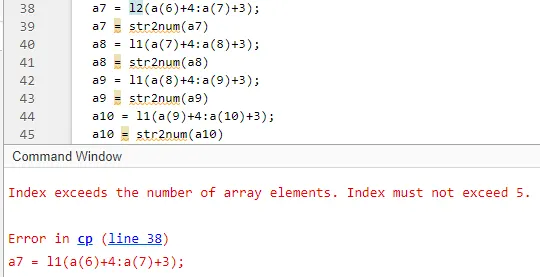
STEP TO OVERCOME: Gone through the code once again and changed the index. For eg: a7 = l1(a(6)+4:a(7)+3); changed to a7 = l2(b(1)+4:b(2)+3);
ERROR:
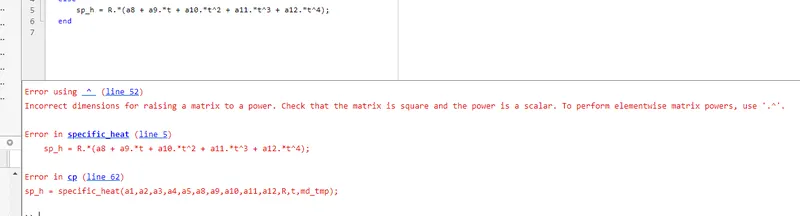
STEP TO OVERCOME: Used .* instead of * to perform multiplication
ERROR:
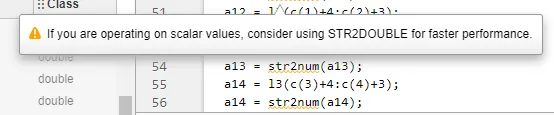
STEP TO OVERCOME: Instead of str2num the command has been changed to str2double.
ERROR:
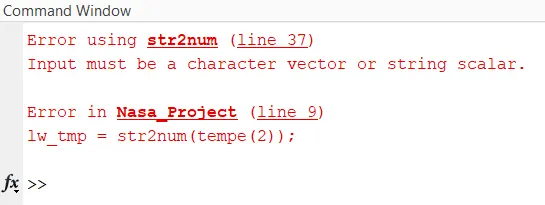
STEP TO OVERCOME: Instead of (tempe(2)) the syntax changed to (tempe{2})
ERROR:
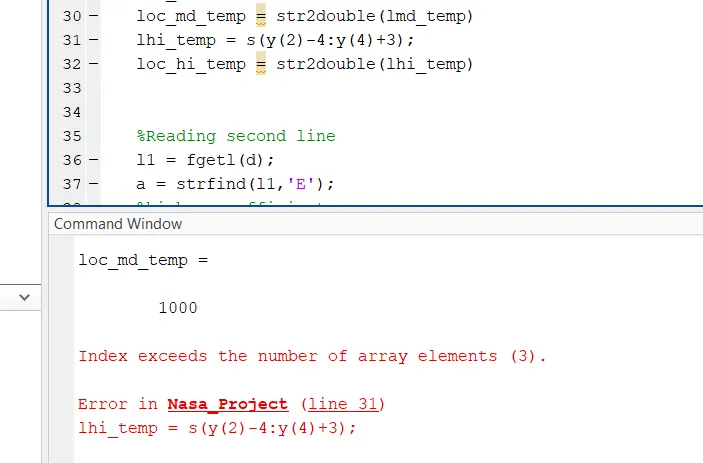
STEP TO OVERCOME: Here the maximum array elements is 3 and i have typed 4 which shows an error. So gone through the code again and changes made accordingly and found in order after running
CONCLUSION
- Function that extracts the 14 co-efficients has been run successfully and calculated the enthalpy, entropy and specific heats for all the species in the data file.
- Calculated the molecular weight of each species successfully and displayed it in the command window.
- Ploted the Cp, Enthalpy and Entropy for the local temperature range, saved it as images with appropriate names and in separate folders for each species with suitable name.
REFERENCE
- https://www.mathworks.com/matlabcentral/answers/106320-make-a-loop-to-calculate-molecular-weight
- https://in.mathworks.com/matlabcentral/fileexchange/26139-molecular-weight-calculator-function
- https://in.mathworks.com/matlabcentral/answers/20661-create-and-name-a-directory
- https://in.mathworks.com/help/matlab/file-operations.html?s_tid=CRUX_topnav
- https://in.mathworks.com/help/matlab/ref/saveas.html
- https://in.mathworks.com/help/matlab/matlab_prog/suppress-warnings.html
- https://www.britannica.com/science/enthalpy
- https://www.thoughtco.com/definition-of-entropy-604458
- https://en.wikipedia.org/wiki/Specific_heat_capacity
- https://www.britannica.com/science/specific-heat
- https://www.cmu.edu/gelfand/lgc-educational-media/polymers/what-is-polymer/molecular-weight-calculation.html
- https://www.angelo.edu/faculty/kboudrea/periodic/structure_mass.htm
- https://in.mathworks.com/help/matlab/ref/cd.html