Week 2- 2R Robotic Arm Challenge
Aim:
Write a program in Matlab to simulate the forward kinematics of a 2R Robotic Arm.
Objective:
1. To simulate forward kinematics of a 2R Robotic Arm.
2. To save simulated path in a video file format.
Solution:
Theory:
Representation Diagram
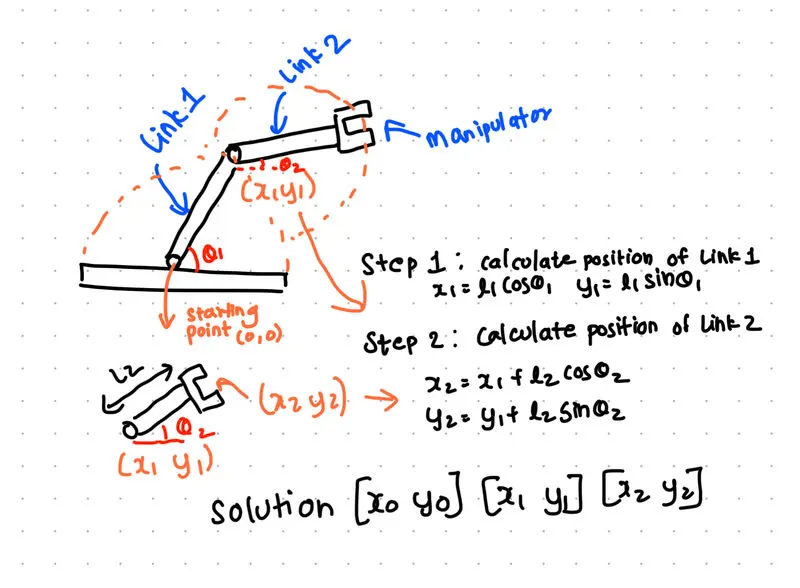
To find position of the manipulator we need to calculate co-ordinates of link 1 and link 2 at any given position.
Calculating values of the co-ordinates.
Since base of link 1 is fixed x and y co-ordinates of the base of the link 1 is (0,0).
Co-ordinates of end of link 1 can be calculated using,
x1=l1 x cos(theta1)
y1=l1 x sin(theta1)
Co-ordinates of base of link 2 is same as co-ordinates of end of link 1 and co-ordinates of end of link 2 can be calculated as,
x2=x1+(l2 x cos(theta2))
y2=y2+(l2 x sin(theta2))
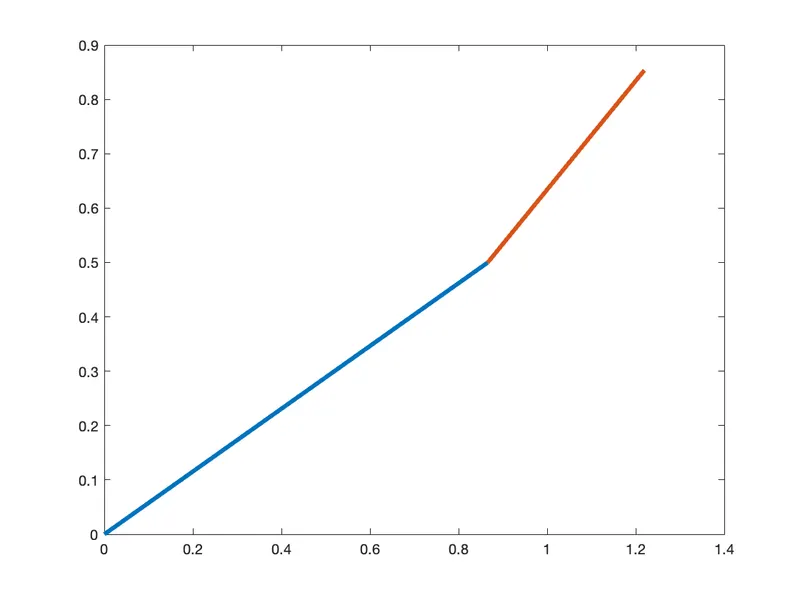
Assuming, l1=1m, l2=0.5m theta1 = 30 theta2=45
This is a Test Code
%program to calculate the forward kinematics of a 2R Robotic Arm

clear all
close all
clc

%Inputs

l1=1;
l2=0.5;

theta1=30;
theta2=45;

%Co-ordinates

x0=0;
y0=0;

x1=l1*cosd(theta1)
y1=l1*sind(theta1)

x2=x1+l2*cosd(theta2)
y2=y1+l2*sind(theta2)

%plotting

plot([x0 x1],[y0 y1],[x1 x2],[y1 y2],'LineWidth',3)
Following plot is generated
Now
To simulate the motion of the manipulator over a range of angular positions of link 1 and link 2.
we have to write a code that calculates all the positions of link 2 on first position of link one.
and finally we have to calculate all the positions of link 2 for every positions of link 1.
This is our main code for the challenge:
%program to simulate the forward kinematics of a 2R Robotic Arm

clear all
close all
clc

%Inputs

l1=1;
l2=0.5;

theta1=linspace(0,90,10);
theta2=linspace(0,90,10);

%Co-ordinates

counter=1;

for i=1:length(theta1);
    THETA1=theta1(i);

        for j=1:length(theta2);
        THETA2=theta2(j);

        x0=0;
        y0=0;

        x1=l1*cosd(THETA1);
        y1=l1*sind(THETA1);

        x2=x1+l2*cosd(THETA2);
        y2=y1+l2*sind(THETA2);

        %plotting

        plot([x0 x1],[y0 y1], [x1 x2],[y1 y2],'LineWidth',3)
        axis([-0.1 1.8 0 1.8])

        pause(0.1)
        grid on

        M(counter)=getframe(gcf);
        counter=counter+1;

    end

end

movie(M)

videofile=VideoWriter('forward_kinematics_challenge.avi','Uncompressed Avi');
open(videofile)
writeVideo(videofile,M)
close(videofile)
Explanation of the code:
Step 1:
Initializing the Matlab:
These commands are used to clear the variables and plots stored in the memory from previous programs.
clear all
close all
clc
Step 2:
Defining Variables and Inputs:
In this step Inputs are defined such as the length of the link 1 and link 2 which are constant. Since we are simulating the path of the manipulator, the variable theta1 and theta2 are varied from 0 to 90 using MATLAB'S built-in 'linspace' function.
%Inputs

l1=1; %Length of link 1
l2=0.5; %Length of link 2

theta1=linspace(0,90,10); % Range of motion of link 1 wrt x axis
theta2=linspace(0,90,10); % Range of motion of link 2 wrt x axis
Step 3:
Calculating Co-ordinates of the Gripper and links:
To simulate the motion of manipulator we have to calculate every possible co-ordinate of the manipulator.
Since Manipulator is situated at the end of link 2. The no of positions that link 2 has is given by 'theta2. In this case, we have specified theta 2 varies from 0 to 90 degree.
Now link 2 is situated at the end on link 1 and link 1 also varies from 0 to 90 degree given by 'theta2', we have to calculate all the position of link 2 for every position of link 1.
This is done by loop control statement in Matlab.
for i=1:length(theta1);

    THETA1=theta1(i);

        for j=1:length(theta2);

        THETA2=theta2(j);

        x0=0;
        y0=0;

        x1=l1*cosd(THETA1);
        y1=l1*sind(THETA1);

        x2=x1+l2*cosd(THETA2);
        y2=y1+l2*sind(THETA2);
First Loop calculates all the position of link 1 and second loop calculates all the position of link 2 for every position of link 1.
Step 4:
Plotting:
Considering above code we have to plot all the positions of the link 1 and link 2. This is done by 'plot' function in Matlab.
      %plotting

      plot([x0 x1],[y0 y1], [x1 x2],[y1 y2],'LineWidth',3)
      axis([-0.1 1.8 0 1.8])

      pause(0.1)
      grid on

      M(counter)=getframe(gcf);

      counter=counter+1;

    end

end
This Generates plots of all positions of link 1 and 2.
Step 5:
Generating Video file:
Since we want to visualize the path of the gripper. we have to save the plots in a video file that can be used to see the motion of link 1 and link 2.
This is done by MATLAB'S 'writeVideo' function.
movie(M)

videofile=VideoWriter('forward_kinematics_challenge.avi','Uncompressed Avi');
open(videofile)
writeVideo(videofile,M)
close(videofile)
This Generates a video output file.
Video Link : https://drive.google.com/file/d/1Z7JMClAGAevb-09YWR0yuy6t2lXZyudR/view?usp=sharing
Errors :
1. Unrecognized variable error
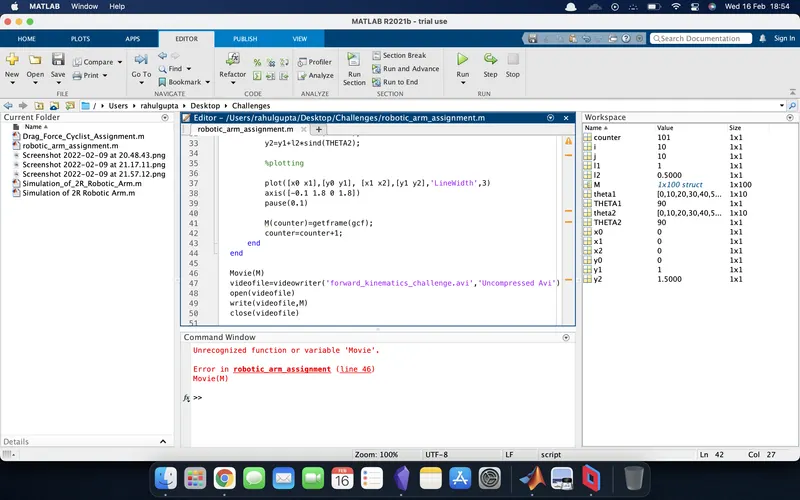
Solved by changing 'Movie(M)' to 'movie(M)'.
2. Unrecognized function error
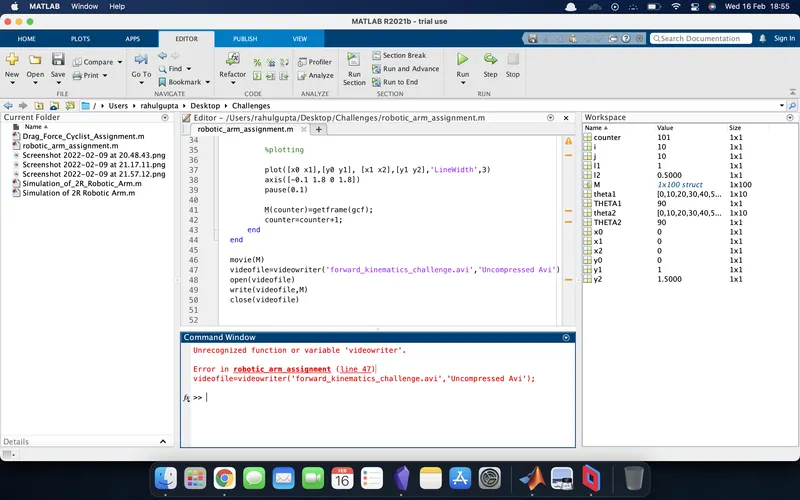
Solved by changing 'videowriter' function to 'VideoWriter'.
3. Incorrect Argument Error
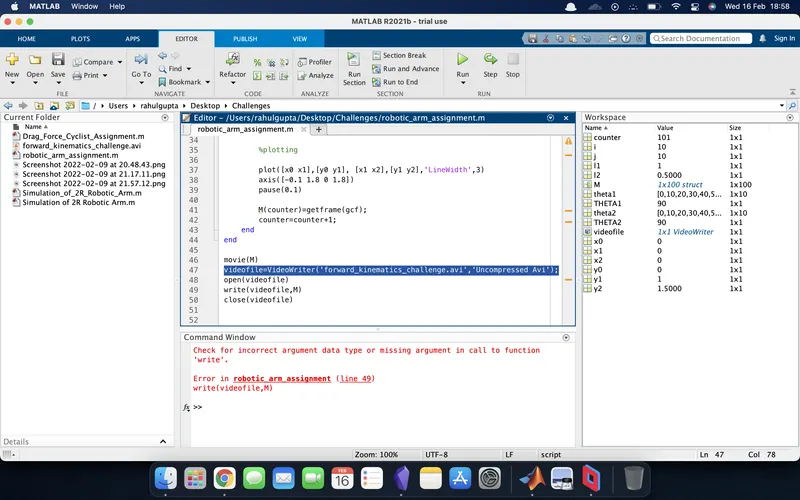
Solved by changing the argument 'write' to 'writeVideo'.