Week 2- 2R Robotic Arm Challenge
AIM : To write a program to simulate the forward kinematics of a 2R Robotic Arm in MATLAB.
OBJECTIVE:
- To solve and simulate the forward kinematics of a 2R Robotic Arm and understand the movement of manipulator.
- To create the animation of working of a 2R Robotic Arm.
INTRODUCTION:
A robotic arm is a robot manipulator, usually programmable, with similar functions to human arm. The links of a manipulator are connected by joints allowing rotational and translational motion of manipulator.
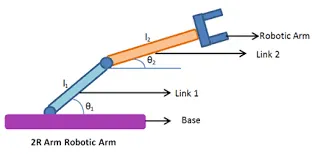
image(i)
In image shown above, the robotic arm consists of 4 components,
- The Base, which is fixed to surface and all other links are joined through hinge joint.
- Link 1 (l1) making θ1 with horizontal.
- Link 2 (l2) making θ2 with horizontal.
- The device attached to robotic arm is manipulator which perform tasks as end- effector.
INPUTS:
- For our program we have assumed the length of link 1 = 1m and link2 = 0.5m.
- In order to simulate the robotic arm it is necessary to vary and to obtain a desired animation and it cannot be possible if we manually enter the respective data everytime. so we created a row vector from 0 to 90 with 10 evenly spaced points between them.
- The coordinates of base is assumed to be at origin(0,0).
- The coordinates of end points of link 1(l1) can be found by trigonometry as,
x1 = l1.cos(θ1) and y1 = l1.sin(θ1)
- Similarly, the coordinates of end point of link 2 (l2) can also be found from trigonometry as,
x2 = x1 + l2.cos(θ2) and y2 = l2.sin(θ2)
MATLAB Code:
% Program to simulate the forward kinematics of 2R Robotic Arm

clear all
close all
clc

%inputs
l1 = 1;
l2 = 0.5;
theta1 = linspace(0,90,10);
theta2 = linspace(0,90,10);
ct=1;

for i = 1:length(theta1)
    THETA1 = theta1(i);
    for j= 1:length(theta2)
        THETA2 = theta2(j);
        x0 = 0;
        y0 = 0;
        x1 = l1*cosd(THETA1);
        y1 = l1*sind(THETA1);

x2 = x1 + l2*cosd(THETA2);
y2 = y1 + l2*sind(THETA2);

% plotting
plot([x0 x1],[y0 y1],[x1 x2],[y1 y2],'linewidth',3);
axis([0 2 0 2])
M(ct) = getframe(gcf);
ct = ct+1;

    end
end
movie(M)
videofile = VideoWriter('forward_kinematics.avi');
open(videofile)
writeVideo(videofile,M)
close(videofile)
RESULTS:
- The following plot obtained at θ1 = 60 and θ2 = 45.
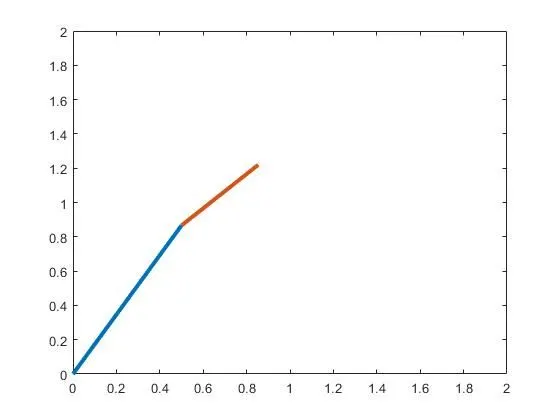
- The animation of simulation of robotic arm is in below link.
REFERENCES:
Image(i) is obtained from google images.